sketchucation logo sketchucation
    • Login
    Oops, your profile's looking a bit empty! To help us tailor your experience, please fill in key details like your SketchUp version, skill level, operating system, and more. Update and save your info on your profile page today!
    ⚠️ Update | Sketchucation Tools 5.0.8 released with licensing improvements and bugfixes Download

    [PLUGIN] Flowify v1.1.0 (updated 150327)

    Scheduled Pinned Locked Moved Plugins
    126 Posts 57 Posters 220.7k Views 57 Watching
    Loading More Posts
    • Oldest to Newest
    • Newest to Oldest
    • Most Votes
    Reply
    • Reply as topic
    Log in to reply
    This topic has been deleted. Only users with topic management privileges can see it.
    • cmdC
      cmd
      last edited by

      Caul

      Looks like a fantastic plugin.

      Thank you for taking the time to provide such a thorough tutorial video. It is really well done.

      Cheers
      CMD

      • CMD
      1 Reply Last reply
      Reply Quote 0
      • Rich O BrienR
        Rich O Brien Moderator
        last edited by

        Hi Caul,

        We added Flowify to the PluginStore.

        Since you are a Plugin Author you are able to track stats, update docs or use our API at...

        plugins.sketchucation.com

        Thanks for sharing here. We appreciate it.

        Download the free D'oh Book for SketchUp πŸ“–

        1 Reply Last reply
        Reply Quote 0
        • cottyC
          cotty
          last edited by

          Nice videos. Thank you for this interesting plugin!

          my SketchUp gallery

          1 Reply Last reply
          Reply Quote 0
          • D
            dtrarch
            last edited by

            Caul
            What a fine and professional tutorial set and beyond what Sketchup was ever thought to do. πŸ‘ πŸ‘
            Just amazing and a real gift.
            Thank you so very much. β˜€

            dtr

            1 Reply Last reply
            Reply Quote 0
            • pilouP
              pilou
              last edited by

              Excellent! 😎
              Frank Gehry will love it! πŸ˜‰

              PS
              You have also a "Flow" function inside Moi3D πŸ€“
              (Ctrl + C, Ctrl + V between Rhino <--> Moi on the 2 ways)

              Frenchy Pilou
              Is beautiful that please without concept!
              My Little site :)

              1 Reply Last reply
              Reply Quote 0
              • A
                alpro
                last edited by

                This looks very cool, thanks for sharing and also for the good tutorial.

                1 Reply Last reply
                Reply Quote 0
                • tt_suT
                  tt_su
                  last edited by

                  Loving the haunted house example! πŸ˜„
                  It's been a while since I used Rhino - is the operation of setting up the meshes the same as FlowAlongSrf?

                  (Btw, nice example of Bezier Surface there - it's seem to be more versatile than I expected. πŸ˜„ )

                  1 Reply Last reply
                  Reply Quote 0
                  • silvershadowS
                    silvershadow
                    last edited by

                    this is amazing!! Thank you so much for this,something i could definitely use with my current project and save some long boring hours.

                    1 Reply Last reply
                    Reply Quote 0
                    • duanekempD
                      duanekemp
                      last edited by

                      This looks amazingly useful!

                      tt_su's question about meshes is good.

                      How does this wrap textures? Are they projected in the same way as meshes?

                      Duane Kemp

                      Kemp Productions
                      Puidoux, Switzerland
                      Gallery:
                      https://duanekemp.artstation.com/

                      1 Reply Last reply
                      Reply Quote 0
                      • F
                        faust07
                        last edited by

                        The demonstrations and examples are impressive and inspiring. This offers completely new possibilities to deform objects specifically and flowing. "Fredo6_FredoScale Radial Bending" on the next level. πŸ‘
                        Will test it under SU8.

                        1 Reply Last reply
                        Reply Quote 0
                        • R
                          rv1974
                          last edited by

                          CAUL, this is awesome thing! Thank you for sharing.
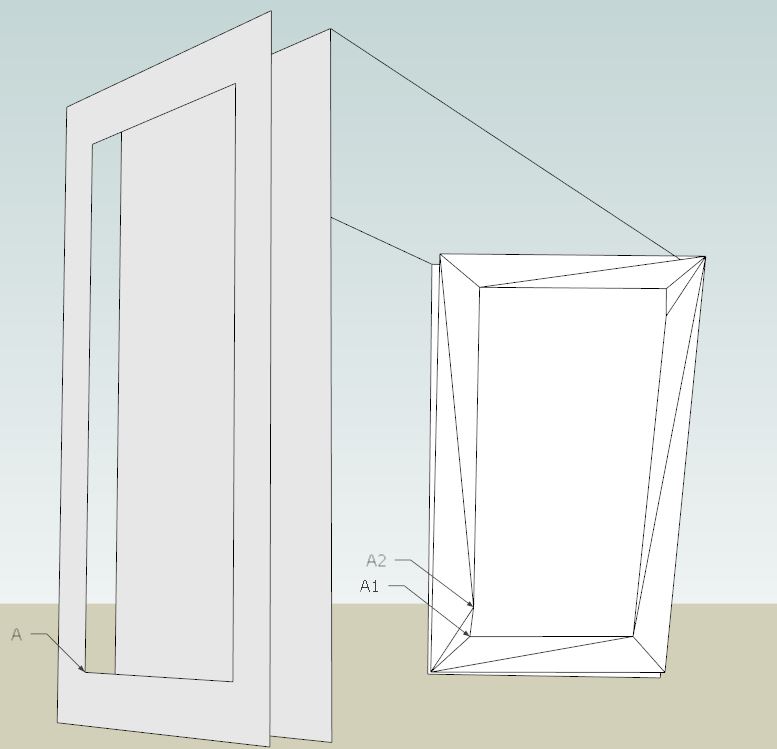
                          I tried some primitive case of 'panelization'. Everything went smooth except point A got split into A1 and A2. Is it possible to tweak the algorithm so it'd keep the same number of vertices?
                          Edit: I found 'flowify without cut' mode that solves this issue β˜€
                          BTW What exactly 'Aux' tools do?


                          nn.skp


                          nn.JPG

                          1 Reply Last reply
                          Reply Quote 0
                          • C
                            CAUL
                            last edited by

                            @rv1974 said:

                            Edit: I found 'flowify without cut' mode that solves this issue β˜€

                            I was just going to suggest this πŸ˜„

                            @rv1974 said:

                            BTW What exactly 'Aux' tools do?

                            The first Aux tool "Edge -> CLine" converts an edge to a construction line. If two connection edges intersect each other (if you pair your corners crosswise), then they split into four edges and that is not handled by the extension. The extension let you convert an edge to a construction line to handle this.

                            The purpose of the second Aux tool cannot really be explained in less than 2500 words. There will eventually be a tutorial with this tool playing a small part.

                            1 Reply Last reply
                            Reply Quote 0
                            • cmdC
                              cmd
                              last edited by

                              Caul

                              I tried to mimic your example and I am have a few problems.

                              1. The IMPOSE GRID function does not modify my "Projection Surface".
                              • I am not getting any errors in the Ruby Console when initiating the IMPOSE GRID feature.
                              1. I am receiving an error dialog message concerning the " Target grid".

                              @unknownuser said:

                              INPUT ERROR: Error while parsing the Target grid
                              The grid must conform to:

                              • A cell consists of exactly four edges. Beware of collinear edge segments
                              • Connection edges must attatch to two adjecent corners
                              • The grid must have four corners
                              • Every row in the grid must have the same number of cells
                              • No holes
                              • I checked the Target Grid and it all seems to comply with the rules.
                              • I am not getting any errors in the Ruby Console

                              Attached is the skp.

                              Can anyone figure out why it's not working?
                              Although I believe I am following the instructions step by step... user error?


                              Problem file

                              • CMD
                              1 Reply Last reply
                              Reply Quote 0
                              • C
                                CAUL
                                last edited by

                                @tt_su said:

                                It's been a while since I used Rhino - is the operation of setting up the meshes the same as FlowAlongSrf?

                                It is very similar, in Rhino there are no explicit connection edges though.

                                @pilou said:

                                You have also a "Flow" function inside Moi3D πŸ€“

                                That was a nice summary, the projective version of Flow is actually coded and may end up in a later version of Flowify.

                                @duanekemp said:

                                Is v1.2 addressing texture mapping? πŸ˜„

                                I will look into this, it would certainly be a nice feature.

                                1 Reply Last reply
                                Reply Quote 0
                                • pilouP
                                  pilou
                                  last edited by

                                  @Cmd
                                  You must draw the 2 lines' Extremities Start to extremities' Target! πŸ’š
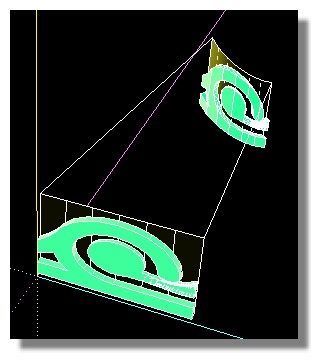
                                  Flowify_works.jpg

                                  Frenchy Pilou
                                  Is beautiful that please without concept!
                                  My Little site :)

                                  1 Reply Last reply
                                  Reply Quote 0
                                  • cmdC
                                    cmd
                                    last edited by

                                    Just as I thought..... USER ERROR Doh!!

                                    Thanks

                                    • CMD
                                    1 Reply Last reply
                                    Reply Quote 0
                                    • PixeroP
                                      Pixero
                                      last edited by

                                      Very very cool. Great job! πŸ‘

                                      1 Reply Last reply
                                      Reply Quote 0
                                      • pep75P
                                        pep75
                                        last edited by

                                        These are the plugins that make SU more valuable! Great scripting Caul!

                                        1 Reply Last reply
                                        Reply Quote 0
                                        • M
                                          Martin i Uixan
                                          last edited by

                                          Thamk you very much, you are magician Caul. It's awesome. First test now

                                          1 Reply Last reply
                                          Reply Quote 0
                                          • panixiaP
                                            panixia
                                            last edited by

                                            @caul said:

                                            @rv1974 said:

                                            Edit: I found 'flowify without cut' mode that solves this issue β˜€

                                            I was just going to suggest this πŸ˜„

                                            Great and useful plugin sir! thank you so much! πŸ‘
                                            i played a bit with it and it's really enjoiable, but i have a request if possible/not toohard to accomplish..
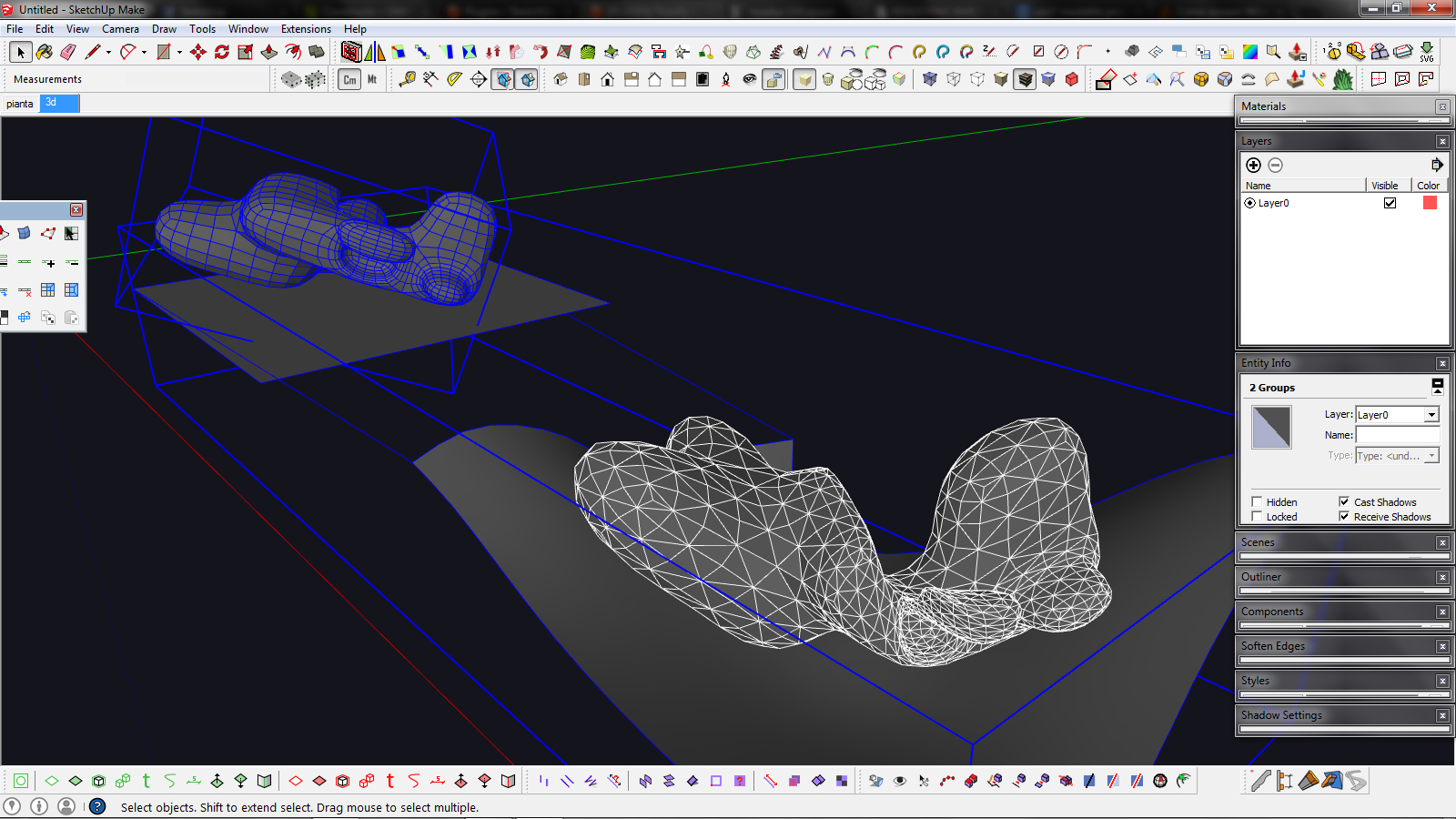
                                            it looks like the "flow without" cut doesn't add triangles but unsfoften every edges.. can we have an option to preserve edge properties so that this tool could be more esily integrated in an organic/quadfacetools-friendly workflow?

                                            edit - attached example


                                            flowify test.jpg

                                            1 Reply Last reply
                                            Reply Quote 0

                                            Hello! It looks like you're interested in this conversation, but you don't have an account yet.

                                            Getting fed up of having to scroll through the same posts each visit? When you register for an account, you'll always come back to exactly where you were before, and choose to be notified of new replies (either via email, or push notification). You'll also be able to save bookmarks and upvote posts to show your appreciation to other community members.

                                            With your input, this post could be even better πŸ’—

                                            Register Login
                                            • 1
                                            • 2
                                            • 3
                                            • 4
                                            • 5
                                            • 6
                                            • 7
                                            • 2 / 7
                                            • First post
                                              Last post
                                            Buy SketchPlus
                                            Buy SUbD
                                            Buy WrapR
                                            Buy eBook
                                            Buy Modelur
                                            Buy Vertex Tools
                                            Buy SketchCuisine
                                            Buy FormFonts

                                            Advertisement