Hologram
-
Hi.
Here is described a method of creating holograms with a plugin.
https://github.com/rdeits/ScratchHolograms/blob/master/Readme.markdown
But I don't know where in pattern.rb a path to draw_pattern.py can be changed.I tired to change it in line 227 and 228 but an error appears.
Error Loading File solid_pattern.rb
C;/Program Files (x86)/Google/Google SketchUp 8/Plugins/solid_pattern.rb;228; syntax error, unexpected $undefined, expecting tSTRING_CONTENT or tSTRING_DBEG or tSTRING_DVAR or tSTRING_END
	Dir.chdir(C;\Documents and Settings\Adminis...
	             ^
C;/Program Files (x86)/Google/Google SketchUp 8/Plugins/solid_pattern.rb;228; syntax error, unexpected $undefined, expecting kEND
...dir(C;\Documents and Settings\Administrator\My Documents\Scr...
                              ^
C;/Program Files (x86)/Google/Google SketchUp 8/Plugins/solid_pattern.rb;228; syntax error, unexpected $undefined, expecting kEND
...ments\ScratchHolograms-master\ScratchHolograms-master)
                              ^
C;/Program Files (x86)/Google/Google SketchUp 8/Plugins/solid_pattern.rb;228; syntax error, unexpected ')', expecting kEND
Robert
-
line 4
SCRIPTS_DIR = File.dirname(__FILE__) PYTHON_PATH = "/usr/local/bin/python""/usr/local/bin/python"need to be your path to where you instal thedraw_pattern.pyI would also changed line 3, then you can leave it all outside of SU and use
load "<your path goes here>"from 'Ruby Console' to test it...good luck
john
-
Error Loading File solid_pattern.rb
C;/Program Files (x86)/Google/Google SketchUp 8/Plugins/solid_pattern.rb;3; Invalid escape character syntax
... and Settings\Administrator\My Documents\ScratchHolograms-ma...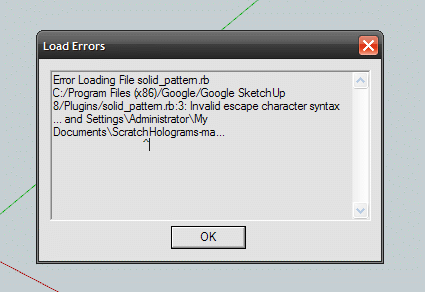
Robert
^
-
Error Loading File solid_pattern.rb
C;/Program Files (x86)/Google/Google SketchUp 8/Plugins/solid_pattern.rb;3; Invalid escape character syntax
... and Settings\Administrator\My Documents\ScratchHolograms-ma...
                              ^
C;/Program Files (x86)/Google/Google SketchUp 8/Plugins/solid_pattern.rb;230; syntax error, unexpected tIDENTIFIER, expecting ')'
	puts "Data export done. Python res...
	    ^
-
the line 3 error is pointing at you back slash ** try using forward slashes /, ruby uses either but python or system might not...
and line 230 is missing a closing bracket )...
sorry
john -
it was written for a mac, so maybe...
d = IO.popen(PYTHON_PATH + " draw_pattern.py " + base_dir + "/" + proposal)possibly needs to be
d = IO.popen(File.join(PYTHON_PATH , " draw_pattern.py ",base_dir, proposal))john
EDIT added the missing bracket... -
The error message points to line #3...
Which reads:
SCRIPTS_DIR = "C:\Documents and Settings\Administrator\My Documents\ScratchHolograms-master" PYTHON_PATH = "C:\Python27" ...You must always escape the
\folder de-liminator within ANY""- OR use''or/etc.
So change these everywhere to be something like one of these examples...
SCRIPTS_DIR = "C:\\Documents and Settings\\Administrator\\My Documents\\ScratchHolograms-master" ...
or
SCRIPTS_DIR = 'C:\Documents and Settings\Administrator\My Documents\ScratchHolograms-master' ...
or
SCRIPTS_DIR = "C:/Documents and Settings/Administrator/My Documents/ScratchHolograms-master" ...
or
SCRIPTS_DIR = 'C:/Documents and Settings/Administrator/My Documents/ScratchHolograms-master' ...The '
/' is the safer folder-path de-liminator...
The\within""is taken as an escape character, like in\n== Newline and\t== Tab...
[mod=:3v04zt7t]EDIT: @driven just beat me to it, but as I typed it... here it is anyway !
 [/mod:3v04zt7t]
 -
Finished exporting vertex data. Running python script... Error; #<Errno;;EACCES; Permission denied - C;/Python27/ draw_pattern.py /C;\Documents and Settings\Administrator\My Documents/Untitled.pattern> C;/Program Files (x86)/Google/Google SketchUp 8/Plugins/solid_pattern.rb;229;in `popen' C;/Program Files (x86)/Google/Google SketchUp 8/Plugins/solid_pattern.rb;229;in `ExportPattern' C;/Program Files (x86)/Google/Google SketchUp 8/Plugins/solid_pattern.rb;239Robert
-
Error: #<Errno::EACCES: Permission denied - C:/Python27/ draw_pattern.py /C:\Documents
you have spaces before and after draw_pattern.py which may be the issue...
-
Finished exporting vertex data.
Running python script...
Error; #<Errno;;ENOEXEC; Exec format error - C;/Python27/draw_pattern.py C;\Documents and Settings\Administrator\My Documents/Untitled.pattern>
C;/Program Files (x86)/Google/Google SketchUp 8/Plugins/solid_pattern.rb;229;in `popen'
C;/Program Files (x86)/Google/Google SketchUp 8/Plugins/solid_pattern.rb;229;in `ExportPattern'
C;/Program Files (x86)/Google/Google SketchUp 8/Plugins/solid_pattern.rb;239
-
EDIT:
I now realize it's about the Windows need for trapping spaces in file paths - change it thus:
Change your paths to keep the\- the system-calls expect them NOT/:
SCRIPTS_DIR = "C:\\Documents and Settings\\Administrator\\My Documents\\ScratchHolograms-master" PYTHON_PATH = "C:\\Python27"
Then enclose the two parts of the system-call inside"":
IO.popen('"'+PYTHON_PATH+"\\draw_pattern.py"+'" "'+base_dir+"\\"+proposal+'"') -
Finished exporting vertex data.
Running python script...
Error; #<Errno;;ENOEXEC; Exec format error - "C;\Python27\draw_pattern.py" "C;\Documents and Settings\Administrator\My Documents\Untitled.pattern">
C;/Program Files (x86)/Google/Google SketchUp 8/Plugins/solid_pattern.rb;229;in `popen'
C;/Program Files (x86)/Google/Google SketchUp 8/Plugins/solid_pattern.rb;229;in `ExportPattern'
C;/Program Files (x86)/Google/Google SketchUp 8/Plugins/solid_pattern.rb;239
-
have a look at Dan's
[Plugin] Hypocycloid Cam Profile Generator v1.0.0 http://sketchucation.com/forums/viewtopic.php?p=470834#p470834
it was based on a python [py/dxf] script that I couldn't get to run...
he reworked it to SU ruby, may be a simpler approach...john
-
I'm no expert on 'python' but isn't the cmd code more like this:
path_to_py argument(s)
Also have you got 'python' set up right in cmd window ?
ftype Python26.File="C:\Python26\python.exe" "%1" %
assoc .py=Python26.File*AND then run it...
IO.popen('"'+PYTHON_PATH+"\\draw_pattern.py+'" "'+base_dir+"\\"+proposal+'"')
OR
**system**('"'+PYTHON_PATH+"\\draw_pattern.py+'" "'+base_dir+"\\"+proposal+'"')OR perhaps the .py part can't be inside "" ?
Read this about file associations... http://eli.thegreenplace.net/2010/12/14/problem-passing-arguments-to-python-scripts-on-windows/
-
Error Loading File solid_pattern.rb
C;/Program Files (x86)/Google/Google SketchUp 8/Plugins/solid_pattern.rb;229; syntax error, unexpected $undefined, expecting ')'
...w_pattern.py+'" "'+base_dir+"\\"+proposal+'"')
                              ^
C;/Program Files (x86)/Google/Google SketchUp 8/Plugins/solid_pattern.rb;229; unterminated string meets end of file
C;/Program Files (x86)/Google/Google SketchUp 8/Plugins/solid_pattern.rb;229; syntax error, unexpected $end, expecting kEND
-
My typo !
2 missing characters...
Try:IO.popen('"'+PYTHON_PATH+"\\%(#0000FF)["+]draw_pattern.py+'" "'+base_dir+"\\"+proposal+'"')If you view your code in Notepad++ with suitable RB syntax coloring it's clearly wrong...
-
@tig said:
If you view your code in Notepad++
I use PSPad. I install Notepad++.
Finished exporting vertex data.
Running python script...
Error; #<NameError; undefined local variable or method `draw_pattern' for main;Object>
C;/Program Files (x86)/Google/Google SketchUp 8/Plugins/solid_pattern.rb;229;in `ExportPattern'
C;/Program Files (x86)/Google/Google SketchUp 8/Plugins/solid_pattern.rb;239
-
Try this:
d = IO.popen('"'+PYTHON_PATH%(#0000BF)[+"\\draw_pattern.py "+]base_dir+"\\"+proposal+'"')
I misunderstood, there is no 'draw_pattern' variable ! -
Finished exporting vertex data.
Running python script...
Error; #<Errno;;EINVAL; Invalid argument - "C;\Python27\draw_pattern.py C;\Documents and Settings\Administrator\My Documents\Untitled.pattern">
C;/Program Files (x86)/Google/Google SketchUp 8/Plugins/solid_pattern.rb;229;in `popen'
C;/Program Files (x86)/Google/Google SketchUp 8/Plugins/solid_pattern.rb;229;in `ExportPattern'
C;/Program Files (x86)/Google/Google SketchUp 8/Plugins/solid_pattern.rb;239
-
I weary... try...
d = IO.popen('"'+PYTHON_PATH+'\draw_pattern.py" "'+base_dir+'"\\"+proposal+'"')
So many permutations...


Hello! It looks like you're interested in this conversation, but you don't have an account yet.
Getting fed up of having to scroll through the same posts each visit? When you register for an account, you'll always come back to exactly where you were before, and choose to be notified of new replies (either via email, or push notification). You'll also be able to save bookmarks and upvote posts to show your appreciation to other community members.
With your input, this post could be even better 💗
Register Login


Advertisement