sketchucation logo sketchucation
    • Login
    Oops, your profile's looking a bit empty! To help us tailor your experience, please fill in key details like your SketchUp version, skill level, operating system, and more. Update and save your info on your profile page today!
    Mac User? | Join the Rayscaper Beta for Mac Learn More

    [Plugin] 3 point Window

    Scheduled Pinned Locked Moved Plugins
    37 Posts 15 Posters 12.4k Views 15 Watching
    Loading More Posts
    • Oldest to Newest
    • Newest to Oldest
    • Most Votes
    Reply
    • Reply as topic
    Log in to reply
    This topic has been deleted. Only users with topic management privileges can see it.
    • PixeroP
      Pixero
      last edited by

      It should be under: View -> Toolbars -> 3 point Window.

      Updated to v1.0.1. Fixed a bug that caused axis problems when drawn at certain angles.

      1 Reply Last reply
      Reply Quote 0
      • D
        DonVid
        last edited by

        Look nice.
        I installed it in Sketchup 2014 but I can not find it in plugings list.
        I also noticed that the the window does not cut the wall (See through the glass).
        Thank you.
        Don

        1 Reply Last reply
        Reply Quote 0
        • PixeroP
          Pixero
          last edited by

          This version doesn't cut a hole since my preferred workflow is to make walls with holes.
          Who knows what the future brings? I have ideas but no time frame.

          1 Reply Last reply
          Reply Quote 0
          • D
            db11
            last edited by

            First off Pixero, thanks for a great plug-in. Its simplicity and speed in custom window creation is awesome.

            One thing that slows me down is having to over-write the pre-sets each time I re-open the tool. I was thinking no problem, I'll just open the script and modify the parameters... but it's .rbs not .rb, therefore uneditable.

            I would like to set the frame and window dimensions once (based on manufacturer specs for the current project) and have it remember them β€” rather than over-writing with default values on each new use.

            So, if you had a way of saving new pre-set values, it would be great. Even better would be multiple pre-sets... for fixed-pane vs operable windows vs window-walls etc.

            Request 2 is an option for triple pane windows. (my current projects are both PassivHaus)

            I understand not wanting feature-bloat to ruin a simple approach, but each of these features would extend functionality without impeding usability. (though they would obviously make the script itself more complex, so I would understand not wanting to)

            Thanks for the consideration.

            1 Reply Last reply
            Reply Quote 0
            • PixeroP
              Pixero
              last edited by

              Remembering settings, it's is on my to do list. πŸ‘

              1 Reply Last reply
              Reply Quote 0
              • D
                db11
                last edited by

                @pixero said:

                Remembering settings, it's is on my to do list. πŸ‘

                Perfect! Will look forward to upcoming releases.

                1 Reply Last reply
                Reply Quote 0
                • PixeroP
                  Pixero
                  last edited by

                  v1.0.2
                  Added session memory of settings.

                  1 Reply Last reply
                  Reply Quote 0
                  • D
                    db11
                    last edited by

                    @pixero said:

                    v1.0.2
                    Added session memory of settings.

                    Perfect. Makes a great tool even better. Thanks!

                    1 Reply Last reply
                    Reply Quote 0
                    • FrederikF
                      Frederik
                      last edited by

                      This is a nice little gem... πŸ‘

                      I've found a bug, though...

                      When making windows in a wall following the X or Y axis (0 degree), it works great...
                      However, if you have a wall in i.e. a 45 degree angle, the glass planes become offset...
                      And even if you continue to do it on a 0 degree wall, the offset is all of a sudden twice as big as on the 45 degree wall...

                      I've attached an image showing what I mean as well as the 'skippy' used for this...
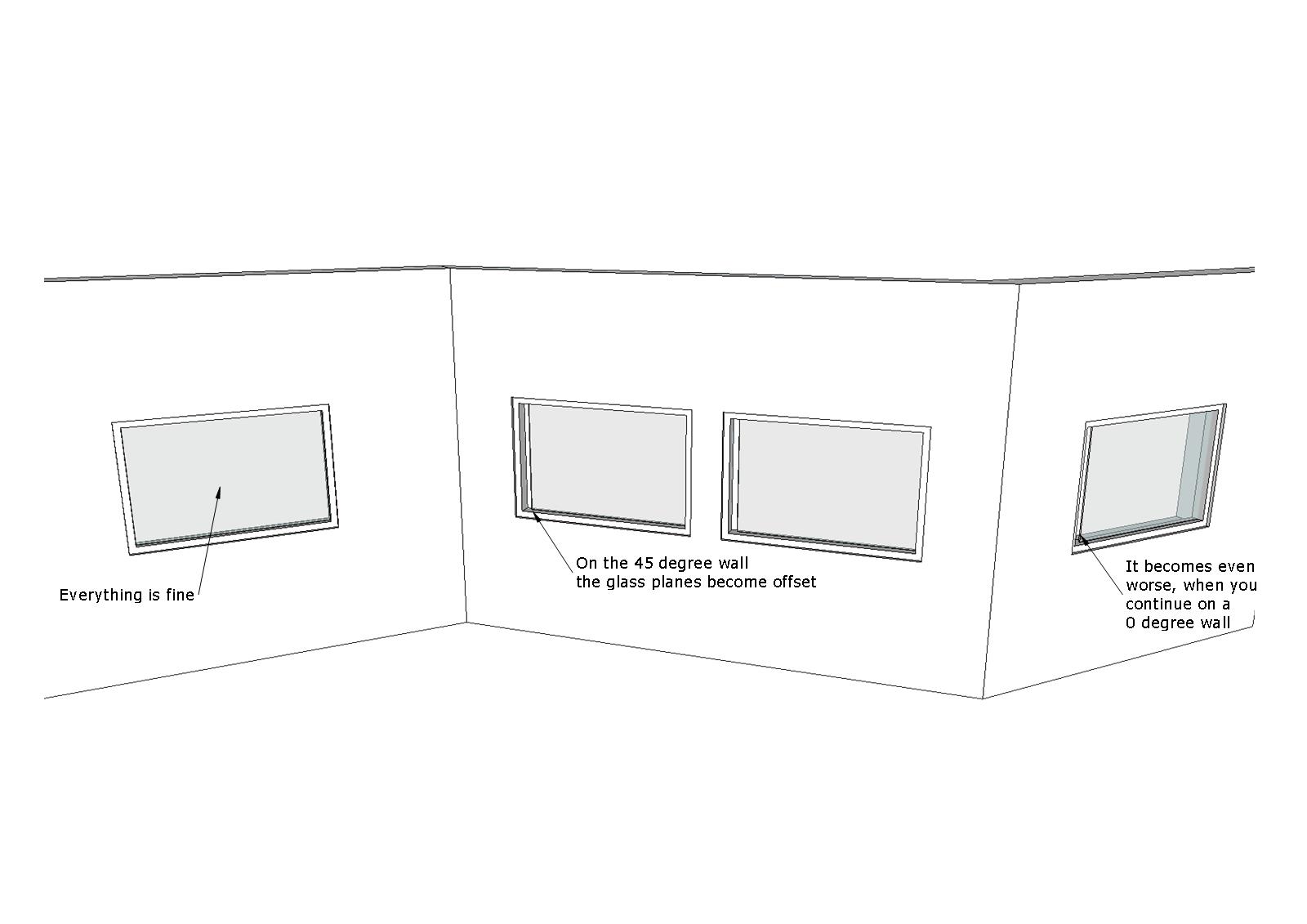

                      3-point-window-bug_1.jpg


                      3-point-window-bug.skp

                      Cheers
                      Kim Frederik

                      1 Reply Last reply
                      Reply Quote 0
                      • PixeroP
                        Pixero
                        last edited by

                        I just tried your scene but couldn't replicate the error.
                        What version are you using? The current version is 1.0.4.

                        1 Reply Last reply
                        Reply Quote 0
                        • FrederikF
                          Frederik
                          last edited by

                          @pixero said:

                          I just tried your scene but couldn't replicate the error.
                          What version are you using? The current version is 1.0.4.

                          That's odd... 😐
                          I do use ver. 1.0.4 together with SU 2015 Pro on a Win 7 64bit 'puter...

                          And now I can't replicate it either... 😳 πŸ˜’

                          Cheers
                          Kim Frederik

                          1 Reply Last reply
                          Reply Quote 0
                          • D
                            dtrarch
                            last edited by

                            Hi all
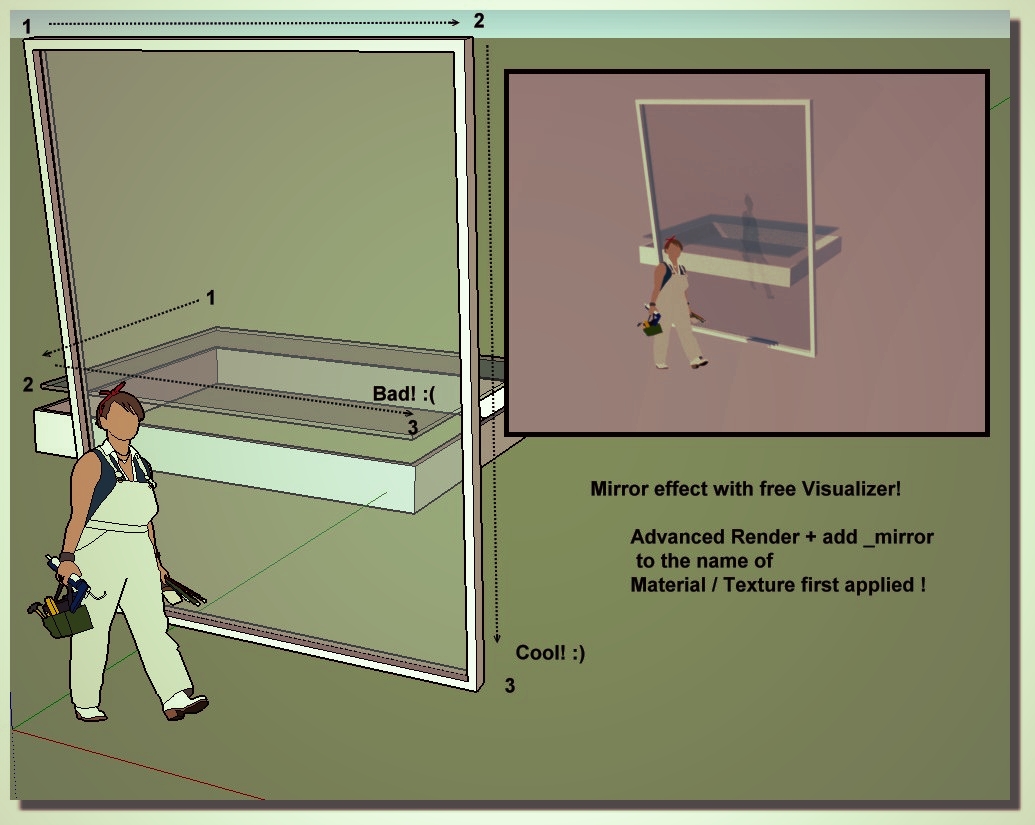
                            The bug depends on the way you draw the three points.
                            Left top>Right top>Right bott will build the window properly. β˜€

                            dtr

                            1 Reply Last reply
                            Reply Quote 0
                            • pilouP
                              pilou
                              last edited by

                              Yes order of creation is very important for this plugin! πŸ€“

                              • Free Visualizer! 😎 (French site πŸ˜‰

                              windows_Viz.jpg

                              Frenchy Pilou
                              Is beautiful that please without concept!
                              My Little site :)

                              1 Reply Last reply
                              Reply Quote 0
                              • PixeroP
                                Pixero
                                last edited by

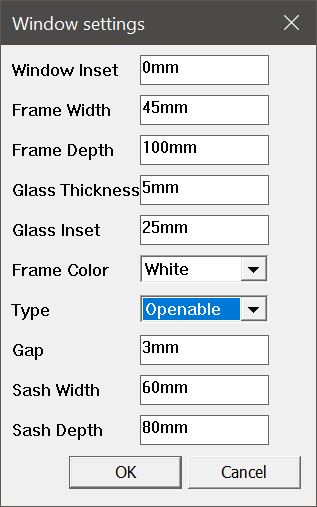
                                I've updated 3pt Window to v.2.0.
                                Fixed some bugs and added some features like Fixed or openable window.
                                (They are not really openable but have the look of such windows).
                                You can now draw windows on sloped and flat surfaces as well.
                                It also have three different frame colors to choose from; white, gray and black.

                                Note that this version only works with SketchUp 2016 or newer.

                                Link Preview Image
                                3 point Window | SketchUcation

                                3D SketchUp Community for Design and Engineering Professionals.

                                favicon

                                (sketchucation.com)

                                Windowsettings.JPGwindowtypes.JPG

                                1 Reply Last reply
                                Reply Quote 0
                                • medeekM
                                  medeek
                                  last edited by

                                  I've installed it into SketchUp 2017 but I'm getting this error:

                                  Error Loading File 3click_Windows.rb
                                  Error: #<LoadError: cannot load such file -- 3click_Windows/3click_Windows_main.rb>
                                  C:/Program Files/SketchUp/SketchUp 2017/Tools/RubyStdLib/rubygems/core_ext/kernel_require.rb:54:in require' C:/Program Files/SketchUp/SketchUp 2017/Tools/RubyStdLib/rubygems/core_ext/kernel_require.rb:54:in require'
                                  C:/Users/Administrator/AppData/Roaming/SketchUp/SketchUp 2017/SketchUp/Plugins/3click_Windows.rb:4:in `<top (required)>'

                                  Anybody else get a similar error? I hope my installation of SketchUp isn't corrupt.

                                  Nathaniel P. Wilkerson PE
                                  Medeek Engineering Inc
                                  design.medeek.com

                                  1 Reply Last reply
                                  Reply Quote 0
                                  • PixeroP
                                    Pixero
                                    last edited by

                                    Sorry about that. My fault. I'm fixing it now and it should be up again shortly...
                                    I'll post here when it's working.

                                    1 Reply Last reply
                                    Reply Quote 0
                                    • PixeroP
                                      Pixero
                                      last edited by

                                      Now I have uploaded it again and it SHOULD be working.
                                      I had mixed up the loading script with an older version. 😳
                                      Hopefully everything will be ok now.

                                      1 Reply Last reply
                                      Reply Quote 0
                                      • ntxdaveN
                                        ntxdave
                                        last edited by

                                        I have not used the plugin for a while. Does or could it automatically cut a whole for the window?

                                        If I remember correctly the last time I used it I had to cut a whole for the window separately.

                                        Noe, how about a 3 point door tool πŸ˜„

                                        Press F1...thank me later

                                        1 Reply Last reply
                                        Reply Quote 0
                                        • ntxdaveN
                                          ntxdave
                                          last edited by

                                          @pixero said:

                                          Hi. It doesn't cut holes. Sdmitch have a script that cuts holes easily. Cant remember the name now but look through his site for it.

                                          Edit. Hole in the wall, I think it was called.

                                          Yes, there are others as well. I was just suggesting it would be neat if one plugin would "do it all". πŸ˜„

                                          Press F1...thank me later

                                          1 Reply Last reply
                                          Reply Quote 0
                                          • PixeroP
                                            Pixero
                                            last edited by

                                            Hi. It doesn't cut holes. Sdmitch have a script that cuts holes easily. Cant remember the name now but look through his site for it.

                                            Edit. Hole in the wall, I think it was called.

                                            1 Reply Last reply
                                            Reply Quote 0

                                            Hello! It looks like you're interested in this conversation, but you don't have an account yet.

                                            Getting fed up of having to scroll through the same posts each visit? When you register for an account, you'll always come back to exactly where you were before, and choose to be notified of new replies (either via email, or push notification). You'll also be able to save bookmarks and upvote posts to show your appreciation to other community members.

                                            With your input, this post could be even better πŸ’—

                                            Register Login
                                            • 1
                                            • 2
                                            • 2 / 2
                                            • First post
                                              Last post
                                            Buy SketchPlus
                                            Buy SUbD
                                            Buy WrapR
                                            Buy eBook
                                            Buy Modelur
                                            Buy Vertex Tools
                                            Buy SketchCuisine
                                            Buy FormFonts

                                            Advertisement