Problems with a half-torus
-
@d12dozr said:
Even easier than using Intersect with Model would be to make the elbow a solid group, the select all 3 groups, Right Click > Outer Shell to combine them into a solid group.
But, isn't that a Pro only Solids feature ? -
@tig said:
@d12dozr said:
Even easier than using Intersect with Model would be to make the elbow a solid group, the select all 3 groups, Right Click > Outer Shell to combine them into a solid group.
But, isn't that a Pro only Solids feature ?outer shell is in suFree8 and suMake.. it's the only solid tool which is in both free and pro versions.
(it's the same thing as Union in suPro.. though for whatever reason, i find it more reliable than union in pro so i use outer shell.. but really, i can't figure out why suPro includes both OuterShell and Union
 )
)
EDIT
well, apparently there is a difference:@unknownuser said:
The result of an outer shell is similar to the result of a union. However, the result of an outer shell can only contain external faces while the result of a union can also contain internal geometry.
there's an example image of the difference between the two at that link.. i guess i've never encountered a situation which would require union vs outerShell.
-
Of course you are correct !

But as you point out 'outer_shell' removes all internal 'holes', so it's dangerous if your group is a say a 'nutshell' form [with a 'wall'] as its inner faces will be removed. -
When they introduced Outer Shell in SU 8, it was for the home 3D printing crowd so they included it in the free versions. It does indeed remove all internal geometry, which is what you usually want for 3D printing. If there is internal geometry not connected to the outside at all, then it usually is not needed for printing anyway.
It is one of the features I use the most for making 3D printable models.
-
Thanks `again folks

@tig said:
Assuming the main part is a solid [group it and see its Entity Info...] you'll need to 'merge' the 'clips'
Note:
The 'clip' on the right is not in the same relationship to the pipe as the left 'clip'.
I assume it should be...
Also the back edge of the clips intersect oddly with the pipe-part and their backside radius does not match the pipe's either [see image] - it will mean far more tweaking later on...
Fix those and then with the parts in the same context use 'intersect'.
You should then be able to use SolidInspector/SolidSolver OR add a SectionPlane to look inside and erase the unwanted faces/edges.Well it was solid at some point, it just isn't now...
 The clips were meant to be in the same relative places but of course I do it the amateurish way: by 'feel'
I set the outer radius of the elbow to the same as the inside of the clip - 27.2mm - but unfortunately they didn't match up
I've moved the clips 'in' so there's no gaps between them and the 'body' so I hope that works.
I seem to have some very weird anomalies going on at the back of the elbow, also under the 'front'. What are they, why did they suddenly appear when I ran SolidSolverand how the begorra do I get rid of them?
My mate's been on the blower, says split pins aren't easy enough, he want snap-clip type things, I'll have to search around t't interweb for ideas.
-
@d12dozr said:
...you can use Netfabb Basic to quickly decimate (reduce the # of polygons) an existing model with out having to re-draw the whole thing.
Here's how: open model in Netfabb, Right click > Level of Detail > Choose something like 50%.
I just learned that this decimation is visual only, and you can't save the decimated model. D'oh!
-
@teig said:
I seem to have some very weird anomalies going on at the back of the elbow, also under the 'front'. What are they, why did they suddenly appear when I ran SolidSolverand how the begorra do I get rid of them?
Looks like the follow me path was too sharp for that size of profile. You can select the elbow geometry > Right click > Intersect selected, then clean up the internal geometry - or make the bend not so sharp, and then you won't get the nasty intersecting geometry.
-
This is what I meant by a keyhole fitting.
With a good fit you should be able to use a simple twist on twist off with any sort of pin to lock it in place. Since you are printing them the flanges should match up on all of them, just change the bell mouth in the models. The hole fittings could be printed and the T piece of the fitting could be a nice round head bolt screwed into the print material.
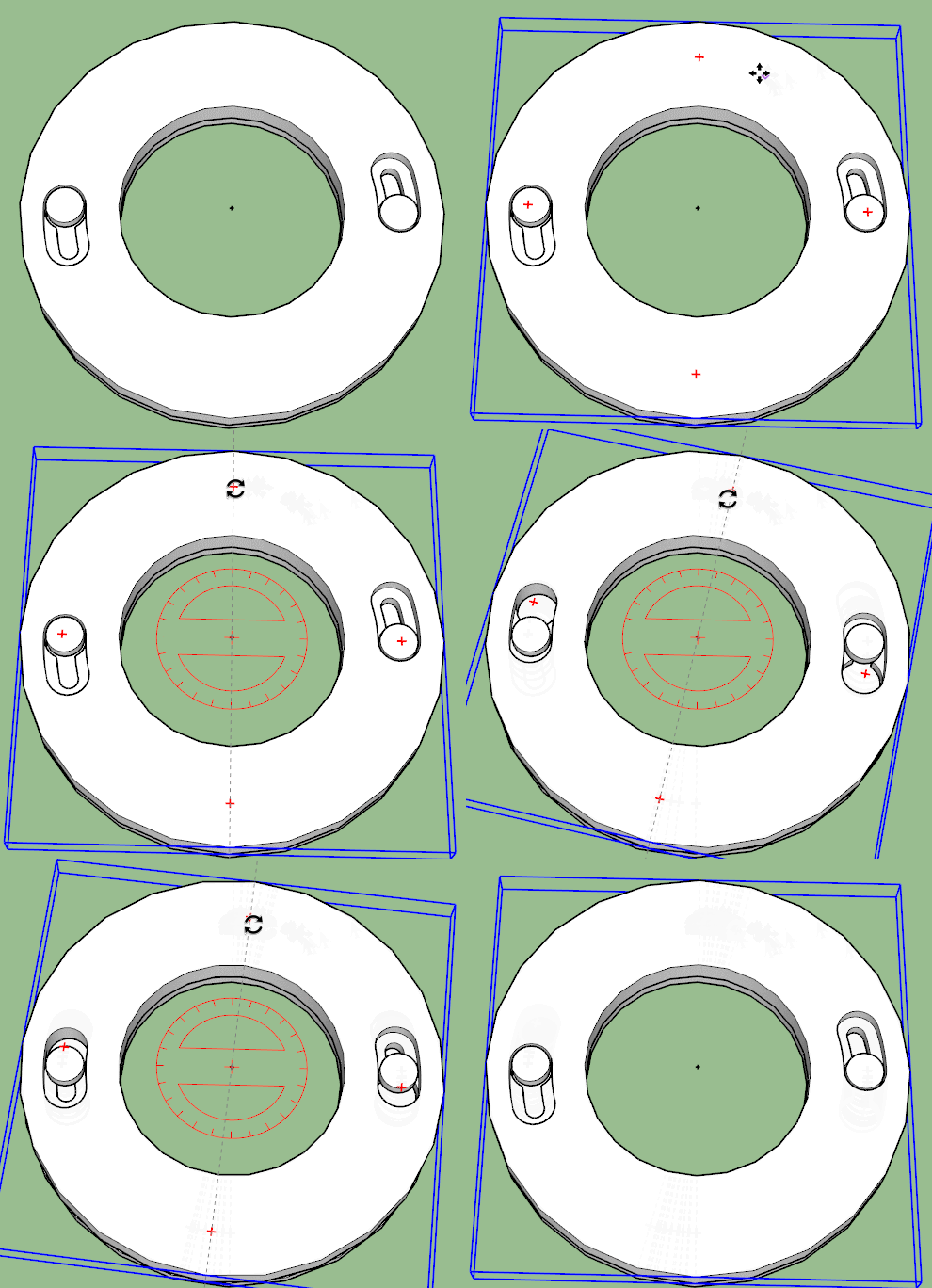
-
That's a classy idea Box, if I could get them to lock on tightly that could be a beaut of a way of doing it. Back to the laptop to try to do what Marcus is advising and draw your 'keyholes' up.
-
If you print the slot part of the hole with a slight taper as you twist it on it will tighten.
And using a threaded bolt will allow you to tighten the fit as necessary. Thin smear of cured silicone on the face as a washer and one hole drilled through for a locking pin. -
Good idea. I spent 30 mins trying to figure out Marcus' words of wisdom and failed so I've started drawing it again. After 2 hours of intensive drawing I've run into the intersect problems again though, SolidSolver has been working on it for the last 10 minutes, I predict failure. I'll go away and try to see how this 'intersect with selection' works.







Advertisement