Error message
-
I get an error message when I try to create an object on layer 0 with no other layers visible.
I have purged Layers and clicked on show hidden geometry in the View menu.
The message reads "your recent operation has caused visible geometry to merge with existing geometry on a HIDDEN LAYER"
I have deleted some layers. Could that cause the problem?
My first question is: How do you "Hide" a layer. I know we can make a layer visible but that's not the same as hiding.
Secondly: How so I UNHIDE a layer?
I'm attaching the file:
Thanks
Jim
-
Jim, you need to spend some time learning about layers in SketchUp. Keep all of the geometry on Layer 0. Only make layer associations for components and/or groups.
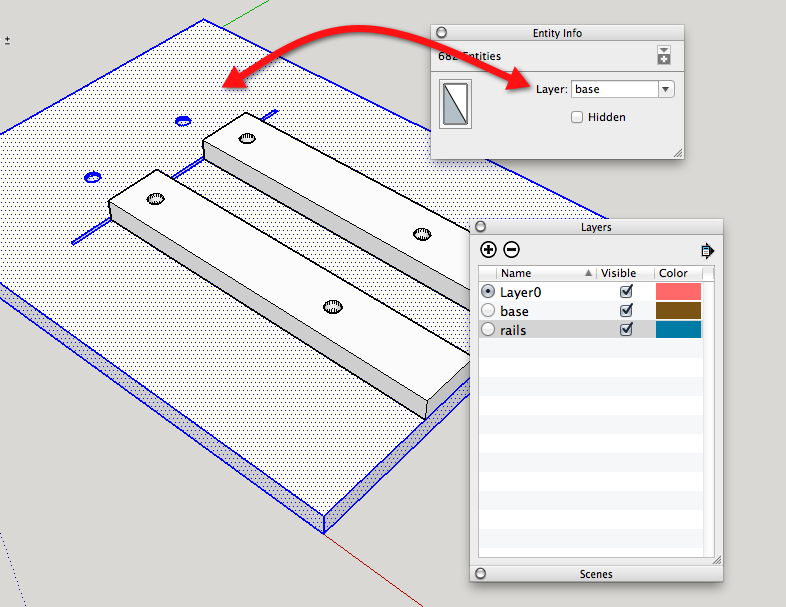
You've got geometry on a layer other than Layer 0 and you're drawing on Layer 0 so the geometry is merging. The only way to prevent geometry from merging with other geometry is to wrap it up in a component or group. Layers do not separate geometry. Layers only control visibility.
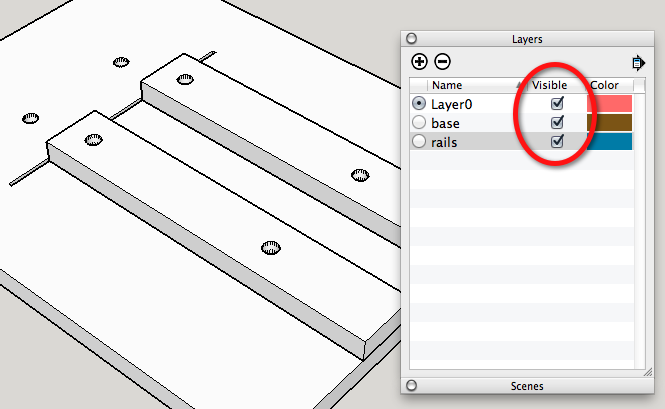
-
Start here: http://help.sketchup.com/en/article/38572
-
For layers, "not visible" = "hidden", "visible" = "unhidden". The usual way to hide and unhide them is on the layers window.
-
try this Six Rules for Modeling in SketchUp
also play with this file with layers and outliner LAYER OUTLINER
Six Rules for Modeling in SketchUp.pdf
-
Once again, thank you gentlemen. I'm a Turbo CAD convert and layers is one of the differences I need to become familiar with. I made the base a component and the problem disappeared.
-
Did you move the geometry of the base back to Layer 0?
-
Dave;
I did and then I made it a group and put the group on the base layer.Jim
-
Good work.
So remember to draw on Layer 0 only, make a component or group of the geometry and assign a layer to that component or group and everything should go smoothly.

Hello! It looks like you're interested in this conversation, but you don't have an account yet.
Getting fed up of having to scroll through the same posts each visit? When you register for an account, you'll always come back to exactly where you were before, and choose to be notified of new replies (either via email, or push notification). You'll also be able to save bookmarks and upvote posts to show your appreciation to other community members.
With your input, this post could be even better 💗
Register Login


Advertisement