Plugin that lists all your plugins?
-
Plugin that lists all your plugins? preferably a text file?
-
I believe the plugins and extensions managers included in the Sketchucation Plugin Store Tools list all plugins and Extensions, not just those installed with it.
-
It does... But, not a text list that can be used in comparison to another. The bundles system seemed to miss quite a few, perhaps those that it did not have access to to reinstall.
-
If you have your old version still installed, you could open it together with the new one and compare the plugins in the managers, maybe that helps.
-
You could use the Sets function.
Create a set including everything and export it.
The .set file can be changed to .txt -
You could use Q-Dir to compare the Plugins folders. Show the plugins folder for one version in one pane and the other plugin in another pane and look at them side by side.
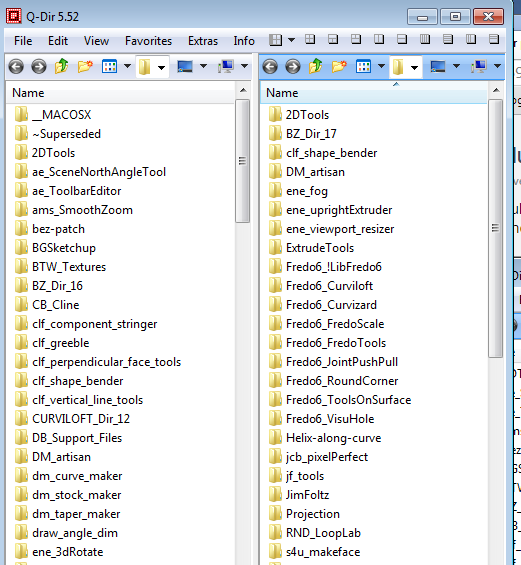
-
@box said:
You could use the Sets function.
Create a set including everything and export it.
The .set file can be changed to .txtClose... only puts a space between each plugin. runs them horizontal instead of vertical. quite the mess to look at.
@dave r said:
You could use Q-Dir to compare the Plugins folders.
I think this might be the closest thing.
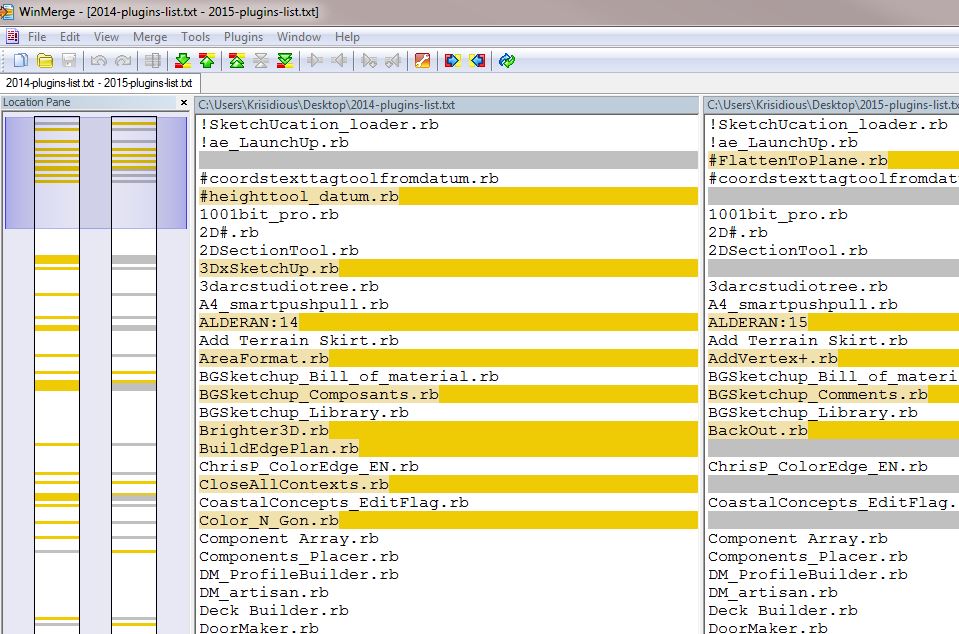
I was wanting to use WinMerge to check the two files. I guess I'll have to trust my old eyes.
-
Indeed the SketchUcation 'Plugins Manager' makes a list of all plugins 'by their folder'.
To get a sorted 'text' list of ALL installed plugins [even any 'disabled' ones] use this snippet in the Ruby Console [copy+paste+<enter>] [note that these have no 'file-type' suffixes, like '.rb'].
puts;puts SCF_Dialog.getMyPlugins.split("|").sort.join("\n")To get plugins listed in different ways substitute '
getMyPlugins' with one of these...getMyCloudPlugins== just those installed in your sketchUcloud folder - if you have one.getMyDisabled== just those that are Disabled [.rb! etc]getMyEnabled== just those that are Enabled [NO .rb! etc]getMyExtensions== just those plugins files which can/do create ExtensionsgetMyHelpers== just those plugins which are 'helpers', probably needed by some other plugins, like 'offset.rb'...getMyUninstalled== just those plugins which have been 'uninstalled' [.rbx etc]There are two other slightly different methods thus:
This:
puts;puts SCF_Dialog.getMyPluginsFolders.join("\n")== all available plugins foldersAnd this method, which gives a complex list of plugins reported by folder.
puts;puts SCF_Dialog.getMyPluginsByFolder.split("||").join("\n\nFOLDER= ").split("|").join("\n")== The listing is in the format: the name of your Computer, the FOLDER= 'Plugins' with the folder's Ruby file contents sorted below - including any disabled ones - and then potentially FOLDER= 'sketchUcloud', 'Custom1' etc...The SketchUcation PluginStore dialog's 'Bundle' system filters the lists to include just those which came from SketchUcation - so if you have say a Smustard.com plugin installed, although the Managers will list it, unfortunately it does not make it into your lists in 'My Downloads', 'My Installs'. or the related 'Bundle'...
-
Boooom... You rock Tig.




Hello! It looks like you're interested in this conversation, but you don't have an account yet.
Getting fed up of having to scroll through the same posts each visit? When you register for an account, you'll always come back to exactly where you were before, and choose to be notified of new replies (either via email, or push notification). You'll also be able to save bookmarks and upvote posts to show your appreciation to other community members.
With your input, this post could be even better 💗
Register Login


Advertisement