sketchucation logo sketchucation
    • 登入
    Oops, your profile's looking a bit empty! To help us tailor your experience, please fill in key details like your SketchUp version, skill level, operating system, and more. Update and save your info on your profile page today!
    🔌 Smart Spline | Fluid way to handle splines for furniture design and complex structures. Download

    [Plugin][$] VisuHole - v1.5a - 01 Apr 24


    已排程 已置頂 已鎖定 已移動 Plugins
    103 貼文 39 Posters 127.5k 瀏覽 39 Watching
    正在載入更多貼文
    • 從舊到新
    • 從新到舊
    • 最多點贊
    回覆
    • 在新貼文中回覆
    登入後回覆
    此主題已被刪除。只有擁有主題管理權限的使用者可以查看。
    • fredo6F 離線
      fredo6
      最後由 編輯

      @bharralure said:

      [attachment=0:2s4g1kip]<!-- ia0 -->2017-10-13 09_47_12-Sans titre - SketchUp Make 2017.jpg<!-- ia0 -->[/attachment:2s4g1kip]Bonjour Fredo,
      Juste un souhait qui n'est peut-être pas réalisable : est-il possible que VisuHole n'explose pas les courbes, arcs et autre cercles, et ainsi ne pas perdre les inférences et autres renseignements disponibles dans "Info sur l'entité" ?
      D'avance merci.

      Not obvious, but I'll think of it in a next version.

      Fredo

      1 條回覆 最後回覆 回覆 引用 0
      • B 離線
        bharralure
        最後由 編輯

        Bonjour Fredo, et merci d'avoir bien voulu prendre ma demande en considération, mais sachez que ce n'est pas une obligation, mais simplement une suggestion, surtout qu'il est possible de ressouder manuellement ces arcs et cercles, pour retrouver facilement, par inférence, leur centre par exemple (très utile, entre autre, pour la cotation).

        1 條回覆 最後回覆 回覆 引用 0
        • R 離線
          rv1974
          最後由 編輯

          cutting crossing window\polyline would be amazing spin-off.

          1 條回覆 最後回覆 回覆 引用 0
          • fredo6F 離線
            fredo6
            最後由 編輯

            @rv1974 said:

            cutting crossing window\polyline would be amazing spin-off.

            And on top of that, it does a chamfering of the intersection!
            ...and keep everything as a solid!
            what else?

            1 條回覆 最後回覆 回覆 引用 0
            • R 離線
              rv1974
              最後由 編輯

              actually when I thought for 2nd time (after first wows!) I realized it hardly can be a precise tool- not so suitable for archviz (my case). could be good for conceptual doodling.

              1 條回覆 最後回覆 回覆 引用 0
              • R 離線
                rv1974
                最後由 編輯

                @fredo6 said:

                @rv1974 said:

                cutting crossing window\polyline would be amazing spin-off.

                And on top of that, it does a chamfering of the intersection!
                ...and keep everything as a solid!
                what else?

                hehe don't you start..
                from 31m00s- grooving 😲

                or even better:

                1 條回覆 最後回覆 回覆 引用 0
                • fredo6F 離線
                  fredo6
                  最後由 編輯

                  I feel like playing in the schoolyard when seeing these videos.
                  Must be a trick, because the first time I played with Blender, I gave up after 2 hours and never came back.

                  1 條回覆 最後回覆 回覆 引用 0
                  • R 離線
                    rv1974
                    最後由 編輯

                    well after watching those ones I have rough idea what indians felt seenig gunned conquistadors on horses for a first time 😆

                    1 條回覆 最後回覆 回覆 引用 0
                    • J 離線
                      jtri
                      最後由 編輯

                      I have some some great uses for this plugin in my modeling, thanks. But when using Drill thru with nested components I get expected results. When using carve I do not see the colors of the nested components. To see the colors I would need to go clean up the model. Is this to be expected with this plugin or operator error? Top model in my example has been cleaned up.


                      Visuhole.skp

                      1 條回覆 最後回覆 回覆 引用 0
                      • fredo6F 離線
                        fredo6
                        最後由 編輯

                        @jtri said:

                        I have some some great uses for this plugin in my modeling, thanks. But when using Drill thru with nested components I get expected results. When using carve I do not see the colors of the nested components. To see the colors I would need to go clean up the model. Is this to be expected with this plugin or operator error? Top model in my example has been cleaned up.

                        Yes, when the carving has the same size that the component, you need some cleanup of the thin faces left over by VisuHole. Unfortunately, the intersection in Sketchup is not always predictable for these special cases, and also, since components are separate, you may not want the cleanup.

                        Fredo

                        1 條回覆 最後回覆 回覆 引用 0
                        • J 離線
                          jtri
                          最後由 編輯

                          Thanks for all your plugins and your support!

                          1 條回覆 最後回覆 回覆 引用 0
                          • G 離線
                            gnome_mo
                            最後由 編輯

                            @pants said:

                            Fredo,

                            Hope you got time for this, because it feels so close...anyway, can you confirm that you're able to make up new stencils and have them work as "punches?" I've found this only works for me if I use your "stock" three sample stencils - the ones you provided as defaults. It lets me pick a new shape that turns yellow and shows all signs of being ready to make a hole, but when I double-click, or try to "orient," etc...no hole results...just a "time elapsed" display.

                            I also have some Sketchucation plugins-vs-extensions issues/possible confusion. Plugin manager shows current 2/4 version. Later, after finding I was still having problems, I noticed the SUcation Extensions manager still showed the old version (now disabled). I keep thinking there's a need to delete/uninstall old versions, not just disable. Apparently one can disable a plugin and still find that it shows up as the old version, active, but in the SUcation extensions manager. Confusing, to me, anyway.

                            Mahalo - Dave

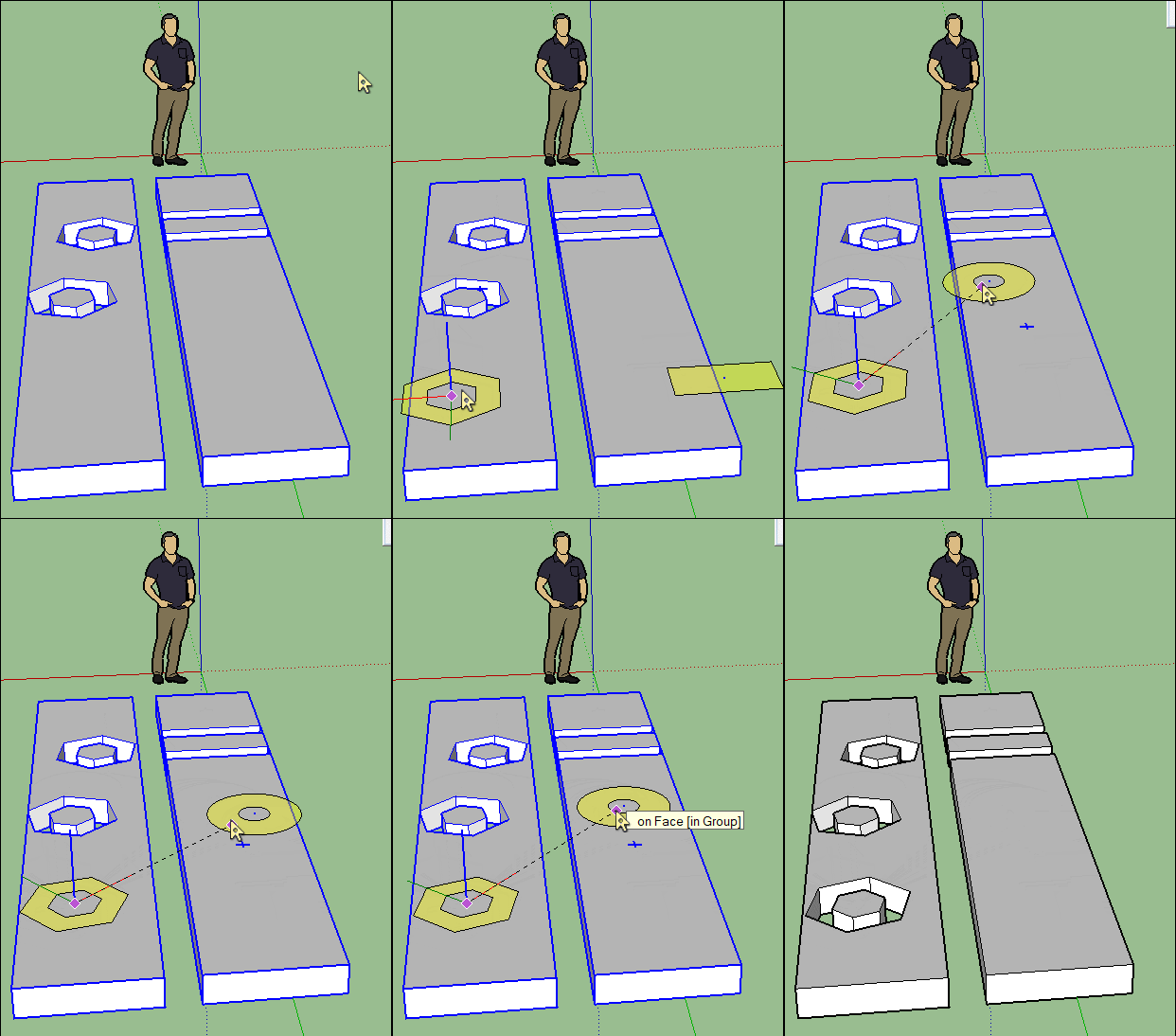
                            I have the very same problem. Haven't managed even all default shapes, circle yes and polygon yes, but rectangle doesn't drill. Neither does my shape. (Rougly - looks like letter "T").
                            I'm trilling through a floor made of 700 planks.
                            Pants, did you manage to drill yours?

                            1 條回覆 最後回覆 回覆 引用 0
                            • pilouP 離線
                              pilou
                              最後由 編輯

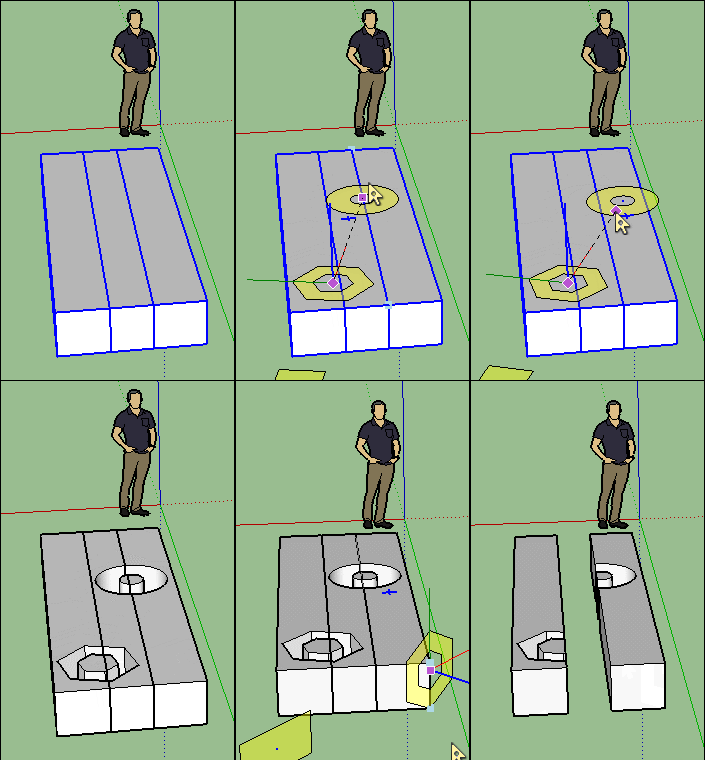
                              With any image or file it's difficult to say something! 😄

                              Else I see no dificulties to make some drills on floors, walls etc...
                              Just select before your objects then call the crazzy VisuHole! 😄
                              One of my favorite when you can't use Boolean function who don't existing on the Make Versions! 😉

                              Here all object is a Group, and view Front Face
                              (will be the same if wall was a floor ! So from View Top)
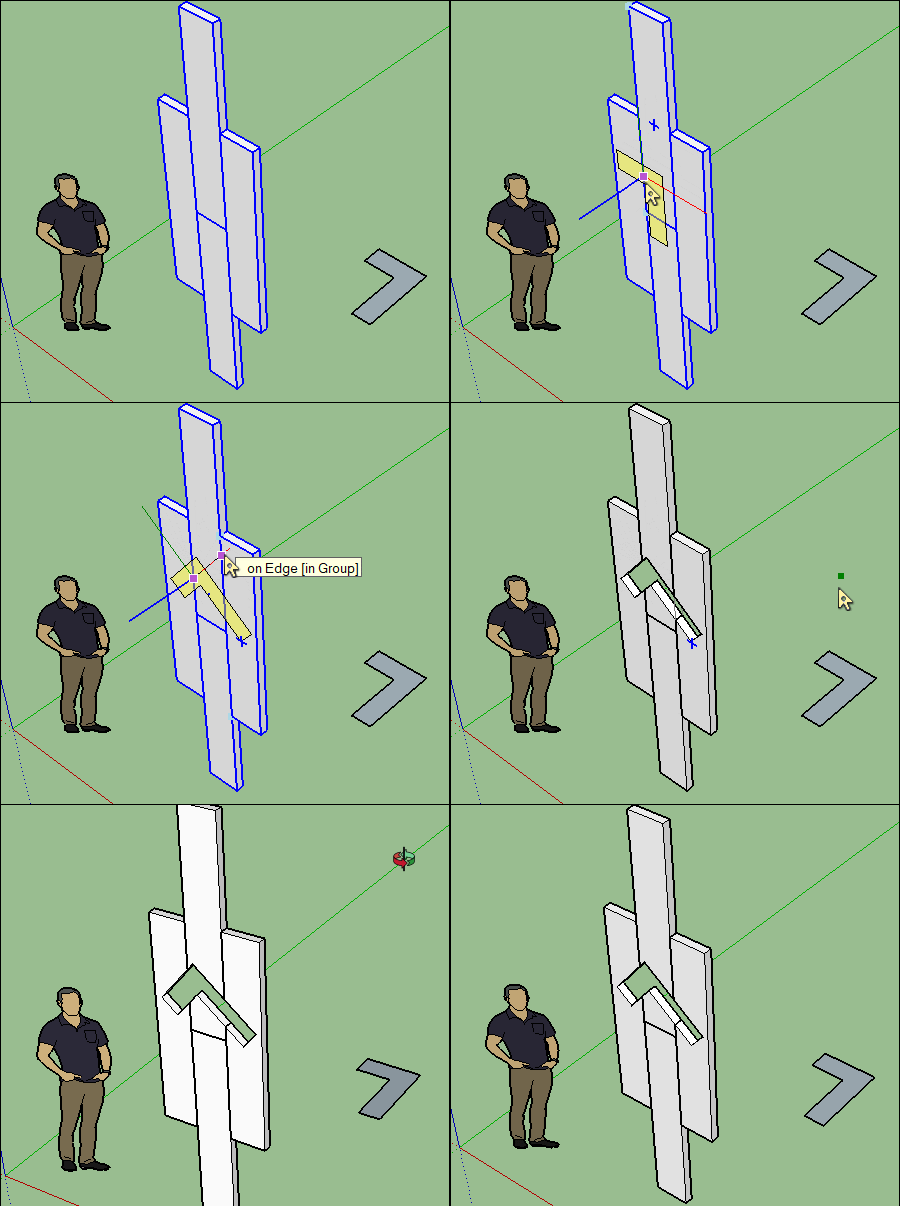
                              GIF8VISUVISU.gif

                              Will be of course the same if the form was a "T" 😉
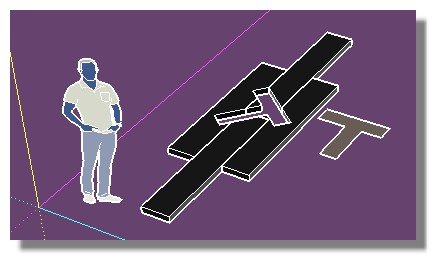
                              the_same_T.jpg

                              Frenchy Pilou
                              Is beautiful that please without concept!
                              My Little site :)

                              1 條回覆 最後回覆 回覆 引用 0
                              • G 離線
                                gnome_mo
                                最後由 編輯

                                Here's the file:

                                Dropbox

                                favicon

                                (www.dropbox.com)

                                1 條回覆 最後回覆 回覆 引用 0
                                • pilouP 離線
                                  pilou
                                  最後由 編輯

                                  With a file its' very more easy to answer! ☀

                                  Always post a file is the Golden Rule! 🤓

                                  It's because your objets are not VOLUMES!!! 😮

                                  They have no bottom! 💚

                                  They are not homogeneous!

                                  It's more difficult for VisuHole!

                                  Your objets must be "manifold" without space between us!

                                  So draw them "pasted" like my drawing above then use VisuHole then Exploded view" X,Y! 😉

                                  Frenchy Pilou
                                  Is beautiful that please without concept!
                                  My Little site :)

                                  1 條回覆 最後回覆 回覆 引用 0
                                  • G 離線
                                    gnome_mo
                                    最後由 編輯

                                    I didn't think that was the problem, since it drilled simple circle, no problem.
                                    But I really need those spaces between them, is it at all possible?

                                    1 條回覆 最後回覆 回覆 引用 0
                                    • pilouP 離線
                                      pilou
                                      最後由 編輯

                                      Seems you can't!

                                      GIF_nono.gif

                                      But if you draw a rectangular box between the 2 existing that will works! 😉

                                      So not a big deal if you know that from the beginning! 😄

                                      Just erase the "Joint(s)" at the end! 😄

                                      Frenchy Pilou
                                      Is beautiful that please without concept!
                                      My Little site :)

                                      1 條回覆 最後回覆 回覆 引用 0
                                      • pilouP 離線
                                        pilou
                                        最後由 編輯

                                        Something like this 😄

                                        GIF_yesyes.gif

                                        Frenchy Pilou
                                        Is beautiful that please without concept!
                                        My Little site :)

                                        1 條回覆 最後回覆 回覆 引用 0
                                        • J 離線
                                          jeff1harmed
                                          最後由 編輯

                                          I downloaded and installed VisuHole_v1.4b. I got random results on curved surfaces, and frequent crashes on SU2017. Great potential but unrealised in my case and I had to uninstall

                                          1 條回覆 最後回覆 回覆 引用 0
                                          • TIGT 離線
                                            TIG Moderator
                                            最後由 編輯

                                            Did you also install the latest Lib Fredo ?

                                            TIG

                                            1 條回覆 最後回覆 回覆 引用 0
                                            • 1
                                            • 2
                                            • 3
                                            • 4
                                            • 5
                                            • 6
                                            • 3 / 6
                                            • 第一個貼文
                                              最後的貼文
                                            Buy SketchPlus
                                            Buy SUbD
                                            Buy WrapR
                                            Buy eBook
                                            Buy Modelur
                                            Buy Vertex Tools
                                            Buy SketchCuisine
                                            Buy FormFonts

                                            Advertisement