sketchucation logo sketchucation
    • 登入
    Oops, your profile's looking a bit empty! To help us tailor your experience, please fill in key details like your SketchUp version, skill level, operating system, and more. Update and save your info on your profile page today!
    🔌 Smart Spline | Fluid way to handle splines for furniture design and complex structures. Download

    [Plugin] Deck Builder (Updated 23-Jun-2015)

    已排程 已置頂 已鎖定 已移動 Plugins
    56 貼文 19 Posters 52.3k 瀏覽 19 Watching
    正在載入更多貼文
    • 從舊到新
    • 從新到舊
    • 最多點贊
    回覆
    • 在新貼文中回覆
    登入後回覆
    此主題已被刪除。只有擁有主題管理權限的使用者可以查看。
    • pilouP 離線
      pilou
      最後由 編輯

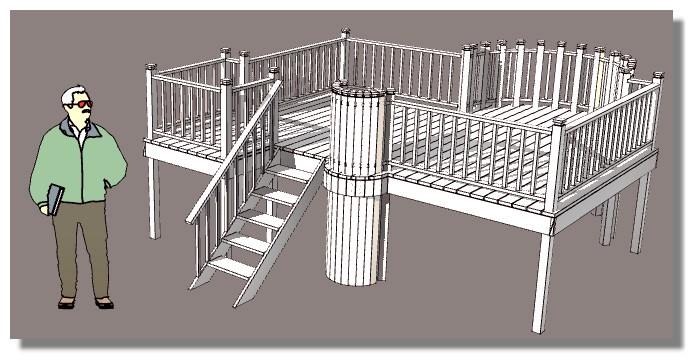
      Very cool! ☀

      http://s6.postimg.org/z36g1n8pd/deck1.jpg

      Frenchy Pilou
      Is beautiful that please without concept!
      My Little site :)

      1 條回覆 最後回覆 回覆 引用 0
      • pilouP 離線
        pilou
        最後由 編輯

        Here maybe a little glitch! 😉
        I made any regulates!

        http://s6.postimg.org/3kuxyptqp/deck_glitch.jpg


        deckglitch.skp

        Frenchy Pilou
        Is beautiful that please without concept!
        My Little site :)

        1 條回覆 最後回覆 回覆 引用 0
        • sdmitchS 離線
          sdmitch
          最後由 編輯

          The quality control director has been fired for not sufficiently testing in metric units.

          Problem has been fixed. Maybe.

          Nothing is worthless, it can always be used as a bad example.

          http://sdmitch.blogspot.com/

          1 條回覆 最後回覆 回覆 引用 0
          • A 離線
            alpro
            最後由 編輯

            sdmitch, installed latest version through Sketchucation Plugin Store, here is what shows in the ruby console when executing the plugin.

            Error: #<TypeError: no implicit conversion from nil to integer>
            C:/Users/MRacz/AppData/Roaming/SketchUp/SketchUp 2014/SketchUp/Plugins/Deck Builder.rb:362:in []' C:/Users/MRacz/AppData/Roaming/SketchUp/SketchUp 2014/SketchUp/Plugins/Deck Builder.rb:362:in add_posts'
            C:/Users/MRacz/AppData/Roaming/SketchUp/SketchUp 2014/SketchUp/Plugins/Deck Builder.rb:218:in `onLButtonDown'

            Thanks for your help.

            Mike

            Just checked my plugins folder, for some reason neither a spindles or post folder was created, weird.

            Nevermind, folder was created and after trying again, deck builder works as advertised, even weirder

            1 條回覆 最後回覆 回覆 引用 0
            • Dave RD 離線
              Dave R
              最後由 編輯

              Mike, I would try reinstalling it. I just installed the current version on my PC via the SCF Plugin Store and don't see the error when starting SketchUp fresh.

              Etaoin Shrdlu

              %

              (THERE'S NO PLACE LIKE)

              G28 X0.0 Y0.0 Z0.0

              M30

              %

              1 條回覆 最後回覆 回覆 引用 0
              • BoxB 離線
                Box
                最後由 編輯

                Can you have a look at the toolbar settings, it seems you have it set to open the toolbar every time SU starts. So even if you have closed the toolbar it will reinitialize at the next start up. Slightly annoying.

                1 條回覆 最後回覆 回覆 引用 0
                • sdmitchS 離線
                  sdmitch
                  最後由 編輯

                  @box said:

                  Can you have a look at the toolbar settings, it seems you have it set to open the toolbar every time SU starts. So even if you have closed the toolbar it will reinitialize at the next start up. Slightly annoying.

                  If you don't want the toolbar to show on start up find this line

                  	cmd.tooltip="Deck Builder";tb.add_item cmd;tb.show


                  and replace it with this line

                  	cmd.tooltip="Deck Builder";tb.add_item cmd;#tb.show


                  The Toolbar will be created but not automatically displayed.

                  Nothing is worthless, it can always be used as a bad example.

                  http://sdmitch.blogspot.com/

                  1 條回覆 最後回覆 回覆 引用 0
                  • BoxB 離線
                    Box
                    最後由 編輯

                    Thanks for that, it certainly works. I would have thought it would be the default setting, after all if you turn it off you would expect it to stay turned off.

                    1 條回覆 最後回覆 回覆 引用 0
                    • sdmitchS 離線
                      sdmitch
                      最後由 編輯

                      @box said:

                      Thanks for that, it certainly works. I would have thought it would be the default setting, after all if you turn it off you would expect it to stay turned off.

                      Perhaps, but few things will persist from session to session.

                      Nothing is worthless, it can always be used as a bad example.

                      http://sdmitch.blogspot.com/

                      1 條回覆 最後回覆 回覆 引用 0
                      • TIGT 離線
                        TIG Moderator
                        最後由 編輯

                        The "user-friendly" way to have your script's loader setup its toolbar so that it opens when its first installed, and then subsequently so it only opens if the user had it open when they last exited SketchUp, is simply done thus:
                        cmd.tooltip="Deck Builder";tb.add_item cmd;tb.show **if tb.get_last_state.abs==1** #TB_VISIBLE/NEVER
                        This way, if the toolbar was switched off by the user when they exited SketchUp it will not get re-opened as the plugin loads next time...

                        TIG

                        1 條回覆 最後回覆 回覆 引用 0
                        • sdmitchS 離線
                          sdmitch
                          最後由 編輯

                          @tig said:

                          The "user-friendly" way to have your script's loader setup its toolbar so that it opens when its first installed, and then subsequently so it only opens if the user had it open when they last exited SketchUp, is simply done thus:
                          cmd.tooltip="Deck Builder";tb.add_item cmd;tb.show **if tb.get_last_state.abs==1** #TB_VISIBLE/NEVER
                          This way, if the toolbar was switched off by the user when they exited SketchUp it will not get re-opened as the plugin loads next time...

                          Thanks for the info. I still have so much to learn.

                          Nothing is worthless, it can always be used as a bad example.

                          http://sdmitch.blogspot.com/

                          1 條回覆 最後回覆 回覆 引用 0
                          • R 離線
                            raymondmartin
                            最後由 編輯

                            Nice tool for deck builders.

                            1 條回覆 最後回覆 回覆 引用 0
                            • M 離線
                              Marauderr
                              最後由 編輯

                              I am new at this and this is my first plugin i try,

                              I can open the deck builder and select the options i want but i dont understand how to make it happen, there is no OK or Cancel Button to click on? so how to make it happen, what is the secret door i use to get there

                              LOL

                              Thank You
                              N.

                              1 條回覆 最後回覆 回覆 引用 0
                              • Dave RD 離線
                                Dave R
                                最後由 編輯

                                Try having a look at the author's tutorial which you can find on the page he links at the bottom of his posts. Lots of other very useful plugins with tutorials to be found there, too.

                                Etaoin Shrdlu

                                %

                                (THERE'S NO PLACE LIKE)

                                G28 X0.0 Y0.0 Z0.0

                                M30

                                %

                                1 條回覆 最後回覆 回覆 引用 0
                                • E 離線
                                  eddie
                                  最後由 編輯

                                  Great plugin! But why have the geometry be individual groups instead of components? Doesnt this bloat the file size and make revising cumbersome??

                                  1 條回覆 最後回覆 回覆 引用 0
                                  • sdmitchS 離線
                                    sdmitch
                                    最後由 編輯

                                    @eddie said:

                                    Great plugin! But why have the geometry be individual groups instead of components? Doesnt this bloat the file size and make revising cumbersome??

                                    Based on my tests, there is little difference in the file size groups versus component instances. Since each deck is different, it only made sense to use components for the spindles and group everything else.

                                    Nothing is worthless, it can always be used as a bad example.

                                    http://sdmitch.blogspot.com/

                                    1 條回覆 最後回覆 回覆 引用 0
                                    • naivejoeN 離線
                                      naivejoe
                                      最後由 編輯

                                      Nice Plugin. It worked as advertised the first time I used it but then I tested the rotation feature and now it won't change back. All decks are drawn with the joists going parallel to the long direction of the face, the deck boards the short way. I've re-installed, restarted and purged IE.
                                      Rotation stays set at 0 no matter which option is chosen, which is how it worked from first install.
                                      Any help?

                                      1 條回覆 最後回覆 回覆 引用 0
                                      • naivejoeN 離線
                                        naivejoe
                                        最後由 編輯

                                        Nice Plugin. It worked as advertised the first time I used it and then I decided to test the rotation feature and now it won't change back. All decks are drawn with the joists going parallel to the long direction of the face, the deck boards the short way. I've re-installed, restarted and purged IE.
                                        Rotation stays set at 0 no matter which option is chosen, which is how it worked from first install.
                                        Any help?

                                        1 條回覆 最後回覆 回覆 引用 0
                                        • sdmitchS 離線
                                          sdmitch
                                          最後由 編輯

                                          @naivejoe said:

                                          Nice Plugin. It worked as advertised the first time I used it and then I decided to test the rotation feature and now it won't change back. All decks are drawn with the joists going parallel to the long direction of the face, the deck boards the short way. I've re-installed, restarted and purged IE.
                                          Rotation stays set at 0 no matter which option is chosen, which is how it worked from first install.
                                          Any help?

                                          Sorry about the delay in responding but I just found your post the morning. After looking at the plugin there was a problem with the Rotation section. It has been corrected and posted so you can download a new copy.

                                          Nothing is worthless, it can always be used as a bad example.

                                          http://sdmitch.blogspot.com/

                                          1 條回覆 最後回覆 回覆 引用 0
                                          • pilouP 離線
                                            pilou
                                            最後由 編輯

                                            Always magic! 😎

                                            always_magic.jpg

                                            Frenchy Pilou
                                            Is beautiful that please without concept!
                                            My Little site :)

                                            1 條回覆 最後回覆 回覆 引用 0
                                            • 1
                                            • 2
                                            • 3
                                            • 2 / 3
                                            • 第一個貼文
                                              最後的貼文
                                            Buy SketchPlus
                                            Buy SUbD
                                            Buy WrapR
                                            Buy eBook
                                            Buy Modelur
                                            Buy Vertex Tools
                                            Buy SketchCuisine
                                            Buy FormFonts

                                            Advertisement