MSPhysics 1.0.3 (16 October 2017)
-
Hi,
With the last version MSPhysics 0.9.5 & AMS Library 3.4.0 it appears an error message in Ruby Console:Error al cargar archivo /Users/Oxer/Library/Application Support/SketchUp 2016/SketchUp/Plugins/MSPhysics/main.rb Error; #<Exception; An exception occurred while loading MSPhysics library. The exception occurred due to one or more of the following reasons; - LoadError; dlopen(/Users/Oxer/Library/Application Support/SketchUp 2016/SketchUp/Plugins/MSPhysics/osx64/2.0/msp_lib.bundle, 9); Library not loaded; @loader_path/../libSDL2-2.0.0.dylib Referenced from; /Users/Oxer/Library/Application Support/SketchUp 2016/SketchUp/Plugins/MSPhysics/osx64/libSDL2_mixer-2.0.0.dylib Reason; image not found - /Users/Oxer/Library/Application Support/SketchUp 2016/SketchUp/Plugins/MSPhysics/osx64/2.0/msp_lib.bundle - LoadError; MSPhysics library file, "/Users/Oxer/Library/Application Support/SketchUp 2016/SketchUp/Plugins/MSPhysics/osx64/2.0/msp_lib_no_sdl.bundle", is missing! > /Applications/SketchUp 2016/SketchUp.app/Contents/Resources/Content/Tools/extensions.rb;197;in `require' /Applications/SketchUp 2016/SketchUp.app/Contents/Resources/Content/Tools/extensions.rb;197;in `load' /Users/Oxer/Library/Application Support/SketchUp 2016/SketchUp/Plugins/MSPhysics.rb;90;in `register_extension' /Users/Oxer/Library/Application Support/SketchUp 2016/SketchUp/Plugins/MSPhysics.rb;90;in `<module;MSPhysics>' /Users/Oxer/Library/Application Support/SketchUp 2016/SketchUp/Plugins/MSPhysics.rb;72;in `<top (required)>'OSX 10.11.6
SU 2016 -
SynSuka3d, I fixed the encoding error with non-ascii user names.
Download version 0.9.6 to get it working.Cristian, Oscar you might be getting these errors because you overwritten original versions rather than deleting them.
It is important that you delete original AMS Library and MSPhysics versions from the plugins folder prior to installing the new ones; otherwise, you'll get nonsense errors. The extension signature tool is not working right. I could not sign my extensions. That's why overwriting original versions will result with errors when using MSPhysics and AMS Library.
-
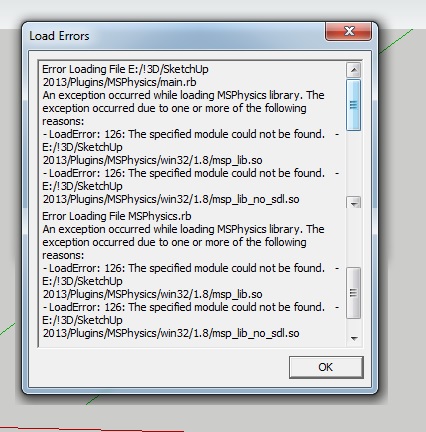
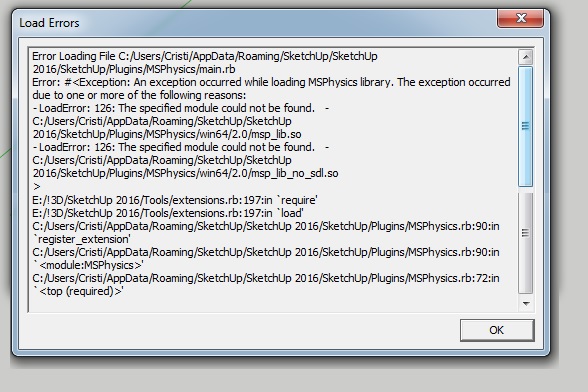
Hello to everyone out there ! and Hello Anton ! It give me an error after program is launched... 2013 and 2016... And on version ...
I manually install all the new plugins and I always delete the old ones ...
Thank you !
-
I obtain similar message:
Error al cargar archivo /Library/Application Support/SketchUp 2016/SketchUp/Plugins/MSPhysics/main.rb
Error; #<Exception; An exception occurred while loading MSPhysics library. The exception occurred due to one or more of the following reasons;
- LoadError; dlopen(/Library/Application Support/SketchUp 2016/SketchUp/Plugins/MSPhysics/osx64/2.0/msp_lib.bundle, 9); Library not loaded; @loader_path/../libSDL2-2.0.0.dylib
  Referenced from; /Library/Application Support/SketchUp 2016/SketchUp/Plugins/MSPhysics/osx64/libSDL2_mixer-2.0.0.dylib
  Reason; image not found - /Library/Application Support/SketchUp 2016/SketchUp/Plugins/MSPhysics/osx64/2.0/msp_lib.bundle
- LoadError; MSPhysics library file, "/Library/Application Support/SketchUp 2016/SketchUp/Plugins/MSPhysics/osx64/2.0/msp_lib_no_sdl.bundle", is missing!
>
/Applications/SketchUp 2016/SketchUp.app/Contents/Resources/Content/Tools/extensions.rb;197;in `require'
/Applications/SketchUp 2016/SketchUp.app/Contents/Resources/Content/Tools/extensions.rb;197;in `load'
/Library/Application Support/SketchUp 2016/SketchUp/Plugins/MSPhysics.rb;90;in `register_extension'
/Library/Application Support/SketchUp 2016/SketchUp/Plugins/MSPhysics.rb;90;in `<module;MSPhysics>'
/Library/Application Support/SketchUp 2016/SketchUp/Plugins/MSPhysics.rb;72;in `<top (required)>'
OSX 10.11.6 SU2016
-
Alright, I'll look into this.
-
The 0.9.4 still working well on OS 10.11.6 SU2016
-
Hello Anton!
I have installed this plug-in and when started a SU , came a window:Error Loading File C:/Users/Jenő/AppData/Roaming/SketchUp/SketchUp 2016/SketchUp/Plugins/MSPhysics/main.rb
Error: #<Exception: An exception occurred while loading MSPhysics library. The exception occurred due to one or more of the following reasons:- Encoding::CompatibilityError: incompatible character encodings: Windows-1250 and UTF-8
- Encoding::CompatibilityError: incompatible character encodings: Windows-1250 and UTF-8
C:/Program Files/SketchUp/SketchUp 2016/Tools/extensions.rb:197:in
require' C:/Program Files/SketchUp/SketchUp 2016/Tools/extensions.rb:197:inload'
C:/Users/Jenő/AppData/Roaming/SketchUp/SketchUp 2016/SketchUp/Plugins/MSPhysics.rb:90:inregister_extension' C:/Users/Jenő/AppData/Roaming/SketchUp/SketchUp 2016/SketchUp/Plugins/MSPhysics.rb:90:inmodule:MSPhysics'
C:/Users/Jenő/AppData/Roaming/SketchUp/SketchUp 2016/SketchUp/Plugins/MSPhysics.rb:72:in `<top (required)>'
My SU is 2016 64 bit (16.1.2104)
My wsystem WIN10 -
C:/Users/Jen**ő**/...Contains an accented character.
The extension's coding was updated to fix the user-path encoding to UTF-8, so do you have the latest version installed ?
If so then perhaps Anton needs to make his re-encoding more robust ? -
Just installed Sketchup Make 2017 and tried to install MSPhysics 0.9.6 and AMS 3.4.0 and got this error ---
Error Loading File C:/Users/anykh/AppData/Roaming/SketchUp/SketchUp 2017/SketchUp/Plugins/MSPhysics/main.rb
Error: #<Exception: An exception occurred while loading MSPhysics library. The exception occurred due to one or more of the following reasons:- LoadError: 126: The specified module could not be found. - C:/Users/anykh/AppData/Roaming/SketchUp/SketchUp 2017/SketchUp/Plugins/MSPhysics/win64/2.2/msp_lib.so
- LoadError: 126: The specified module could not be found. - C:/Users/anykh/AppData/Roaming/SketchUp/SketchUp 2017/SketchUp/Plugins/MSPhysics/win64/2.2/msp_lib_no_sdl.so
C:/Program Files/SketchUp/SketchUp 2017/Tools/extensions.rb:197:in
require' C:/Program Files/SketchUp/SketchUp 2017/Tools/extensions.rb:197:inload'
C:/Users/anykh/AppData/Roaming/SketchUp/SketchUp 2017/SketchUp/Plugins/MSPhysics.rb:90:inregister_extension' C:/Users/anykh/AppData/Roaming/SketchUp/SketchUp 2017/SketchUp/Plugins/MSPhysics.rb:90:inmodule:MSPhysics'
C:/Users/anykh/AppData/Roaming/SketchUp/SketchUp 2017/SketchUp/Plugins/MSPhysics.rb:72:in `<top (required)>' -
That's unfortunate. Looks like I will need to create another account to ensure that the encoding error is actually not fixed.
-
Hi,
I'm want to do a path following object, but I don't really know how. I found on this thread that it's done with curvy joints, but I'm lost. Please, can you explain how or do you have kind of example?
Thanks!
-
Okay, those loading and encoding issues should be fixed now. Upgrade to 0.9.7.
-
Hi M3one,
At the moment, you can refer to this tutorial on curvy joints.
https://www.youtube.com/watch?v=dU-KgxKc0dsYou can also check out this example model at 3Dwarehouse.
https://3dwarehouse.sketchup.com/model.html?id=d21984a9-477b-44d7-9eca-c191ae85afe4Anton
-
@anton_s said:
Hi M3one,
At the moment, you can refer to this tutorial on curvy joints.
https://www.youtube.com/watch?v=dU-KgxKc0dsYou can also check out this example model at 3Dwarehouse.
https://3dwarehouse.sketchup.com/model.html?id=d21984a9-477b-44d7-9eca-c191ae85afe4Anton
Thanks Anton, I'll check it later
-
@anton_s said:
Okay, those loading and encoding issues should be fixed now. Upgrade to 0.9.7.
Thanks Anton that has sorted the loading issue with Sketchup 2017.
Regards
-
Hello, I can't download MSPhysics 0.9.7 plugin from your link!
-
First of all thanks for sharing this great plugin
Please I need help. with chains. -
I installed the last version 0.9.7 and it appears this message:
Error al cargar archivo /Users/Oxer/Library/Application Support/SketchUp 2017/SketchUp/Plugins/MSPhysics/main.rb
Error; #<Exception; An exception occurred while loading MSPhysics 0.9.7! The exception occurred due to one or more of the following reasons;
- LoadError; dlopen(/Users/Oxer/Library/Application Support/SketchUp 2017/SketchUp/Plugins/MSPhysics/osx64/2.2/msp_lib.bundle, 9); Library not loaded; @loader_path/../libSDL2-2.0.0.dylib
  Referenced from; /Users/Oxer/Library/Application Support/SketchUp 2017/SketchUp/Plugins/MSPhysics/osx64/libSDL2_mixer-2.0.0.dylib
  Reason; image not found - /Users/Oxer/Library/Application Support/SketchUp 2017/SketchUp/Plugins/MSPhysics/osx64/2.2/msp_lib.bundle
- LoadError; MSPhysics library file, "/Users/Oxer/Library/Application Support/SketchUp 2017/SketchUp/Plugins/MSPhysics/osx64/2.2/msp_lib_no_sdl.bundle", is missing!
>
/Applications/SketchUp 2017/SketchUp.app/Contents/Resources/Content/Tools/extensions.rb;197;in `require'
/Applications/SketchUp 2017/SketchUp.app/Contents/Resources/Content/Tools/extensions.rb;197;in `load'
/Users/Oxer/Library/Application Support/SketchUp 2017/SketchUp/Plugins/MSPhysics.rb;90;in `register_extension'
/Users/Oxer/Library/Application Support/SketchUp 2017/SketchUp/Plugins/MSPhysics.rb;90;in `<module;MSPhysics>'
/Users/Oxer/Library/Application Support/SketchUp 2017/SketchUp/Plugins/MSPhysics.rb;72;in `<top (required)>'
SU2017 & OSX 10.11.6
-
Hello !!!
I think most stable version is MSPhysics_0.9.4 for now ... in MSPhysics_0.9.7 "Drag to orbit" does not work when the simulation is runing...
Emersonvip - you can browse through this forum about chains ( http://sketchucation.com/forums/search.php?keywords=chain%26amp;t=56852%26amp;sf=msgonly ). Here you have a file, see how it was done this chain piece by piece and you will understand how MSPhysics it works with chains.
as Anton wrote in a reply "You can adjust Update Timestep, Solver Model, and Update Rate for the desired speed, performance, and stability."
-
Hi Anton and thanks for MSPhysics your done a great job so far congratulations.
only problem for me is new MS scripts are confusing....old sketcky user
waiting on more models with script examples in them.Scaled down my j-pod/cable car model from Eneroth Railroad plugin
Curvy piston joint testing

thx again




Advertisement