sketchucation logo sketchucation
    • 登入
    Oops, your profile's looking a bit empty! To help us tailor your experience, please fill in key details like your SketchUp version, skill level, operating system, and more. Update and save your info on your profile page today!
    🔌 Smart Spline | Fluid way to handle splines for furniture design and complex structures. Download

    MSPhysics 1.0.3 (16 October 2017)

    已排程 已置頂 已鎖定 已移動 Plugins
    926 貼文 171 Posters 963.5k 瀏覽 172 Watching
    正在載入更多貼文
    • 從舊到新
    • 從新到舊
    • 最多點贊
    回覆
    • 在新貼文中回覆
    登入後回覆
    此主題已被刪除。只有擁有主題管理權限的使用者可以查看。
    • A 離線
      Anton_S
      最後由 編輯

      @faust07 said:

      It would be good, if we could control the speed of an object that is connected to a CurvyPiston joint with slider or script.

      You can do it with script. Paste this code into the object connected to a CurvePiston joint.

      
      onStart {
        @joint = this.get_connected_joints.grep(CurvyPiston).first
      }
      onUpdate {
        if @joint
          @joint.rate = key('w') * 1 # some value; in this case we controll it with kry 'w'
        end
      }


      Here is a link to all available functions in CurvyPiston: http://www.rubydoc.info/github/AntonSynytsia/MSPhysics/MSPhysics/CurvyPiston

      1 條回覆 最後回覆 回覆 引用 0
      • A 離線
        Anton_S
        最後由 編輯

        Ralph I suggest starting from the basics. Here is the guide: https://github.com/AntonSynytsia/MSPhysics/wiki.
        Its not done yet, but progress is being made.
        To open the UI press on that button:

        https://github.com/AntonSynytsia/MSPhysics/raw/master/Wiki-Images/toggle_ui.png

        1 條回覆 最後回覆 回覆 引用 0
        • R 離線
          Ralphxyz
          最後由 編輯

          thanks Anton, I have not seen that menu bar.

          1 條回覆 最後回覆 回覆 引用 0
          • F 離線
            faust07
            最後由 編輯

            First tests with the new renderer Indigo RT - Export Replay to SkIndigo works very well. Have only one question: How do I get emitter objects into the Indigo rendering process? These objects are not shown.

            1 條回覆 最後回覆 回覆 引用 0
            • A 離線
              Anton_S
              最後由 編輯

              Faust, it's good to know that it works. I'll see if there is anything I can do to get the emitter rendering in Indigo.

              1 條回覆 最後回覆 回覆 引用 0
              • jujuJ 離線
                juju
                最後由 編輯

                @anton_s said:

                Faust, it's good to know that it works. I'll see if there is anything I can do to get the emitter rendering in Indigo.

                Be sure to liaise with "OnoSendai" and "Whaat" for assistance... 👍

                Save the Earth, it's the only planet with chocolate.

                1 條回覆 最後回覆 回覆 引用 0
                • D 離線
                  Dalton325
                  最後由 編輯

                  Is there a manual for MSPhysics? For now, I'm just trying to make a simple animation with hinges, and it's doing all kinds of crazy things. I've found a couple of solutions through trial and error, but I'd love an instruction manual. Thanks.

                  1 條回覆 最後回覆 回覆 引用 0
                  • F 離線
                    faust07
                    最後由 編輯

                    Regarding rendering of MSPhysics animations: After further tests with Indigo is clear, the definition of new materials in MSPhysics scripts leads to termination of the rendering start and an error is indicated (test with MIDI-Studio, AntonS).
                    Color changes of objects in scripts are not shown when rendering (test with Animated_colors, PituPhysics).

                    1 條回覆 最後回覆 回覆 引用 0
                    • A 離線
                      Anton_S
                      最後由 編輯

                      @Juju, thanks. I'll contact these guys if I get stcuck on something.


                      @Dalton I made a few beginner videos on using joints. They are not the best, but better than nothing. Here are the links: https://github.com/AntonSynytsia/MSPhysics/wiki/Using-Joints


                      @Faust Thanks for another report. I'll check it all out.

                      1 條回覆 最後回覆 回覆 引用 0
                      • MALAISEM 離線
                        MALAISE
                        最後由 編輯

                        It sounds well. Could someone explain how to " associate" curvy joint and a curve ?

                        Cheers

                        La Connaissance n'a de valeur que partagée

                        1 條回覆 最後回覆 回覆 引用 0
                        • A 離線
                          Anton_S
                          最後由 編輯

                          Hi Malaise,
                          I just completed a tutorial on curvy joints. Here it is:

                          1 條回覆 最後回覆 回覆 引用 0
                          • pilouP 離線
                            pilou
                            最後由 編輯

                            Very fluid! 😎

                            Frenchy Pilou
                            Is beautiful that please without concept!
                            My Little site :)

                            1 條回覆 最後回覆 回覆 引用 0
                            • MALAISEM 離線
                              MALAISE
                              最後由 編輯

                              You've done a really good tutorial. Many thanks for sharing. 👍 👍

                              La Connaissance n'a de valeur que partagée

                              1 條回覆 最後回覆 回覆 引用 0
                              • F 離線
                                faust07
                                最後由 編輯

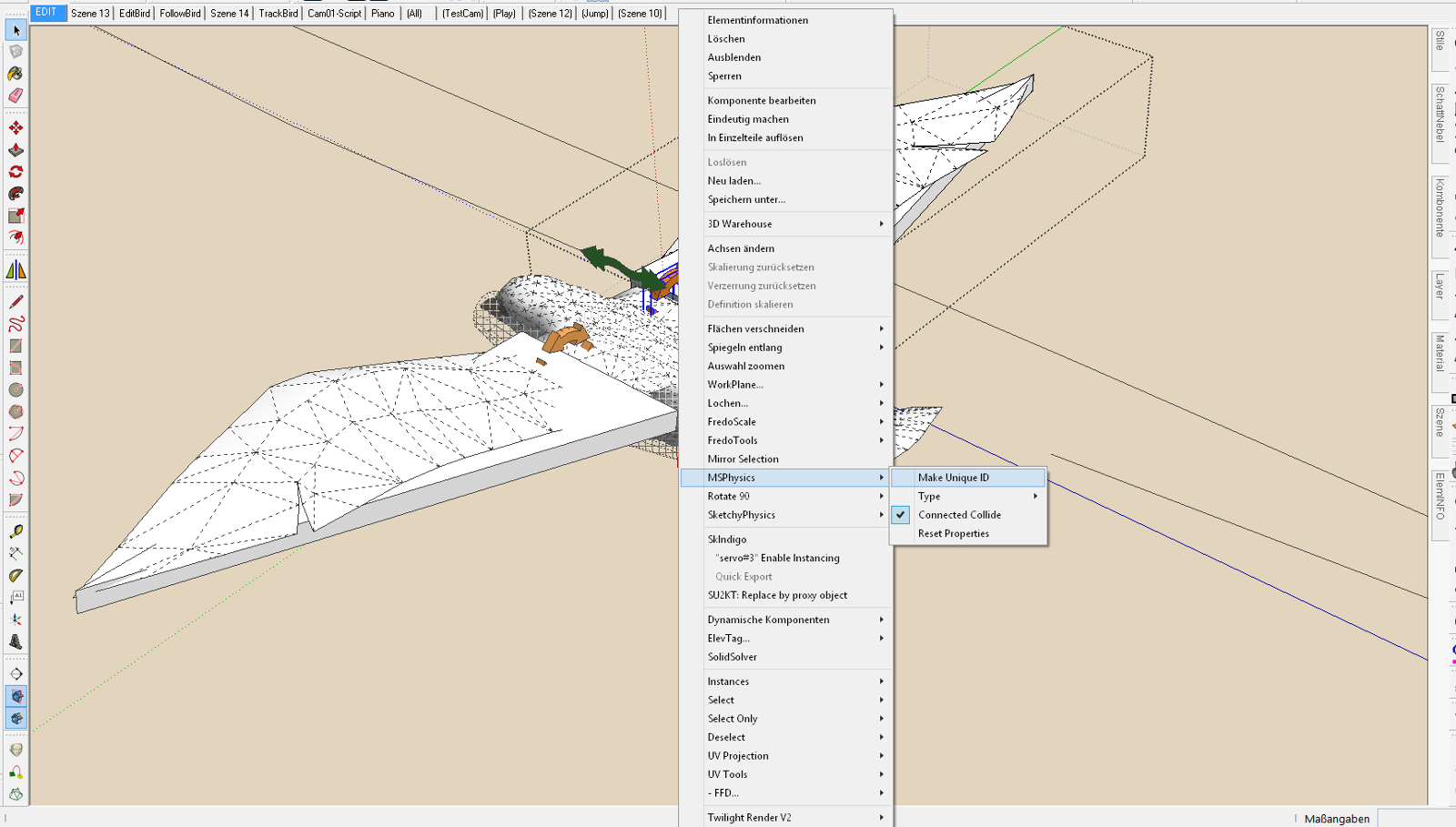
                                I just found the way in MSP-Context-Menu to give copied joints their unique Identity - "Make Unique ID". This makes the reproduction of complex MSPhysics objects much easier. And is another great advantage.

                                1 條回覆 最後回覆 回覆 引用 0
                                • MALAISEM 離線
                                  MALAISE
                                  最後由 編輯

                                  Hallo Faust07

                                  Could you post a "printscreen"?  Grüss
                                  

                                  La Connaissance n'a de valeur que partagée

                                  1 條回覆 最後回覆 回覆 引用 0
                                  • F 離線
                                    faust07
                                    最後由 編輯

                                    I have copied a few birdies and it looks good, not to have to set up the joints again. However, Joint Connections need to be updated manually.

                                    MSP_Make_Unique_ID.png

                                    1 條回覆 最後回覆 回覆 引用 0
                                    • F 離線
                                      faust07
                                      最後由 編輯

                                      Hi Anton: "Small modest" request for a script: Daughter Your ingenious SketchyPhysics model with script - WAVES. I'd like to have a script for a surface (floor surface, water surface, etc.), which gives information on the location at which point an object penetrates this at a certain speed. At this point, should a particular event happen -. E.g. emit a cloud of dust ... Don't know if this is in MSphysics possible.

                                      1 條回覆 最後回覆 回覆 引用 0
                                      • F 離線
                                        faust07
                                        最後由 編輯

                                        Two more detailed questions about the above topic regarding onTouch: How can I get the absolute coordinates of the point (x, y, z), there a falling object is touching a flat (square) face first? And how can I get the amount of the force of that impact? Thanks!
                                        Sorry, already found it in Your script examples "Touch Events" (first post..).

                                        1 條回覆 最後回覆 回覆 引用 0
                                        • A 離線
                                          Anton_S
                                          最後由 編輯

                                          Hi faust,

                                          Assigning unique IDs is one way to manage copied joints. Another way, a more preferable one, is by selecting the whole birdy, with its components, and clicking (Context Menu)->MSPhysics->State->Connect Closest Joints. After that, you can copy the birdy multiple times without having to assign unique IDs.

                                          It is possible to create waves and splash effects with MSPhysics, however, just like in SketchyPhysics, there won't be much physics involved; most of it would be controlled through scripting. That said, the touch events won't respond to the bodies contacting the "artificial" waves. This will require writing additional code for determining contacts and then emitting dust or splash effects at such points. All in all what your asking for might require quite a lot of coding and I'll have to pass on that one. You can however try utilizing it yourself maybe with workarounds and simpler approaches.

                                          Anton

                                          1 條回覆 最後回覆 回覆 引用 0
                                          • F 離線
                                            faust07
                                            最後由 編輯

                                            The Connect Closet Joints - method sounds great. Will try it. Thanks!
                                            I hope that your last sentences were based only on the coding of specials like waves and not generally on to the development of MSPhysics ...?


                                            1 條回覆 最後回覆 回覆 引用 0
                                            • 1
                                            • 2
                                            • 43
                                            • 44
                                            • 45
                                            • 46
                                            • 47
                                            • 45 / 47
                                            • 第一個貼文
                                              最後的貼文
                                            Buy SketchPlus
                                            Buy SUbD
                                            Buy WrapR
                                            Buy eBook
                                            Buy Modelur
                                            Buy Vertex Tools
                                            Buy SketchCuisine
                                            Buy FormFonts

                                            Advertisement