MSPhysics 1.0.3 (16 October 2017)
-
I have a good install in C:\Users\Ralph\AppData\Roaming\SketchUp\SketchUp 2016\SketchUp\Plugins.
Sketchup starts with no complaints.
Now what do I do?
I do not see MSPhysics in my extensions list.I copied it to my 2015 folder and now I see it in my Extensions list.
How do I get started?
I will back over this entire thread once again.
At least now I have a chance of doing something.
Thanks Anton for all of your help!!
-
now how do I "open MSPhysics UI" I am trying to follow the scripting tutorial.
Ralph
-
@faust07 said:
It would be good, if we could control the speed of an object that is connected to a CurvyPiston joint with slider or script.
You can do it with script. Paste this code into the object connected to a CurvePiston joint.
onStart {
  @joint = this.get_connected_joints.grep(CurvyPiston).first
}
onUpdate {
  if @joint
    @joint.rate = key('w') * 1 # some value; in this case we controll it with kry 'w'
  end
}
Here is a link to all available functions in CurvyPiston: http://www.rubydoc.info/github/AntonSynytsia/MSPhysics/MSPhysics/CurvyPiston
-
Ralph I suggest starting from the basics. Here is the guide: https://github.com/AntonSynytsia/MSPhysics/wiki.
Its not done yet, but progress is being made.
To open the UI press on that button:
-
thanks Anton, I have not seen that menu bar.
-
First tests with the new renderer Indigo RT - Export Replay to SkIndigo works very well. Have only one question: How do I get emitter objects into the Indigo rendering process? These objects are not shown.
-
Faust, it's good to know that it works. I'll see if there is anything I can do to get the emitter rendering in Indigo.
-
-
Is there a manual for MSPhysics? For now, I'm just trying to make a simple animation with hinges, and it's doing all kinds of crazy things. I've found a couple of solutions through trial and error, but I'd love an instruction manual. Thanks.
-
Regarding rendering of MSPhysics animations: After further tests with Indigo is clear, the definition of new materials in MSPhysics scripts leads to termination of the rendering start and an error is indicated (test with MIDI-Studio, AntonS).
Color changes of objects in scripts are not shown when rendering (test with Animated_colors, PituPhysics). -
@Juju, thanks. I'll contact these guys if I get stcuck on something.
@Dalton I made a few beginner videos on using joints. They are not the best, but better than nothing. Here are the links: https://github.com/AntonSynytsia/MSPhysics/wiki/Using-Joints
@Faust Thanks for another report. I'll check it all out.
-
It sounds well. Could someone explain how to " associate" curvy joint and a curve ?
Cheers
-
Hi Malaise,
I just completed a tutorial on curvy joints. Here it is: -
Very fluid!

-
You've done a really good tutorial. Many thanks for sharing.

-
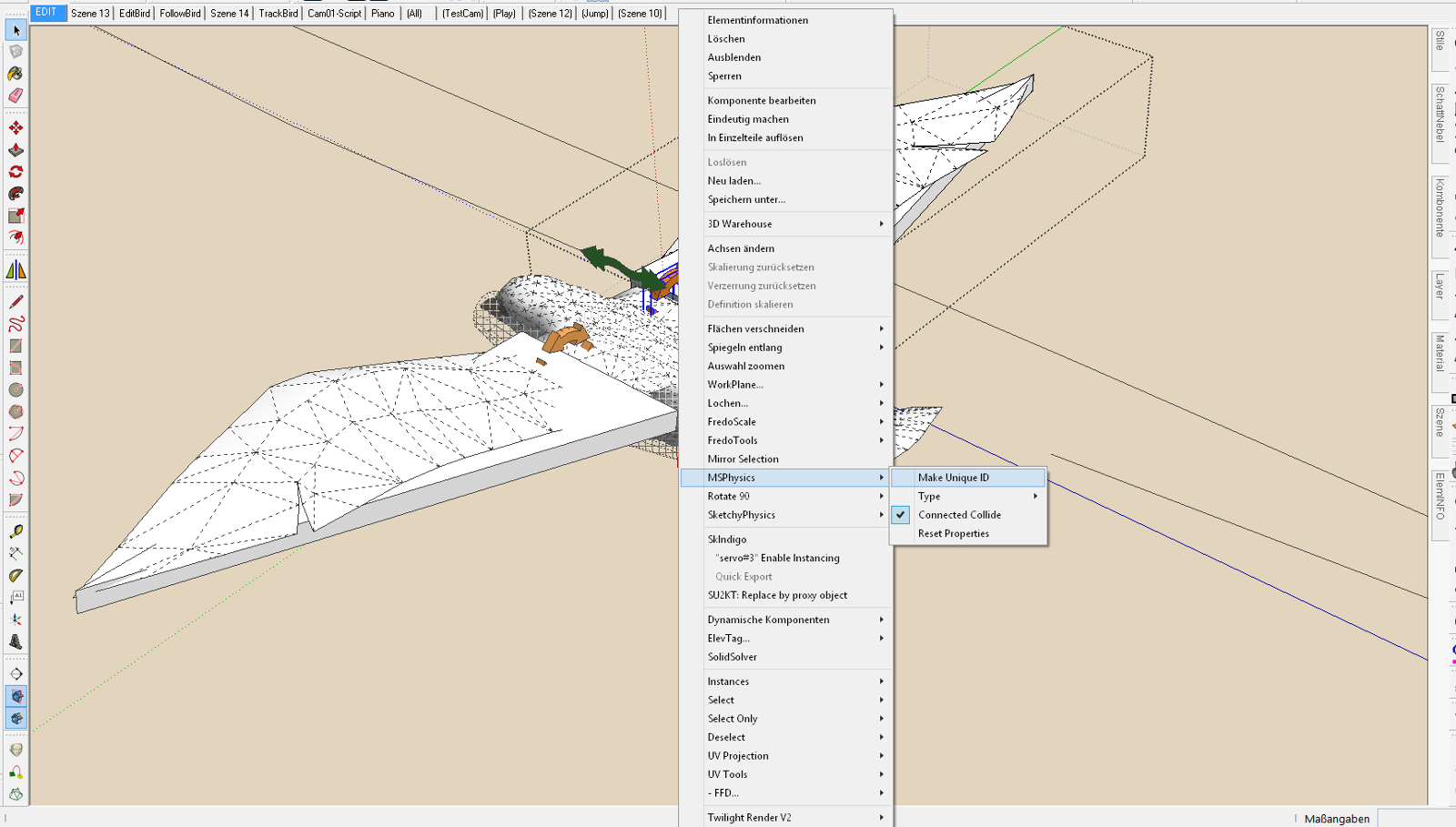
I just found the way in MSP-Context-Menu to give copied joints their unique Identity - "Make Unique ID". This makes the reproduction of complex MSPhysics objects much easier. And is another great advantage.
-
Hallo Faust07
Could you post a "printscreen"? Grüss -
I have copied a few birdies and it looks good, not to have to set up the joints again. However, Joint Connections need to be updated manually.
-
Hi Anton: "Small modest" request for a script: Daughter Your ingenious SketchyPhysics model with script - WAVES. I'd like to have a script for a surface (floor surface, water surface, etc.), which gives information on the location at which point an object penetrates this at a certain speed. At this point, should a particular event happen -. E.g. emit a cloud of dust ... Don't know if this is in MSphysics possible.
-
Two more detailed questions about the above topic regarding onTouch: How can I get the absolute coordinates of the point (x, y, z), there a falling object is touching a flat (square) face first? And how can I get the amount of the force of that impact? Thanks!
Sorry, already found it in Your script examples "Touch Events" (first post..).



Hello! It looks like you're interested in this conversation, but you don't have an account yet.
Getting fed up of having to scroll through the same posts each visit? When you register for an account, you'll always come back to exactly where you were before, and choose to be notified of new replies (either via email, or push notification). You'll also be able to save bookmarks and upvote posts to show your appreciation to other community members.
With your input, this post could be even better 💗
Register Login


Advertisement