sketchucation logo sketchucation
    • 登入
    Oops, your profile's looking a bit empty! To help us tailor your experience, please fill in key details like your SketchUp version, skill level, operating system, and more. Update and save your info on your profile page today!
    🔌 Smart Spline | Fluid way to handle splines for furniture design and complex structures. Download

    Housebuilder

    已排程 已置頂 已鎖定 已移動 Newbie Forum
    sketchup
    160 貼文 57 Posters 224.7k 瀏覽 57 Watching
    正在載入更多貼文
    • 從舊到新
    • 從新到舊
    • 最多點贊
    回覆
    • 在新貼文中回覆
    登入後回覆
    此主題已被刪除。只有擁有主題管理權限的使用者可以查看。
    • TIGT 離線
      TIG Moderator
      最後由 編輯

      If you have your Extensions Manager > Extension Loading Policy set to Unrestricted you can load unsigned RBZ files.
      Many older RBZs are not signed, but work just fine if the Policy is relaxed.
      Why do you need to be so 'careful' ?

      TIG

      1 條回覆 最後回覆 回覆 引用 0
      • F 離線
        FiKumiczek
        最後由 編輯

        Hi,
        first of all thank you for a great job with keeping alive that old plugin 😄

        I want to do translation of this one for a friend and also change some small things.
        However housebuilder.rb and housebuildertool.rb (in folder) are encrypted. Is there any way to do anything to get acces into the code itself? I've already translated toolbar and changed all the lumber sizes, but all the popups are problematic for my friends 😞

        1 條回覆 最後回覆 回覆 引用 0
        • Dave RD 離線
          Dave R
          最後由 編輯

          The encrypted RB files can only be unencrypted by the author so you would have to contact him. Based on history, he hasn't been interested in doing that, though.

          Etaoin Shrdlu

          %

          (THERE'S NO PLACE LIKE)

          G28 X0.0 Y0.0 Z0.0

          M30

          %

          1 條回覆 最後回覆 回覆 引用 0
          • X 離線
            XxXTAZXxX
            最後由 編輯

            I have tried many time to get house builder to install on SU many times. just keeps coming up with error. i am not cpu smart anyhelp would be great

            1 條回覆 最後回覆 回覆 引用 0
            • X 離線
              XxXTAZXxX
              最後由 編輯

              i have trying to down loading the housebuilder for my SU 17 but i just dont know what to do. i have done, i think the right stuff from other streams. i am at a lose.

              1 條回覆 最後回覆 回覆 引用 0
              • TIGT 離線
                TIG Moderator
                最後由 編輯

                To get/use any RBZ you just download it.
                You do not 'process' it.
                If WinRar thinks it ought to extract it, then stop it doing that.
                An RBZ archive is actually a ZIP archive with its file-type suffix changed...

                Once you have an intact RBZ file - perhaps it's in your Downloads folder - then you just use the 'Install Extension' red button in SketchUp's Window > Extension Manager menu item, and select the RBZ...

                When it is installed, then its menu items, toolbars etc should become available to you...

                TIG

                1 條回覆 最後回覆 回覆 引用 0
                • N 離線
                  nickb22
                  最後由 編輯

                  It is the 2017 Version. Yeah every time I try double clicking the RBZ file, I asks how I would like to open it and I can’t find a program to open that file. I have a Microsoft surface pro I believe with windows 10 and it’s been difficult

                  @tig said:

                  Which version ?
                  Contact its author - it is probably easily fixable...

                  I am a complete noob at doing all of this. I have downloaded the metric link and since i have WinRAR on my computer, it goes directly there. I have no idea what to do next or how to get into my 2017 Sketchup Pro.

                  1 條回覆 最後回覆 回覆 引用 0
                  • N 離線
                    nickb22
                    最後由 編輯

                    @oneear said:

                    Nevermind, i found it in a different thread and it installed perfectly in SU 2017. Here is the link i used:

                    http://sketchucation.com/forums/download/file.php?id=128142

                    How do you open this? Everytime i click it my computer asks me what app would i like to use and it never gives me sketchup as an option.

                    1 條回覆 最後回覆 回覆 引用 0
                    • Dave RD 離線
                      Dave R
                      最後由 編輯

                      @nickb22 said:

                      How do you open this? Everytime i click it my computer asks me what app would i like to use and it never gives me sketchup as an option.

                      As with any other extension you've downloaded to your computer, in SketchUp, go to Window>Extensions Manager. Click on Install Extension at the bottom of the window. Navigate to where you saved the extension, select it, click Open and then Yes.

                      Etaoin Shrdlu

                      %

                      (THERE'S NO PLACE LIKE)

                      G28 X0.0 Y0.0 Z0.0

                      M30

                      %

                      1 條回覆 最後回覆 回覆 引用 0
                      • S 離線
                        silenthentefant
                        最後由 編輯

                        I just want to say that this is an great plugin and a great forum for some of the issues i had with other problem. Fixed them all by reading in this forum. But now i have question that i didn`t find any answer to. How to change the dimensions on the material? I try to change the numbers in the housebuilder_section.txt, but nothing changed. Do i change this also in rubyeditor? or is there another way?

                        Did do some modification in the plugin, like change the stud and joist spacing so it fits my porpuse.

                        Jan

                        1 條回覆 最後回覆 回覆 引用 0
                        • H 離線
                          Helle
                          最後由 編輯

                          Tried to install from this thread, but keep getting:

                          Error Loading File HouseBuilder_extension.rb
                          Error: #<NameError: undefined local variable or method exec_on_autoload' for main:Object> C:/Users/Helle/AppData/Roaming/SketchUp/SketchUp 2016/SketchUp/Plugins/HouseBuilder_extension.rb:197:in <top (required)>'

                          I need the metric version in SU 2016 pro, but I simply cannot figure out what to do (sorry if this has been asked before)

                          1 條回覆 最後回覆 回覆 引用 0
                          • TIGT 離線
                            TIG Moderator
                            最後由 編輯

                            Did you get the latest metric RBZ from the link suggested in an earlier post here - http://sketchucation.com/forums/viewtopic.php?p=564448#p564448

                            It works for me...

                            It is old and flaky, and there are newer/better tools around now... but it will work if you load the most recent version...

                            TIG

                            1 條回覆 最後回覆 回覆 引用 0
                            • A 離線
                              abrahamsfam18
                              最後由 編輯

                              I have tried following all the steps listed above but can't get homebuilder installed and working on my PC in Sketchup 2019 Pro. The extension just says "unsigned" in the extension manager.

                              1 條回覆 最後回覆 回覆 引用 0
                              • Dave RD 離線
                                Dave R
                                最後由 編輯

                                Unsigned does not mean it isn't installed. In fact that is an indication that it is indeed installed. As long as you leave loading permission for extensions set to allow unsigned extensions to load, there's no need to worry about it being unsigned.

                                This is an old extension though and may not run correctly in SU2019 due to changes in the scripting language version since the extension's last update. There are newer extensions out there that do work.

                                Etaoin Shrdlu

                                %

                                (THERE'S NO PLACE LIKE)

                                G28 X0.0 Y0.0 Z0.0

                                M30

                                %

                                1 條回覆 最後回覆 回覆 引用 0
                                • J 離線
                                  Jacester
                                  最後由 編輯

                                  I have the file d/l ed on the computer it says it's in the extension warehouse but, to no avail does it work.. I'm ready to throw my computer through the wall.. wtf why is it so hard to do this simple af task????

                                  1 條回覆 最後回覆 回覆 引用 0
                                  • Dave RD 離線
                                    Dave R
                                    最後由 編輯

                                    @jacester said:

                                    I have the file d/l ed on the computer it says it's in the extension warehouse

                                    Do you mean it shows as installed in Extension Manager? This extension is not hosted in the Extension Warehouse.
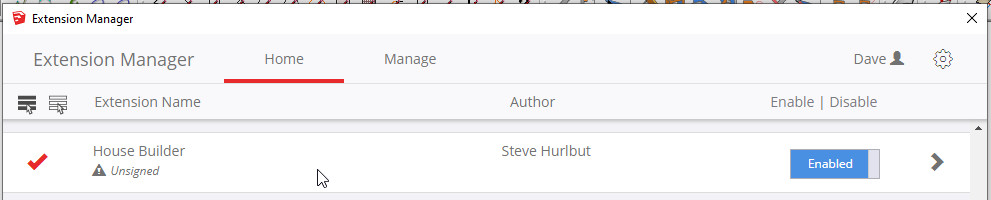
                                    Screenshot - 12_1_2019 , 6_33_57 PM.png

                                    @jacester said:

                                    wtf why is it so hard to do this simple af task????

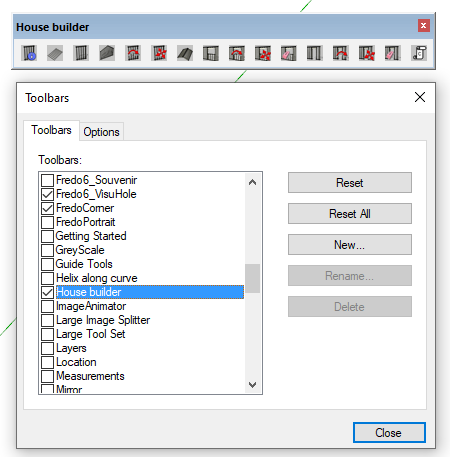
                                    All you need to do is look in the correct menu. This extension shows in the Draw menu or you can display the toolbar.
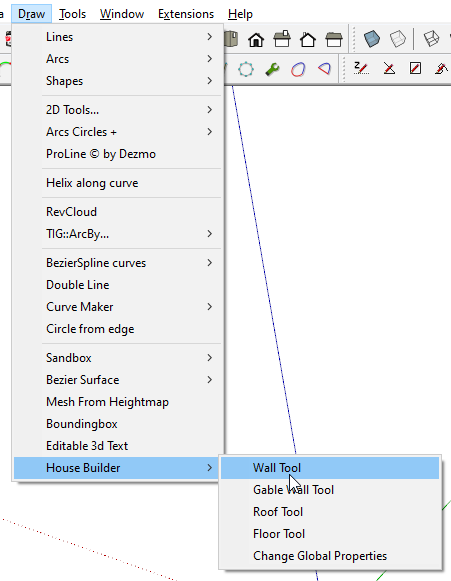
                                    Screenshot - 12_1_2019 , 6_17_14 PM.png

                                    Screenshot - 12_1_2019 , 6_20_52 PM.png

                                    Etaoin Shrdlu

                                    %

                                    (THERE'S NO PLACE LIKE)

                                    G28 X0.0 Y0.0 Z0.0

                                    M30

                                    %

                                    1 條回覆 最後回覆 回覆 引用 0
                                    • D 離線
                                      dannygerhard17
                                      最後由 編輯

                                      I down loaded house builder and install the file into sketch up,but in the warehouse manager it is saying unsigned so is not function correctly, what am I doing wrong???

                                      1 條回覆 最後回覆 回覆 引用 0
                                      • Dave RD 離線
                                        Dave R
                                        最後由 編輯

                                        @dannygerhard17 said:

                                        what am I doing wrong???

                                        Leaping to the incorrect conclusion that "Unsigned" means the extension doesn't work. Unsigned would only prevent the extension from loading if you've set the loading permission to limit loading. The Housebuilder extensions hosted here do work just fine in current versions of SketchUp.

                                        Speaking of current versions of SketchUp, which one are you using. Your profile indicates SketchUp 2019 Free/Make but that couldn't be since there is no SketchUp 2019 Make.

                                        Etaoin Shrdlu

                                        %

                                        (THERE'S NO PLACE LIKE)

                                        G28 X0.0 Y0.0 Z0.0

                                        M30

                                        %

                                        1 條回覆 最後回覆 回覆 引用 0
                                        • D 離線
                                          dannygerhard17
                                          最後由 編輯

                                          My mistake I typed the wrong version I am using Sketch up 2017

                                          1 條回覆 最後回覆 回覆 引用 0
                                          • Dave RD 離線
                                            Dave R
                                            最後由 編輯

                                            How about updating your profile so it is correct? Update it on the SketchUp forum, too.

                                            Etaoin Shrdlu

                                            %

                                            (THERE'S NO PLACE LIKE)

                                            G28 X0.0 Y0.0 Z0.0

                                            M30

                                            %

                                            1 條回覆 最後回覆 回覆 引用 0
                                            • 1
                                            • 2
                                            • 3
                                            • 4
                                            • 5
                                            • 6
                                            • 7
                                            • 8
                                            • 1 / 8
                                            • 第一個貼文
                                              最後的貼文
                                            Buy SketchPlus
                                            Buy SUbD
                                            Buy WrapR
                                            Buy eBook
                                            Buy Modelur
                                            Buy Vertex Tools
                                            Buy SketchCuisine
                                            Buy FormFonts

                                            Advertisement
