sketchucation logo sketchucation
    • Login
    Oops, your profile's looking a bit empty! To help us tailor your experience, please fill in key details like your SketchUp version, skill level, operating system, and more. Update and save your info on your profile page today!
    Mac User? | Join the Rayscaper Beta for Mac Learn More

    Interior Rendering - SketchUp & Maxwell Render

    Scheduled Pinned Locked Moved WIP
    17 Posts 9 Posters 4.4k Views 9 Watching
    Loading More Posts
    • Oldest to Newest
    • Newest to Oldest
    • Most Votes
    Reply
    • Reply as topic
    Log in to reply
    This topic has been deleted. Only users with topic management privileges can see it.
    • neetsN
      neets
      last edited by

      Hey guys,

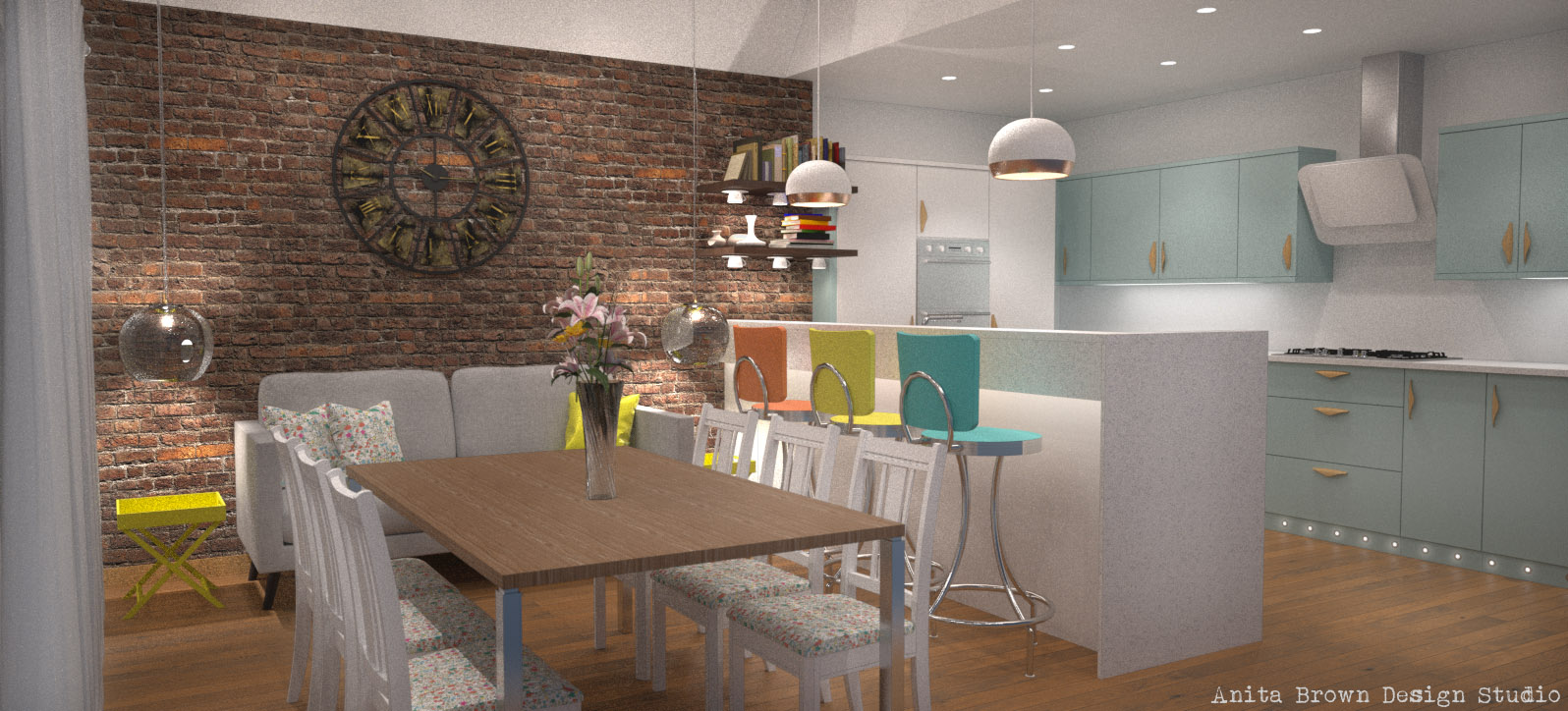
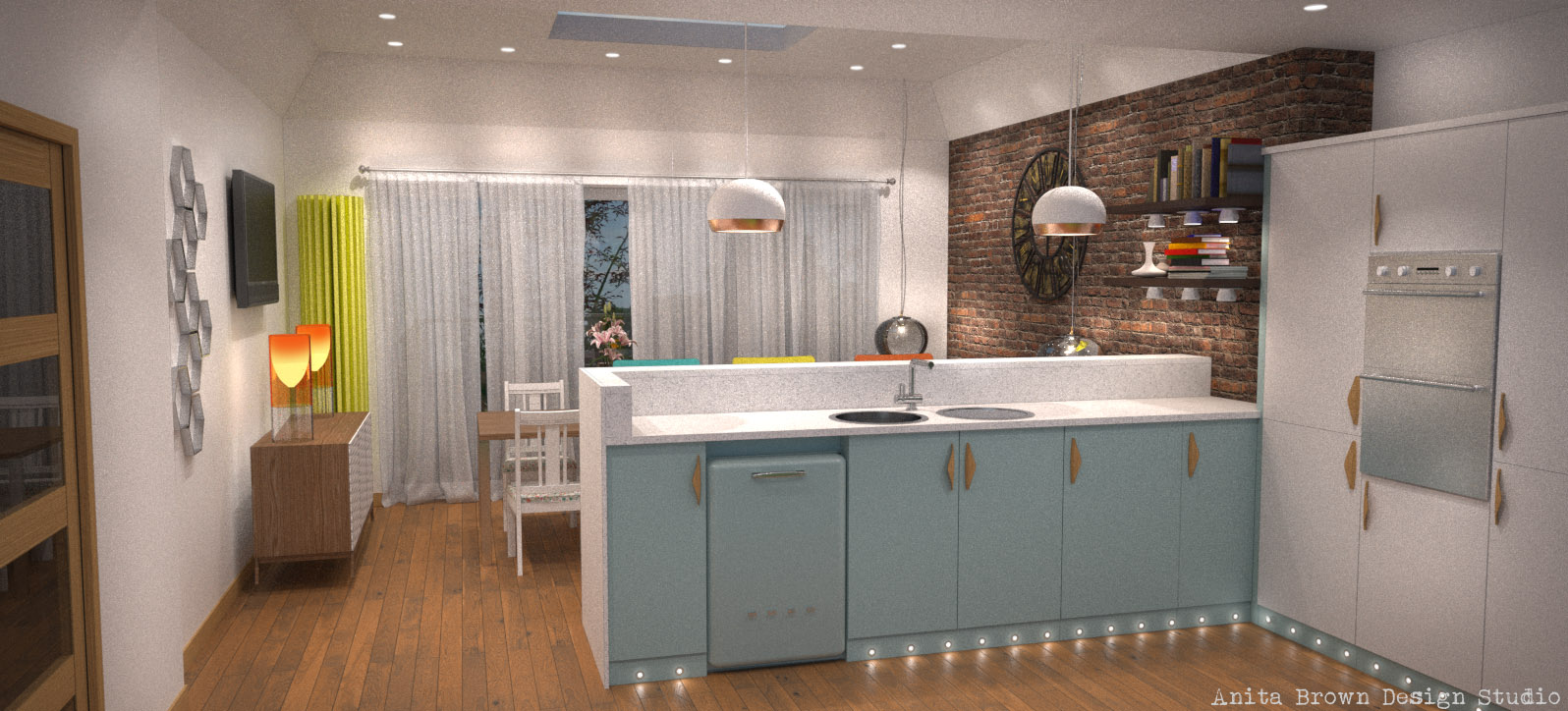
      Thought I'd upload my most recent 3D Visualisation commission for an open plan kitchen and dining area.

      Anita
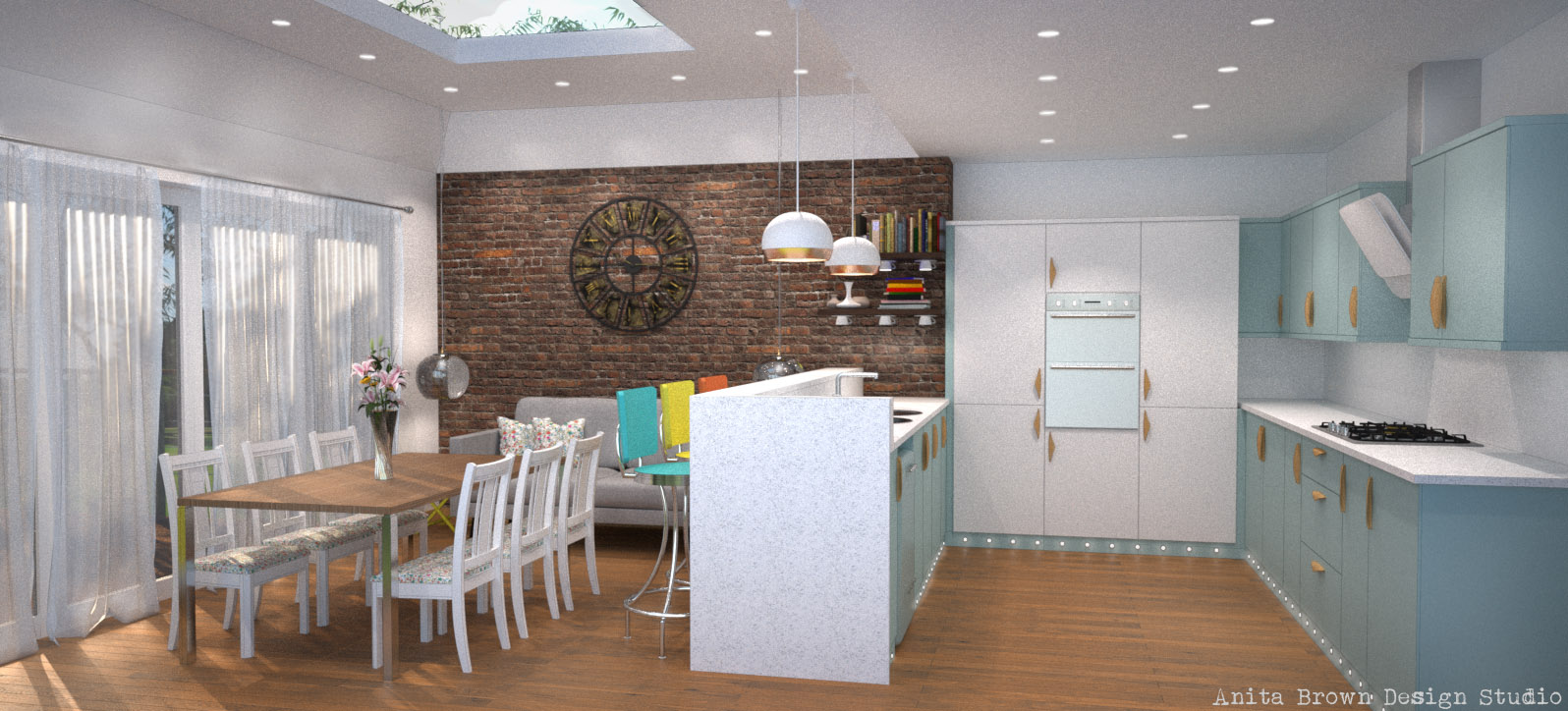
      Kitchen Angle 1 Final 030314 copy.jpg

      Kitchen Angle 2 Final 030314.jpg

      Kitchen Angle 3 Final 030314.jpg

      Interested to know more about me and my 3D Visualisation work? Then you want to click right here: http://anitabrowndesignstudio.com/

      1 Reply Last reply
      Reply Quote 0
      • okomtaO
        okomta
        last edited by

        this is a nice picture,, but the handle door near oven machine looks like some bugs hanging on the cabinet door,,( sorry for my poor english),,:D

        1 Reply Last reply
        Reply Quote 0
        • jeff hammondJ
          jeff hammond
          last edited by

          nice work Anita πŸ‘

          dotdotdot

          1 Reply Last reply
          Reply Quote 0
          • ElibjrE
            Elibjr
            last edited by

            Anita, I like the lighting and modelling work. But if all possible try to render fro at leas another 4 hours or so to reduce the graininess in the images or use a noise reducer in a photo editing program like Paint-dot-net (free) Gimp(free)Photoshop Elements($) or Photoshop($$$)for quick clearer results. Otherwise these are excellent spaces. I wonder of you changed the wooden handles to chrome what the atmosphere would be like. keep up the good work.

            1 Reply Last reply
            Reply Quote 0
            • neetsN
              neets
              last edited by

              Thanks guys for your feedback. Unfortunately, this wasn't my design! It was another Designer's and I had to comply with her wishes (wooden handles). The noise issue is something that consistently aggravates me with Maxwell Render - these images were rendered for an entire weekend (around the clock). I literally ran out of time! I have Photoshop but I don't find that I'm able to reduce the noise AND retain detail. Any ideas/advice on how best to address this?

              Thanks,
              Anita

              Interested to know more about me and my 3D Visualisation work? Then you want to click right here: http://anitabrowndesignstudio.com/

              1 Reply Last reply
              Reply Quote 0
              • Dave RD
                Dave R
                last edited by

                Nice work Anita. I like the kitchen and those door/drawer pulls.

                Etaoin Shrdlu

                %

                (THERE'S NO PLACE LIKE)

                G28 X0.0 Y0.0 Z0.0

                M30

                %

                1 Reply Last reply
                Reply Quote 0
                • neetsN
                  neets
                  last edited by

                  Hey Dave,

                  Thanks, of course you like the door pulls! They are after all your handy work! Praise the Lord for Dave!! πŸ˜„

                  Anita

                  Interested to know more about me and my 3D Visualisation work? Then you want to click right here: http://anitabrowndesignstudio.com/

                  1 Reply Last reply
                  Reply Quote 0
                  • FrederikF
                    Frederik
                    last edited by

                    Nice renders indeed... πŸ˜„

                    Don't know if it's a desired effect that they all are quite grainy...? πŸ˜•
                    Also... They seem a tad too bright for my taste... 😐

                    Hope you don't mind, I just took them into Adobe Lightroom, where you can adjust the white-balance, tone as well as remove noise/grain...
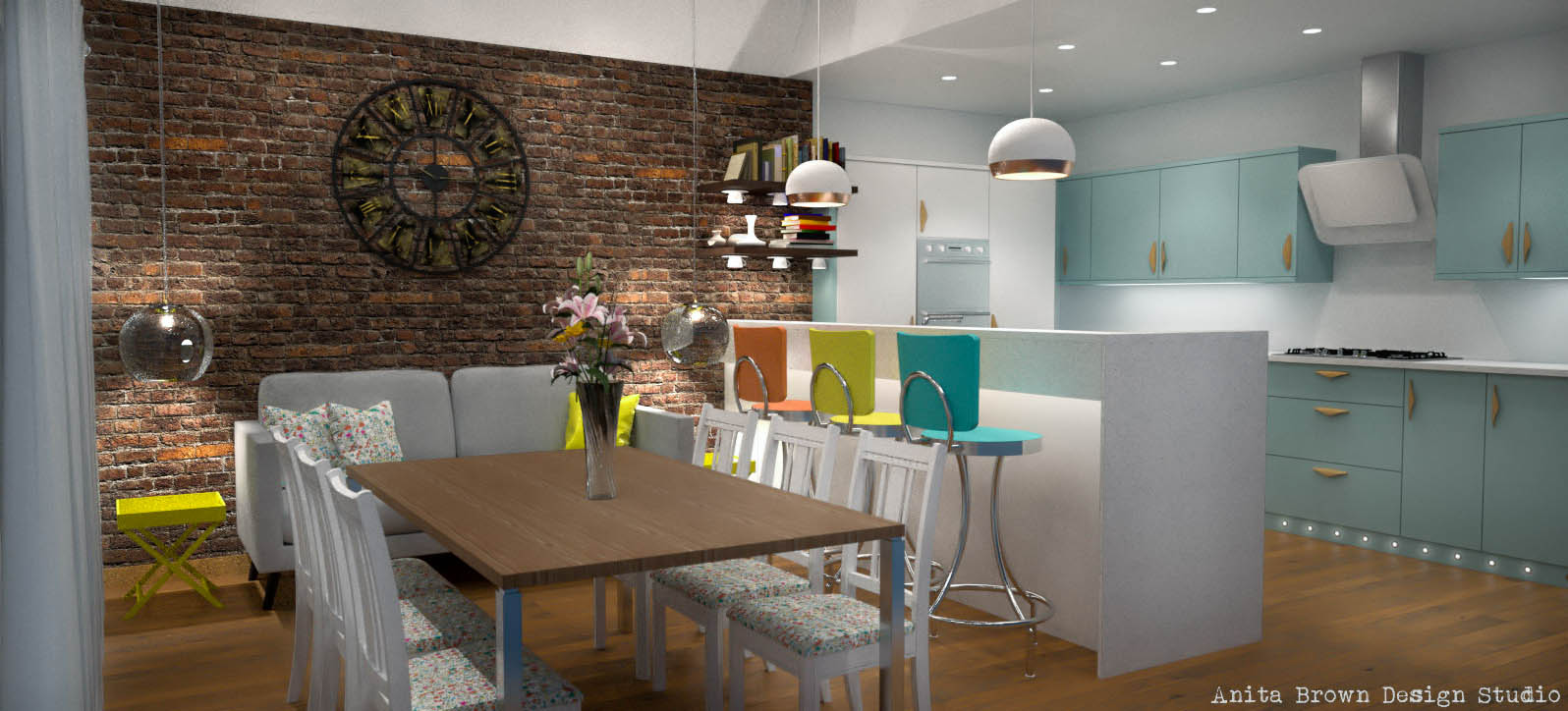

                    Kitchen Angle 2 Final 030314_filtered-2.jpg

                    Cheers
                    Kim Frederik

                    1 Reply Last reply
                    Reply Quote 0
                    • neetsN
                      neets
                      last edited by

                      Frederik,

                      I don't mind you playing around at all - the problem with adjusting contrast, saturation levels etc. is that when these images PRINT, they are far too dark. I have conducted limited research into the problem of images appearing brighter on screen than they do in print, which has been made even more problematic because of todays backlit monitors. The image that you think appears too bright on screen will be much darker on paper and because these are usually presented on hard copy, I have to take that into consideration when finalising the image settings. I have had to calibrate my laptop to try and gauge how the image will appear when printed, as opposed to how it appears on screen.

                      The graininess is not something I strive to achieve! These images were rendered for a continuous 40 hours using my lowly laptop. When they are presented on paper, they are smaller and therefore the noise is less noticeable. My gripe with removing noise is that it blurs the detail in the overall image. I'm hoping that when I purchase a dedicated rendering workstation that is more powerful, that I will be able to achieve crisper images.

                      Anita

                      Interested to know more about me and my 3D Visualisation work? Then you want to click right here: http://anitabrowndesignstudio.com/

                      1 Reply Last reply
                      Reply Quote 0
                      • ElibjrE
                        Elibjr
                        last edited by

                        @unknownuser said:

                        Frederik,

                        I don't mind you playing around at all - the problem with adjusting contrast, saturation levels etc. is that when these images PRINT, they are far too dark. I have conducted limited research into the problem of images appearing brighter on screen than they do in print, which has been made even more problematic because of todays backlit monitors. The image that you think appears too bright on screen will be much darker on paper and because these are usually presented on hard copy, I have to take that into consideration when finalising the image settings. I have had to calibrate my laptop to try and gauge how the image will appear when printed, as opposed to how it appears on screen.

                        The graininess is not something I strive to achieve! These images were rendered for a continuous 40 hours using my lowly laptop. When they are presented on paper, they are smaller and therefore the noise is less noticeable. My gripe with removing noise is that it blurs the detail in the overall image. I'm hoping that when I purchase a dedicated rendering workstation that is more powerful, that I will be able to achieve crisper images.

                        Anita

                        I have noticed with Maxwell Render (if you have not already) try to use mxm materials and lights if you are going to be doing final renders. I have found that it helps with render time and graininess.

                        EB

                        1 Reply Last reply
                        Reply Quote 0
                        • FrederikF
                          Frederik
                          last edited by

                          @unknownuser said:

                          ...the problem with adjusting contrast, saturation levels etc. is that when these images PRINT, they are far too dark.

                          That's a fair and valid point... πŸ‘

                          Cheers
                          Kim Frederik

                          1 Reply Last reply
                          Reply Quote 0
                          • RichardR
                            Richard
                            last edited by

                            @frederik said:

                            @unknownuser said:

                            ...the problem with adjusting contrast, saturation levels etc. is that when these images PRINT, they are far too dark.

                            That's a fair and valid point... πŸ‘

                            That depends on the media you are printing on to! Meaning that the media isn't accepting enough ink loading.

                            In your scene what are the values of the whites used? They should be limited to 220,220,220 RGB. Could account for the amount of noise.

                            BUILTBRAND.COM.AU

                            1 Reply Last reply
                            Reply Quote 0
                            • neetsN
                              neets
                              last edited by

                              Hi Richard, that's an excellent point re: RGB of white. I think I used 240, 240, 240. I have since reduced it to 220, 220, 220 and it works a treat πŸ˜‰

                              Although, I still have to disagree with your opinion re: not enough ink loading. When I print the renders, I use a professional printing company and the initial result can still be too dark. I usually have to fiddle with the exposure settings (or sometimes go back to the render and adjust the ISO etc.) and then try printing it again. They have also confirmed that most images will always print darker than on screen.

                              Interested to know more about me and my 3D Visualisation work? Then you want to click right here: http://anitabrowndesignstudio.com/

                              1 Reply Last reply
                              Reply Quote 0
                              • Bryan KB
                                Bryan K
                                last edited by

                                Very nice!

                                See my portfolio at https://delphiscousin.blogspot.com/

                                1 Reply Last reply
                                Reply Quote 0
                                • jo-keJ
                                  jo-ke
                                  last edited by

                                  usually I use Topaz Denoise for noise reduction. It is a usefull plugin for Photoshop.

                                  http://www.zz7.de

                                  1 Reply Last reply
                                  Reply Quote 0
                                  • neetsN
                                    neets
                                    last edited by

                                    Thanks for that tip πŸ˜„ I've heard lots of good things about Topaz!

                                    Interested to know more about me and my 3D Visualisation work? Then you want to click right here: http://anitabrowndesignstudio.com/

                                    1 Reply Last reply
                                    Reply Quote 0
                                    • neetsN
                                      neets
                                      last edited by

                                      @bryan k said:

                                      Very nice!

                                      Thank you!

                                      Interested to know more about me and my 3D Visualisation work? Then you want to click right here: http://anitabrowndesignstudio.com/

                                      1 Reply Last reply
                                      Reply Quote 0

                                      Hello! It looks like you're interested in this conversation, but you don't have an account yet.

                                      Getting fed up of having to scroll through the same posts each visit? When you register for an account, you'll always come back to exactly where you were before, and choose to be notified of new replies (either via email, or push notification). You'll also be able to save bookmarks and upvote posts to show your appreciation to other community members.

                                      With your input, this post could be even better πŸ’—

                                      Register Login
                                      • 1 / 1
                                      • First post
                                        Last post
                                      Buy SketchPlus
                                      Buy SUbD
                                      Buy WrapR
                                      Buy eBook
                                      Buy Modelur
                                      Buy Vertex Tools
                                      Buy SketchCuisine
                                      Buy FormFonts

                                      Advertisement