[Plugin] EdgeInspector - v1.2a - 12 Oct 14
-
EdgeInspector is a standalone script which inspects, and then fixes, some Edge defects in the model, usually coming after DXF imports and Intersections. It currently supports 5 edge defects (more may be coming on request):
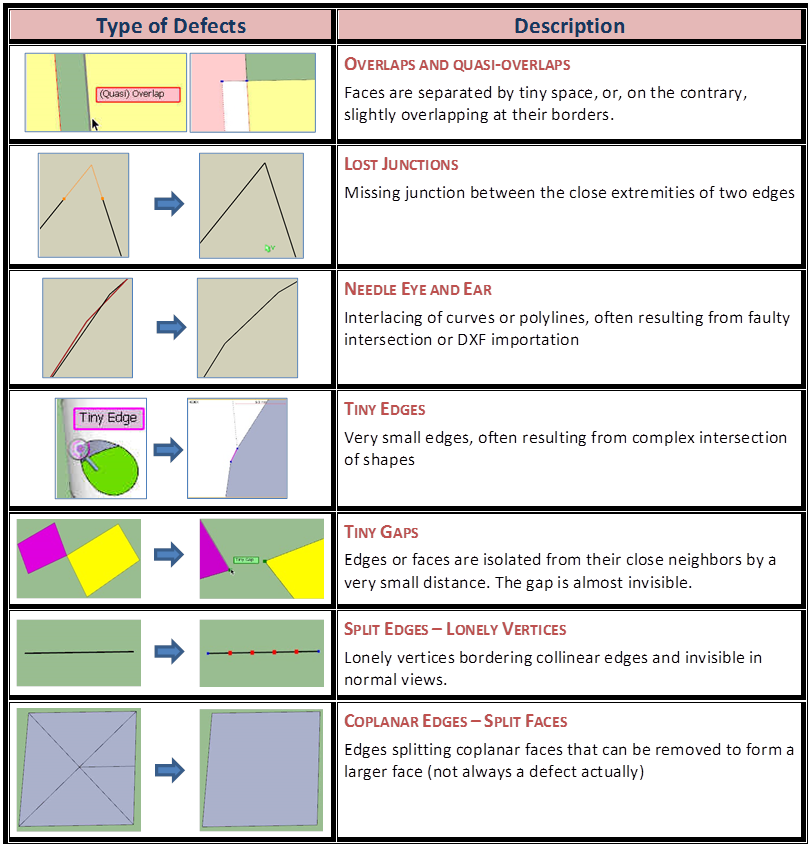
These defects can be inspected and fixed by type, based on the user’s choice:
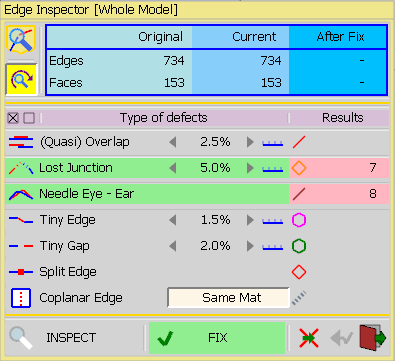
For convenience, EdgeInspector comes with a Geometrical Magnifier Glass which can zoom beyond the native Sketchup capability (2x – 5000x).
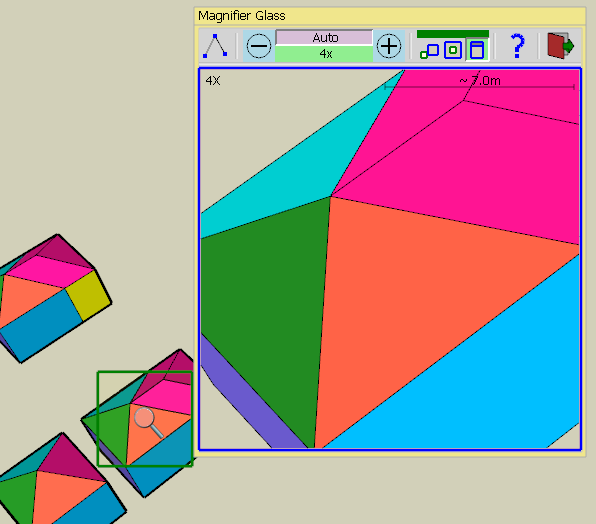
The magnifier Glass allows freezing a view and perform a few operations on the entities (Edition mode). These edition tools are implemented in a similar way as the native Skethcup equivalent functions, with some differences however.
- Selection of edges and faces (via clic, double-clic, triple-clic, with modifiers Shift and Ctrl)
- Tape Measure with inferencing (point to point or parallel from an edge)
- Move Vertex, Edges or Faces with inferencing
- Edge Eraser. The DEL key is also supported to erase selected edges and faces
- Repair Now, to fix defects individually
- Ignore Repair, mark a defect so that it is ignored by the global repairing of EdgeInspector
EdgeInspector is installed as part of FredoTools..
See the main post for this plugin for Installation of FredoTools
Quickcard EdgeInspector - English - v1.1.pdf
(see also section Quick Start and Videos below)- SU Versions: SU6, SU7, SU8, SU13 – works better with SU8 M1 and above
- Platforms: Windows and Mac
- Languages: English, French
- Menus: by default, EdgeInspector is installed in Tools > FredoTools. It does NOT appear in the Contextual menu.
- Icon toolbar: Fredo6 Tools. There is only a single icon. By default, it is not shown. You need to go to the Default Parameters… dialog of FredoTools to enable the icon.
- The plugin is free, for private and commercial usage.
EdgeInspector Overview
[flash=640,480:uvpt70ls]http://www.youtube.com/v/1gLGaqO712Q&hl[/flash:uvpt70ls]Lost Junctions and Needle-eyes
[flash=640,480:uvpt70ls]http://www.youtube.com/v/2xI7G3MK5hg&hl[/flash:uvpt70ls]Launching Edge Inspector
It can be launched on a Pre-selection. If there is no selection, then the scope of inspection is the Whole model.
A Floating palette window appears. It allows controlling the list of defects to be inspected, as well as their individual parameters.
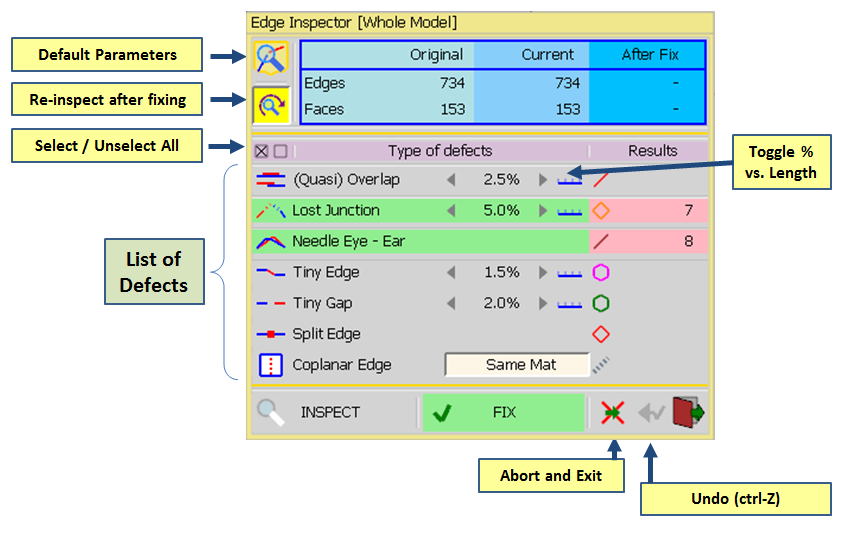
Click on INSPECT button. All defects will be highlighted by a specific edge color or small mark in the model.
Then, click on FIX button to fix them.
You can freely rollback (or Ctrl-Z) to undo the fixing.
Note: some models are tricky. Fixing defects may not be complete in one pass. So it’s a good idea to inspect again after fixing (there is an option to do it automatically).
Launching the Magnifier Glass
-
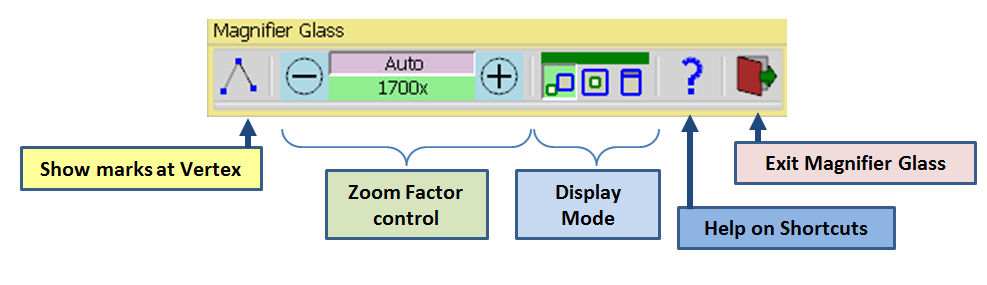
when the cursor is a small magnifier glass, click in the view. The Magnifier glass window will appear with a floating palette
-
For convenience, there are 3 sizes available: Small, Medium and Large. The choice of the size is a question of screen but also of CPU power. Performance are better with smaller sizes. The option can be selected in the Default Parameters of LibFredo6.
-
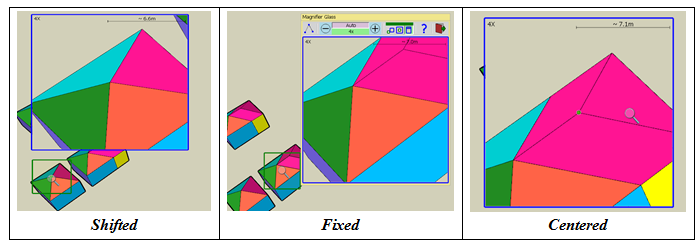
Display Mode: The magnifier glass can be displayed in 3 modes:
-
Fixed, embedded in the floating palette (which you can move around, if needed)
-
Shifted: the magnifier glass is displayed near the position of the cursor so that you can view the area spotted in the Sketchup viewport
-
Centered: the magnifier glass is centered on the cursor. Convenient for small zoom factors, but less adapted for heavy zooming, though.
Zooming with the Magnifier Glass
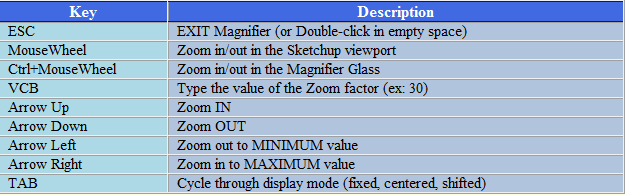
- Zoom, Panning and Orbiting in the Viewport via Mousewheel and the Middle mouse button is reflected in the Magnifier glass. This is one way to zoom in / out.
- Zooming in the Magnifier glass, that is, increasing / decreasing the zoom factor, can be done with Ctrl-Mousewheel, Arrows, palette buttons and the VCB.
- The zoom factor is indicated in the magnifier window and in the palette. There is also a small scale to give an approximation of the 3D distance corresponding to the half-width of the glass.
Edition Mode in the frozen view
If you click again in the viewport, you can freeze the view and enter the Edition Mode where you can perform a few functions.
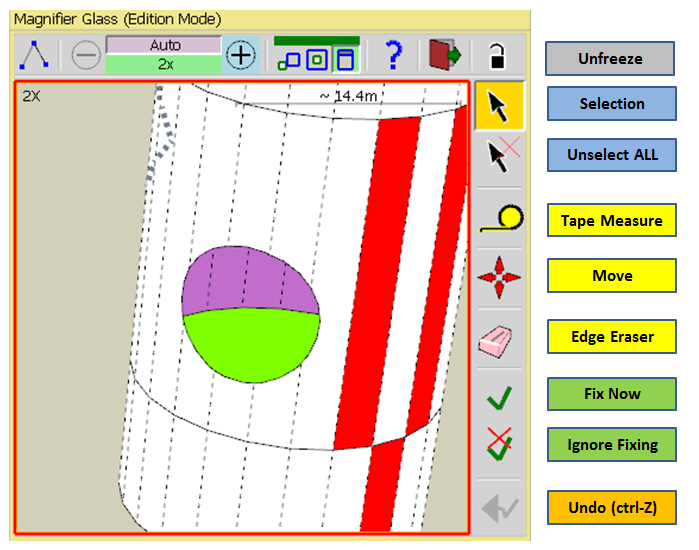
- Selection of edges and faces (via clic, double-clic, triple-clic, with modifiers Shift and Ctrl)
- Tape Measure with inferencing (point to point or parallel from an edge)
- Move: Vertex, Edges or Faces can be moved with inferencing. As in native Sketchup, you can move just a single vertex, or, using the selection tool, pre-select edges and faces and then move them altogether to a given target. Be aware that when edges are part of a curve or an arc, moving a vertex individually will likely move the whole curve or arc and its attached geometry.
- Edge Eraser. Applicable to Edges only. I supports only the click-release mode on Edges. The DEL key is also supported to erase selected edges and faces
- Repair Now, to fix defects individually
- Ignore Repair, mark a defect so that it is ignored by the global repairing of EdgeInspector
- Rollback – Undo: any operation can be safely undone via this button or via Ctrl-Z
- Panning: It is performed by a click-drag-release and applicable to all tools by default. For Move and Tape tools, you have an option (in the Default Parameters of LibFredo6) to deactivate panning and use click-drag-release for Move or Tape instead (in such a case, Panning can still be done via Ctrl-click-drag-release or Shift-click-drag-release)
Other Functions
- Mark for vertices. You can enable / disable marks for vertices. They will be shown with a small blue square.
- Quick Help. The Help button displays the main commands and shortcuts for zooming and editing in the Magnifier Glass.
Major limitations of the Magnifier Glass
- Textures are not rendered. Instead faces are painted with the dominant color of the texture.
- When zooming on small objects, the Magnifier glass may miss some edges or faces. Just zoom in the Sketchup viewport to get closer to the area you want to enlarge.
- The Z-Order of faces may not be correct. This is because the rendering is based on a rudimentary algorithm compatible with acceptable performance. Usually, try to Zoom-in or slightly orbit.
- Performance is depending on the zoom factor and to the number of faces / edges in the area spotted.
EdgeInspector 1.2a – 12 Oct 14: Major fixes and evolutions for Lost Junctions, Tiny Gaps and Tiny Edges. More accurate and relevant detection and fixing
EdgeInspector 1.1a – 15 Feb 14: Added Needle-eyes and Lost Junctions, based on a request by rv1974
EdgeInspector 1.0g – 22 Jan 14: Initial public release
-
WOW! Thank you very much!
-
A new hit for the repairs!

-
This is excellent. Of course, for Fredo's work, that is like saying the sky has air in it.

-
Excellent!
-
This looks very interesting ! Thank you !

I hope to have a real use for it in my next 3d printing project !
-
sounds awesome
 gone testing.
Oh Fredo! -


OMG! This looks really incredible. Another great tool out of the blue...
Big THANKS!
-
It's a great tools..........
-
I've been terrorized for years by poor skilled autocadders with this triple decease, see attached.
If only this tool could treat it(preferably automatically, without excessive manual digging) I'd nominate you for Nobel.
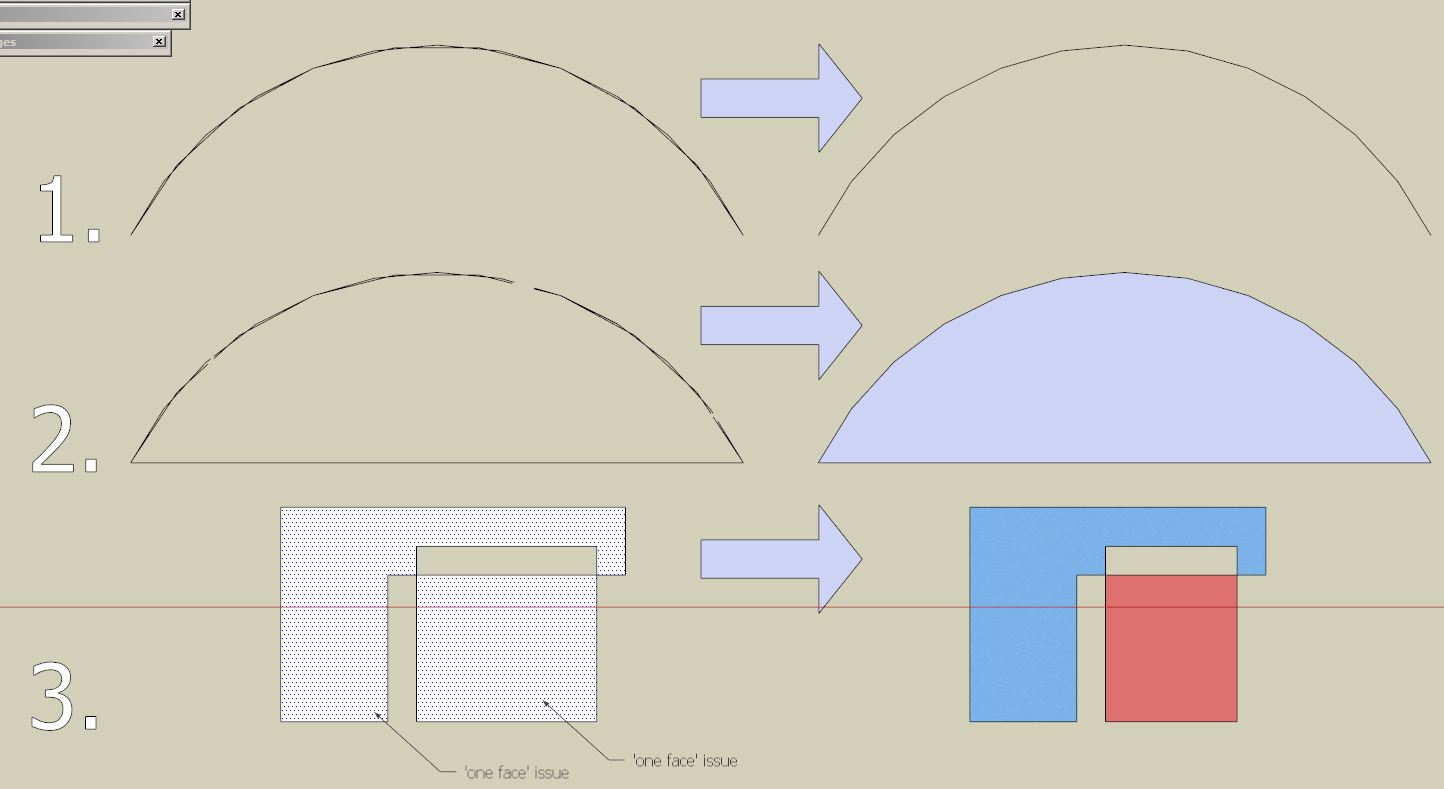
-
Absolutely fabulous!
-
very very intersting.. thank you once again!
-
NEW RELEASE: EdgeInspector v1.1a - 15 Feb 14
EdgeInspector 1.1a is a release which introduces the detection and fixing of 2 new defects: lost junctions and needle-eyes.
This comes from an original request by rv1974 (I will soon add the Fake Holes detection so that he owes me a Nobel prize!).
[flash=640,480:3f05uay3]http://www.youtube.com/v/2xI7G3MK5hg&hl[/flash:3f05uay3]
See main post on EdgeInspector for more information
See main post of this thread for Download of FredoTools.
Fredo
-

-
Had some field tests- This is Rock-solid tool! Very stable and polished. Amazing!
What I noticed sometimes Inspector leaves some bad vertexes that it won't be able to remove
(see attached). It could be easily solved by coping the faces only, deleting everything and inserting the copied.
-
Nice work! Thank you!
-
@rv1974 said:
Had some field tests- This is Rock-solid tool! Very stable and polished. Amazing!
What I noticed sometimes Inspector leaves some bad vertexes that it won't be able to remove
(see attached). It could be easily solved by coping the faces only, deleting everything and inserting the copied.Seems your segments are not perfectly aligned, one with a difference of 1.38 degrees and the two other with 0.01 degrees. These last two are detected, but are not fixed, because the method assumes segments are perfectly aligned for Sketchup.
By the way, RemoveLonelyVertices does not detect them either.
I'll see if I can do something to trap these cases and fix them.
Fredo
-
Don't bother. Make a Groove Maker Tool instead.
-
For a magnifier tool I asked years before when Pixdim comes out
Thanks for it!
-
NEW RELEASE: EdgeInspector v1.2a - 12 Oct 14
EdgeInspector 1.2a is a major release which is fixing a number of problems with 3 tools: Lost Junctions, Tiny Gaps and Tiny Edges.
This release provides a more accurate and relevant inspection and fixing:
- Tiny Edges are now detected and fixed in groups (loop, hook and sequence)
- Tiny Gaps are detected more adequately and fixed either by moving vertices or by moving the whole connected shapes (to keep the integrity of geometry)
- Lost Junctions receives a more accurate treatment
See main post on EdgeInspector for more information
See main post of this thread for Download of FredoTools.
Fredo










Advertisement