sketchucation logo sketchucation
    • 登入
    Oops, your profile's looking a bit empty! To help us tailor your experience, please fill in key details like your SketchUp version, skill level, operating system, and more. Update and save your info on your profile page today!
    🔌 Smart Spline | Fluid way to handle splines for furniture design and complex structures. Download

    [Plugin] EdgeInspector - v1.2a - 12 Oct 14

    已排程 已置頂 已鎖定 已移動 Plugins
    42 貼文 18 Posters 38.8k 瀏覽 18 Watching
    正在載入更多貼文
    • 從舊到新
    • 從新到舊
    • 最多點贊
    回覆
    • 在新貼文中回覆
    登入後回覆
    此主題已被刪除。只有擁有主題管理權限的使用者可以查看。
    • F 離線
      floriane_mvdb
      最後由 編輯

      Hello Fredo 6, thank you for this plugin that seems to be really awesome!

      I don't know if it's the good place to ask for some help using this tool, didn't find any subject about it in the forum.. The problem is that everytime i try to fix the defects calculated in Edge Inspector, i get the same error message saying : error during inspection, Cannot convert argument to Sketchup::Point3d (with a list of errors)
      What could i do to solve the problem ?

      Thank you

      1 條回覆 最後回覆 回覆 引用 0
      • fredo6F 離線
        fredo6
        最後由 編輯

        @floriane_mvdb said:

        Hello Fredo 6, thank you for this plugin that seems to be really awesome!

        I don't know if it's the good place to ask for some help using this tool, didn't find any subject about it in the forum.. The problem is that everytime i try to fix the defects calculated in Edge Inspector, i get the same error message saying : error during inspection, Cannot convert argument to Sketchup::Point3d (with a list of errors)
        What could i do to solve the problem ?

        Thank you

        In order for me to help, could you post or send me the error full text, either as a copy paste, or by exporting the file as a txt.
        Could you also tell me which correction tool(s) you were using.
        I may also need the model, incase I do not see the problem from the error log.

        Thanks

        Fredo

        1 條回覆 最後回覆 回覆 引用 0
        • P 離線
          pipinek
          最後由 編輯

          Empty window.

          Greetings,

          When I select some edges and apply the Edgeinspector tool I have an empty window with no content:
          http://screenshot.net/lzdn6tp.jpg

          What could be wrong here (except the problem between my chair and a screen)?
          Thank you in advance.

          1 條回覆 最後回覆 回覆 引用 0
          • fredo6F 離線
            fredo6
            最後由 編輯

            @pipinek

            The attached image is missing.

            Fredo

            1 條回覆 最後回覆 回覆 引用 0
            • P 離線
              pipinek
              最後由 編輯

              Hello Fredo,

              It is quite strange, the image is visible on my equipment:

              http://s32.postimg.org/r4yuq6dv9/image.png

              1 條回覆 最後回覆 回覆 引用 0
              • fredo6F 離線
                fredo6
                最後由 編輯

                @pipinek,

                There must be a bug. Could you please open the Ruby Console before launching EdgeInspector and tell me the error you see.

                Thanks

                Fredo

                1 條回覆 最後回覆 回覆 引用 0
                • P 離線
                  pipinek
                  最後由 編輯

                  Thanks Fredo for your reaction,

                  Here is the result, well no result at all. The Ruby Console is empty.
                  I have launched RConsole, selected a rectangle and activated Edgeinspector tool.

                  http://screenshot.net/095oxs2.jpg

                  http://screenshot.net/095oxs2.jpg

                  PS
                  I have just noticed that on the other PC with apparently with the same plugin set and configuration (SU 2015) the plugin works well.
                  Bizarre. Is the any potential conflict to take into consideration?
                  If yes what shall I check?

                  Thank you in advance for your kind assistance Fredo.

                  1 條回覆 最後回覆 回覆 引用 0
                  • fredo6F 離線
                    fredo6
                    最後由 編輯

                    Did you try without edge preselection ?

                    Fredo

                    1 條回覆 最後回覆 回覆 引用 0
                    • P 離線
                      pipinek
                      最後由 編輯

                      Do you mean Whole Model?
                      Same results. Empty Edge Inspector box.

                      I have found the following in Ruby Console (I typed before several SU sessions: 'edgeinspector' - the Ruby Content has stil remained there):

                      edgeinspector
                      Error: #<NameError: undefined local variable or method edgeinspector' for main:Object> <main>:in <main>'
                      SketchUp:1:in `eval'

                      Finally I have managed it to work by a crazy chance.
                      I have change something in option shrink... by clicking on a tiny square. Now I have an option bar for each tool including Edge Inspector box content.

                      http://screenshot.net/r577nc6.jpg

                      http://screenshot.net/r577nc6.jpg


                      I have another issue with Drawalong tool though.
                      I cannot assign a letter/keyboard shortcut to it.
                      Any combination I have tried (my prefered a letter D) when typed it opens a web browser with a youtube page with instruction video.

                      Is there any solution to the issue, any possibility to have a key shortcut to Drawalong tool?

                      1 條回覆 最後回覆 回覆 引用 0
                      • fredo6F 離線
                        fredo6
                        最後由 編輯

                        @pipinek said:

                        I have another issue with Drawalong tool though.
                        I cannot assign a letter/keyboard shortcut to it.
                        Any combination I have tried (my prefered a letter D) when typed it opens a web browser with a youtube page with instruction video.

                        Is there any solution to the issue, any possibility to have a key shortcut to Drawalong tool?

                        I think that in the Preferences - Short Cut dialog box, you filter with "DrawAlong". This shows the Video menu.
                        You should filter with "Draw Along", with a space, which will display the main command.

                        Fredo

                        1 條回覆 最後回覆 回覆 引用 0
                        • P 離線
                          pipinek
                          最後由 編輯

                          Huge thanks.

                          It does work as you have described.
                          But you have to admit that its a too tricky for an everyman user. The tool name is DrawAlong (no space).

                          I will be aware such possibilities in the future.

                          Best regards with my gratitude for your responses.

                          1 條回覆 最後回覆 回覆 引用 0
                          • fredo6F 離線
                            fredo6
                            最後由 編輯

                            Glad it works now.
                            Actually, the best is to look first at the menu text and apply the filter accordingly.

                            Fredo

                            1 條回覆 最後回覆 回覆 引用 0
                            • P 離線
                              pipinek
                              最後由 編輯

                              Indeed this is the best way.
                              Alas, I am not the one.

                              Thank you once more for your assistance and your marvellous works.

                              1 條回覆 最後回覆 回覆 引用 0
                              • K 離線
                                karasupike
                                最後由 編輯

                                thank youu!!

                                1 條回覆 最後回覆 回覆 引用 0
                                • B 離線
                                  bharralure
                                  最後由 編輯

                                  Bonjour,
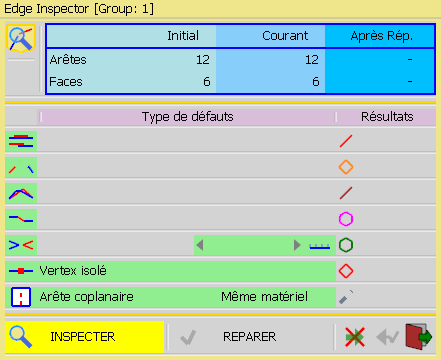
                                  Edge Inspector v3.3b semble ne pas fonctionner correctement sur SU 2019 (Installé depuis SketchUcation).
                                  Au lancement de l'outil, la fenêtre affichée est incomplète, tel que le montre la capture d'écran jointe.
                                  J'ai désinstallé FredoTools, puis réinstallé sans succès.
                                  Je joins également le rapport de la console Rubis, en espérant que cela aide.
                                  D'avance merci pour toute aide.
                                  EdgeInspector.png
                                  EdgeInspector_ErreurInstallation.txt

                                  1 條回覆 最後回覆 回覆 引用 0
                                  • fredo6F 離線
                                    fredo6
                                    最後由 編輯

                                    Thanks for advising. I fixed it in FredoTools v3.3c. This is actually an incompatibility introduced with the new version of Ruby that is shipped with SU2019.

                                    Fredo

                                    1 條回覆 最後回覆 回覆 引用 0
                                    • B 離線
                                      bharralure
                                      最後由 編輯

                                      Effectivement, la version 3.3b fonctionne parfaitement dans SU 2018, mais je viens d'installer la version 3.3c dans SU 2019, et tout est rentré dans l'ordre.
                                      Encore un grand MERCI pour la rapidité de cette mise à jour, et pour l'ensemble de votre travail.

                                      1 條回覆 最後回覆 回覆 引用 0
                                      • C 離線
                                        ct103stu0
                                        最後由 編輯

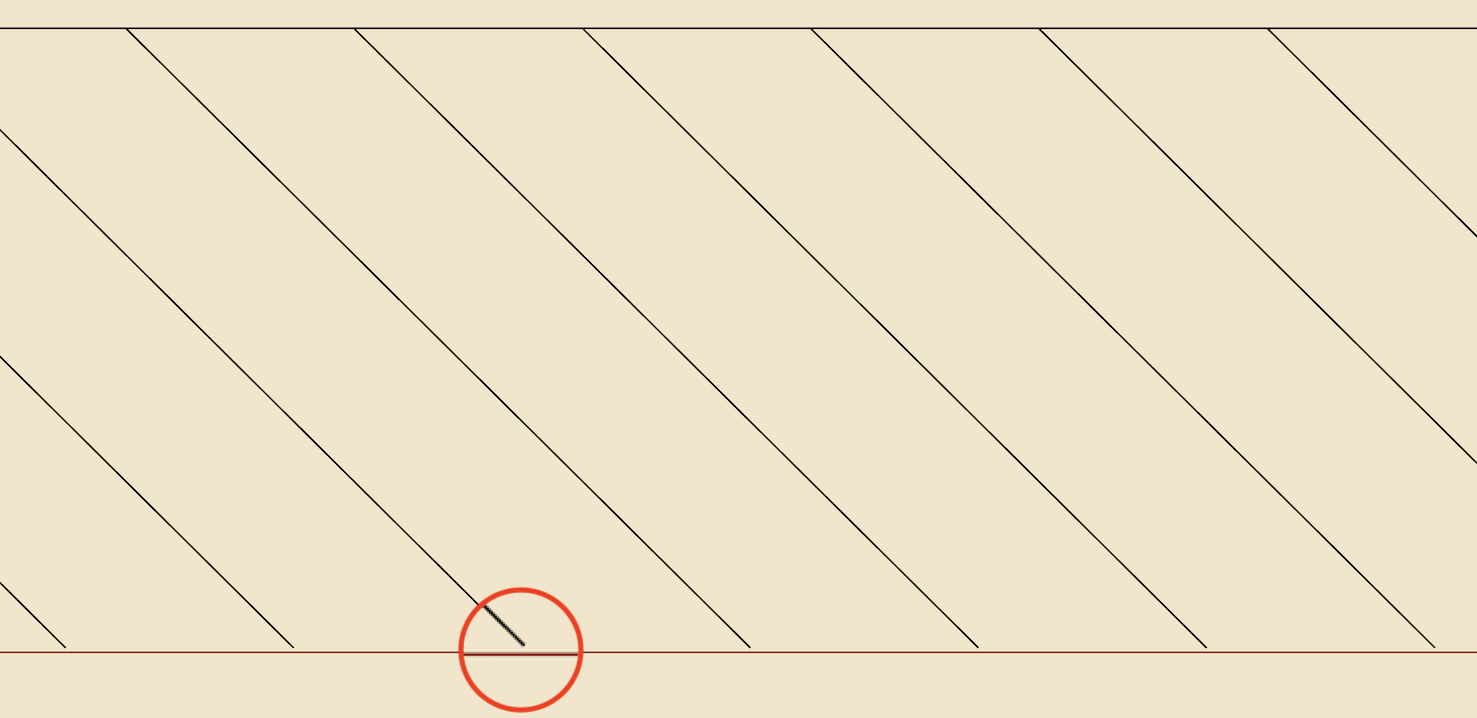
                                        Could not detect and/or fix these tiny gaps in diagonal lines. See attached file (screen shot). What am I doing wrong?

                                        Example screen shot

                                        1 條回覆 最後回覆 回覆 引用 0
                                        • fredo6F 離線
                                          fredo6
                                          最後由 編輯

                                          @ct103stu0 said:

                                          Could not detect and/or fix these tiny gaps in diagonal lines. See attached file (screen shot). What am I doing wrong?

                                          Could you post or send me the model.

                                          May be normal, or maybe not....

                                          1 條回覆 最後回覆 回覆 引用 0
                                          • C 離線
                                            ct103stu0
                                            最後由 編輯

                                            In the screenshot and SU model, in terms of EdgeInspector defects, what are these "spaces" in the diagonal lines called (tiny gaps, lost junctions, etc.)?

                                            1 條回覆 最後回覆 回覆 引用 0
                                            • 1
                                            • 2
                                            • 3
                                            • 2 / 3
                                            • 第一個貼文
                                              最後的貼文
                                            Buy SketchPlus
                                            Buy SUbD
                                            Buy WrapR
                                            Buy eBook
                                            Buy Modelur
                                            Buy Vertex Tools
                                            Buy SketchCuisine
                                            Buy FormFonts

                                            Advertisement