[Plugin] SketchUcation Tools 2.6
-
@tig said:
If we don't set it, OR we set it to an empty string
''the 'tooltip' is repeated below - which looks illogical - with the tooltip's text being an 'echo' !That's why.

Can't the secondary tip differ from the primary tip?
-
Of course we can have it say whatever you want...
BUT what more do you want to say ?
Currently it's
SketchUcation Plugin Store ...More is easily added... but I don't think additional info will enhance it

SketchUcation Plugin Store Clicking on this button opens a dialog which allows you to AutoInstall and Update Plugins...etc

If you want changes try editing the
SCF_loader.rband the.status_bar_text=for each tool...
cmd.="..."
to
cmd.status_bar_text="Clicking on this button opens a dialog which allows you to AutoInstall and Update Plugins...etc"
OR better still add new Constants to the../Strings/SCF-EN-US.stringsfile and use those Constant as the.status_bar_text=
For example, in the file
../Strings/SCF-EN-US.strings
add
SBAR="Clicking on this button opens a dialog which allows you to AutoInstall and Update Plugins...etc"
then
cmd.tooltip="#{DESC}" cmd.status_bar_text="#{SBAR}"Make one Constant for each of the three button cmds:
` DESC="...
SBAR="...MDESC="...
MSBAR="...XDESC="...
XSBAR="...`This 'strings' version allows translations to other locales...
Note: in v8 the '
tooltip' text appears in the button onMouseOver and the 'status_bar_text' text is in the status-bar at the bottom, but in >=v2013 the tooltip's text is a combo of the 'tooltip' and 'status_bar_text'...
The 'loader' rb sets a 'redundant'.tooltip=for the non-toolbar [menu-only] cmds - these are never displayed [just there in case a toolbar-button ever got added]: however, it also sets.status_bar_text=for the non-toolbar [menu-only] cmds - this is also 'redundant' in newer versions of SketchUp, BUT in v8 onMouseOver for the menu item it will display that text in the status-bar.@Rich let me know your thoughts...
-
Very nice update! Especially to be able to update all installed plugins at once. Many thanks for that!

-
Nice work guys!
-
Updated to 2.5.1
Addressed some bulk update issues
-
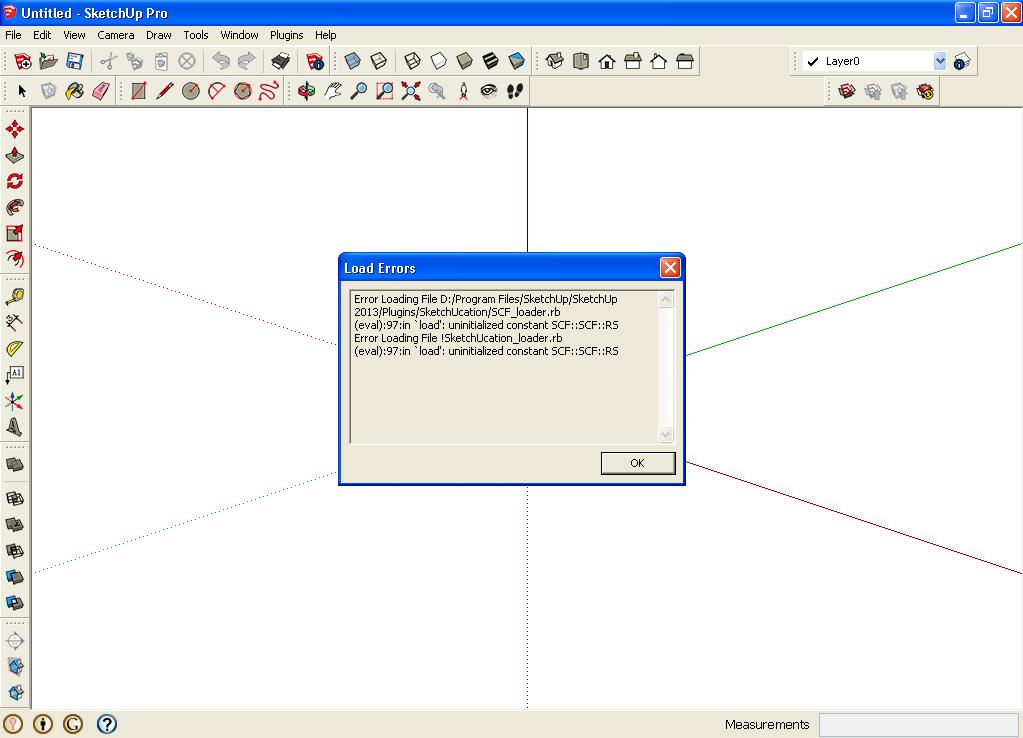
When I open SU 2013 PRO, there is a message Load Errors (please see attached picture). I have XP. When I press the OK button, the appearance of the icons of the Plugin Store.
-
@frlic said:
When I open SU 2013 PRO, there is a message Load Errors (please see attached picture). I have XP. When I press the OK button, the appearance of the icons of the Plugin Store.
This is strange.
I have the exact same SUp version and when I install the tool I do not get these errors.
How did you install to toolset?
You must restart SketchUp to effect the changes ??
If you AutoInstall from the older PluginStore dialog it should warn you if you have insufficient security permissions to add files to the Plugins folder.
Or did you try to install it from a downloaded RBZ file, using the Preferences > Extensions > Install... button >
Can I suggest you check your Plugins folders permissions...
As an Admin > context-menu > Properties > Security > Edit...
All entries should be FULL read/write ...Having a link/button named 'Compatibility Files...' in the top-bars of the Windows Explorer window for the Plugins folder, that's a sure sign of wrong permissions...
Therefore you might not have all of the plugin's files properly installed...
CAn I also suggest you remove the !SketchUcation_loader.rb and the SketchUcation subfolder from the Plugins folder.
Then Install a fresh version of the plugin...Report back if you still get error messages...
-
Anyone else experiencing the whole thing crashing when you try to install from inside the plugin?
[mod=:14fmud1g]Fixed: Followed the permissions instructions above.[/mod:14fmud1g]
-
a query.
In version 2, the list of recent plugin could see a list of all plugin chronologically ordered.
In version 2.5, the list of recent plugin, you can only see the last 20 plugin. this feature will ever change? -
@pomelo3d said:
a query.
In version 2, the list of recent plugin could see a list of all plugin chronologically ordered.
In version 2.5, the list of recent plugin, you can only see the last 20 plugin. this feature will ever change?In v2 you also should have seen only the last 20 plugins in the recent list. Only the full list lists all the plugins in the store. (Therefore it takes some time to load...)
-
If, in version 2 are seen 20 plugin, but when I slide down the sidebar plugin loaded another 20, and so on. no?
-
@pomelo3d said:
If, in version 2 are seen 20 plugin, but when I slide down the sidebar plugin loaded another 20, and so on. no?
No. But it's a good suggestion for the further development.

-
yes.
-
I have two computers, a desktop at home and a laptop, which I use when I have to go to the office. So that now that I can see which plugins require updating on the desktop, I was wondering, is there a file I can copy from my desktop to my laptop, such that when I do a check on what plugins need updating on the laptop, the program would also show which plugins are missing on the laptop and need to be downloaded.
This way I could keep the laptop in sync with the desktop.
Thanks in advance. This program was much needed.
Ken
-
Hi Ken,
In the future releases we plan to implement such a feature you're looking for. Until then in the "My Downloads" list you can see those plugins what you've ever downloaded from the pluginstore on any computer. At the moment no feature to port the "My installs" but it is on our "To Do List". -
Yes
A future version might well have a new 'My Syncs' tab - where you will be able to see what plugins you have installed on your current computer/SketchUp-version, AND also those extra ones on other computers/SketchUp-versions [provided you have accessed the PluginStore at least once from these alternative computers/SketchUp-versions], and then it'll offer you the chance to AutoInstall the missing ones - either clicked individually or in bulk [like the 'Update all' button in 'My Updates']...
We are [hopefully] anticipating your needs/desires, and much of the needed codes is already available.
We just need to assemble it and beta test etc...
However, please do make suggestions for enhancements - there's always going to be something we haven't thought of
-
This is a great addition to SU and it keeps getting better. Love the updating notification, just updated four plugins that I didn't realise had been modified!
I hope I've not missed the memo; installation of plugins is so simple, is there an easy way to uninstall unwanted plugins?
-
There's a Plugins > SketchUcation item 'SketchUcation Plugins Uninstaller..'
That opens a dialog similar to the Plugins Manager.
It lets you Uninstall selected Plugins - the rb/rbs/rb!/rbs! files are renamed with a final x - rbx.rbsx/rb!x/rbs!x
They do not then appear in the 'Plugins Manager' or 'My Installs' lists.
You can Reinstall any 'x' plugins using the same dialog too.If you want to permanently remove these Uninstalled files from your system you'll need to do it manually - open your Plugins folder, filter by the final 'x', select them and 'delete'.
The associated subfolder [if any] is usually named after the plugin file itself and so it can therefore be removed manually too, at the same time; although leaving it in the Plugins folder does no harm... -
I get these two...
Error - Start up.pdf
One at start up, the second when I click on the Plug ins manager button.
Error - Plug Ins Manager.pdf
Also: I use multiple monitors, and the new tool bars and menus show up frequently on one of the other screens...am I the only one? -
@tig said:
There's a Plugins > SketchUcation item 'SketchUcation Plugins Uninstaller..'
That opens a dialog similar to the Plugins Manager.
It lets you Uninstall selected Plugins - the rb/rbs/rb!/rbs! files are renamed with a final x - rbx.rbsx/rb!x/rbs!x
They do not then appear in the 'Plugins Manager' or 'My Installs' lists.
You can Reinstall any 'x' plugins using the same dialog too.I had not realized this was available


Very handy.
Seems like this should also be in SketchUcation Plugins Store in the "My Setup"







Advertisement