[Plugin] SketchUcation Tools 2.6
-
But v2.6.0 should never affect other tools like zooming/tool-change

Do you try to do other things as it's downloading then installing ?
If so why ??
The most you should notice with it in v8 is a brief thinking time [ << 1sec] as SketchUp starts up and then the PluginStore dialog first opens or is closed.The download should be noticeably faster that before - typically 400%...
A few Plugins are quite hefty and take a while to download - but they should still arrive faster than with the earlier versions of the PluginStore...
You need at least v8M2 to use the PluginStore, currently v2014 does offer some improved download speed, but the changes were also mimicked in v8/v2013 albeit a little slower - but they should still outperform v2.5
Do you have other plugins loading that might add observers which are messing with things in v8 - like some proto-BIM tools ? But lead you to consider v2.6.0 the instigator of the issue ?
-
@Rich - I meant subjective weight and subjective abandon. Whinge was the wrong word too. Sorry about that. English is my first language.
@TIG - I haven't been downloading - only disabling/enabling. Sketchup 8M2free and 2013pro both hang during use with SkTools loaded - and do not hang at all with it unloaded. (preferences/extensions/tickbox off)
All plugins are loaded from Plugin store, only other plugin is as belowrequire 'sketchup.rb'
path = "C:/Users/___________"
$LOAD_PATH << path; $LOAD_PATH.uniq!
if File.exist?(path)
Dir.entries(path).each{|file|
ext=File.extname(file).downcase
next unless ext==".rb" || ext==".rbs"
Sketchup.load(File.join(path, file))
}My connection is fast - 6mb/2mb home/office.
????
Thanks -
Hi Tommy,
No offense caused.
I think part of your speed issue is because SUTools is in Dropbox.
If you move it out does the speed change?
-
There is also a brief 'thinking time' in open/close with SCF Managers, but it should not be so significant.
The disabling/enabling by adding/removing the final ! will obviously take somewhat longer over a complicated networked path like Dropbox folder...
BUT again I find it relatively fast and of little import -
Ok - after a couple of tests the short answer is SUTools (probably with some as yet unknown issue) causes SU8M2 to hang (for about a minute) on start up, on closing plugin store dialog, plugin manager dialog, extension manager dialog and plugin uninstaller.
SUTools is the only plugin installed (and it's in the standard folder) I reset my registry, cleared my cache in IE and Chrome and I have full permissions.
Before this. I put SUTools in the standard plugin folder and my alternate folder on my desktop. The same hanging occurred as above but additional hangs occurred in dialogs when I selected my alternate folder. At this stage I had only reset my registry.
Before resetting my registry the same hanging occurred, but I had the following error message when alternate folder was selected in plugin manager
Error: #<Exception: Invalid Dialog>
(eval):1461:inclose' (eval):1461:innew'
(eval):1463:incall' (eval):1463 when alternate folder was selected in extension manager. Error: #<Exception: Invalid Dialog> (eval):2235:inclose'
(eval):2235:innew' (eval):1463:incall'
(eval):1463Probably just a registry clash for those, but thought it might shed some light. If I disable SUTools as an extension in SU preferences - SU works smoothly in all situations listed above.
Sorry for the info dump - hope something in there is useful to you.
Suggestions welcome! -
I'll send you a PM with some suggestions that might help.
But you should not get issues of such long time delays - they should be but momentary... -
While performing a heavy backup task that uses almost all of my internet connection I noticed very long (20 to 30 seconds) startup times for Sketchup.
Sketchup's native interface almost instantly appears, some empty spaces on the toolbars are there (location of several plugins), Windows 7 busy-circle appears and after 20 to 30 seconds everything is normal again and I can start using Sketchup.
Normally I have the same behavior but it's just a few seconds like that.I emptied SU's plugins folder - SU opens instantly
Only installed SkecthucationTools.rbz - still have v2.5.1 rbz on my drive - SU opens instantly
Updated Sketchucation tools to v2.6 - 20 to 30 second delay is there.So my guess is: v2.6 tries to connect to internet at startup of Sketchup and that's interfering with the startup of the rest of the plugins. If that is the case, could that be avoided somehow?
edit: same delay occurs after installing a plugin from the SketchUcation Plugin Store and closing the Plugin Store window. Backup is finally finished now...speed back to normal with only short delay.
-
SketchUcation Plugin Store V2.6.0
When I try an autoinstall, when the AutoInstall: Choose Folder dialog comes up and I select a folder nothing happens. The AutoInstall: Choose Folder dialog stays there after I click on the folder????What happened to V2.5.2?
-
@bob james said:
SketchUcation Plugin Store V2.6.0
When I try an autoinstall, when the AutoInstall: Choose Folder dialog comes up and I select a folder nothing happens. The AutoInstall: Choose Folder dialog stays there after I click on the folder????
What happened to V2.5.2?This is odd.
Can you try it with the Ruby Console open and post any error messages.
You highlight the desired folder and press the 'Select' button at the bottom of the dialog... then what happens ?
Is there anything unusual about the chosen folder ?
What does it do if you choose the main [default=first] Plugins folder ?? -
@tig said:
Can you try it with the Ruby Console open and post any error messages.
Nothing in Console
@tig said:
You highlight the desired folder and press the 'Select' button at the bottom of the dialog... then what happens ?
What "Select" button?
@tig said:
Is there anything unusual about the chosen folder ?
Nothing new
@tig said:
What does it do if you choose the main [default=first] Plugins folder ??
Nothing happens

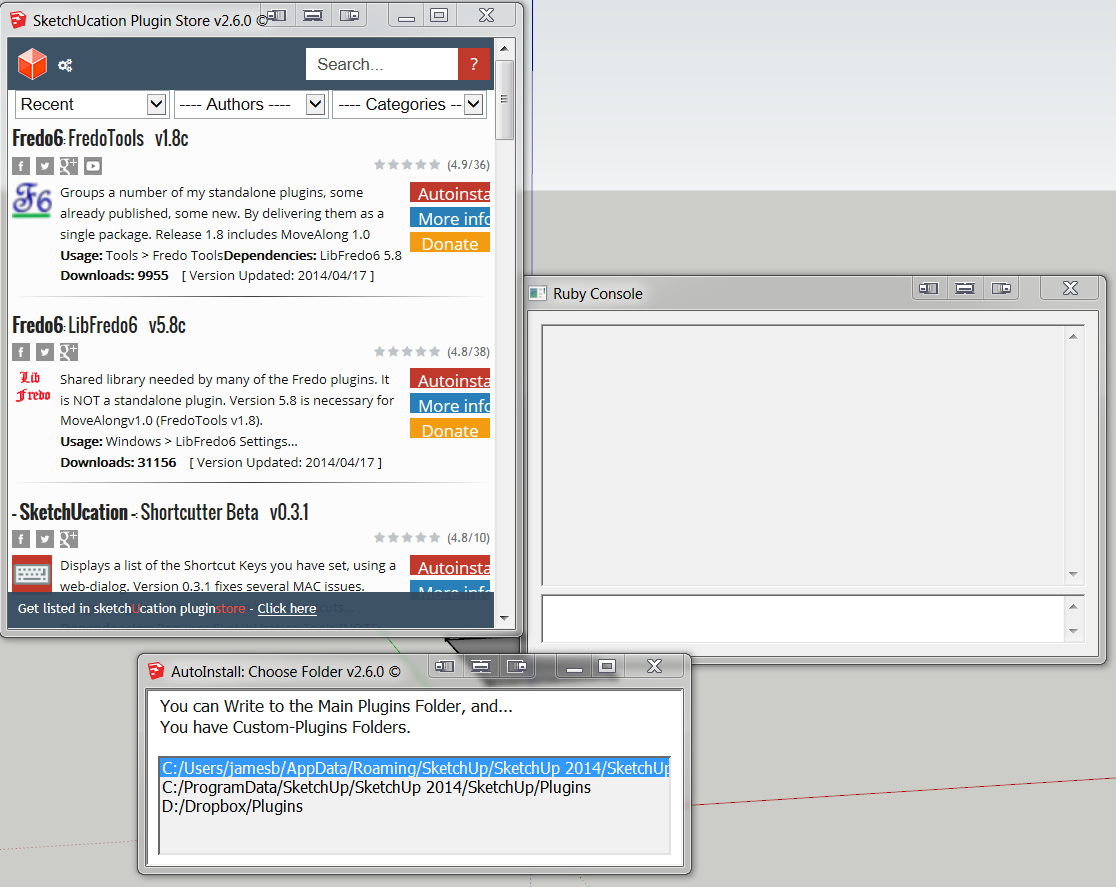
-
-
Sorry, I edited it as I thought it was a typo... you had been beta testing v2.5.2 and the current version is v2.6.0 ?
We haven't even got to v2.6.1 yetThere is obviously something wrong with your choose-custom-folder dialog.
It should display a 'Select' button at the bottom [which says, "Choose AutoInstall Folder"].
You simply highlight the destination and click that to carry on..
The last used destination is reused next time too.My version shows this...
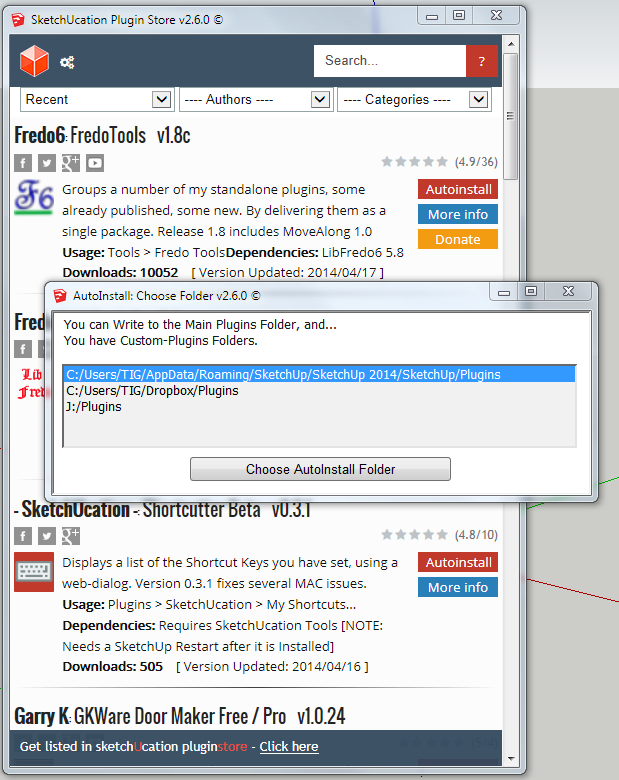
So something is clearly adrift...Initial thought...
Can you pull the bottom edge of the dialog downwards to reveal that button ?
It's size should be remembered across sessions on PC, so perhaps this is all that is needed ?But if not, and you are confident in using
regedit, then you could try deleting this Registry entry, so the next time you use the PluginStore dialog it defaults...
HKEY_CURRENT_USER\Software\SketchUp\SketchUp 2014\WebDialog_SketchUcation-InstallerLet us know it these ideas don't resolve the issue ?
-
@unknownuser said:
Initial thought...
Can you pull the bottom edge of the dialog downwards to reveal that button ?
It's size should be remembered across sessions on PC, so perhaps this is all that is needed ?That was it

Thank you, TIG, for taking your time to help.
-
Hello. I have been in forum for a while but have not posted anything, I use SU for my hobbies with not much knowledge in designing so I'm still learning.
I'm quite happy with new feature in sketchucation tools 2.6 but I have similar problems as tommy.jhd.
Sketchup start much slower with sketchucation tools enabled. Delay time is about 5s or more, sometimes, it crashes. Disable sketchucation tools make every things normal.
Although you have explain the cause, could you show me a fix or workaround (not to disable the tools).
I'm using win 7 32bit sketchup 8 free.
Thank you, -
just upgrade to the last version of the tool as request by the tool itself and SU have started to crash at every launch.
I've removed the plugin loader and folder from the SU plugin folder and the app run smoothly.
I'm on SUpro8.
any advice?thank's,
andrea -
I've always manually loaded up plugins, but the SU Tools seemed like a great idea.
It works well, but drags SKUP to a crawl, both loading the application and working - it just freezes for about a minute.
I thought it may be other plugins, so disabled them & restarted - no improvement.
I renamed the !SketchUcation_loader.rb to !SketchUcation_loader.rb! with the other plugins reactivated & all was well again.
The plugins are located at C:\Users*ME*\AppData\Roaming\SketchUp\SketchUp 2014\SketchUp\Plugins, with the Thea plugin installed at C:\ProgramData\SketchUp\SketchUp 2014\SketchUp\Plugins.
Xeon PC with 16Gb RAM, win7 x64 OS.Can anyone help me with diagnosing the cause?
-
Can you tell us your Internet speed?
-
Hi @ all,
I installed SketchUcation Tools 2.6 on a Win 8.1 machine in SU 8, when I start Su 8 the SketchUcation Tools 2.6 is creating the following file:
C:\Users\Username\AppData\Local\temp\SCF\f_43864.vbs,
and while my firewall asks me if i want to let it access the internet - and I say yes, SuTools is creating the next .vbs with a random number which makes my firwall asking - and so on...
Why is that happening? Can I stop that?thanks, regards,
3rdEye -
@3rdeye said:
Hi @ all,
I installed SketchUcation Tools 2.6 on a Win 8.1 machine in SU 8, when I start Su 8 the SketchUcation Tools 2.6 is creating the following file:
C:\Users\Username\AppData\Local\temp\SCF\f_43864.vbs,
and while my firewall asks me if i want to let it access the internet - and I say yes, SuTools is creating the next .vbs with a random number which makes my firwall asking - and so on...
Why is that happening? Can I stop that?thanks, regards,
3rdEye
v2.6.0 sends small data packets to the SCF server etc.
In v2014 it can use Ruby2 methods.
But in v8 it has to make temporary vbs files to do this in your ../Temp/SCF folder.
They are automatically erased afterwards.
If you add an 'exception' to your Firewall [or AntiVirus App] 'exceptions' list] it should let them pass unchallenged ?
With a wild-card like:C:\Users\Username\AppData\Local\Temp\SCF\*.vbs
I'll also PM you with some other ideas... BUT some VBS files must run to have all of the PluginStore functionality... -
@rich o brien said:
Can you tell us your Internet speed?
It's fair to middling - part of a corporate network.
TIG's given me some homework to test - I'll give it a go at the end of the day.Tweaks worked, problems relate to our internet access setup





Advertisement