sketchucation logo sketchucation
    • Login
    Oops, your profile's looking a bit empty! To help us tailor your experience, please fill in key details like your SketchUp version, skill level, operating system, and more. Update and save your info on your profile page today!
    Mac User? | Join the Rayscaper Beta for Mac Learn More

    [Extension][$] iSelect

    Scheduled Pinned Locked Moved Plugins
    54 Posts 20 Posters 27.7k Views 20 Watching
    Loading More Posts
    • Oldest to Newest
    • Newest to Oldest
    • Most Votes
    Reply
    • Reply as topic
    Log in to reply
    This topic has been deleted. Only users with topic management privileges can see it.
    • JQLJ
      JQL
      last edited by

      LOL! Brilliant! So simple and clever! Just brilliant!

      I'll install it of course but I'm so used to being careful right now that if I use this I may become even dumber than what I already am...

      Thanks,

      JQL

      www.casca.pt
      Visit us on facebook!

      1 Reply Last reply
      Reply Quote 0
      • plesiosaurP
        plesiosaur
        last edited by

        It seems to be deselecting everything. Are there any selection settings that I need to addressed before using?

        1 Reply Last reply
        Reply Quote 0
        • cottyC
          cotty
          last edited by

          Nice idea! Thank you.

          my SketchUp gallery

          1 Reply Last reply
          Reply Quote 0
          • tridemT
            tridem
            last edited by

            very clever ๐Ÿ‘

            1 Reply Last reply
            Reply Quote 0
            • pilouP
              pilou
              last edited by

              So That is Select only visible ? โ˜€

              Frenchy Pilou
              Is beautiful that please without concept!
              My Little site :)

              1 Reply Last reply
              Reply Quote 0
              • S
                samothrace41
                last edited by

                Thank you very much ! Very useful !

                1 Reply Last reply
                Reply Quote 0
                • N
                  numerobis
                  last edited by

                  Very nice! ๐Ÿ‘ Thank You! ๐Ÿ˜Ž

                  1 Reply Last reply
                  Reply Quote 0
                  • C
                    chris87
                    last edited by

                    Very useful plugin !
                    Thank you....

                    1 Reply Last reply
                    Reply Quote 0
                    • G
                      glro
                      last edited by

                      nice idea

                      it works perfectly for faces in the selection

                      but it doesn't work for components in the selection

                      for example:
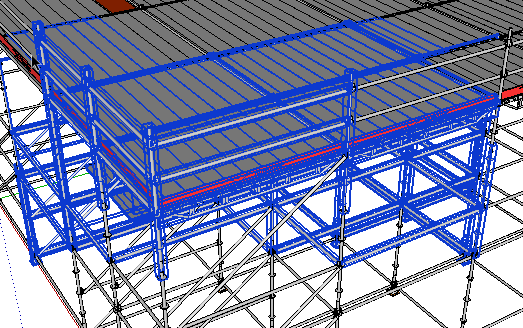
                      before

                      When i clic on the eye button:

                      after

                      you can see that some components that were visible,have been excluded from the selection, and some others, which were not entirely visible, have been kept

                      Would it be possible to fix that?

                      1 Reply Last reply
                      Reply Quote 0
                      • JClementsJ
                        JClements
                        last edited by

                        Nice job. For those that don't wish to use the toolbar, could there also be another version in which the context menu would display an option to execute the script?

                        John | Illustrator | Beaverton, Oregon

                        1 Reply Last reply
                        Reply Quote 0
                        • renderizaR
                          renderiza
                          last edited by

                          Finished fixing the component & group situation and will start on adding the context menu next. Another plus to adding context menu is that it will show up on keyboard shortcut list. ๐Ÿ˜‰

                          Thanks for feedback! ๐Ÿ‘

                          [url=https://www.sketchupcode.com/:z3kqsidd]My Extensions ...[/url:z3kqsidd]

                          1 Reply Last reply
                          Reply Quote 0
                          • renderizaR
                            renderiza
                            last edited by

                            [pre:12acadvw]Authors:: Renderiza
                            Plugin Name:: iSelect
                            Version:: 1.0.1
                            Date:: 11/6/2013
                            Cost:: Free[/pre:12acadvw]
                            iSelect v1.0.1 is now available for download.

                            http://jroot.sketchucation.com/pluginrepo/image/RND_iSelect_v1.0.0.png

                            %(#909090)[What is new:

                            • Group & Component selection is fixed
                            • Context Menu Added (right click > iSelect)
                            • Add keyboard shortcut

                            How to set keyboard shortcut:
                            Window > Preference > Shortcuts > Function = Edit/Item/iSelect > Add Shortcut

                            Thanks for Feedback! ๐Ÿ‘]

                            [url=https://www.sketchupcode.com/:z3kqsidd]My Extensions ...[/url:z3kqsidd]

                            1 Reply Last reply
                            Reply Quote 0
                            • JClementsJ
                              JClements
                              last edited by

                              Thank you.

                              John | Illustrator | Beaverton, Oregon

                              1 Reply Last reply
                              Reply Quote 0
                              • erikBE
                                erikB
                                last edited by

                                Seems like a really, really!! useful tool.
                                But auto-install with sketchUp plugin manager (I even tried it twice) doesn't install it ?
                                Am I missing something, or is something missing ๐Ÿ˜‰ ?
                                erib

                                1 Reply Last reply
                                Reply Quote 0
                                • renderizaR
                                  renderiza
                                  last edited by

                                  @erikb said:

                                  But auto-install with sketchUp plugin manager (I even tried it twice) doesn't install it ?
                                  Am I missing something, or is something missing ๐Ÿ˜‰ ?

                                  Have you verified that your plugin folder's permission have full rights?

                                  Just in case try auto-installing it from Extension Warehouse to see if that works.

                                  [url=https://www.sketchupcode.com/:z3kqsidd]My Extensions ...[/url:z3kqsidd]

                                  1 Reply Last reply
                                  Reply Quote 0
                                  • Dave RD
                                    Dave R
                                    last edited by

                                    Thanks for this plugin. I think it'll be very useful.

                                    Erik, I just auto-installed it with the Plugin Store and it worked just fine for me.

                                    Etaoin Shrdlu

                                    %

                                    (THERE'S NO PLACE LIKE)

                                    G28 X0.0 Y0.0 Z0.0

                                    M30

                                    %

                                    1 Reply Last reply
                                    Reply Quote 0
                                    • erikBE
                                      erikB
                                      last edited by

                                      Windows keeps being a mystery to me. ๐Ÿ˜’
                                      Not so long ago Tig mentioned the fact that being logged in as administrator not necessary meant you had full rights on every directory. So in order to overcome this he suggested all the usual directory's (sketchup, plugins,..) should all have this full admininstrator rights attributed to them. I don't recall anymore according to which plugin this was mentioned. BUT I then made sure all rights where given, and in the end the plugin worked. Seems that, for what ever reason (microsoft?) this now isn't anymore the case (altough all the other plugins work), for the plugin folder!
                                      So again I changed the rights and "hoera !!" it works.
                                      And may I say, fantastic plugin !!! So often when moving things (even after checking in x-ray mode) you missed a face of a vertex in the background and therefor messed up your model whit out noticing it. And when you found out later there is so much correction to be done (or some times it is virtual impossible timewise).
                                      So ๐Ÿ‘ ๐ŸŽ‰ ๐Ÿ‘ for this great plugin. (not to mention some other great plugins you made) Thanks,
                                      erikB

                                      1 Reply Last reply
                                      Reply Quote 0
                                      • deaneauD
                                        deaneau
                                        last edited by

                                        Really usefull.

                                        what do you think about a plugin that can do following:

                                        i have an object with inner and outer faces. i would have a plugin that select only outsidefaces.

                                        look here

                                        404 Not Found

                                        favicon

                                        (sketchucation.com)

                                        scroll down to

                                        404 Not Found

                                        favicon

                                        (sketchucation.com)

                                        thankyou for this plugin

                                        dean

                                        MADE, BORN AND LIVING IN BERLIN
                                        Big Thank You to all Programmers
                                        Some German words are so long that they have a perspective. M.Twain

                                        1 Reply Last reply
                                        Reply Quote 0
                                        • G
                                          glro
                                          last edited by

                                          @renderiza said:

                                          [pre]Authors:: Renderiza
                                          ...
                                          [*]Group & Component selection is fixed
                                          ...
                                          [/color]

                                          yes

                                          it works better, thank you...

                                          there seems to be still some problems

                                          selection from top
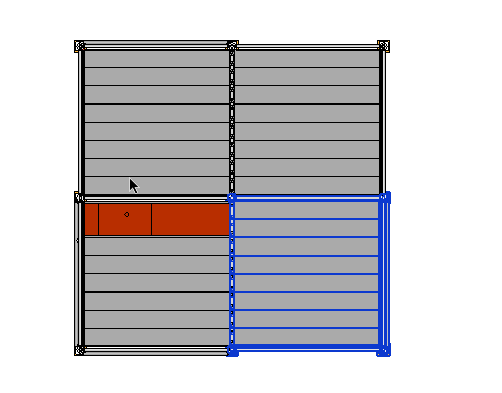
                                          selection from tp

                                          this is what is selected from another point of view
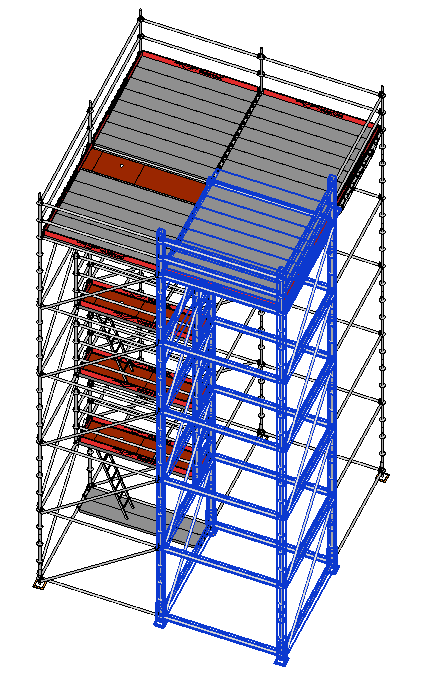
                                          selection before iselect

                                          after clicking on "iselect" button, some columns remain selected

                                          as i understand the rule (a component which is not totally visible is excluded from the selection), this shouldn't happen, no?
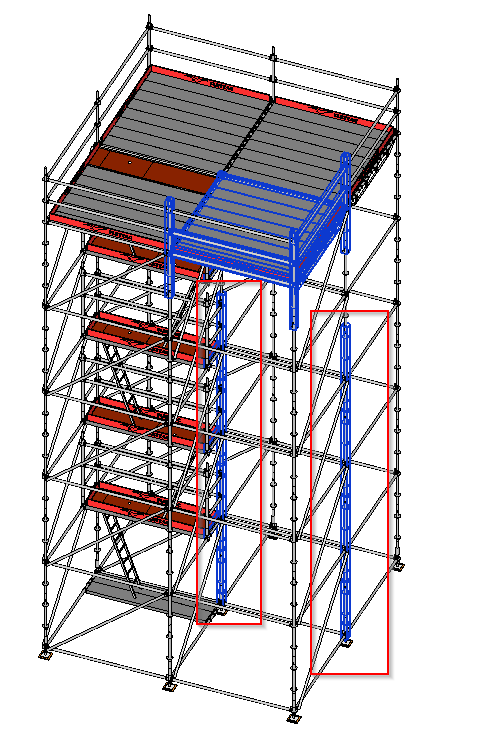

                                          selection after iselect

                                          1 Reply Last reply
                                          Reply Quote 0
                                          • pilouP
                                            pilou
                                            last edited by

                                            Seems there is a glitch! ๐Ÿ˜‰

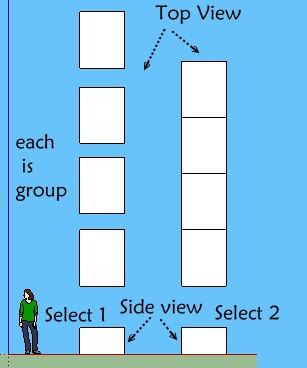
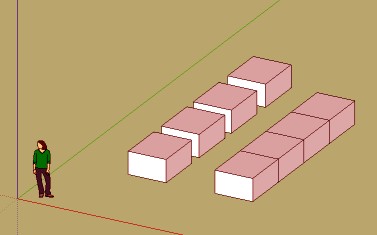
                                            Each 3d block is a group! I select in side view!

                                            Seems don't works when I all select 1 or all select 2 from left to right or right to lerft! ๐Ÿ˜ฒ

                                            All stay selected after click the black eye!(in perspective or parallal projection) ๐Ÿ˜ฎ

                                            iselect.jpg

                                            plop.jpg


                                            v6.skp

                                            Frenchy Pilou
                                            Is beautiful that please without concept!
                                            My Little site :)

                                            1 Reply Last reply
                                            Reply Quote 0

                                            Hello! It looks like you're interested in this conversation, but you don't have an account yet.

                                            Getting fed up of having to scroll through the same posts each visit? When you register for an account, you'll always come back to exactly where you were before, and choose to be notified of new replies (either via email, or push notification). You'll also be able to save bookmarks and upvote posts to show your appreciation to other community members.

                                            With your input, this post could be even better ๐Ÿ’—

                                            Register Login
                                            • 1
                                            • 2
                                            • 3
                                            • 1 / 3
                                            • First post
                                              Last post
                                            Buy SketchPlus
                                            Buy SUbD
                                            Buy WrapR
                                            Buy eBook
                                            Buy Modelur
                                            Buy Vertex Tools
                                            Buy SketchCuisine
                                            Buy FormFonts

                                            Advertisement