sketchucation logo sketchucation
    • 登入
    Oops, your profile's looking a bit empty! To help us tailor your experience, please fill in key details like your SketchUp version, skill level, operating system, and more. Update and save your info on your profile page today!
    ⚠️ Important | Libfredo 15.6b introduces important bugfixes for Fredo's Extensions Update

    Sketchup and Blender

    已排程 已置頂 已鎖定 已移動 Extensions & Applications Discussions
    extensions
    170 貼文 26 Posters 30.6k 瀏覽 26 Watching
    正在載入更多貼文
    • 從舊到新
    • 從新到舊
    • 最多點贊
    回覆
    • 在新貼文中回覆
    登入後回覆
    此主題已被刪除。只有擁有主題管理權限的使用者可以查看。
    • Rich O BrienR 離線
      Rich O Brien Moderator
      最後由 編輯

      Not really....

      You need to think the same for both. It is about good topology.

      I do think you would benefit more in trying to model this in Blender then asking when you hit problems.

      I pretty much guarantee that how you model it in Blender will transition to SU. Proper topology means easier UV mapping.

      So either model it in SU with topology in mind or vice versa.

      Download the free D'oh Book for SketchUp 📖

      1 條回覆 最後回覆 回覆 引用 0
      • soloS 離線
        solo
        最後由 編輯

        Can you show me how to model it in SU so that it translates better in Blender?

        http://www.solos-art.com

        If you see a toilet in your dreams do not use it.

        1 條回覆 最後回覆 回覆 引用 0
        • StinkieS 離線
          Stinkie
          最後由 編輯

          Couldn't you bevel the n-gons in slightly in Blender to get rid of the smoothing issues?

          1 條回覆 最後回覆 回覆 引用 0
          • Rich O BrienR 離線
            Rich O Brien Moderator
            最後由 編輯

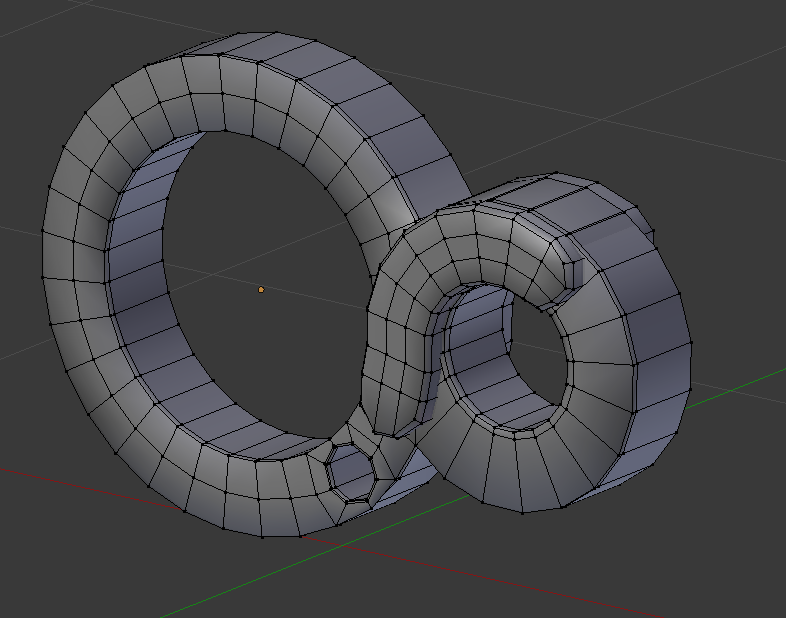
            Here's a very quick example....

            Image 1.png

            Download the free D'oh Book for SketchUp 📖

            1 條回覆 最後回覆 回覆 引用 0
            • soloS 離線
              solo
              最後由 編輯

              @rich o brien said:

              Here's a very quick example....

              [attachment=0:314utpts]<!-- ia0 -->Image 1.png<!-- ia0 -->[/attachment:314utpts]

              So what will it take to get a tutorial on how you did that?

              And another thing, what software do folks use when doing a tutorial that shows what mouse and keyboard button is pressed?

              http://www.solos-art.com

              If you see a toilet in your dreams do not use it.

              1 條回覆 最後回覆 回覆 引用 0
              • arail1A 離線
                arail1
                最後由 編輯

                I think real important plugins when considering export to sub d are RemoveLonelyVertices or Vertex Tools. Even after you've thought through what the other program wants and modeled accordingly you can end up with a lot of tris because of hidden vertices at mid line positions in SketchUp (for instance when you had a polygon intersecting another polygon and then deleted the intersection)

                Hope that helps in some way.

                1 條回覆 最後回覆 回覆 引用 0
                • pilouP 離線
                  pilou
                  最後由 編輯

                  @unknownuser said:

                  The reasons for learning Blender for me are numerous from animations, nurb modeling

                  Maybe I am wrong but seems Blender has not yet so many tools for nurbs ?

                  Frenchy Pilou
                  Is beautiful that please without concept!
                  My Little site :)

                  1 條回覆 最後回覆 回覆 引用 0
                  • soloS 離線
                    solo
                    最後由 編輯

                    @unknownuser said:

                    @unknownuser said:

                    The reasons for learning Blender for me are numerous from animations, nurb modeling

                    Maybe I am wrong but seems Blender has not yet so many tools for nurbs ?

                    http://www.solos-art.com

                    If you see a toilet in your dreams do not use it.

                    1 條回覆 最後回覆 回覆 引用 0
                    • Rich O BrienR 離線
                      Rich O Brien Moderator
                      最後由 編輯

                      Here's a good example why using n-gons in SU and then fixing them in Blender still causes havoc...
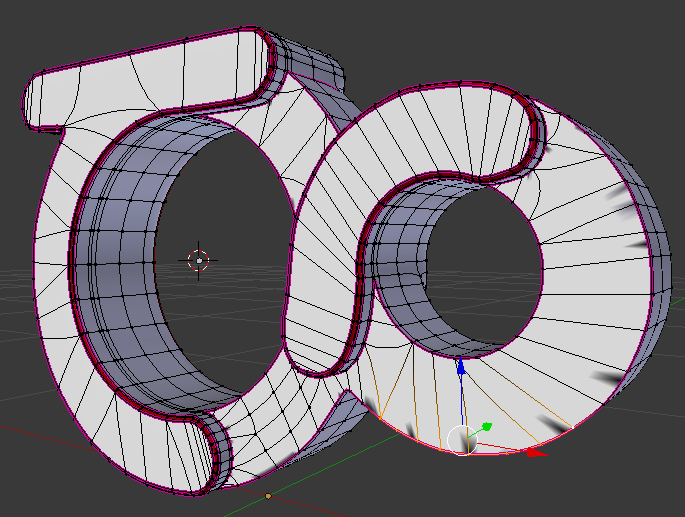

                      Image 4.png

                      Image 3.png

                      For modeling something like this logo you need to forward plan a small bit.

                      Both circles that meet in the middle must have a common amount of adjacent verts...
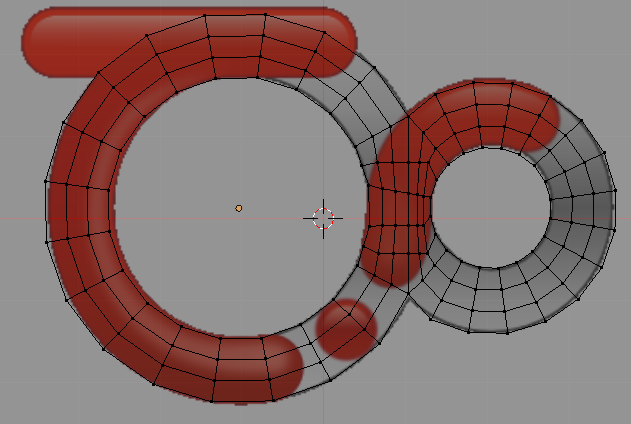
                      Image 5.png

                      Download the free D'oh Book for SketchUp 📖

                      1 條回覆 最後回覆 回覆 引用 0
                      • soloS 離線
                        solo
                        最後由 編輯

                        Rich, So how would one use SU with Blender then going forward? What I mean is Sketchup even to be considered or should one just break the ties and go Blender 100%? As it seems that the mesh SU creates is pretty useless in Blender.

                        http://www.solos-art.com

                        If you see a toilet in your dreams do not use it.

                        1 條回覆 最後回覆 回覆 引用 0
                        • Rich O BrienR 離線
                          Rich O Brien Moderator
                          最後由 編輯

                          No, it's the habit that SU creates that is the problem.

                          Is is so easy to draw circles, have incorrect topology and create n-gons in SU that the user is pretty much learning a modeling approach that goes against every convention in every other app.

                          It is not to say SU is at fault it is that the user takes the lazy approach. Hence people whining that nothing is like SU and failing to step outside the comfort zone.

                          I model most of my Blender proxies in SU because it is quicker. I don't do detail work in SU though.

                          One of 2 things will happen here. You'll either have a Eureka moment or you'll just constantly flog SU into doing something it in't meant to do...

                          I've no problem helping out while you transition but I ain't investing time when I get the impression it is already proving too non-SU.

                          The reason I adopted Blender was I needed better animation tools. But months of 'why does this SU export cause this or that' meant the progress was slow. But now I know when to open S or when to open Blender.

                          I don't have a secret I just learned when to stop in SU and when to migrate models to Blender.

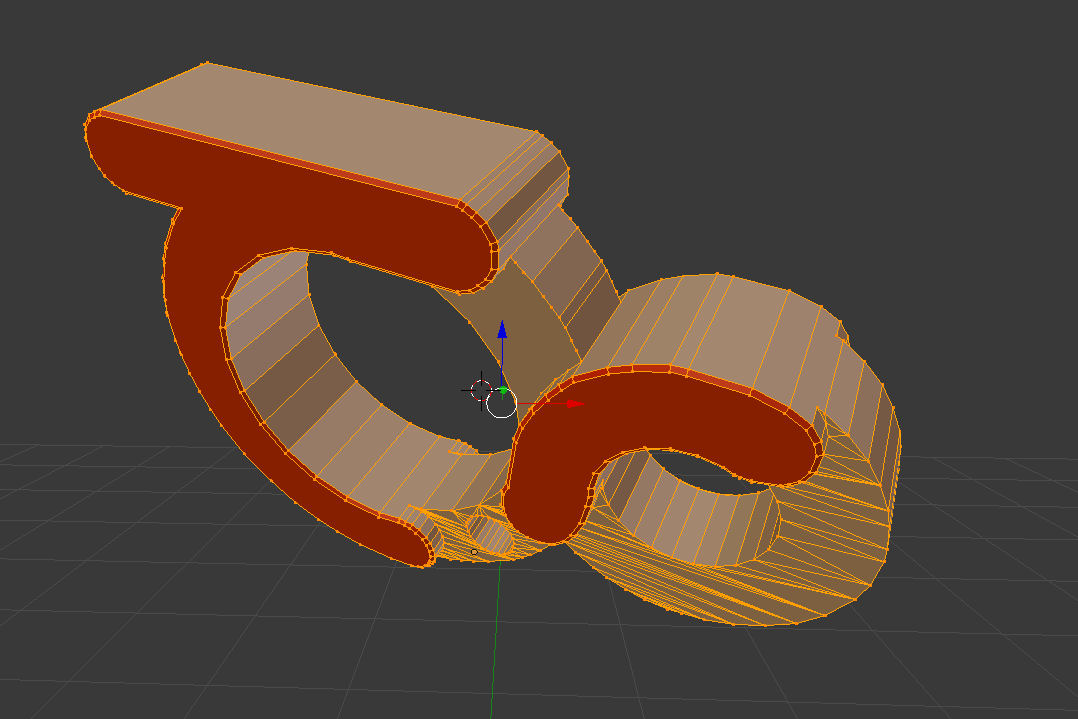
                          thea logo.skp

                          Here's what I would make in SU prior to Blender export for the sub-d work. Nothing anyone else couldn't do.

                          Download the free D'oh Book for SketchUp 📖

                          1 條回覆 最後回覆 回覆 引用 0
                          • D 離線
                            dedmin
                            最後由 編輯

                            About units in Blender - this is very confusing for new users:
                            http://www.katsbits.com/tutorials/blender/metric-imperial-units.php

                            Importing Google SketchUp files into Blender 3D - advanced:
                            http://www.katsbits.com/tutorials/blender/import-google-sketchup-kmz-models-advanced.php

                            1 條回覆 最後回覆 回覆 引用 0
                            • D 離線
                              dedmin
                              最後由 編輯

                              @solo said:

                              And another thing, what software do folks use when doing a tutorial that shows what mouse and keyboard button is pressed?
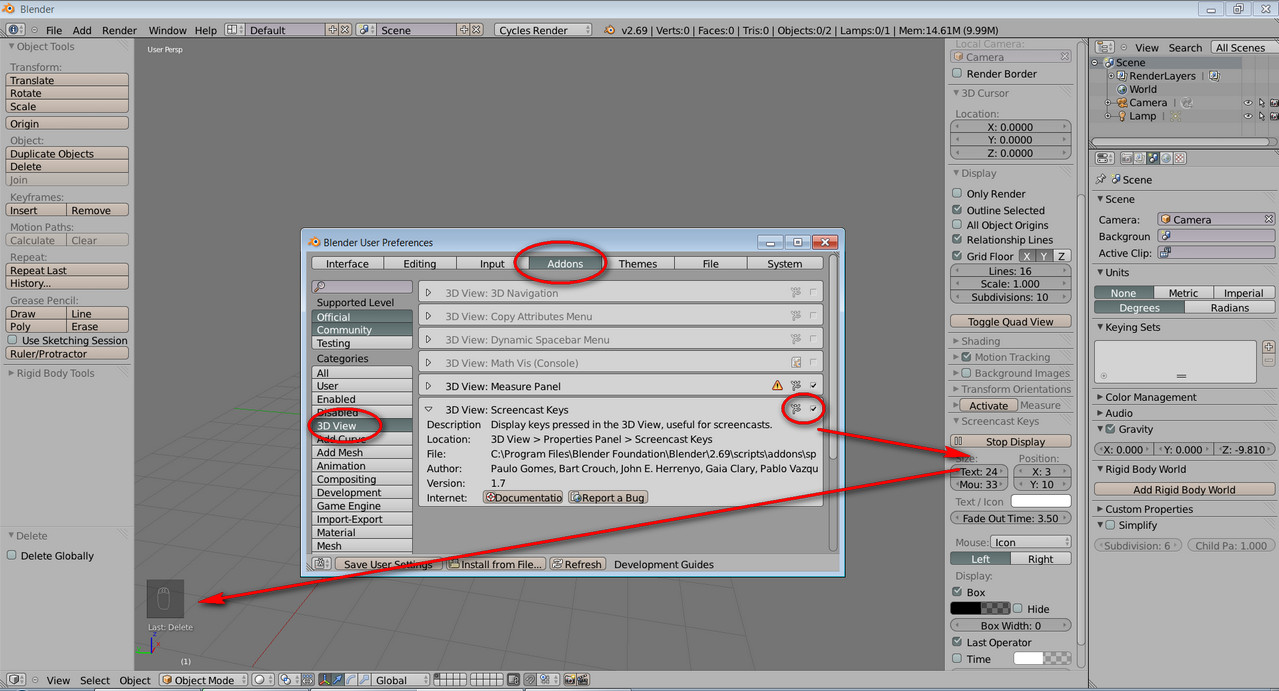
                              2013-11-04_103216.jpg

                              1 條回覆 最後回覆 回覆 引用 0
                              • michaliszissiouM 離線
                                michaliszissiou
                                最後由 編輯

                                OK, joining the club.

                                There are many reasons to turn a geometry to quads.
                                SketchUp supports n-gons based geometry.
                                Blender also supports n-gons.
                                The way to import the SUp n-gons to blender and continue to be N-gons is the Collada format.
                                Import in blender as collada then.
                                Enter edit mode, select all (A), press W menu/[remove doubles], select all again, [ctrl+N], this will turn all normals of faces outwards , in case something messed up in SUp.
                                Now you are ready to go for a nice UV unwrapping. No need to import textures from SUp (it is possible) because the SUp default unwrapping can be automatically generated in blender. It is the cubic projection.
                                The blender UV editor is one of the more powerful around and I suggest you to learn it.

                                Now, you re ready to setup a scene, lighting and go for a Cycles rendering.
                                And, more additional modeling of course.

                                1 條回覆 最後回覆 回覆 引用 0
                                • JQLJ 離線
                                  JQL
                                  最後由 編輯

                                  I tried exporting a model from SU to render in Blender, with little success. Is there a way to export cameras from SU to Blender? That was mostly where I stuck because everything was already set in SU.

                                  Thanks,

                                  JQL

                                  www.casca.pt
                                  Visit us on facebook!

                                  1 條回覆 最後回覆 回覆 引用 0
                                  • soloS 離線
                                    solo
                                    最後由 編輯

                                    @jql said:

                                    I tried exporting a model from SU to render in Blender, with little success. Is there a way to export cameras from SU to Blender? That was mostly where I stuck because everything was already set in SU.

                                    Thanks,

                                    JQL

                                    Looking at the addons in Blender there are many importers and exporters, I wonder what it will take or who it will take to write one for Sketchup, one that will support layers, groups, components, camera's and even animations.

                                    http://www.solos-art.com

                                    If you see a toilet in your dreams do not use it.

                                    1 條回覆 最後回覆 回覆 引用 0
                                    • soloS 離線
                                      solo
                                      最後由 編輯

                                      My first attempt at following a tutorial.

                                      I changed the obstacle to the Thea logo and opted to render with the Thea plugin and not Cycles as Cycles was still rendering after 15 minutes (too slow) and Thea completed it in just over 3 minutes.
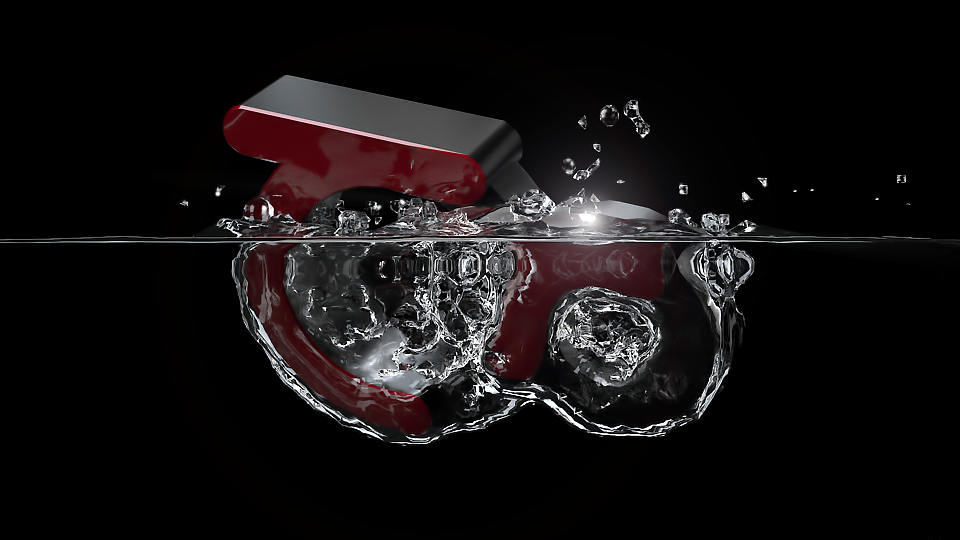
                                      blend test.png

                                      http://www.solos-art.com

                                      If you see a toilet in your dreams do not use it.

                                      1 條回覆 最後回覆 回覆 引用 0
                                      • Rich O BrienR 離線
                                        Rich O Brien Moderator
                                        最後由 編輯

                                        Winner.

                                        Show the blender mesh.

                                        Mine way to quickly learn commands is with the dynamic menu. Hit space bar while in the viewport and start typing.

                                        Download the free D'oh Book for SketchUp 📖

                                        1 條回覆 最後回覆 回覆 引用 0
                                        • soloS 離線
                                          solo
                                          最後由 編輯

                                          @rich o brien said:

                                          Winner.

                                          Show the blender mesh.

                                          Mine way to quickly learn commands is with the dynamic menu. Hit space bar while in the viewport and start typing.

                                          What is supposed to happen when you hit space, I get a window that opens but not sure what to do then.

                                          Here is the screen shot.
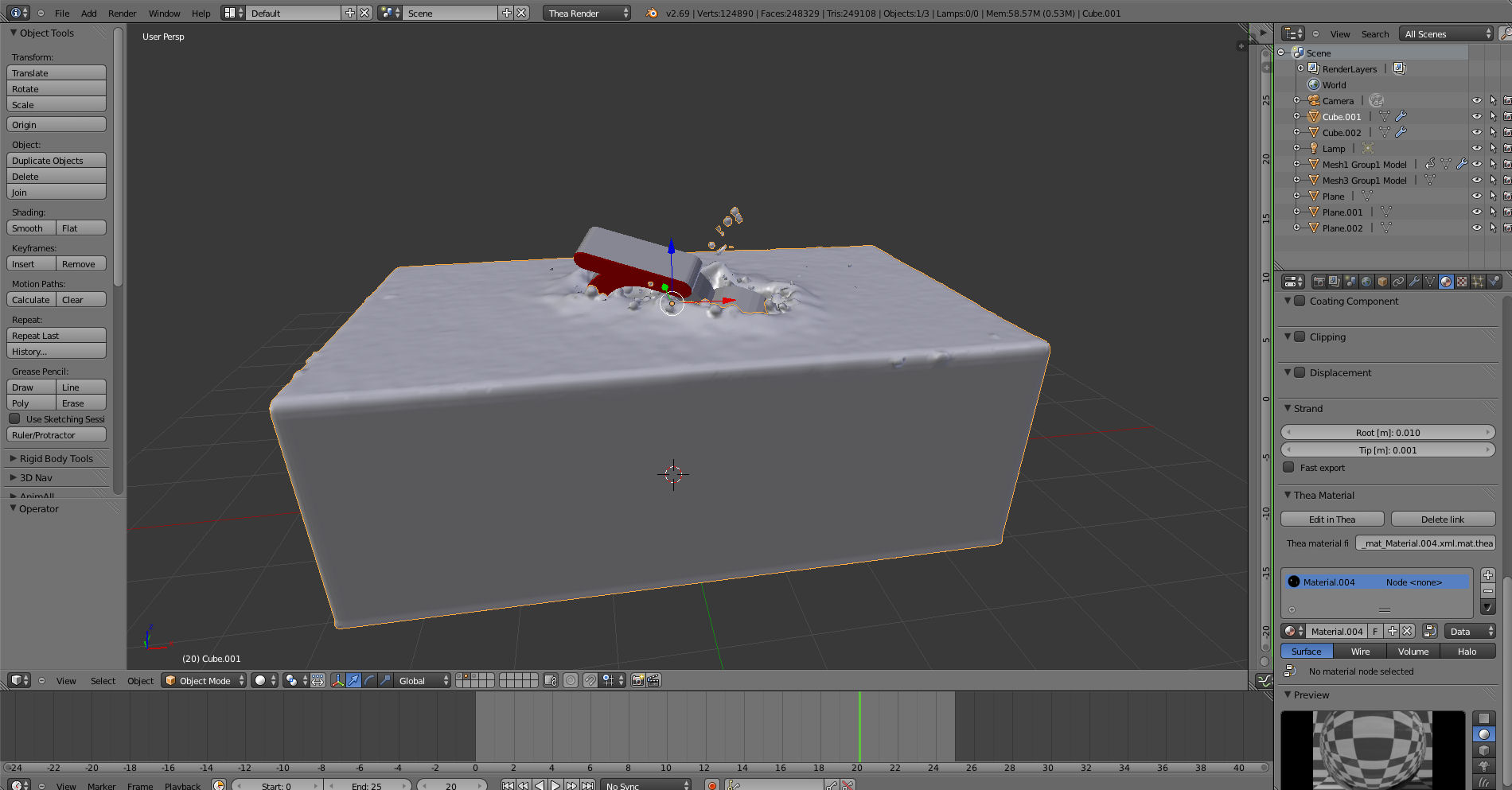
                                          blender screen1.jpg

                                          thealogoblender.jpg

                                          http://www.solos-art.com

                                          If you see a toilet in your dreams do not use it.

                                          1 條回覆 最後回覆 回覆 引用 0
                                          • Rich O BrienR 離線
                                            Rich O Brien Moderator
                                            最後由 編輯

                                            You should see this command palette...
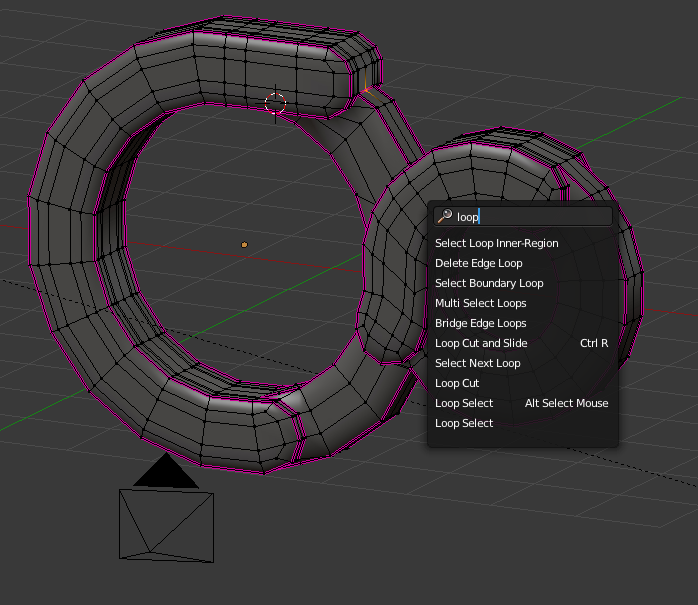
                                            Image 7.png

                                            ...here you can type a word to see what the command is...

                                            example...if you needed to merge verts hit space - type merge...
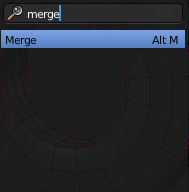
                                            Image 8.png

                                            ...and you'll see the command is Alt+M

                                            Great way to learn what is the shortcuts and the commands.

                                            I'd really like to see the Thea Logo in edit mode.

                                            Select it, hit edit and then hit / on the numpad to go into local view.

                                            Take a screengrab while in edit mode so we can see the mesh.

                                            Download the free D'oh Book for SketchUp 📖

                                            1 條回覆 最後回覆 回覆 引用 0
                                            • 1
                                            • 2
                                            • 3
                                            • 4
                                            • 5
                                            • 6
                                            • 7
                                            • 8
                                            • 9
                                            • 5 / 9
                                            • 第一個貼文
                                              最後的貼文
                                            Buy SketchPlus
                                            Buy SUbD
                                            Buy WrapR
                                            Buy eBook
                                            Buy Modelur
                                            Buy Vertex Tools
                                            Buy SketchCuisine
                                            Buy FormFonts

                                            Advertisement