sketchucation logo sketchucation
    • 登入
    Oops, your profile's looking a bit empty! To help us tailor your experience, please fill in key details like your SketchUp version, skill level, operating system, and more. Update and save your info on your profile page today!
    ⚠️ Important | Libfredo 15.6b introduces important bugfixes for Fredo's Extensions Update

    Sketchup and Blender

    已排程 已置頂 已鎖定 已移動 Extensions & Applications Discussions
    extensions
    170 貼文 26 Posters 30.6k 瀏覽 26 Watching
    正在載入更多貼文
    • 從舊到新
    • 從新到舊
    • 最多點贊
    回覆
    • 在新貼文中回覆
    登入後回覆
    此主題已被刪除。只有擁有主題管理權限的使用者可以查看。
    • soloS 離線
      solo
      最後由 編輯

      Michalis, is this a low poly subdivision modifier with a displacement texture?

      http://www.solos-art.com

      If you see a toilet in your dreams do not use it.

      1 條回覆 最後回覆 回覆 引用 0
      • michaliszissiouM 離線
        michaliszissiou
        最後由 編輯

        Yeah,
        well, the first one is a very low poly box modeling ~10k faces. Any detail comes form normal (tangent space) maps.
        The second one is dubdivided a lot and displaced by displ maps. Basically a few cylinders with loops on them
        Both normal or displacement maps have been baked- constructed by baking a relief modeling, on a single quad face.
        You basically model a relief like panel, you place a second one quad object in front of it, you ask blender to bake displ or nor-maps to "active". (active is the last you select, if interested, I could post a workaround on this)
        But in the end, you have this pre baked map, you just use the UV editor to align it to the existed topology.
        Here comes the tricky part, the powerful UV editor of blender.
        From a certain perspective, this is reverse engineering, the goal is to have a very low poly base with all the maps on it. Easy to export in any renderer. Or another application.
        It is a game, a kind of a generator, a conceptual art. Still, it is real geometry. Alternatively, an inspiration for other constructions. It became an obsession LOL, a friend named it "loopinitis" decease.

        1 條回覆 最後回覆 回覆 引用 0
        • soloS 離線
          solo
          最後由 編輯

          @michaliszissiou said:

          Yeah,
          well, the first one is a very low poly box modeling ~10k faces. Any detail comes form normal (tangent space) maps.
          The second one is dubdivided a lot and displaced by displ maps. Basically a few cylinders with loops on them
          Both normal or displacement maps have been baked- constructed by baking a relief modeling, on a single quad face.
          You basically model a relief like panel, you place a second one quad object in front of it, you ask blender to bake displ or nor-maps to "active". (active is the last you select, if interested, I could post a workaround on this)
          But in the end, you have this pre baked map, you just use the UV editor to align it to the existed topology.
          Here comes the tricky part, the powerful UV editor of blender.
          From a certain perspective, this is reverse engineering, the goal is to have a very low poly base with all the maps on it. Easy to export in any renderer. Or another application.
          It is a game, a kind of a generator, a conceptual art. Still, it is real geometry. Alternatively, an inspiration for other constructions. It became an obsession LOL, a friend named it "loopinitis" decease.

          Is there a walk through some place or a video tutorial, I'd really like to learn this and another thing, say I have a shape created in meta modeling and convert it to regular mesh will this process work with it?

          http://www.solos-art.com

          If you see a toilet in your dreams do not use it.

          1 條回覆 最後回覆 回覆 引用 0
          • olisheaO 離線
            olishea
            最後由 編輯

            Michalis is the Gaudi of Blender! 😄

            oli

            1 條回覆 最後回覆 回覆 引用 0
            • michaliszissiouM 離線
              michaliszissiou
              最後由 編輯

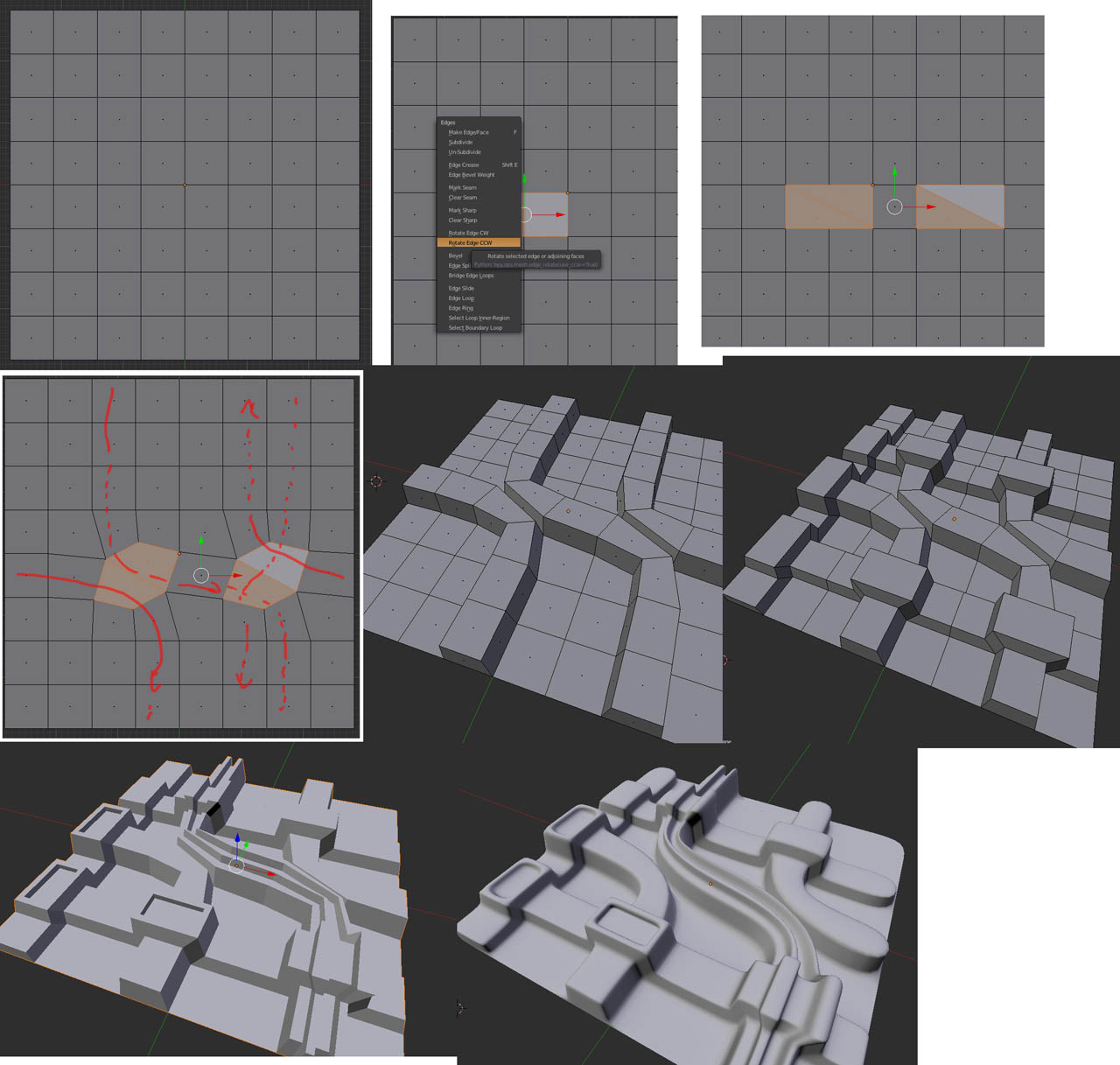
              Simple ideas, working on a grid
              Loops, extrudes (insets) and subdivisions.

              Alternatively, if these loops can follow a geometrical displacement panel-map, I mean, if the selected face loop can be unwrapped as an aliened quad row on a geometrical pattern…. such a displacement will follow the topology.
              This is the basic idea. Too much work? Blender UV editor can do it automatically with 1-2 clicks.

              Screen Shot 2013-11-10 at 8.07.49 PM.jpg

              1 條回覆 最後回覆 回覆 引用 0
              • michaliszissiouM 離線
                michaliszissiou
                最後由 編輯

                @unknownuser said:

                Is there a walk through some place or a video tutorial, I'd really like to learn this and another thing, say I have a shape created in meta modeling and convert it to regular mesh will this process work with it?

                A video tut?
                Oliver Villar did a tutorial based on this. It explains only the basics though. There is much more potential on this method.
                http://www.youtube.com/watch?v=3wyzvsmfia0&feature=youtu.be

                1 條回覆 最後回覆 回覆 引用 0
                • L 離線
                  Lobster
                  最後由 編輯

                  I must admit i did not really go for tutorials when i first started learning blender.

                  Even if this modelling time lapse isn't what you want to model in Blender i think it says more about modelling, approaches to modelling and retopology (after the z brush bit) than quite a few of the tutorials i have subsequently watched.

                  If in doubt just start modelling a hand in mid air and end up with the right number of edges to join to the arm! Using the sculpt brushes to shape the low poly mesh e.t.c.

                  it was definitely, mind blowing.

                  Regards

                  1 條回覆 最後回覆 回覆 引用 0
                  • Rich O BrienR 離線
                    Rich O Brien Moderator
                    最後由 編輯

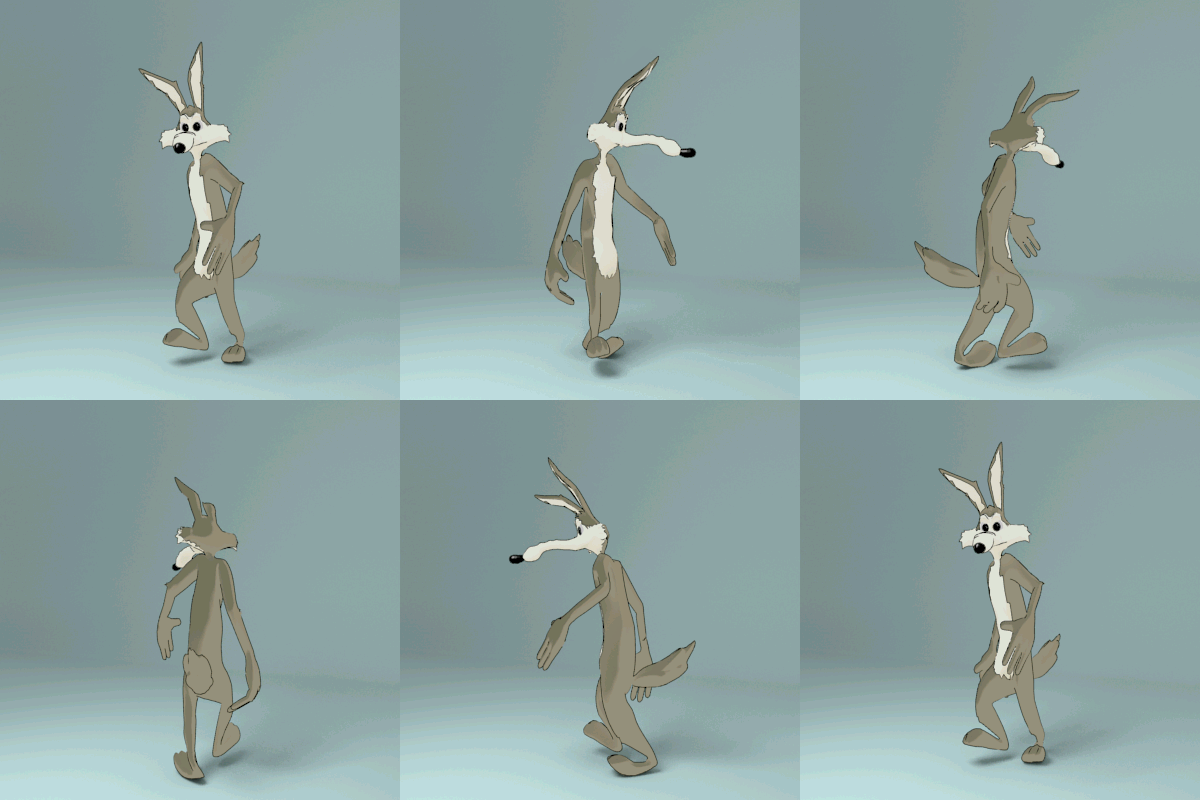
                    Had some fun with Pete's model...

                    COYOTE-01.jpg

                    coyote.gif

                    Properly meshed and rigged this will make for some fun loony tune time 👍

                    Download the free D'oh Book for SketchUp 📖

                    1 條回覆 最後回覆 回覆 引用 0
                    • pilouP 離線
                      pilou
                      最後由 編輯

                      Funny : a French Blender Guru is named CoyHot! 😎
                      Site in English 😉

                      http://www.coyhot.com/Images/Enter_Logo.jpg

                      Frenchy Pilou
                      Is beautiful that please without concept!
                      My Little site :)

                      1 條回覆 最後回覆 回覆 引用 0
                      • michaliszissiouM 離線
                        michaliszissiou
                        最後由 編輯

                        we should still keep in mind how rapidly Cycles renderer is developing, right?
                        I noticed this artwork today, byn blender artist Spelle.

                        http://blenderartists.org/forum/attachment.php?attachmentid=271759&d=1384961721

                        1 條回覆 最後回覆 回覆 引用 0
                        • arail1A 離線
                          arail1
                          最後由 編輯

                          That is an incredibly impressive image!

                          1 條回覆 最後回覆 回覆 引用 0
                          • Rich O BrienR 離線
                            Rich O Brien Moderator
                            最後由 編輯

                            Link Preview Image
                            Sneak Peek: Blender Toolbar Tabs

                            Campbell Barton demonstrates an early version of tabs for the Blender user interface. Remember this is still very much work in progress! I like what I’m seeing…

                            favicon

                            BlenderNation (www.blendernation.com)

                            New UI coming

                            Download the free D'oh Book for SketchUp 📖

                            1 條回覆 最後回覆 回覆 引用 0
                            • olisheaO 離線
                              olishea
                              最後由 編輯

                              About bloody time! This is the only thing that holds me back from being competent with blender.

                              oli

                              1 條回覆 最後回覆 回覆 引用 0
                              • andybotA 離線
                                andybot
                                最後由 編輯

                                @rich o brien said:

                                Link Preview Image
                                Sneak Peek: Blender Toolbar Tabs

                                Campbell Barton demonstrates an early version of tabs for the Blender user interface. Remember this is still very much work in progress! I like what I’m seeing…

                                favicon

                                BlenderNation (www.blendernation.com)

                                New UI coming

                                Looks like a nice evolution. Not sure Oli that it'll necessarily make Blender easier to learn. From what I could tell it doesn't fundamentally change anything about the UI, just makes it a bit easier to navigate.

                                http://charlottesvillearchitecturalrendering.com/

                                1 條回覆 最後回覆 回覆 引用 0
                                • pilouP 離線
                                  pilou
                                  最後由 編輯

                                  It's a pity that was not make from the beginning! 😒

                                  Frenchy Pilou
                                  Is beautiful that please without concept!
                                  My Little site :)

                                  1 條回覆 最後回覆 回覆 引用 0
                                  • Rich O BrienR 離線
                                    Rich O Brien Moderator
                                    最後由 編輯

                                    The level of commits for the next Blender is growing...

                                    Render time remaining now added

                                    Themeable UV editor

                                    Cycles speed improvement

                                    OSL improvements.

                                    Download the free D'oh Book for SketchUp 📖

                                    1 條回覆 最後回覆 回覆 引用 0
                                    • michaliszissiouM 離線
                                      michaliszissiou
                                      最後由 編輯

                                      Christmas coming.
                                      A nice blender tutorial from Andrew Price
                                      I found it interesting, a good presentation of Sapling Tree blender editor.
                                      Some particles system
                                      Color indexing and some PPros (compositor)
                                      https://www.youtube.com/watch?v=5Yd7ad08e54

                                      1 條回覆 最後回覆 回覆 引用 0
                                      • pilouP 離線
                                        pilou
                                        最後由 編輯

                                        Happy new year! 😎
                                        This guy is very good in Blender and speeching! ☀
                                        A real entertainer! 👍

                                        Frenchy Pilou
                                        Is beautiful that please without concept!
                                        My Little site :)

                                        1 條回覆 最後回覆 回覆 引用 0
                                        • michaliszissiouM 離線
                                          michaliszissiou
                                          最後由 編輯

                                          Bisect tool in blender
                                          http://www.blendernation.com/2013/11/28/quick-tip-creating-stones-with-the-bisect-tool-part-1/

                                          1 條回覆 最後回覆 回覆 引用 0
                                          • michaliszissiouM 離線
                                            michaliszissiou
                                            最後由 編輯

                                            A wonderful Blender presentation.
                                            Have fun, it is a 2:20 hours video.

                                            1 條回覆 最後回覆 回覆 引用 0
                                            • 1
                                            • 2
                                            • 3
                                            • 4
                                            • 5
                                            • 8
                                            • 9
                                            • 1 / 9
                                            • 第一個貼文
                                              最後的貼文
                                            Buy SketchPlus
                                            Buy SUbD
                                            Buy WrapR
                                            Buy eBook
                                            Buy Modelur
                                            Buy Vertex Tools
                                            Buy SketchCuisine
                                            Buy FormFonts

                                            Advertisement