[Plugin][$] JointPushPull Interactive - v4.9a - 02 Apr 25




-
Can anyone suggest how to avoid the following Ruby error that occurs when trying to activate Joint Push Pull Interactive 4.4e (with Libfredo6 12.5a, on macOS 10.14.6 with SketchUp Pro 2018)? I get a similar error when trying to invoke other Fredo6 extensions.
Error: #<LoadError: dlopen(/Users/Tom/Library/Application Support/SketchUp 2018/SketchUp/Plugins/SketchUcation/SCFLicense/Mac_22/SUEX_SCFLibrary.bundle, 9): no suitable image found. Did find:
/Users/Tom/Library/Application Support/SketchUp 2018/SketchUp/Plugins/SketchUcation/SCFLicense/Mac_22/SUEX_SCFLibrary.bundle: cannot load 'SUEX_SCFLibrary.bundle' (load command 0x80000034 is unknown)
/Users/Tom/Library/Application Support/SketchUp 2018/SketchUp/Plugins/SketchUcation/SCFLicense/Mac_22/SUEX_SCFLibrary.bundle: cannot load 'SUEX_SCFLibrary.bundle' (load command 0x80000034 is unknown) - /Users/Tom/Library/Application Support/SketchUp 2018/SketchUp/Plugins/SketchUcation/SCFLicense/Mac_22/SUEX_SCFLibrary.bundle>
/Applications/SketchUp 2018/SketchUp.app/Contents/Frameworks/Ruby.framework/Versions/2.2/lib/ruby/2.2.0/rubygems/core_ext/kernel_require.rb:54:inrequire' /Applications/SketchUp 2018/SketchUp.app/Contents/Frameworks/Ruby.framework/Versions/2.2/lib/ruby/2.2.0/rubygems/core_ext/kernel_require.rb:54:inrequire'
/users/tom/library/application support/sketchup 2018/sketchup/plugins/sketchucation/scflicense/scflicenseruby.rbe:156:inload_binary' /users/tom/library/application support/sketchup 2018/sketchup/plugins/sketchucation/scflicense/scflicenseruby.rbe:71:indynamic_token'
/users/tom/library/application support/sketchup 2018/sketchup/plugins/fredo6_!libfredo6/lib6plugin.rbe:1688:intem_context' /users/tom/library/application support/sketchup 2018/sketchup/plugins/fredo6_!libfredo6/lib6plugin.rbe:1656:intem_launcher'
/users/tom/library/application support/sketchup 2018/sketchup/plugins/fredo6_!libfredo6/lib6plugin.rbe:119:inlaunch_action' /users/tom/library/application support/sketchup 2018/sketchup/plugins/fredo6_!libfredo6/lib6plugin.rbe:244:inlaunch_action'
/users/tom/library/application support/sketchup 2018/sketchup/plugins/fredo6_jointpushpull/bootstrap_jointpushpull.rbe:87:inlaunch_action' /users/tom/library/application support/sketchup 2018/sketchup/plugins/fredo6_jointpushpull/bootstrap_jointpushpull.rbe:135:inblock in declare_command'
/users/tom/library/application support/sketchup 2018/sketchup/plugins/fredo6_!libfredo6/lib6plugin.rbe:1407:incall' /users/tom/library/application support/sketchup 2018/sketchup/plugins/fredo6_!libfredo6/lib6plugin.rbe:1407:incommand_invoke'
/users/tom/library/application support/sketchup 2018/sketchup/plugins/fredo6_!libfredo6/lib6plugin.rbe:1388:inblock (2 levels) in build_config_commands' /users/tom/library/application support/sketchup 2018/sketchup/plugins/fredo6_!libfredo6/lib6traductor.rbe:1378:incall'
/users/tom/library/application support/sketchup 2018/sketchup/plugins/fredo6_!libfredo6/lib6traductor.rbe:1378:inblock in add_command' SketchUp:1:incall'In case it matters, I have the sketchuCation Extension Store 4.2.3 extension installed, but it is not fully working. I can bring up the Extension Store UI and do various things, but downloading an extension fails (ZIP error). I have been in communication with TIG about that, but it remains unresolved.
I did successfully use Joint Push Pull Interactive a couple of weeks ago, I think before March 1 2022 when Fredo's licensing rules were changed. I have a license file for all of Fredo's extensions, but I cannot install any of the licenses due to similar Ruby errors when activating the License functions in Fredo's extensions (and possibly the sketchuCation Extension Store extension problems).
- Tom -
-
-
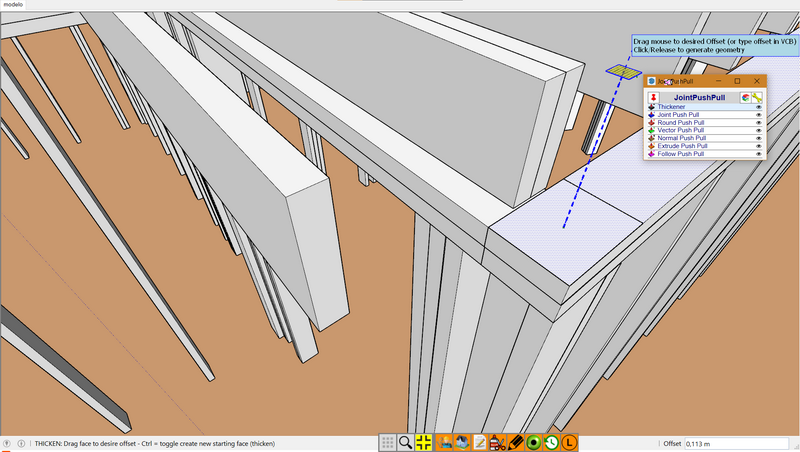
The attached skp file does not correspond to the picture.
So, difficult to know which face(s) you wish to push pull...
Also, could you update to the latest version of JointPushPull (v4.4e).
-
Any thoughts on the load error traceback that I posted a few replies above?
-
@tdahl said:
Any thoughts on the load error traceback that I posted a few replies above?
We are checking if the Licensing system works on Mojave. We'll come back with an update.... Sorry for inconvenience.
-
I just saw a post on the SketchUp Forms that a new version (4.2.5) of the SketchuCation Extension Store extension has been released, and I see on these forums that the release notes for v4.2.5 mention a fix for macOS Mojave (which I use). So I removed v4.2.3 that I had, restarted SketchUp, installed v4.2.5, and now the License... function works successfully in the various Fredo extensions that I have installed (macOS 10.14.6, SketchUp 2018).
Thank you @TIG and @fredo6.
-
I just downloaded this extension but it says that license is over and i have to pay? I haven't even used it once and it said that it was free? Is there anything i can do about it?
-
@iaira said:
Is there anything i can do about it?
Maybe. What version of SketchUp are you actually using? Your profile indicates a version that does not exist.
-
@iaira said:
I just downloaded this extension but it says that license is over and i have to pay? I haven't even used it once and it said that it was free? Is there anything i can do about it?
Did you already use it on the same computer before?
-
-
@fredo6 said:
@iaira said:
I just downloaded this extension but it says that license is over and i have to pay? I haven't even used it once and it said that it was free? Is there anything i can do about it?
Did you already use it on the same computer before?
No it was the first time I've downloaded fredo6 library and joint push pull extension. I've never encountered such a license problem before. what a bummer, it really looks like a great extension to simplify tasks.
-
Hey I just downloaded and I cant find the plugin is nowhere and I did exactly what the tutorial said.
-
I just purchased the license for this.
the receit is in my email
So how do I get my sketchup make 2017 to recognize the license......
After paying for the extention sketucation does not tell me anything. The only receit is in my email.
I tried clicking on one of the join push pull icons and I got a window with a button saying manage license and I clicks and another window pops up saying I should validate license
What exactly am I to validate.
What i have in my email is like a receit of payment.
Is there like a code or something that I have to use?
Where do i get my paid license file?? -
When you buy an extension's license your might get a PayPal receipt by email, but you should also get an email containing a 'license' file for that extension...
Download and save the license file to somewhere safe on your computer [I have a special folder for licenses in My Documents].
Check your spam-folder in case your email set up is overly cautious...
Next you need to manage your license via the menu item that's listed under the extension's menu entry...
The dialog's validate button click opens a navigator, with that you find the license file, in its saved location, ans select it.
It should then be validated for that extension, and the dialog should change to show that the extension is licensed... -
Hello, I'm trying to purchase the join push tool, but when it directs me to the payment checkout I put the card information and click on pay now, the page refresh and nothing more happens, did it twice and still no purchased happen! Plz any help ?
-
We are exchanging PMs with Mimom about the issue.
-
do I have to make a payment to use this?
-
@dharma26 said:
do I have to make a payment to use this?
Yes. Joint Push/Pull requires a paid license. See the pinned thread here:
https://sketchucation.com/forums/viewtopic.php?f=323&t=74668
-
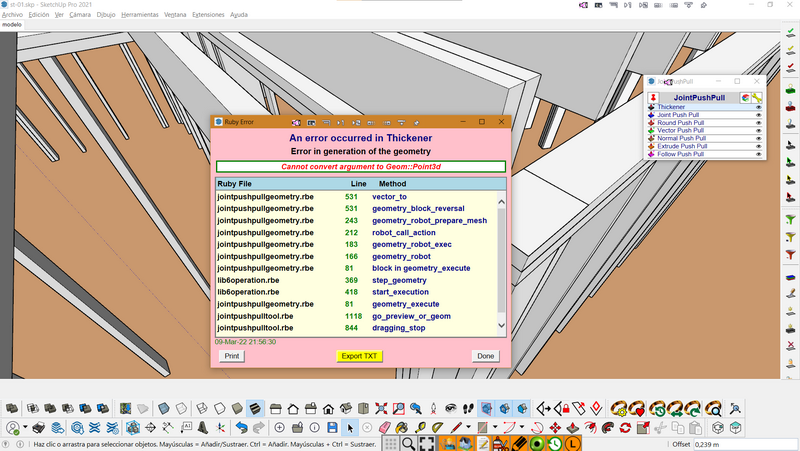
Borders' option in the Joint Push Pull plugin missing please fix it by tomorrow. il be checking out. I have a customer who waits and now I'm stuck with that error






Advertisement