sketchucation logo sketchucation
    • Login
    Oops, your profile's looking a bit empty! To help us tailor your experience, please fill in key details like your SketchUp version, skill level, operating system, and more. Update and save your info on your profile page today!
    ⚠️ Update | Sketchucation Tools 5.0.8 released with licensing improvements and bugfixes Download

    [Plugin][$] JointPushPull Interactive - v4.9a - 02 Apr 25


    Scheduled Pinned Locked Moved Plugins
    619 Posts 156 Posters 938.1k Views 155 Watching
    Loading More Posts
    • Oldest to Newest
    • Newest to Oldest
    • Most Votes
    Reply
    • Reply as topic
    Log in to reply
    This topic has been deleted. Only users with topic management privileges can see it.
    • Dave RD
      Dave R
      last edited by

      @ahmed0007 said:

      Getting a bugsplat... any solution?

      You'd need to provide some useful information to be able to diagnose the problem and find a solution. Share the SKP file and the values you are trying to use.

      Etaoin Shrdlu

      %

      (THERE'S NO PLACE LIKE)

      G28 X0.0 Y0.0 Z0.0

      M30

      %

      1 Reply Last reply
      Reply Quote 0
      • A
        Ahmed0007
        last edited by

        @dave r said:

        @ahmed0007 said:

        Getting a bugsplat... any solution?

        You'd need to provide some useful information to be able to diagnose the problem and find a solution. Share the SKP file and the values you are trying to use.

        here are:


        ezgif-2-12c249956a58.gif


        J.skp

        1 Reply Last reply
        Reply Quote 0
        • Dave RD
          Dave R
          last edited by

          I don't have any problems with your file in SU2019.
          Random PushPull.gif
          Click on the picture to see it move.

          Make sure have the current version installed along with the current version of LibFredo6 and make sure you installed SketchUp correctly. That is, you right clicked on the installer and selected Run as administrator from the context menu.

          Etaoin Shrdlu

          %

          (THERE'S NO PLACE LIKE)

          G28 X0.0 Y0.0 Z0.0

          M30

          %

          1 Reply Last reply
          Reply Quote 0
          • A
            Ahmed0007
            last edited by

            @dave r said:

            I don't have any problems with your file in SU2019.
            [attachment=0:22w16jj0]<!-- ia0 -->Random PushPull.gif<!-- ia0 -->[/attachment:22w16jj0]
            Click on the picture to see it move.

            Make sure have the current version installed along with the current version of LibFredo6 and make sure you installed SketchUp correctly. That is, you right clicked on the installer and selected Run as administrator from the context menu.

            yesterday i installed both JPP and Fredo6lib
            everything is up to date
            watch this https://streamable.com/oqz8g

            1 Reply Last reply
            Reply Quote 0
            • fredo6F
              fredo6
              last edited by

              I am unable to reproduce the problem either....

              Do you get it always?

              Fredo

              1 Reply Last reply
              Reply Quote 0
              • A
                Ahmed0007
                last edited by

                and latest version of JPP is working fine with SU2017

                1 Reply Last reply
                Reply Quote 0
                • A
                  Ahmed0007
                  last edited by

                  @fredo6 said:

                  I am unable to reproduce the problem either....

                  Do you get it always?

                  Fredo

                  Thanks for reply

                  i haven't used random push pull a lot.
                  i found an old version of JPP (v3.6a) this also give me bugsplat screen. in su19
                  watch here : http://bit.ly/31SyEk5

                  Edit ; and latest version of JPP is working fine with SU2017

                  1 Reply Last reply
                  Reply Quote 0
                  • Dave RD
                    Dave R
                    last edited by

                    You never answered my question about proper installation of SketchUp. Did you install SketchUp 2018 and 2019 correctly?

                    Etaoin Shrdlu

                    %

                    (THERE'S NO PLACE LIKE)

                    G28 X0.0 Y0.0 Z0.0

                    M30

                    %

                    1 Reply Last reply
                    Reply Quote 0
                    • A
                      Ahmed0007
                      last edited by

                      @dave r said:

                      You never answered my question about proper installation of SketchUp. Did you install SketchUp 2018 and 2019 correctly?

                      sorry i don't remember that how i had installed.
                      but give main an hour to reinstall as you said.

                      1 Reply Last reply
                      Reply Quote 0
                      • TIGT
                        TIG Moderator
                        last edited by

                        You do not need to 'reinstall'.
                        Login as your normal Windows user-account.
                        Ensure SketchUp is closed.
                        Find the SketchUp installer file's exe icon - it's probably in your Downloads folder.
                        Then select it, right-click > context-menu > "Run as administrator"
                        When prompted choose "Repair"
                        Done.

                        It will not harm your existing set up - just 'repair' it, if that is necessary

                        TIG

                        1 Reply Last reply
                        Reply Quote 0
                        • A
                          Ahmed0007
                          last edited by

                          @tig said:

                          You do not need to 'reinstall'.
                          Login as your normal Windows user-account.
                          Ensure SketchUp is closed.
                          Find the SketchUp installer file's exe icon - it's probably in your Downloads folder.
                          Then select it, right-click > context-menu > "Run as administrator"
                          When prompted choose "Repair"
                          Done.

                          It will not harm your existing set up - just 'repair' it, if that is necessary

                          oh! Thanks 👍

                          1 Reply Last reply
                          Reply Quote 0
                          • A
                            Ahmed0007
                            last edited by

                            @dave r said:

                            You never answered my question about proper installation of SketchUp. Did you install SketchUp 2018 and 2019 correctly?

                            i have done proper installation of SketchUp.
                            and i have still same issue.

                            1 Reply Last reply
                            Reply Quote 0
                            • fredo6F
                              fredo6
                              last edited by

                              @ahmed0007 said:

                              i have done proper installation of SketchUp.
                              and i have still same issue.

                              Since the bugsplat is reproducible on your environment and is not on Dave's or mine, there must be something on your side, possibly a conflict with another plugin (maybe a redefinition of random methods).

                              If you have time, could you remove suspicious plugins, in general not mainstream, and check if you get the bug splat.

                              Many thanks

                              Fredo

                              1 Reply Last reply
                              Reply Quote 0
                              • A
                                Ahmed0007
                                last edited by

                                @fredo6 said:

                                @ahmed0007 said:

                                i have done proper installation of SketchUp.
                                and i have still same issue.

                                Since the bugsplat is reproducible on your environment and is not on Dave's or mine, there must be something on your side, possibly a conflict with another plugin (maybe a redefinition of random methods).

                                If you have time, could you remove suspicious plugins, in general not mainstream, and check if you get the bug splat.

                                Many thanks

                                Fredo

                                i already tried with only JPP and fredoLib installed. but this also not work.
                                but you're right there is something wrong with my pc.
                                today i tested JPP on my brother pc and it's working fine there.
                                i don't know what i should do to fix this issue.
                                reinstall windows?
                                any suggestion?
                                and Thanks for your time.

                                1 Reply Last reply
                                Reply Quote 0
                                • fredo6F
                                  fredo6
                                  last edited by

                                  No need to reinstall Windows...

                                  Did you try with another model file?

                                  Also, can you confirm that

                                  • you get the bugsplat only when using the Random feature of JPP
                                  • whether this happens for both Normal and Joint tools (since both have a random option)

                                  Fredo

                                  1 Reply Last reply
                                  Reply Quote 0
                                  • A
                                    Ahmed0007
                                    last edited by

                                    @fredo6 said:

                                    No need to reinstall Windows...

                                    Did you try with another model file?

                                    Also, can you confirm that

                                    • you get the bugsplat only when using the Random feature of JPP
                                    • whether this happens for both Normal and Joint tools (since both have a random option)

                                    Fredo

                                    with all JPP tools and with any model
                                    Video : https://streamable.com/upjw5

                                    1 Reply Last reply
                                    Reply Quote 0
                                    • Dave RD
                                      Dave R
                                      last edited by

                                      When you get the Bug Splats are you sending them in with your e-mail address attached? As a licensed SketchUp Pro user with up-to-date Maintenance and Support, you could file a ticket with their Technical Support folks and ask them to look at the Bug Splat reports and decipher what is happening to cause the splat. At this point, since you seem to be the only one having a problem and we can't reproduce the Bug Splats even with your file, more information is needed.

                                      Etaoin Shrdlu

                                      %

                                      (THERE'S NO PLACE LIKE)

                                      G28 X0.0 Y0.0 Z0.0

                                      M30

                                      %

                                      1 Reply Last reply
                                      Reply Quote 0
                                      • A
                                        Ahmed0007
                                        last edited by

                                        @ahmed0007 said:

                                        Getting a bugsplat when trying to change the random push pull values. in sketchup 2019 and 18
                                        any solution?

                                        problem fixed after doing following steps:

                                        Uninstall sketchup (2019 and 18) with revo uninstall (also delete Leftovers items and registry files)

                                        Reinstall only su19
                                        after opening first time this give me this error "mfc140u.dll" Missing

                                        install Visual C++ Redistributable for Visual Studio 2015
                                        and
                                        uninstall Visual C++ Redistributable for Visual Studio 2017

                                        Done!

                                        Thank you Fredo6 and Dave R for response.

                                        1 Reply Last reply
                                        Reply Quote 0
                                        • fredo6F
                                          fredo6
                                          last edited by

                                          Glad to see that it now works for you.

                                          Still, this is puzzling, and I don't really see why JointPushPull would specifically crash in relation to the version of C++, since it is pure Ruby.

                                          1 Reply Last reply
                                          Reply Quote 0
                                          • BoxB
                                            Box
                                            last edited by

                                            Hi Fredo,
                                            I was just doing a gif to show something in JPP and noticed it breaks the dimension connection.
                                            Checked 2018,19,20.
                                            FredoScale for example doesn't break the connection.

                                            Not sure if it has always been that way and I just don't remember it being like that.
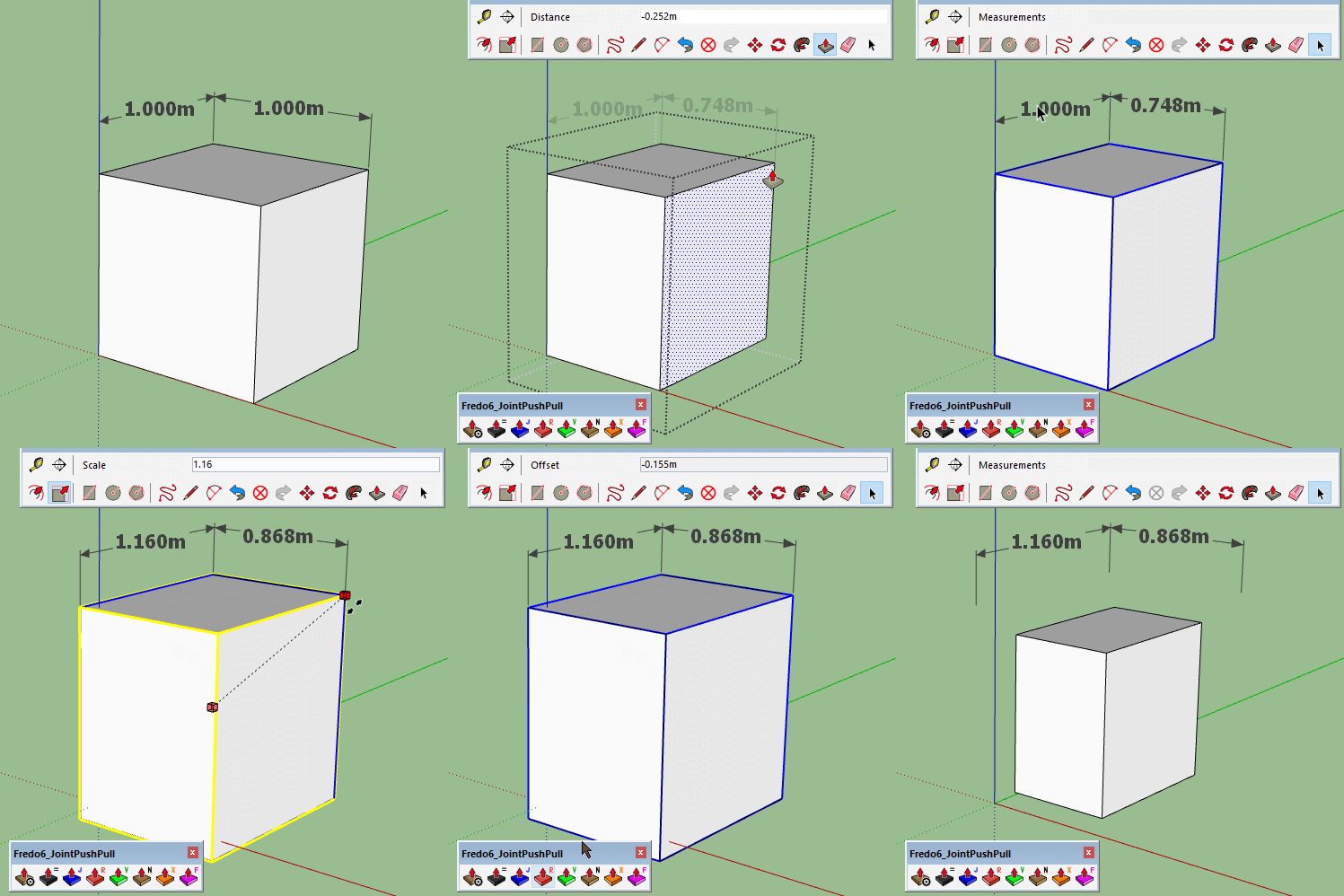

                                            Dims Break.gif

                                            1 Reply Last reply
                                            Reply Quote 0

                                            Hello! It looks like you're interested in this conversation, but you don't have an account yet.

                                            Getting fed up of having to scroll through the same posts each visit? When you register for an account, you'll always come back to exactly where you were before, and choose to be notified of new replies (either via email, or push notification). You'll also be able to save bookmarks and upvote posts to show your appreciation to other community members.

                                            With your input, this post could be even better 💗

                                            Register Login
                                            • 1
                                            • 2
                                            • 20
                                            • 21
                                            • 22
                                            • 23
                                            • 24
                                            • 30
                                            • 31
                                            • 22 / 31
                                            • First post
                                              Last post
                                            Buy SketchPlus
                                            Buy SUbD
                                            Buy WrapR
                                            Buy eBook
                                            Buy Modelur
                                            Buy Vertex Tools
                                            Buy SketchCuisine
                                            Buy FormFonts

                                            Advertisement