[Plugin] 3D Parametric Shapes - makes placeable components
-
@johnwmcc said:
Sounds good to have it added to the Plugin Store. What if anything further do I have to do before you can do that?
I'll look after the first upload
@johnwmcc said:
And what is the relationship between the Plugin Store and the new Trimble Sketchup Extension Warehouse?
There's none as far as I am aware?
@johnwmcc said:
Should it appear in both? One or the other only? I'd welcome your advice.
That's entirely up to you. There's no harm in hosting in both.
@johnwmcc said:
As to joining the Plugin Authors group, I'd be very pleased, but I'm only very sporadically active in writing (or usually, adapting others') plugins.
That's no problem. You can pop in as you see fit.
-
Nice. I'll wait till in Plug-in store.
-
I've added a further Shape - Helical Ramp.
The helical ramp further adds to the helix, and draws an (optionally tapering) helical ramp surface, with new ramp starting width and ending width parameters.
See first post in this forum for an updated v2.1 which includes the Helical Ramp.
-
 Cool, and what about the famous teapot?
-
Wonderful plugin, thanks, great to have instant primitives, plus helices!
-
@majid said:
:thumb: Cool, and what about the famous teapot?
http://sketchucation.com/forums/viewtopic.php?f=323%26amp;t=24079
-
Added Helical Ramp with Sides shape, with parameter for slope of sides from horizontal. Changed helical parameters to ask for start and end height, instead of pitch. Minor bug fixes.
-
Minor update (to v2.2.7) - changed module name from CommunityExtensions to JWM in all four .rb files in .rbz archive to avoid potential conflict with SketchUp Extension Warehouse version.
-
It gives load error msg in my pc.
Error Loading File C:/Users/emre özel/AppData/Roaming/SketchUp/SketchUp 2014/SketchUp/Plugins/jwm_shapes/shapes.rb
Error: cannot load such file -- C:/Users/emre özel/AppData/Roaming/SketchUp/SketchUp 2014/SketchUp/Plugins/jwm_shapes/parametric.rb
C:/Program Files (x86)/SketchUp/SketchUp 2014/Tools/RubyStdLib/rubygems/core_ext/kernel_require.rb:45:inrequire' C:/Program Files (x86)/SketchUp/SketchUp 2014/Tools/RubyStdLib/rubygems/core_ext/kernel_require.rb:45:inrequire'
C:/Users/emre özel/AppData/Roaming/SketchUp/SketchUp 2014/SketchUp/Plugins/jwm_shapes/shapes.rb:8:in<top (required)>' C:/Program Files (x86)/SketchUp/SketchUp 2014/Tools/extensions.rb:197:inrequire'
C:/Program Files (x86)/SketchUp/SketchUp 2014/Tools/extensions.rb:197:inload' C:/Users/emre özel/AppData/Roaming/SketchUp/SketchUp 2014/SketchUp/Plugins/jwm_shapes.rb:24:inregister_extension'
C:/Users/emre özel/AppData/Roaming/SketchUp/SketchUp 2014/SketchUp/Plugins/jwm_shapes.rb:24:in<module:Shapes>' C:/Users/emre özel/AppData/Roaming/SketchUp/SketchUp 2014/SketchUp/Plugins/jwm_shapes.rb:12:inmodule:JWM'
C:/Users/emre özel/AppData/Roaming/SketchUp/SketchUp 2014/SketchUp/Plugins/jwm_shapes.rb:11:in `<top (required)>' -
I'm afraid I don't quite know why this happens, or even definitely how to fix it, though I have a couple of suggestions to try.
It seems from the Ruby console dialogue that you included, that the plugin loader (Plugins/shapes.rb) isn't finding the file parametric.rb where it expects to, in the Plugins/jwm_shapes subfolder.
How did you install the Plugin? If through the Window/Preferences/Extensions/Install Extension button, it ought to put the files where they belong.
Please look and see what files/folders you have in your Plugins folder
"C:/Users/emre özel/AppData/Roaming/SketchUp/SketchUp 2014/SketchUp/Plugins/"You should have one file from this plugin (jwm_shapes.rb) and one folder (jwm_shapes). The folder should contain the following files:
CHANGELOG.txt
extension_info.txt
mesh_additions.rb
parametric.rb
shapes.png
shapes.rb
shapes_icon.png
(and maybe shapes 221.rb)If those files aren't there, the installation hasn't worked properly.
If you manually unzipped the .rbz file, you may not have checked the option to preserve the folder structure.
To fix it, you might try (a) installing the plugin through the 'official' route - open SU, then go to Window/Preferences/Extensions [Install Extension] and select the downloaded jwm_shapes.rbz file to install.
or (b) change the extension of the downloaded file from .rbz to .zip, Extract the files in it (preserving the folder structure), to get the files and folder identified above, then copy the one file shapes.rb, and then the folder and contents jwm_shapes, into the Plugins folder.
I've just double checked that downloading the .rbz file from the top of this post, and using the official SU Extension installer works for me.
I don't think this a problem specifically to do with this one plugin. You could try downloading another plugin, and trying to install that.
If none of this works, try the Sketchup Extensions forum.
Best wishes
John McC
-
most likely suspect is ö in the path...
TT posted a workaround in the dev forum, search for force_encoding...
it was along the lines of
file__ = __FILE__ file__ = file__.force_encoding("UTF-8") if defined?(Encoding)@emre, do any plugins load? if so which ones?
john
-
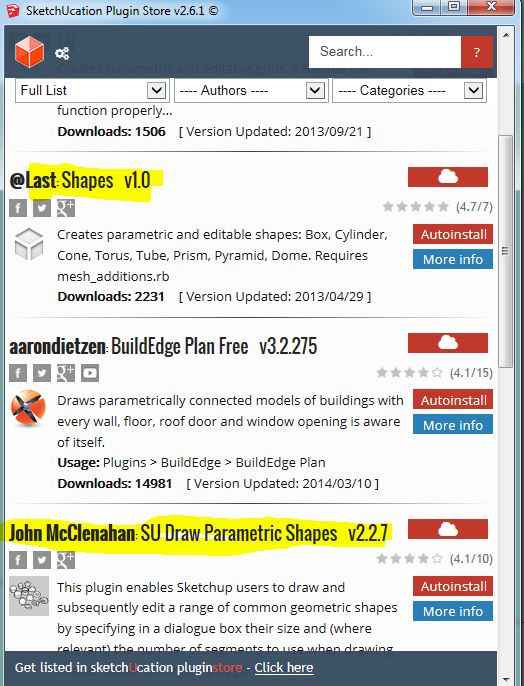
It's worth pointing out here that the version of this that is in the plugin store, simply called shapes, doesn't work with SU2014.
The RBZ above does work and it's a different version.So Emre you linked to the plugin store one as the one you had downloaded in another thread, Is that the case? have you tried with this one? Or the newer version also in the store?
John, you might want to see about updating or removing the earlier one in the store.
-
Edit: I see you've edited and understood while I was writing this. I'll leave it here anyway as a visual for Emre as I get a similar error message if I install the old Shapes version.
I think there is just a bit of confusion going on because of the similarity of a couple of plugins.
I think Emre has tried the one called Shape and not the one in this thread. I don't know if shape is your but the wording makes it look like it could be.
-
The @Last version really ought to be removed from this Plugin store - the Google Sketchup team did an update of it several years ago, and mine/Trimble's was originally based on the previous SU Team version. However, with the advent of SU2014, the code was extended by me, then the code was updated to work with the new Ruby version, and Thomas Thomasson of the Trimble team helped me extensively to clean up the code. Trimble then chose to make it the first Community/Open Source SU plugin.
-
Feature Request- I would like to see a modification that would allow you to specify where the 3D shape is drawn. I currently is always drawn at 0,0,0. While the shape is added to your model as a group which allows you to easily move it, there could be times when that space is occupied and you would have trouble getting to the shape just added. It would be good if you could click the spot where you want the shape added before adding it.
This was discussed in another thread and it was suggested that I add it as a request in this thread........
-
I have looked at doing this, but found it too difficult for me. Sorry - I did try!
I did produce some code that would read the pick point (there are other plugins that I was able to adapt this from).
But I couldn't see how to incorporate that into saving the parameters of the object, or even how to draw it at the picked point. My Ruby coding skills aren't good enough, I'm afraid.
But I'd be very happy to have someone else edit the code to do this if they know how!
Even if they can't do that, it would be very good if the parametric.rb code could be modified to save and list the object parameters IN ORDER - at the moment, they are stored as a hash, which has no intrinsic order, and doesn't list in the order of entry, or necessarily even the same order on different uses. (Again, I'm not a good enough Ruby programmer to know how to do that).
-
What if you used Components instead of Groups, then simply attached the Component to the mouse cursor for placement using Model#place_component()?
-
I'll see if I can work out how to convert the Group into a Component without losing the parametric properties of the Shape. I think I tried it a while ago, but if I remember correctly, the parametric properties don't survive the conversion from Group to Component, and I couldn't (at the time, anyway) see how to fix that.
It won't be soon, though - I haven't much time spare from other non-SU projects at the moment.
-
@johnwmcc said:
I'll see if I can work out how to convert the Group into a Component without losing the parametric properties of the Shape. I think I tried it a while ago, but if I remember correctly, the parametric properties don't survive the conversion from Group to Component, and I couldn't (at the time, anyway) see how to fix that.
It won't be soon, though - I haven't much time spare from other non-SU projects at the moment.
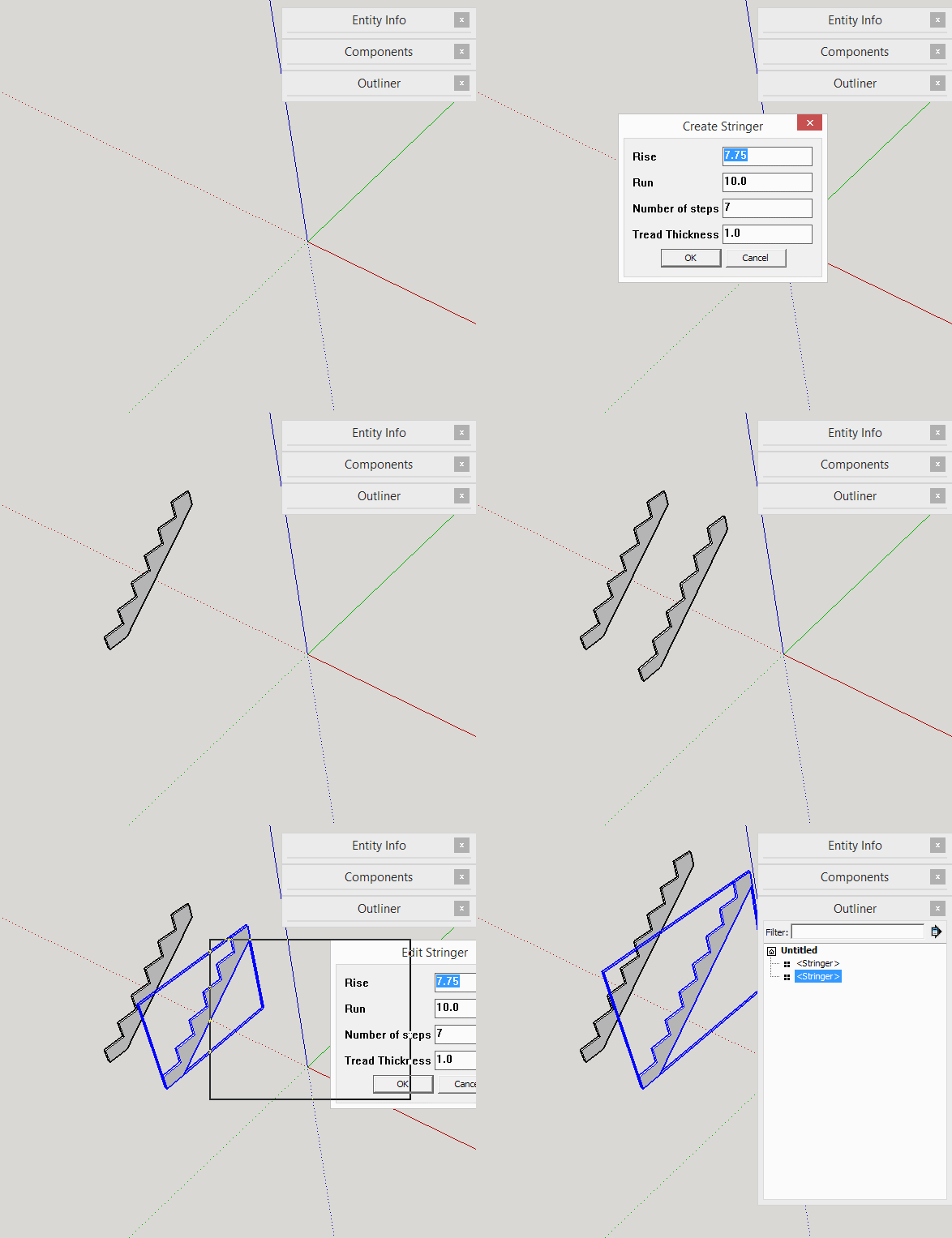
You wouldn't convert the Group to a Component. You would add a ComponentDefinition then add the geometry to the definition. Then call Model.place_component with the new definition.
parametric.rb will work with the instances. All instances will be updated when edited. I made a quick example using someone's stringer-drawing code.
-
The issue that was raised in another recent thread was that, although the jwm version and the Trimble su_ EWH version are different toolsets with different modules, methods etc, they both ill-advisedly share the same Extension name.
This means that the first RB to load 'jwm' lays claim to that Extension and loads its code - when the 'su_' version comes along it does not load as it thinks its Extension is already loaded [which it is, at least going 'by-name'].
So if both Plugins' RB files are installed only the 'jwm' version will loads and appear in the menu !This was confusing users who expected them both to load separately.
Naming one of their Extensions slightly differently would be helpful.In passing: the oldie @Last 'shapes.rb' version is only provided in the SCF Plugin store as legacy code [I'll add a note to its entry...]








Advertisement