sketchucation logo sketchucation
    • Login
    Oops, your profile's looking a bit empty! To help us tailor your experience, please fill in key details like your SketchUp version, skill level, operating system, and more. Update and save your info on your profile page today!
    Mac User? | Join the Rayscaper Beta for Mac Learn More

    [Plugin] Layers Panel 1.2.1

    Scheduled Pinned Locked Moved Plugins
    673 Posts 110 Posters 368.9k Views 110 Watching
    Loading More Posts
    • Oldest to Newest
    • Newest to Oldest
    • Most Votes
    Reply
    • Reply as topic
    Log in to reply
    This topic has been deleted. Only users with topic management privileges can see it.
    • jiminy-billy-bobJ
      jiminy-billy-bob
      last edited by

      Layers panel is not maintained anymore.
      It is now open-source, anyone can contribute and update it, or even make it better and sell it if you want.
      Here is the repo : https://github.com/jiminy-billy-bob/Layers-Panel

      As a result, I'm not responding to bug or feature requests anymore. You can still post them, in case another developer might want to fix/add them.

      25% off Skatter for SketchUcation Premium Members

      1 Reply Last reply
      Reply Quote 0
      • JQLJ
        JQL
        last edited by

        @derei said:

        I have a suspicion that Layers Panel is messing up with Scene settings. It won't keep the hidden/visible layers as set and something (couldn't figure what) makes certain scenes (the activated one) to update with the setting on that particular moment.

        Eg: - i set some hidden/visible layers to a scene, then I update it. If I change something after that (add layer, hide layers, show more layers, etc), I will end up with a messed-up scene that won't keep the settings that i did to it in the first time.

        This just renders the plugin mostly unusable.

        Did this happened to others?

        You have to go to settings and untick the "update active scene" button.

        Actually if you go to the first posts on the topic you'll see it was a feature that Jiminy fixed and removed, but I complained that it was very handy so we could adjust scenes layers...

        www.casca.pt
        Visit us on facebook!

        1 Reply Last reply
        Reply Quote 0
        • E
          ExpertBeater
          last edited by

          Thank you jiminy-billy-bob for this genius plug-in, i wonder if there is possibilty to add mitsuba renderer engine to existing render engines

          1 Reply Last reply
          Reply Quote 0
          • A
            akeo563
            last edited by

            sorry Im new in sketch up . I have a question ,when i install Layers Panel 1.2.1 in sketch up 2016 and got problem like this it not show true panel how to solve it ,Please help me
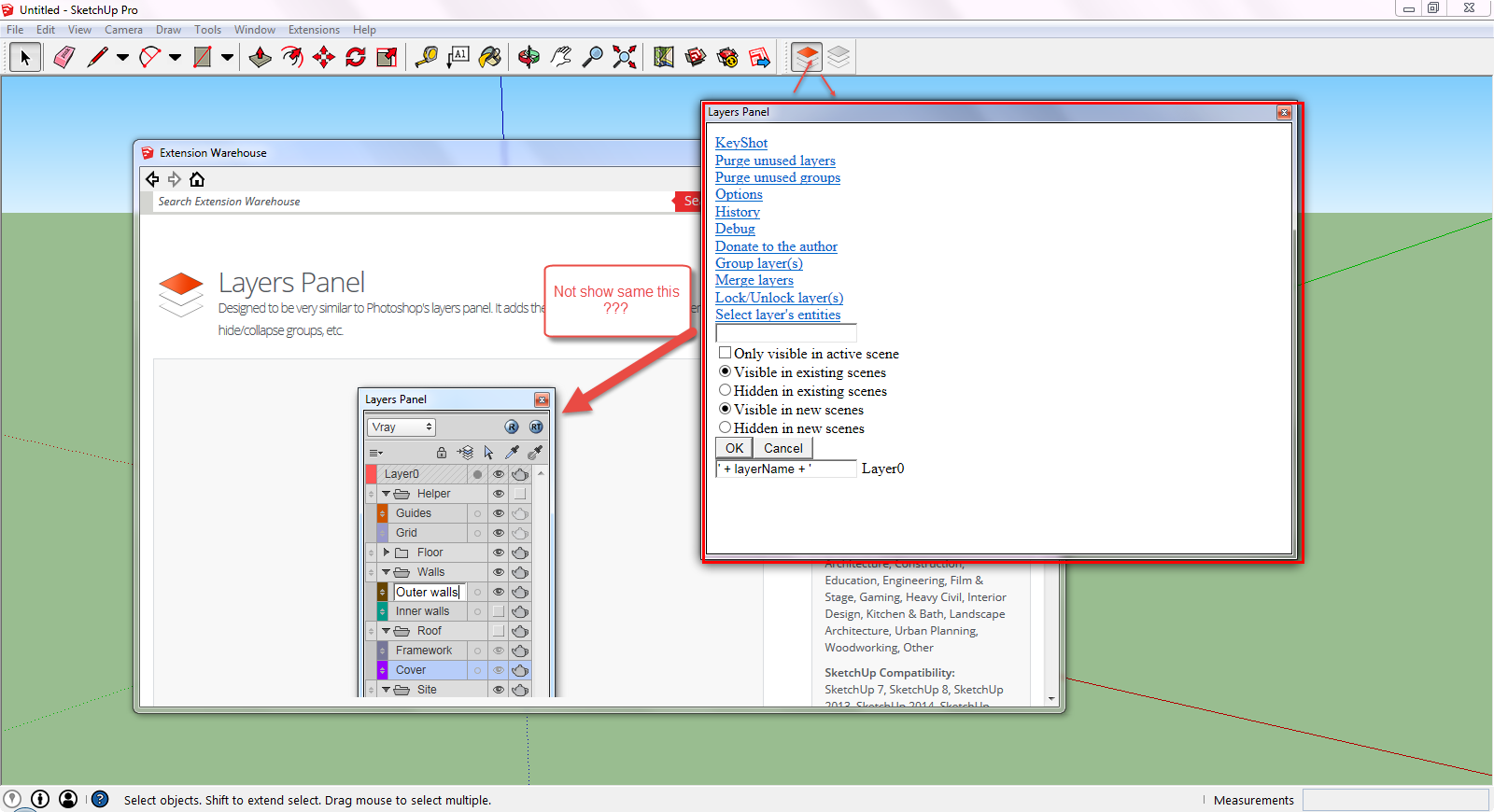
            Layers Panel Problem.png

            1 Reply Last reply
            Reply Quote 0
            • EdsonE
              Edson
              last edited by

              I have always used Layers Panel without much trouble. Until now. Perhaps it has to do with some incompatibility to SU 2016. the fact is: icannot seem to get the main panel to appear on my screen. the layer states panel shows up but the main one does not. I have reinstalled it twice but the behavior is the same.

              any ideas? thanks.

              edson mahfuz, architect| porto alegre β€’ brasil
              http://www.mahfuz.arq.br

              1 Reply Last reply
              Reply Quote 0
              • jujuJ
                juju
                last edited by

                @edson said:

                I have always used Layers Panel without much trouble. Until now. Perhaps it has to do with some incompatibility to SU 2016. the fact is: icannot seem to get the main panel to appear on my screen. the layer states panel shows up but the main one does not. I have reinstalled it twice but the behavior is the same.

                any ideas? thanks.

                It looks like it is something local to your machine, working here. (Win 8.1, SU 2016 x64)

                have you had more monitors connected recently?

                Save the Earth, it's the only planet with chocolate.

                1 Reply Last reply
                Reply Quote 0
                • EdsonE
                  Edson
                  last edited by

                  hi juju,

                  no, the setup is the same as before. but I am on mac so the fact that it is working for you does not mean much in this case.

                  thanks.

                  edson mahfuz, architect| porto alegre β€’ brasil
                  http://www.mahfuz.arq.br

                  1 Reply Last reply
                  Reply Quote 0
                  • Rubber DuckyR
                    Rubber Ducky
                    last edited by

                    I am also having this problem and am also on a Mac. The main panel simply will not show on my computer screen. This plugin worked well for several months before the main panel disappeared. I have also uninstalled and reinstalled the plugin. Near as I can tell, the panel "thinks" it is showing properly. The Mac version of Sketchup doesn't have any kind of "show all panels onscreen" sort of command.

                    Layers Panel was a very useful plug-in while it worked. If anyone has a suggestion for fixing this problem, pleas post it.

                    1 Reply Last reply
                    Reply Quote 0
                    • EdsonE
                      Edson
                      last edited by

                      I am afraid our complaints will reach a dead end as the author of this extension is no longer developing nor mantaining it. pity. it showed great promise.

                      perhaps someone would take it up and fix it.

                      edson mahfuz, architect| porto alegre β€’ brasil
                      http://www.mahfuz.arq.br

                      1 Reply Last reply
                      Reply Quote 0
                      • R
                        resmas
                        last edited by

                        Amazing plugin mate, great work.

                        SU should implement it by default.

                        I have a request, cna you add Octane Render support?

                        I use Octane to render my work, and would be a charme if i had the Octane layer option.

                        You can find more information in here.

                        404 Not Found

                        favicon

                        (sketchucation.com)

                        cheers
                        resmas

                        all the best to you, and one mote time a big thanks πŸ˜‰

                        1 Reply Last reply
                        Reply Quote 0
                        • A
                          art3mii
                          last edited by

                          Hello!
                          When i push "R" on layer Panel, error: "Vray is not installed jn this system? or is disabled"
                          what am I doing wrong?((
                          SU pro2017 17.2.2555 64bit + V-Ray 3.60.03 Trial.

                          1 Reply Last reply
                          Reply Quote 0
                          • jiminy-billy-bobJ
                            jiminy-billy-bob
                            last edited by

                            Layers Panel is quite old, I don't think it works with V-Ray 3, sorry.

                            25% off Skatter for SketchUcation Premium Members

                            1 Reply Last reply
                            Reply Quote 0
                            • R
                              RubenB
                              last edited by

                              I know this is an old thread and no one has posted any changes to the open source code. Sure would be nice if someone would take up the task of updating this to SU 19 and adding support for line types. Sure heat to give up this tool but without line type support it's pretty much useless now, Quite the shame sense this layer manager is so much better than the SU layer tool

                              1 Reply Last reply
                              Reply Quote 0
                              • jiminy-billy-bobJ
                                jiminy-billy-bob
                                last edited by

                                There is a new plugin based on Layers Panel: https://extensions.sketchup.com/sv/content/layers-organizer

                                25% off Skatter for SketchUcation Premium Members

                                1 Reply Last reply
                                Reply Quote 0
                                • A
                                  arquibaires
                                  last edited by

                                  HOW CAN I ALPHABETICALLY ORDER THE LAYERS IN THE PLUGIN LAYERS PANEL?
                                  THANKS

                                  1 Reply Last reply
                                  Reply Quote 0
                                  • S
                                    samodelkin_77
                                    last edited by

                                    @arquibaires said:

                                    HOW CAN I ALPHABETICALLY ORDER THE LAYERS IN THE PLUGIN LAYERS PANEL?
                                    THANKS

                                    you can find the link on page 1 ))

                                    By the way, guru in Ruby, please tell me how to add a little code so that you can change the name of the layer by pressing F2 ?
                                    ((Now it works by double-clicking, I'm more familiar with F2, and I can't substitute an addition and a check for F2 in the code in any way-it doesn't work out = little experience)

                                    1 Reply Last reply
                                    Reply Quote 0
                                    • P
                                      PropertyToday
                                      last edited by

                                      Hello.
                                      I have some problem with layer panel plugin v 1.2.2 (Thomas Hauchecorne)
                                      Sometimes, all groups disappear and all layers appear in one row with no groups. Do you know this bug? Do you know how to deal with it. Is it possible to restore groups or do we have to build the entire group structure from the begining? Adam

                                      1 Reply Last reply
                                      Reply Quote 0
                                      • X
                                        xongchaksin
                                        last edited by

                                        Extension Errors Report
                                        SketchUp: 26.1.252
                                        OS: Windows 11
                                        Ruby: 3.2.2

                                        Extension: Layers Panel (1.2.2)
                                        Error: LoadError (cannot load such file -- Win32API)
                                        <internal:C:/Program Files/SketchUp/SketchUp 2026/SketchUp/Tools/RubyStdLib/rubygems/core_ext/kernel_require.rb>:85:in require' <internal:C:/Program Files/SketchUp/SketchUp 2026/SketchUp/Tools/RubyStdLib/rubygems/core_ext/kernel_require.rb>:85:in require'
                                        C:/Users/thana/AppData/Roaming/SketchUp/SketchUp 2026/SketchUp/Plugins/jbb_layers_panel/layers_panel.rb:21:in <module:JBB_LayersPanel>' C:/Users/thana/AppData/Roaming/SketchUp/SketchUp 2026/SketchUp/Plugins/jbb_layers_panel/layers_panel.rb:5:in <top (required)>'
                                        C:/Program Files/SketchUp/SketchUp 2026/SketchUp/Tools/extensions.rb:197:in require' C:/Program Files/SketchUp/SketchUp 2026/SketchUp/Tools/extensions.rb:197:in load'
                                        C:/Users/thana/AppData/Roaming/SketchUp/SketchUp 2026/SketchUp/Plugins/jbb_layers_panel.rb:51:in register_extension' C:/Users/thana/AppData/Roaming/SketchUp/SketchUp 2026/SketchUp/Plugins/jbb_layers_panel.rb:51:in module:JBB_LayersPanel'
                                        C:/Users/thana/AppData/Roaming/SketchUp/SketchUp 2026/SketchUp/Plugins/jbb_layers_panel.rb:35:in `<top (required)>'


                                        1 Reply Last reply
                                        Reply Quote 0

                                        Hello! It looks like you're interested in this conversation, but you don't have an account yet.

                                        Getting fed up of having to scroll through the same posts each visit? When you register for an account, you'll always come back to exactly where you were before, and choose to be notified of new replies (either via email, or push notification). You'll also be able to save bookmarks and upvote posts to show your appreciation to other community members.

                                        With your input, this post could be even better πŸ’—

                                        Register Login
                                        • 1
                                        • 2
                                        • 9
                                        • 10
                                        • 11
                                        • 12
                                        • 13
                                        • 33
                                        • 34
                                        • 11 / 34
                                        • First post
                                          Last post
                                        Buy SketchPlus
                                        Buy SUbD
                                        Buy WrapR
                                        Buy eBook
                                        Buy Modelur
                                        Buy Vertex Tools
                                        Buy SketchCuisine
                                        Buy FormFonts

                                        Advertisement