sketchucation logo sketchucation
    • Login
    Oops, your profile's looking a bit empty! To help us tailor your experience, please fill in key details like your SketchUp version, skill level, operating system, and more. Update and save your info on your profile page today!
    Mac User? | Join the Rayscaper Beta for Mac Learn More

    [Plugin] Layers Panel 1.2.1

    Scheduled Pinned Locked Moved Plugins
    673 Posts 110 Posters 368.9k Views 110 Watching
    Loading More Posts
    • Oldest to Newest
    • Newest to Oldest
    • Most Votes
    Reply
    • Reply as topic
    Log in to reply
    This topic has been deleted. Only users with topic management privileges can see it.
    • jiminy-billy-bobJ
      jiminy-billy-bob
      last edited by

      Hey guys, I've added a poll at the top of the topic.
      Choose what render engine you would like to be supported by Layers Panel.

      I don't garanty that I can make it work with every engine, but it some cases it can be done by the engine's dev (Like Tomasz is supposed to be doing with Thea πŸ˜„ ). So if an engine gets lots of vote and it has to be done by the dev, I can communicate them that there is high demand.

      25% off Skatter for SketchUcation Premium Members

      1 Reply Last reply
      Reply Quote 0
      • jiminy-billy-bobJ
        jiminy-billy-bob
        last edited by

        It's here guys ! πŸ˜„

        New version 0.9 beta !

        Changelog :

        • OSX support
        • Fixed clicking on layer's name not selecting it

        Download in the plugin store !

        A huge thanks to TT for the OSX support ! πŸ‘ πŸ‘

        It's the first OSX version, so it still has bugs. We need you to find them πŸ˜‰

        25% off Skatter for SketchUcation Premium Members

        1 Reply Last reply
        Reply Quote 0
        • tt_suT
          tt_su
          last edited by

          A couple known bugs:

          • "Add Group" doesn't work the first time you click it.
          • Unfolding the window doesn't work correct. Instead of unfolding it expands a little in the width.
          1 Reply Last reply
          Reply Quote 0
          • Bob JamesB
            Bob James
            last edited by

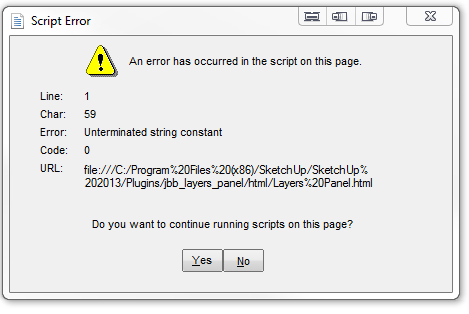
            After loading the latest version I still get this upon opening a model.

            Layer Panel 0.9.PNG

            i7-4930K 3.4Ghz, 2x GTX780 6GB, 32GB DDR3-1600 ECC, OCZ Vertex 4 500GB, WD Black 3TB, 32TB NAS, 4x 27" Monitors, SpaceMouse Pro, X-keys XK-60

            1 Reply Last reply
            Reply Quote 0
            • H
              huckrorick
              last edited by

              Is there a way to tell within Sketchup which version I am using?

              1 Reply Last reply
              Reply Quote 0
              • tt_suT
                tt_su
                last edited by

                @bob james said:

                After loading the latest version I still get this upon opening a model.

                Any model_ Or a specific model?

                1 Reply Last reply
                Reply Quote 0
                • jiminy-billy-bobJ
                  jiminy-billy-bob
                  last edited by

                  @bob james said:

                  After loading the latest version I still get this upon opening a model.

                  "Still", you mean you had this issue before 0.9 ?
                  Does it happen everytime ? Only when opening a model, not when opening the dialog ?

                  @huckrorick said:

                  Is there a way to tell within Sketchup which version I am using?

                  Window > Preferences > Extensions > click on Layers Panel. You'll get the version at the bottom.

                  25% off Skatter for SketchUcation Premium Members

                  1 Reply Last reply
                  Reply Quote 0
                  • Bob JamesB
                    Bob James
                    last edited by

                    @tt_su said:

                    Any model_ Or a specific model?

                    Any model

                    @jiminy-billy-bob said:

                    "Still", you mean you had this issue before 0.9 ?

                    Yes. And when I change the condition or existence of layers in SU Layers it does not "track" into Layers Panel.

                    @jiminy-billy-bob said:

                    Does it happen everytime ? Only when opening a model, not when opening the dialog ?

                    Yes. On two different computers: home and work (Win7)

                    β€’It also pops up when using Ctrl-Z to restore a Ctrl-X.
                    β€’It also still disrupts the layers associated with a scene: if I change the layer combination in a scene and the go back to a different scene the layers in that previous scene have been lost. When I disable Layers Panel the problem goes away (repeatable experience over many models and both machines)

                    i7-4930K 3.4Ghz, 2x GTX780 6GB, 32GB DDR3-1600 ECC, OCZ Vertex 4 500GB, WD Black 3TB, 32TB NAS, 4x 27" Monitors, SpaceMouse Pro, X-keys XK-60

                    1 Reply Last reply
                    Reply Quote 0
                    • tt_suT
                      tt_su
                      last edited by

                      What IE version do you have installed?

                      1 Reply Last reply
                      Reply Quote 0
                      • jiminy-billy-bobJ
                        jiminy-billy-bob
                        last edited by

                        Did you try to delete everything related to Layers Panel in your plugins folder, and perform a clean install ?

                        About the scene issue, did you check that the auto-update option is disabled ?

                        25% off Skatter for SketchUcation Premium Members

                        1 Reply Last reply
                        Reply Quote 0
                        • Bob JamesB
                          Bob James
                          last edited by

                          @tt_su said:

                          What IE version do you have installed?

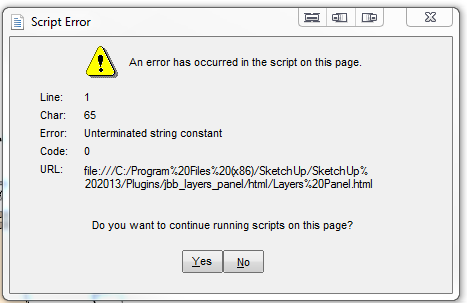
                          Also the Ctrl-X/Ctrl-Z dialog box has a different Char:59 instead of 65

                          By the way: closing and opening Layer Panel gives the Char:59 version of the error.


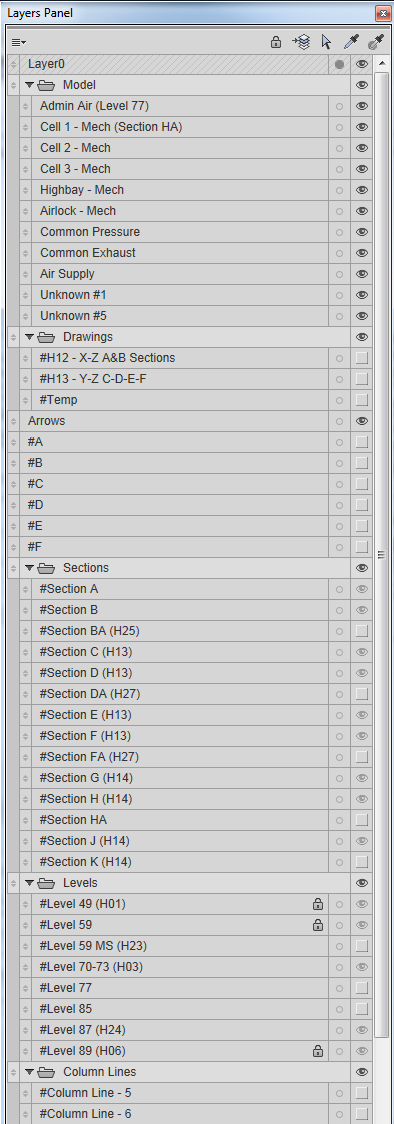
                          IE10.PNG


                          Layer Panel 0.9.-2PNG.PNG


                          Panel 2.PNG

                          i7-4930K 3.4Ghz, 2x GTX780 6GB, 32GB DDR3-1600 ECC, OCZ Vertex 4 500GB, WD Black 3TB, 32TB NAS, 4x 27" Monitors, SpaceMouse Pro, X-keys XK-60

                          1 Reply Last reply
                          Reply Quote 0
                          • Bob JamesB
                            Bob James
                            last edited by

                            @jiminy-billy-bob said:

                            Did you try to delete everything related to Layers Panel in your plugins folder, and perform a clean install ?

                            Yes, and the error pops up during the installation!

                            @jiminy-billy-bob said:

                            About the scene issue, did you check that the auto-update option is disabled ?

                            It was enabled. I disabled it, closed and reopened SU and the scenes are saved (hooray), but I get the Char:59 error each time I switch scenes. By the way, I have to click "Yes" and then the dialog box comes up again and I have to click "Yes" a second time.

                            i7-4930K 3.4Ghz, 2x GTX780 6GB, 32GB DDR3-1600 ECC, OCZ Vertex 4 500GB, WD Black 3TB, 32TB NAS, 4x 27" Monitors, SpaceMouse Pro, X-keys XK-60

                            1 Reply Last reply
                            Reply Quote 0
                            • jiminy-billy-bobJ
                              jiminy-billy-bob
                              last edited by

                              So, the error pops up even when the dialog is closed ?

                              25% off Skatter for SketchUcation Premium Members

                              1 Reply Last reply
                              Reply Quote 0
                              • Bob JamesB
                                Bob James
                                last edited by

                                @jiminy-billy-bob said:

                                So, the error pops up even when the dialog is closed ?

                                No. I have it set to open when SU starts. But it "errors" when I turn it off and then on again.
                                From previous post: Disabling the auto-update option seems counter-intuitive. What does "auto-update" do?

                                i7-4930K 3.4Ghz, 2x GTX780 6GB, 32GB DDR3-1600 ECC, OCZ Vertex 4 500GB, WD Black 3TB, 32TB NAS, 4x 27" Monitors, SpaceMouse Pro, X-keys XK-60

                                1 Reply Last reply
                                Reply Quote 0
                                • jiminy-billy-bobJ
                                  jiminy-billy-bob
                                  last edited by

                                  It auto-updates the layer state of the current scene.
                                  If you turn on or off a layer, it's saved in the scene.

                                  25% off Skatter for SketchUcation Premium Members

                                  1 Reply Last reply
                                  Reply Quote 0
                                  • jiminy-billy-bobJ
                                    jiminy-billy-bob
                                    last edited by

                                    Can you try with all the other plugins disabled ?

                                    25% off Skatter for SketchUcation Premium Members

                                    1 Reply Last reply
                                    Reply Quote 0
                                    • wind-borneW
                                      wind-borne
                                      last edited by

                                      @jiminy-billy-bob said:

                                      It's here guys ! πŸ˜„

                                      New version 0.9 beta !

                                      Changelog :

                                      • OSX support
                                      • Fixed clicking on layer's name not selecting it

                                      Download in the plugin store !

                                      A huge thanks to TT for the OSX support ! πŸ‘ πŸ‘

                                      It's the first OSX version, so it still has bugs. We need you to find them πŸ˜‰

                                      Glad to join in.
                                      Enjoying the ability to group, merge and rearrange β˜€

                                      Problem:
                                      The options panel doesn't work for me.
                                      None of the changes take effect.
                                      Shown, reopening options(right) after setting(left).
                                      Tried reinstalling and tested on 2013 also, same no go.

                                      Annoyance:
                                      Upon closing, Save dialog appears even if no changes made on file with this extension enabled.
                                      For those of us using shortcuts or main toolbar, having floating toolbar automatically load. Deleted that line for now.

                                      Suggestion:
                                      You might want to enlarge icon for use in main toolbar, barely discernible as shown on top shot.

                                      OSX 10.9, Safari 7.0, SU 8

                                      Good luck and thanks again...
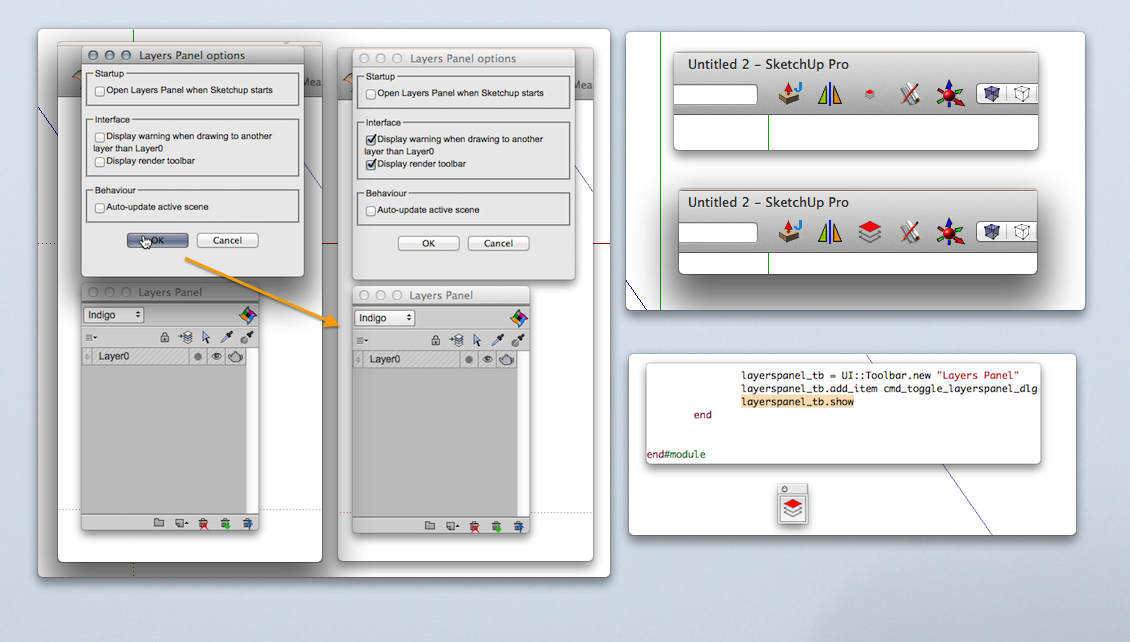

                                      lp.png

                                      "To read between the lines was easier than to follow the text."OSX 10.11.6

                                      %(#BF80BF)[SU 8 pro

                                      1 Reply Last reply
                                      Reply Quote 0
                                      • jiminy-billy-bobJ
                                        jiminy-billy-bob
                                        last edited by

                                        Thanks for your feedback ! πŸ˜‰

                                        @wind-borne said:

                                        Annoyance:
                                        Upon closing, Save dialog appears even if no changes made on file with this extension enabled.
                                        For those of us using shortcuts or main toolbar, having floating toolbar automatically load. Deleted that line for now.

                                        I have to initialize some stuff, so there is no real workaround for the save dialog.

                                        As for the toolbar, can't you just hide it in the toolbars options ?

                                        25% off Skatter for SketchUcation Premium Members

                                        1 Reply Last reply
                                        Reply Quote 0
                                        • Bob JamesB
                                          Bob James
                                          last edited by

                                          @jiminy-billy-bob said:

                                          Can you try with all the other plugins disabled ?

                                          I have 188 rb files. I used SketchUcation Extensions Manager and was able to disable all the other extensions (that had no effect on the problem[s]). But SketchUcation Plugins Manager can only disable one plugin at a time. 😞 So disabling all of the rb files one at a time is not very desirable.
                                          What I will try is: disable my Plugins folder and make a dummy with just Layers Panel and whatever basic plugins are required.

                                          i7-4930K 3.4Ghz, 2x GTX780 6GB, 32GB DDR3-1600 ECC, OCZ Vertex 4 500GB, WD Black 3TB, 32TB NAS, 4x 27" Monitors, SpaceMouse Pro, X-keys XK-60

                                          1 Reply Last reply
                                          Reply Quote 0
                                          • TIGT
                                            TIG Moderator
                                            last edited by

                                            @Bob

                                            The SketchUcation Plugins Manager [and its other siblings - Extensions Manager and Plugins Uninstaller] will allow you to select multiple items in either column - Loaded/Enabled or Disabled - clicking and holding the Ctrl for individual items added to the selection or Shift key to add all up/down from the last one you selected [like any Windows app]...
                                            Then click the red > button to disable as desired.
                                            IF you made a named 'Set' [blue button] of the current Plugins set up... BEFORE doing major change... then you can easily revert to that named 'Set' on a later occasion...

                                            The Managers are there to ease the pain... you just need to restart SketchUp to see the changes... πŸ˜„

                                            TIG

                                            1 Reply Last reply
                                            Reply Quote 0

                                            Hello! It looks like you're interested in this conversation, but you don't have an account yet.

                                            Getting fed up of having to scroll through the same posts each visit? When you register for an account, you'll always come back to exactly where you were before, and choose to be notified of new replies (either via email, or push notification). You'll also be able to save bookmarks and upvote posts to show your appreciation to other community members.

                                            With your input, this post could be even better πŸ’—

                                            Register Login
                                            • 1
                                            • 2
                                            • 3
                                            • 4
                                            • 5
                                            • 33
                                            • 34
                                            • 1 / 34
                                            • First post
                                              Last post
                                            Buy SketchPlus
                                            Buy SUbD
                                            Buy WrapR
                                            Buy eBook
                                            Buy Modelur
                                            Buy Vertex Tools
                                            Buy SketchCuisine
                                            Buy FormFonts

                                            Advertisement