sketchucation logo sketchucation
    • 登入
    Oops, your profile's looking a bit empty! To help us tailor your experience, please fill in key details like your SketchUp version, skill level, operating system, and more. Update and save your info on your profile page today!
    🔌 Smart Spline | Fluid way to handle splines for furniture design and complex structures. Download

    [Plugin] Layers Panel 1.2.1

    已排程 已置頂 已鎖定 已移動 Plugins
    672 貼文 109 Posters 203.3k 瀏覽 109 Watching
    正在載入更多貼文
    • 從舊到新
    • 從新到舊
    • 最多點贊
    回覆
    • 在新貼文中回覆
    登入後回覆
    此主題已被刪除。只有擁有主題管理權限的使用者可以查看。
    • jiminy-billy-bobJ 離線
      jiminy-billy-bob
      最後由 編輯

      @cmeed said:

      -All groups gone 😞

      The groups unique IDs are still present in your file, but they are not listed by Layers Panel serialized string. Don't know why...
      Were layers still sorted, or did they revert back to Sketchup's default sorting ?

      Did anyone else experienced this ?

      25% off Skatter for SketchUcation Premium Members

      1 條回覆 最後回覆 回覆 引用 0
      • jiminy-billy-bobJ 離線
        jiminy-billy-bob
        最後由 編輯

        @plesiosaur said:

        Any plans to add Thea to the Render list? Thanks

        See this :

        @jiminy-billy-bob said:

        Actually, if it works with Thea on day, it'll behave differently. You will probably have an option directly inside Thea allowing you to choose if you want to render with Layers Panel feature or not. But you won't render from within Layers Panel as you do with Vray/Maxwell/etc. This is due to the way Thea is designed. I can't trigger the render from my plugin.

        I gave evrything to Tomasz to make it work, the ball is on his side now 😉 So if you badly want this feature, you should get in touch with him !

        😄

        25% off Skatter for SketchUcation Premium Members

        1 條回覆 最後回覆 回覆 引用 0
        • cmeedC 離線
          cmeed
          最後由 編輯

          @jiminy-billy-bob said:

          @cmeed said:

          -All groups gone 😞

          The groups unique IDs are still present in your file, but they are not listed by Layers Panel serialized string. Don't know why...
          Were layers still sorted, or did they revert back to Sketchup's default sorting ?

          Did anyone else experienced this ?

          The layers were not in any order.

          1 條回覆 最後回覆 回覆 引用 0
          • jiminy-billy-bobJ 離線
            jiminy-billy-bob
            最後由 編輯

            Maybe the order they were created ? (Which is SU's default)

            25% off Skatter for SketchUcation Premium Members

            1 條回覆 最後回覆 回覆 引用 0
            • ElibjrE 離線
              Elibjr
              最後由 編輯

              Any thought to adding Render[in], IRender-nXt or Shaderlight to the list? This is such a great plugin! Thank you for all your work.

              1 條回覆 最後回覆 回覆 引用 0
              • jiminy-billy-bobJ 離線
                jiminy-billy-bob
                最後由 編輯

                @elibjr said:

                Any thought to adding Render[in], IRender-nXt or Shaderlight to the list? This is such a great plugin! Thank you for all your work.

                Same case as Thea, I have to contact the developers.

                25% off Skatter for SketchUcation Premium Members

                1 條回覆 最後回覆 回覆 引用 0
                • Bob JamesB 離線
                  Bob James
                  最後由 編輯

                  Any progress with regard to solving the problem with the interference with the saving of scenes?

                  i7-4930K 3.4Ghz, 2x GTX780 6GB, 32GB DDR3-1600 ECC, OCZ Vertex 4 500GB, WD Black 3TB, 32TB NAS, 4x 27" Monitors, SpaceMouse Pro, X-keys XK-60

                  1 條回覆 最後回覆 回覆 引用 0
                  • jiminy-billy-bobJ 離線
                    jiminy-billy-bob
                    最後由 編輯

                    Working on it 😉

                    25% off Skatter for SketchUcation Premium Members

                    1 條回覆 最後回覆 回覆 引用 0
                    • jiminy-billy-bobJ 離線
                      jiminy-billy-bob
                      最後由 編輯

                      Bug found : When a group is moved to be nested in another group, we can't rename it. We have to restart Layers Panel.
                      Working on a fix.

                      25% off Skatter for SketchUcation Premium Members

                      1 條回覆 最後回覆 回覆 引用 0
                      • unclebimU 離線
                        unclebim
                        最後由 編輯

                        Great plugin, I have integrated it immediately in my workflow. However I noticed following issues (bugs?):

                        1. In SU 8 it displayed the outdated IE version message and did not allow the scroll. Since ver. 0.5 it does not display this message but only shows render engines in the window and no layers or layer groups at all. In SU 2013 this problem does not exist.

                        2. Not sure whether since ver. 0.4 or 0.5 but in both SU 8 and SU 2013 Edit->Paste and Ctrl+V do not work when pasting a group/component from another SU file, Edit->Paste in place works though. Removing the plugin files from SU Plugins folder resolved the problem in both SU 8 and SU 2013. Also renaming layers in the native SU Layers window sometimes caused bugsplat with the plugin installed in SU 2013.

                        Hope that helps.

                        Thank you for your great plugin, it is so useful.

                        1 條回覆 最後回覆 回覆 引用 0
                        • jiminy-billy-bobJ 離線
                          jiminy-billy-bob
                          最後由 編輯

                          @unclebim said:

                          1. In SU 8 it displayed the outdated IE version message and did not allow the scroll. Since ver. 0.5 it does not display this message but only shows render engines in the window and no layers or layer groups at all. In SU 2013 this problem does not exist.

                          What's your IE version ?

                          @unclebim said:

                          1. Not sure whether since ver. 0.4 or 0.5 but in both SU 8 and SU 2013 Edit->Paste and Ctrl+V do not work, Edit->Paste in place works though. Removing the plugin files from SU Plugins folder resolved the problem in both SU 8 and SU 2013. Also renaming layers in the native SU Layers window sometimes caused bugsplat with the plugin installed in SU 2013.

                          Weird. Does it work when Layers Panel is installed but closed ?

                          25% off Skatter for SketchUcation Premium Members

                          1 條回覆 最後回覆 回覆 引用 0
                          • Bob JamesB 離線
                            Bob James
                            最後由 編輯

                            @unclebim said:

                            Not sure whether since ver. 0.4 or 0.5 but in both SU 8 and SU 2013 Edit->Paste and Ctrl+V do not work when pasting a group/component from another SU file, Edit->Paste in place works though

                            This started happening for me after ver 0.5

                            i7-4930K 3.4Ghz, 2x GTX780 6GB, 32GB DDR3-1600 ECC, OCZ Vertex 4 500GB, WD Black 3TB, 32TB NAS, 4x 27" Monitors, SpaceMouse Pro, X-keys XK-60

                            1 條回覆 最後回覆 回覆 引用 0
                            • danchoD 離線
                              dancho
                              最後由 編輯

                              Hi,
                              I was installed your plugin and it is nice how its work in new file, but with
                              my actual project I can't see layer list with your plugin.

                              Secont, will be fine that you can put a possibility to show/hide panel like old layer window, click on the top of window.

                              Here is screen capture:

                              THX
                              Daniel
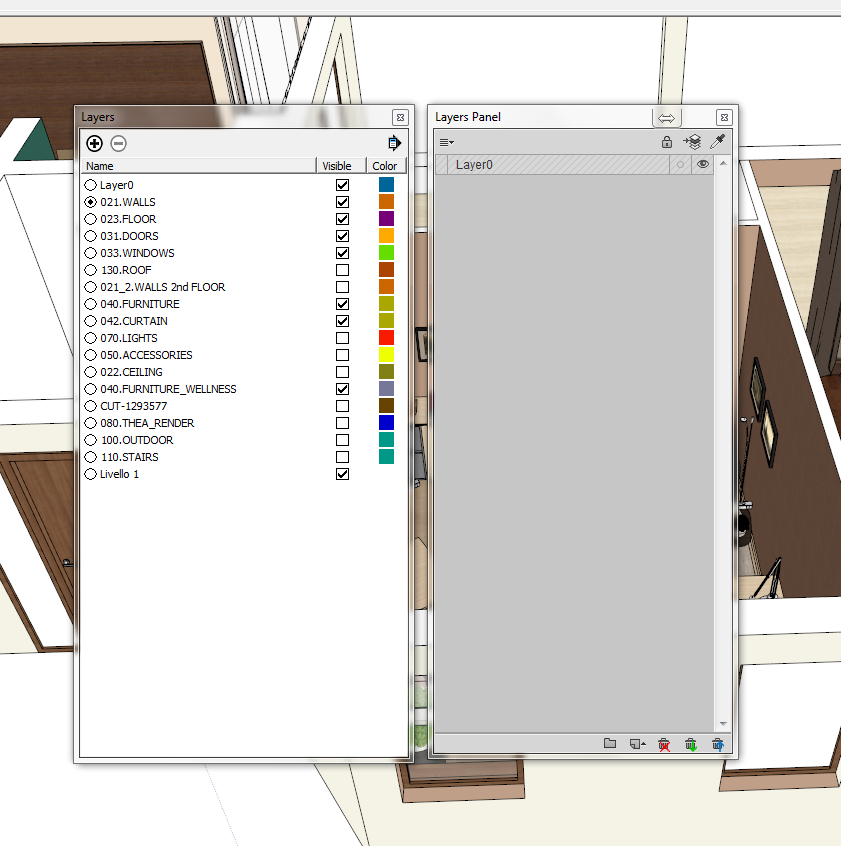

                              old and new layer window

                              1 條回覆 最後回覆 回覆 引用 0
                              • jiminy-billy-bobJ 離線
                                jiminy-billy-bob
                                最後由 編輯

                                @bob james said:

                                @unclebim said:

                                Not sure whether since ver. 0.4 or 0.5 but in both SU 8 and SU 2013 Edit->Paste and Ctrl+V do not work when pasting a group/component from another SU file, Edit->Paste in place works though

                                This started happening for me after ver 0.5

                                All the time ? With all kind of objects ? Even when LP is closed ?

                                I really don't see what could cause that... And I can't reproduce it.

                                25% off Skatter for SketchUcation Premium Members

                                1 條回覆 最後回覆 回覆 引用 0
                                • jiminy-billy-bobJ 離線
                                  jiminy-billy-bob
                                  最後由 編輯

                                  @dancho said:

                                  my actual project I can't see layer list with your plugin.

                                  You're not the first to experience this.
                                  Could you send me the file by PM ? (Even with all the content deleted, keeping only the layers) The best would be a version of the file that was never saved since LP was installed.

                                  @dancho said:

                                  Secont, will be fine that you can put a possibility to show/hide panel like old layer window, click on the top of window.

                                  That's not possible, unfortunatly 😞

                                  25% off Skatter for SketchUcation Premium Members

                                  1 條回覆 最後回覆 回覆 引用 0
                                  • tt_suT 離線
                                    tt_su
                                    最後由 編輯

                                    @jiminy-billy-bob said:

                                    That's not possible, unfortunatly 😞

                                    Workaround suggestion, size the window and leave a small clickable header in the HTML itself.

                                    1 條回覆 最後回覆 回覆 引用 0
                                    • jiminy-billy-bobJ 離線
                                      jiminy-billy-bob
                                      最後由 編輯

                                      I guess I could do that, thanks 😄
                                      But still not dockable, though

                                      25% off Skatter for SketchUcation Premium Members

                                      1 條回覆 最後回覆 回覆 引用 0
                                      • jiminy-billy-bobJ 離線
                                        jiminy-billy-bob
                                        最後由 編輯

                                        @dancho said:

                                        my actual project I can't see layer list with your plugin.

                                        Try to change scene.

                                        25% off Skatter for SketchUcation Premium Members

                                        1 條回覆 最後回覆 回覆 引用 0
                                        • M 離線
                                          Mike Whitton
                                          最後由 編輯

                                          This is a marvelous idea - SketchUp has needed this sought of control of layers for a long time. BUT .....It makes my version of SketchUp (2013) very unstable to the point of being unusable. I have had to uninstall the plugin.

                                          Am I doing something wrong?

                                          1 條回覆 最後回覆 回覆 引用 0
                                          • K 離線
                                            kct3937
                                            最後由 編輯

                                            Too bad it doesn't work in OSX. Looks like a good plugin. Now if it worked on a real operating system….just imagine.

                                            Dave Richards might quit looking in a mirror.

                                            1 條回覆 最後回覆 回覆 引用 0
                                            • 1
                                            • 2
                                            • 29
                                            • 30
                                            • 31
                                            • 32
                                            • 33
                                            • 34
                                            • 31 / 34
                                            • 第一個貼文
                                              最後的貼文
                                            Buy SketchPlus
                                            Buy SUbD
                                            Buy WrapR
                                            Buy eBook
                                            Buy Modelur
                                            Buy Vertex Tools
                                            Buy SketchCuisine
                                            Buy FormFonts

                                            Advertisement