sketchucation logo sketchucation
    • 登入
    Oops, your profile's looking a bit empty! To help us tailor your experience, please fill in key details like your SketchUp version, skill level, operating system, and more. Update and save your info on your profile page today!
    🔌 Smart Spline | Fluid way to handle splines for furniture design and complex structures. Download

    [Plugin] s4u_Align

    已排程 已置頂 已鎖定 已移動 Plugins
    45 貼文 16 Posters 29.9k 瀏覽 16 Watching
    正在載入更多貼文
    • 從舊到新
    • 從新到舊
    • 最多點贊
    回覆
    • 在新貼文中回覆
    登入後回覆
    此主題已被刪除。只有擁有主題管理權限的使用者可以查看。
    • hdpvH 離線
      hdpv
      最後由 hdpv 編輯

      s4u_Align_v4.0.0
      Set Plane by Object
      Align Axis ,Construction line and BoundingBox.
      Align and Align+Copy(Hold Ctrl).

      http://s3-us-west-2.amazonaws.com/assets.sketchup.com/web/ewh/s3fs-public/s3fs-public/align_0.gif

      s4u_Align_v3.3.0
      Align with BoundingBox
      s4u_AlignTool_v3.1.0 (update 06 April 2015)
      Align in Top ,Front,Left ,Right view...
      s4u_AlignTool_v3.0.2 (update 06 April 2015)
      -Fix toolbar show for Mac
      s4u_AlignTool_v3.0.1 (update 19 Sep 2014)
      -Align with axis ,construction line

      http://sketchucation.com/resources/pluginstore?pln=s4u_aligntool_v1.0.4
      http://extensions.sketchup.com/en/content/s4u-aligntool

      Tutorial video:

      s4u-AlignTool 2.2.0(18 July 2014)
      -Fix error(align edge in group)
      -New feature: Align preselect objects
      s4u-AlignTool 2.1.0(4 July 2014)
      -Fix error
      -The Spanish Language version
      s4u-AlignTool 2.0.3 (1 July 2014)
      -Fix error
      -Hold Ctrl(Alt on Mac)for multi-select -> Double click or Enter for finish.
      -Press Tab, for change align or align+move.
      -The Spanish Language version
      -Thanks Oxer for update on Mac and translation.
      s4u-AlignTool 2.0.1 (20 June 2014)
      Align selected objects.Press TAB for Align or Align and Move.Press hold Ctrl for multiselect.
      Press UP,DOWN or Right Mouse for opposite Align
      s4u-AlignTool 2.0.0 (10 June 2014)

      • align OUT group,multi-align with press hold Ctrl key.
        s4u_AlignTool_v1.1.0 (25 April 2014)
        -Press UP, DOWN or Right Mouse for Mirror after align face
        s4u_AlignTool_v1.0.4 (18 September 2013)
        -Change key Shift -> TAB ( sometime Zoom+Pan with Shift )
        -Press TAB for Align or Align and Move.
        s4u_AlignTool_v1.0.3
        Update:
        -Fix error Component/Group had scaled
        -Source code
        s4u_AlignTool_v1.0.2 (15 August 2013)
        Update:
        Align selected objects.
        Press Shift for Align or Align and Move.
        Press Ctrl for multiselect.
        Align Edge or Face not in Group(Component)
        s4u_AlignTool_v1.0.1

      Suforyou
      http://www.sketchupforyou.com

      1 條回覆 最後回覆 回覆 引用 0
      • jolranJ 離線
        jolran
        最後由 編輯

        Hah, exellent!

        I do suspect there exist similar Tools doing something like this, but your plugin look very easy to use and practical. Bravo!

        1 條回覆 最後回覆 回覆 引用 0
        • hdpvH 離線
          hdpv
          最後由 編輯

          Thanks , Test my plugin ,Jolran

          Suforyou
          http://www.sketchupforyou.com

          1 條回覆 最後回覆 回覆 引用 0
          • 3 離線
            3dsmax9
            最後由 編輯

            very nice and useful, thanks.

            1 條回覆 最後回覆 回覆 引用 0
            • renderizaR 離線
              renderiza
              最後由 編輯

              Excellent plugin thank you for sharing! 👍

              [url=https://www.sketchupcode.com/:z3kqsidd]My Extensions ...[/url:z3kqsidd]

              1 條回覆 最後回覆 回覆 引用 0
              • R 離線
                rv1974
                最後由 編輯

                Hi Hdpv!
                Nice script, thanks for sharing!
                Is it possible to add multiple 'Clone aligning' functionality (with say Cnrl key pressed)??
                In that case PRE-selecting the object to be aligned\copied would be more logical.

                1 條回覆 最後回覆 回覆 引用 0
                • hdpvH 離線
                  hdpv
                  最後由 編輯

                  Hi rv1974
                  I've thought about it, I will try,
                  I don't "Pre-Selecting object" because to easily select multiple objects(press enter or spacebar for finish selecting)

                  Suforyou
                  http://www.sketchupforyou.com

                  1 條回覆 最後回覆 回覆 引用 0
                  • DETXD 離線
                    DETX
                    最後由 編輯

                    Great many thanks.
                    This plug help me very easy align object.
                    Hope more features.

                    1 條回覆 最後回覆 回覆 引用 0
                    • jolranJ 離線
                      jolran
                      最後由 編輯

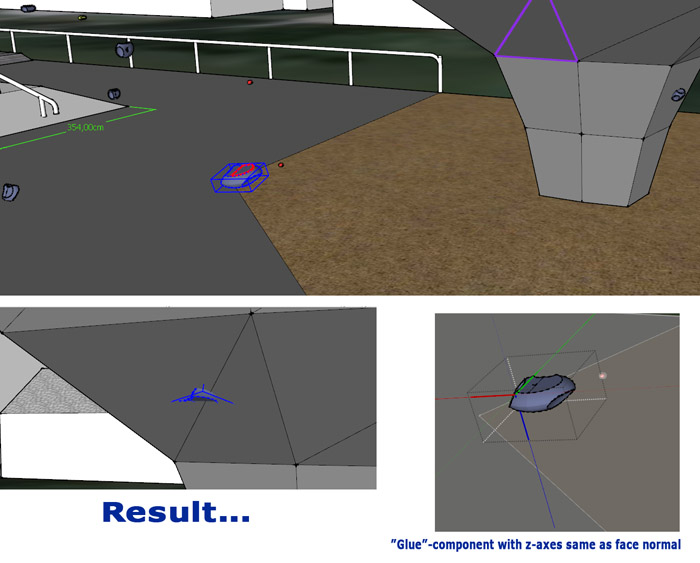
                      Hi, tried using this plugin on Project of mine. Think there is an issue with Glue-ready-components having their axes not aligned to Global axes ?

                      Code is scrambled so can't tell what's up, bro 😉 ..

                      See pic.


                      climbinggrip.jpg

                      1 條回覆 最後回覆 回覆 引用 0
                      • hdpvH 離線
                        hdpv
                        最後由 編輯

                        Hi Jolran,
                        I'm fixing this error. It was because I used center's face instead of centerbounds's face
                        Thanks

                        Suforyou
                        http://www.sketchupforyou.com

                        1 條回覆 最後回覆 回覆 引用 0
                        • jolranJ 離線
                          jolran
                          最後由 編輯

                          @unknownuser said:

                          I'm fixing this error. It was because I used center's face instead of centerbounds's face

                          Well you could probably use something like
                          centerpoint = face.bounds.center.project_to_plane(face.plane), I gather.

                          However I don't think the alignment problem is comming from this ?
                          (the Component in pic is flipped backwards/upwards, part from not sticking to the face)

                          Are you using the face.normals to align or axes of Components?
                          Face normals would be more predictable, possibly. If getting the right nested transformations from the Group/Component, that is.

                          Anyway, thanks! Be willing to testdrive next version for some feedback.

                          1 條回覆 最後回覆 回覆 引用 0
                          • hdpvH 離線
                            hdpv
                            最後由 編輯

                            maybe,this problem is your Group/component have scale ,reset scale is no problem
                            I trying fix this problem.

                            Suforyou
                            http://www.sketchupforyou.com

                            1 條回覆 最後回覆 回覆 引用 0
                            • JBJDesignsJ 離線
                              JBJDesigns
                              最後由 編輯

                              Hi!

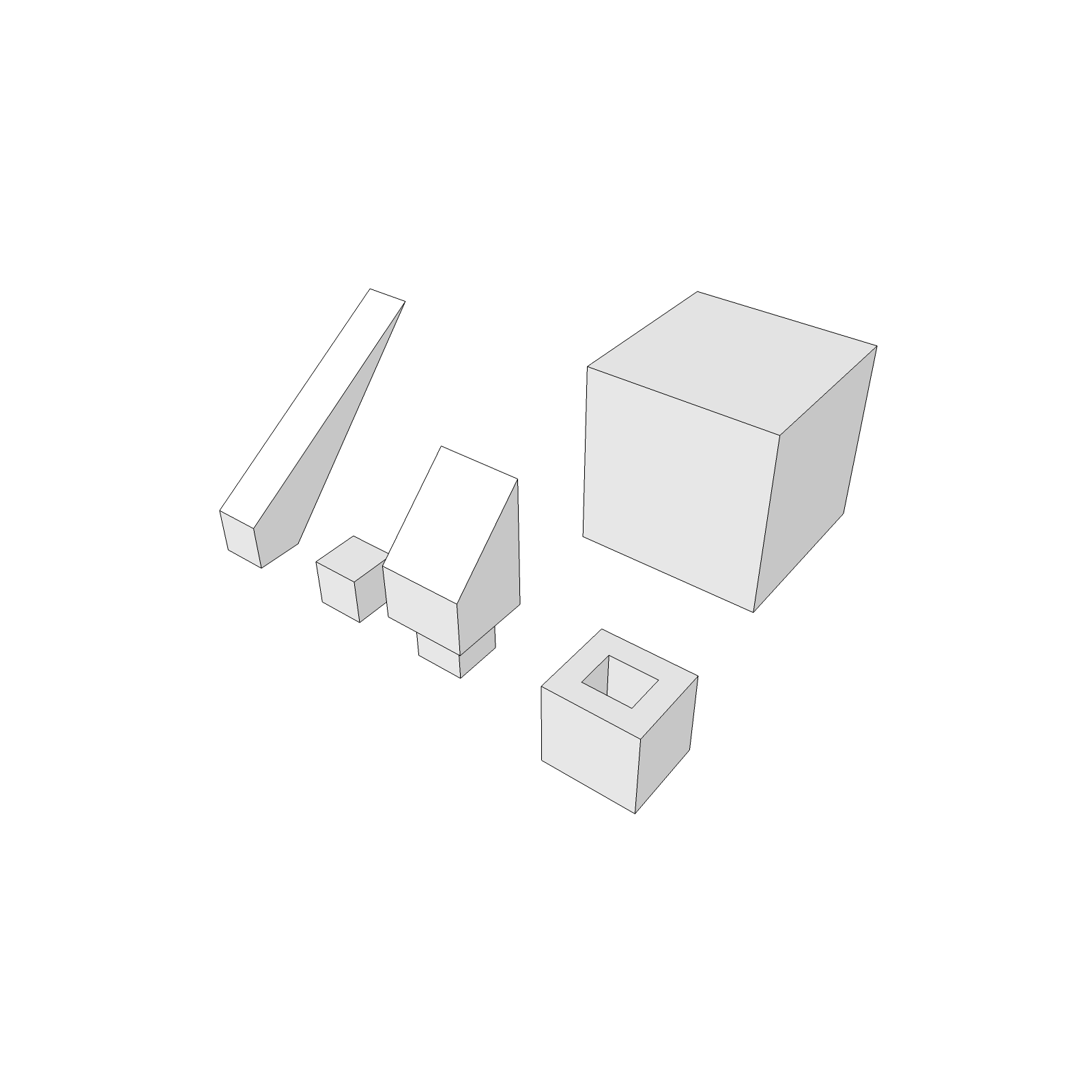
                              I've watched the video several times and have similar objects set-up to mimic what is being demonstrated. I'm not getting the same results; and it's probably because I'm missing something. For instance: I selected "Align Edges" tool; then I selected the edge of the largest object (as demonstrated); then holding down the "CTRL" key, I select the first small box; immediately the first box stretches out in a wedge shape and aligns itself with the larger box; only one object is effected -- if I click on the other small box, nothing happens. It looks pretty simple after viewing the video -- guess I could use some additional help. I've attached a picture to illustrate my point.

                              By the way, your other tools are outstanding especially the S4U to Components (already made a faceted table base and posted it on 3D Warehouse). So thanks for sharing! Jo 😄


                              Proj_NewToolsTest14.png

                              ...you send them to school, you give them books, and they eat the pages...

                              1 條回覆 最後回覆 回覆 引用 0
                              • F 離線
                                function
                                最後由 編輯

                                i think this is great, it could increase workflow quite a bit
                                some issues: it seems to flip things upside down when I don't intend on it sometimes -

                                also I think the selection process should be opposite of what it is. right now you select target first and then the object you want aligned, but it makes a lot more sense to select the object you are working on and want to move to be selected first.

                                oh ya when you click the link to download in the sketchucation store plugin, SKP crashes 😲

                                1 條回覆 最後回覆 回覆 引用 0
                                • Rich O BrienR 離線
                                  Rich O Brien Moderator
                                  最後由 編輯

                                  @function said:

                                  oh ya when you click the link to download in the sketchucation store plugin, SKP crashes 😲

                                  Fixed

                                  Download the free D'oh Book for SketchUp 📖

                                  1 條回覆 最後回覆 回覆 引用 0
                                  • F 離線
                                    function
                                    最後由 編輯

                                    👍

                                    1 條回覆 最後回覆 回覆 引用 0
                                    • F 離線
                                      function
                                      最後由 編輯

                                      you don't hold control, you just press it

                                      1 條回覆 最後回覆 回覆 引用 0
                                      • hdpvH 離線
                                        hdpv
                                        最後由 編輯

                                        hi JBJDesigns!
                                        You can see status bar for instruction,
                                        -select target edge(face)
                                        -then press Ctrl if you want multiselect
                                        -select aligned edge(face)
                                        -press again Ctrl for finish select.
                                        press Tab for change "align" or "align and move"

                                        Suforyou
                                        http://www.sketchupforyou.com

                                        1 條回覆 最後回覆 回覆 引用 0
                                        • hdpvH 離線
                                          hdpv
                                          最後由 編輯

                                          press Ctrl,not hold
                                          1-select target edge(face)
                                          2-then press Ctrl if you want multiselect
                                          3-select aligned edge(face)
                                          4-press again Ctrl for finish select.

                                          Suforyou
                                          http://www.sketchupforyou.com

                                          1 條回覆 最後回覆 回覆 引用 0
                                          • unclebimU 離線
                                            unclebim
                                            最後由 編輯

                                            Wonderful plugin! Thanks! I use the Q JS Align plugin all the time but it works only along the three axes and I believe your plugin will go on top of the most used list now.


                                            1 條回覆 最後回覆 回覆 引用 0
                                            • 1
                                            • 2
                                            • 3
                                            • 1 / 3
                                            • 第一個貼文
                                              最後的貼文
                                            Buy SketchPlus
                                            Buy SUbD
                                            Buy WrapR
                                            Buy eBook
                                            Buy Modelur
                                            Buy Vertex Tools
                                            Buy SketchCuisine
                                            Buy FormFonts

                                            Advertisement