sketchucation logo sketchucation
    • 登入
    Oops, your profile's looking a bit empty! To help us tailor your experience, please fill in key details like your SketchUp version, skill level, operating system, and more. Update and save your info on your profile page today!
    🔌 Smart Spline | Fluid way to handle splines for furniture design and complex structures. Download

    [Plugin][$] 3D Tree Maker - New version 1.10.14

    已排程 已置頂 已鎖定 已移動 Plugins
    322 貼文 79 Posters 174.2k 瀏覽 79 Watching
    正在載入更多貼文
    • 從舊到新
    • 從新到舊
    • 最多點贊
    回覆
    • 在新貼文中回覆
    登入後回覆
    此主題已被刪除。只有擁有主題管理權限的使用者可以查看。
    • L 離線
      Lee05
      最後由 編輯

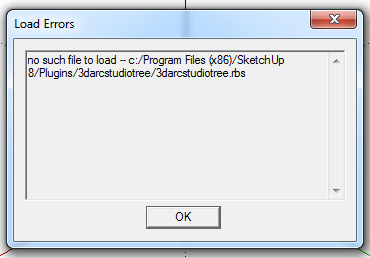
      Installed new version from Plugin Store, got an error.
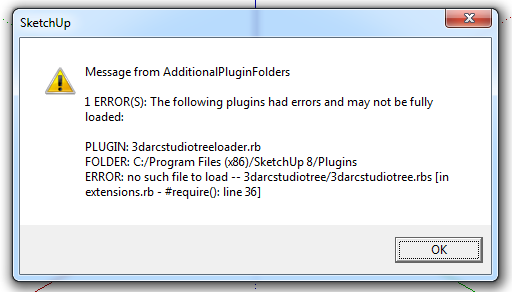

      TreeMaker.png

      1 條回覆 最後回覆 回覆 引用 0
      • ppoublanP 離線
        ppoublan
        最後由 編輯

        Hi Lee05,
        Currently 3D Tree Maker can only be setup into the Plugins folder of Sketchup, and cant be installed in other directory with AdditionalPluginFolders.
        Seems the same issue than Bob James
        see http://sketchucation.com/forums/viewtopic.php?f=323%26amp;t=52540%26amp;start=150#p509692
        Yours
        Pascal

        1 條回覆 最後回覆 回覆 引用 0
        • ppoublanP 離線
          ppoublan
          最後由 編輯

          Oxer,
          As I understand, you correctly got the new tree webdialog.
          Then you select a tree and clic on "Ok"
          Here nothing happens.
          Then if you clic somewhere on the model(do not clic escape or another toolbox at this time as it will exit from tree tool and go back to the other tool) to place the tree, still nothing drawn.
          Does the Sketchup status text (on the left bottom) display a message from Tree Maker, like "Clic to place tree, Esc to cancel" or other message ?

          Can you confirm when you open the Ruby console before calling "New Tree", that you got no error displayed in the ruby console ?

          Does not seems to be an installation problem, so maybe I need to make a "debug" version with some logs in this case, but I will need a little time to prepare this.

          1 條回覆 最後回覆 回覆 引用 0
          • ppoublanP 離線
            ppoublan
            最後由 編輯

            Oxer,
            I made a test on my PC changing show_modal by show, and got the same problem. So I suspect this is linked to the fact that modals webdialog are not working the same on PC and Mac.
            I will need to get advice from experts on this in the developer forum.
            Will come back to you as soon as possible.
            Pascal

            1 條回覆 最後回覆 回覆 引用 0
            • OxerO 離線
              Oxer
              最後由 編輯

              Thanks for the reply!!
              I sent you a PM two hours ago but it's in the Outbox still. ❓

              "The result is the end what is important is the process" by Oxer
              http://www.oxervision.blogspot.com/

              1 條回覆 最後回覆 回覆 引用 0
              • ppoublanP 離線
                ppoublan
                最後由 編輯

                Oxer, (and Mac Users)
                Just published in the Sketchucation Plugin Store a new version that should fix the problem of nothing happens after "New Tree..." webdialog.
                But as I have no Mac available, if Mac users may test and give feedback ?
                Yours
                Pascal

                1 條回覆 最後回覆 回覆 引用 0
                • OxerO 離線
                  Oxer
                  最後由 編輯

                  Yes, it works now on Mac. 👍
                  I tried to send you a PM yesterday, but it's in the Outbox still, so I put here the Spanish Language Translation.

                  Spanish Language file

                  These are some strings not included in the original language file

                  Menu Plugin

                  License...

                  Registration Popup window

                  Unregistered Product
                  username:
                  keycode:
                  unregistered@nowhere.com

                  UI.messagebox

                  Waiting...
                  Working...
                  Clic to place tree, Esc to cancel
                  Building...
                  Building tree...
                  Building tree stems...
                  Building tree leaves...
                  Building tree leaves level 1...
                  Building tree leaves level 2...
                  Building tree flowers...
                  Commit...
                  Tree built.
                  Building tree proxy...
                  Commit tree proxy...
                  Tree proxy built.

                  Description Tree for trees of previous version

                  tree converted from old

                  "The result is the end what is important is the process" by Oxer
                  http://www.oxervision.blogspot.com/

                  1 條回覆 最後回覆 回覆 引用 0
                  • L 離線
                    Lee05
                    最後由 編輯

                    Hi Pascal,
                    the plugin is setup into the Plugins folder of Sketchup, as installed by
                    plugin store.
                    Error still the same.

                    Toni


                    TreeMaker.png

                    1 條回覆 最後回覆 回覆 引用 0
                    • ppoublanP 離線
                      ppoublan
                      最後由 編輯

                      Hi Lee,
                      Looks like Sketchup does not see the file.
                      Check the permissions as described here : http://sketchucation.com/forums/viewtopic.php?f=323%26amp;t=56005
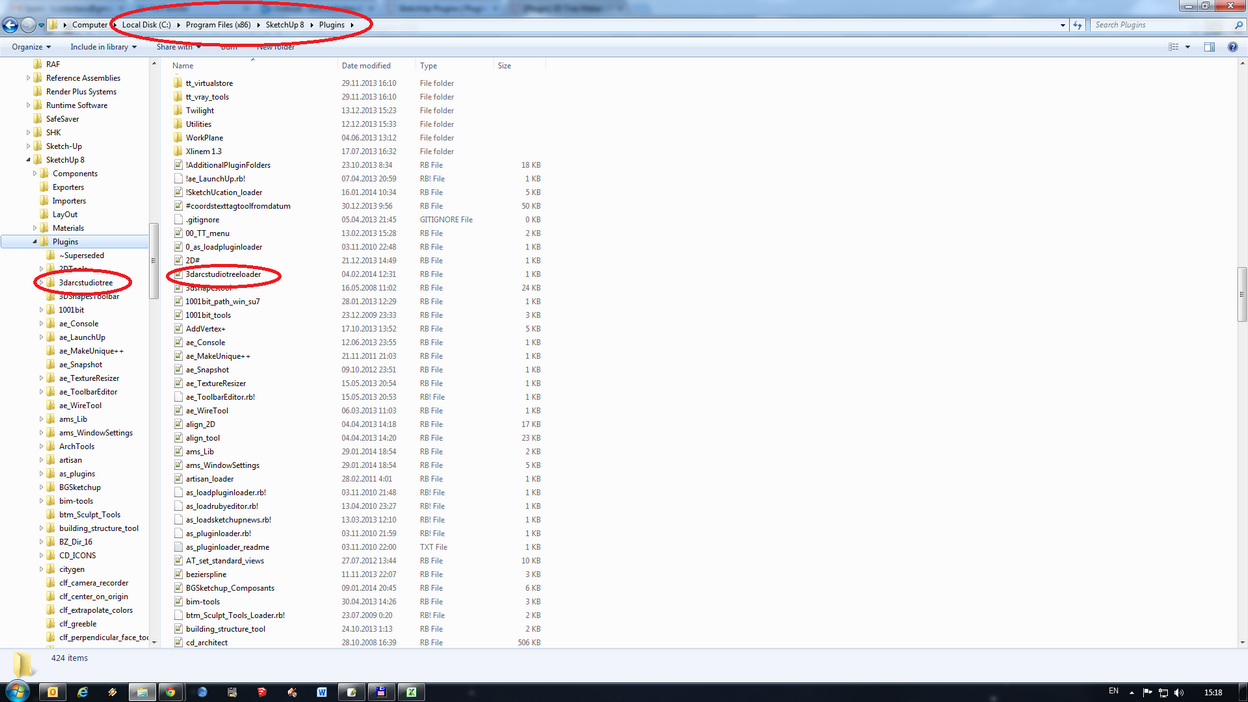
                      Could you provide a screen capture of your Plugins/3darcstudiotree directory to check the files are there.
                      You should have something like this :
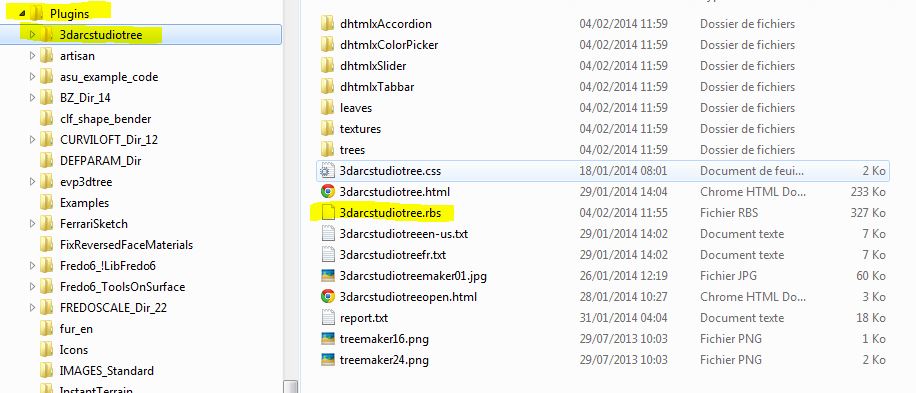
                      plugins3darcstudiotreedir.JPG

                      1 條回覆 最後回覆 回覆 引用 0
                      • L 離線
                        Lee05
                        最後由 編輯

                        Hello Pascal,
                        Here's the print screen. In my opinion the plugin is properly installed.

                        Toni


                        SU_Plugins.png

                        1 條回覆 最後回覆 回覆 引用 0
                        • ppoublanP 離線
                          ppoublan
                          最後由 編輯

                          Hi Lee,
                          I do not understand why the file is not loaded by SU if it exists in the right place.
                          To see what happens from SU, can you run this commande from the Ruby Console :
                          File.exists?(Sketchup.find_support_file("Plugins/3darcstudiotree")+"/3darcstudiotree.rbs")
                          Does it return true ?
                          You can also make a try to run SU as Administrator.
                          Pascal

                          1 條回覆 最後回覆 回覆 引用 0
                          • ppoublanP 離線
                            ppoublan
                            最後由 編輯

                            @oxer said:

                            Yes, it works now on Mac. 👍
                            I tried to send you a PM yesterday, but it's in the Outbox still, so I put here the Spanish Language Translation.

                            [attachment=0:101urpzm]<!-- ia0 -->3darcstudiotreees.txt.zip<!-- ia0 -->[/attachment:101urpzm]

                            These are some strings not included in the original language file

                            tree converted from old

                            Thanks a lot Oxer for that work and pointing out some strings are missing. I will add them to the code in order to be able to localize them as well.
                            Yours
                            Pascal

                            1 條回覆 最後回覆 回覆 引用 0
                            • L 離線
                              Lee05
                              最後由 編輯

                              I run command in Ruby Console, it returns true.
                              SU is running as administrator, error still there.

                              I've installed home the plugin, here works fine.
                              Toni

                              1 條回覆 最後回覆 回覆 引用 0
                              • OxerO 離線
                                Oxer
                                最後由 編輯

                                I seen a curious plant in the templates, the tree26 👍 😆 😆 😆 😆

                                "The result is the end what is important is the process" by Oxer
                                http://www.oxervision.blogspot.com/

                                1 條回覆 最後回覆 回覆 引用 0
                                • ppoublanP 離線
                                  ppoublan
                                  最後由 編輯

                                  @lee05 said:

                                  I've installed home the plugin, here works fine.
                                  Toni

                                  hi Toni,
                                  So it works fine now ?
                                  You copied files to Plugins/3darcstudiotree folder to solve it ?
                                  Just want to know if it was a pb of security rights or files beeing in the right folder.
                                  Yours
                                  Pascal

                                  1 條回覆 最後回覆 回覆 引用 0
                                  • L 離線
                                    Lee05
                                    最後由 編輯

                                    Hi Pascal,
                                    3D Tree Maker works fine on computer from home, there I've installed it from SU plugin store, I did'nt change anything, just leave it how installed itself.

                                    On my office computer I still get that error. SU runs as administrator, everything is at it's place and security settings are the same as for all other plugins.
                                    When running the command in ruby console returns true also.

                                    1 條回覆 最後回覆 回覆 引用 0
                                    • TIGT 離線
                                      TIG Moderator
                                      最後由 編輯

                                      Have you read and fixed things as this?
                                      http://sketchucation.com/forums/viewtopic.php?p=508319#p508319

                                      Also your SketchUp installation path looks a bit 'non-standard' ?
                                      Did you allow the SketchUp-installer to choose the path or did you 'customize' it ?
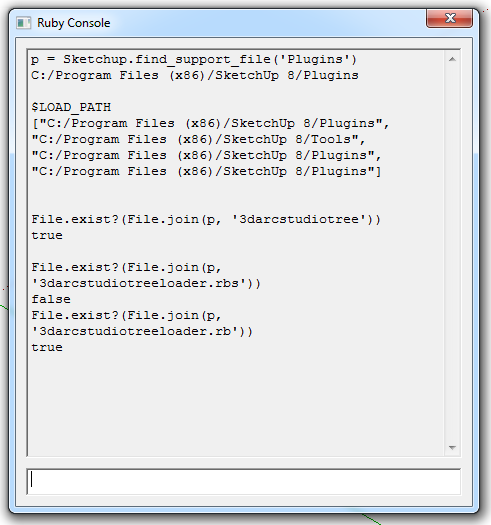
                                      To check where SketchUp thinks Plugins should be and where they are please type or copy+paste these lines of code in the Ruby Console + <enter>

                                      p = Sketchup.find_support_file('Plugins')
                                      should return the path to you plugins folder.

                                      $LOAD_PATH
                                      should return an array of paths, including the same one to the Plugins folder [p].

                                      File.exist?(File.join(p, '3darcstudiotree'))
                                      should return true if that folder exists in Plugins.

                                      File.exist?(File.join(p, '3darcstudiotreeloader.rb'))
                                      should return true if that file exists in Plugins.

                                      😕

                                      TIG

                                      1 條回覆 最後回覆 回覆 引用 0
                                      • L 離線
                                        Lee05
                                        最後由 編輯

                                        Hi TIG,

                                        I have read that topic and everything looks ok.
                                        The installation path for SU is a little non-standard on both PC home and office but only at office I got the error. The installation was made from Sketchup Plugin Store v.2.5.1 as other plugins that work fine.

                                        I run the lines of code in Ruby Console it returns at it should, see image.

                                        😢


                                        Ruby console.png

                                        1 條回覆 最後回覆 回覆 引用 0
                                        • TIGT 離線
                                          TIG Moderator
                                          最後由 編輯

                                          @Lee05

                                          Your results are fine. 😄 😕
                                          Now recheck that Plugins folder's properties > security against the FULL permissions, as mentioned in my previous post...

                                          The main rbs code is encrypted so we can't see exactly what it's doing...

                                          The tool perhaps writes some temporary data files that it has a permission issue with ?

                                          Can I suggest you contact the maker of the tool directly...

                                          TIG

                                          1 條回覆 最後回覆 回覆 引用 0
                                          • ppoublanP 離線
                                            ppoublan
                                            最後由 編輯

                                            @lee,
                                            If the error message is "file not found", I do not think it is due to the content of the file itself. But maybe I'm wrong...

                                            Do not have many other ideas to solve the issue. Here are 2 options you may try :
                                            -delete the file 3darcstudiotreeloader.rb
                                            -delete the directory 3darcstudiotree and all its content

                                            • run SU
                                            • reinstall the plugin from Sketchucation pluginstore
                                              and see if you got the same error

                                            If the problem is still there, copy all the files that are in the plugins directory somewhere else (to be able to put them back later).
                                            Delete all the files in the plugin directory except 3darcstudiotreeloader.rb
                                            Run SU and test

                                            Just to be sure, when you move from SU8 to SU2013, did you reinstalled your plugins or just copied the files from SU8 to SU2013 ? cause I have seen some errors linked to copy of old SU8 files into the SU2013 plugin dir.

                                            1 條回覆 最後回覆 回覆 引用 0
                                            • 1
                                            • 2
                                            • 13
                                            • 14
                                            • 15
                                            • 16
                                            • 17
                                            • 17 / 17
                                            • 第一個貼文
                                              最後的貼文
                                            Buy SketchPlus
                                            Buy SUbD
                                            Buy WrapR
                                            Buy eBook
                                            Buy Modelur
                                            Buy Vertex Tools
                                            Buy SketchCuisine
                                            Buy FormFonts

                                            Advertisement