sketchucation logo sketchucation
    • Login
    Oops, your profile's looking a bit empty! To help us tailor your experience, please fill in key details like your SketchUp version, skill level, operating system, and more. Update and save your info on your profile page today!
    ⚠️ Important | Libfredo 15.6a introduces important bugfixes for Fredo's Extensions Update

    Smooth right-click option...

    Scheduled Pinned Locked Moved SketchUp Discussions
    sketchup
    12 Posts 6 Posters 438 Views 6 Watching
    Loading More Posts
    • Oldest to Newest
    • Newest to Oldest
    • Most Votes
    Reply
    • Reply as topic
    Log in to reply
    This topic has been deleted. Only users with topic management privileges can see it.
    • Dave RD Offline
      Dave R
      last edited by

      Seriously? You're looking for a plugin for native tool in SketchUp?
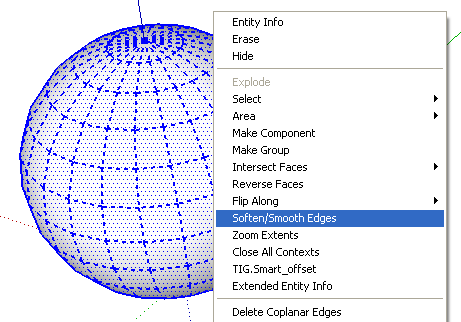
      ss.png

      Etaoin Shrdlu

      %

      (THERE'S NO PLACE LIKE)

      G28 X0.0 Y0.0 Z0.0

      M30

      %

      1 Reply Last reply Reply Quote 0
      • A Offline
        agamemnus
        last edited by

        Dave, I'm sorry -- I wasn't clear enough. There's no smooth option when selecting a single line/edge.

        1 Reply Last reply Reply Quote 0
        • Dave RD Offline
          Dave R
          last edited by

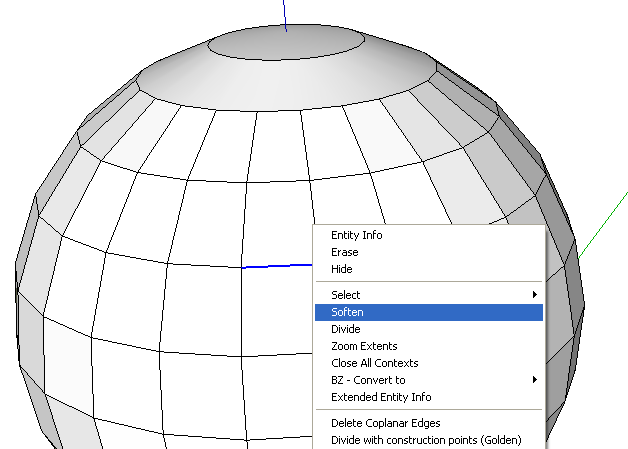
          Really?

          soft.png

          What version of SketchUp are you using?

          Etaoin Shrdlu

          %

          (THERE'S NO PLACE LIKE)

          G28 X0.0 Y0.0 Z0.0

          M30

          %

          1 Reply Last reply Reply Quote 0
          • A Offline
            agamemnus
            last edited by

            Dave..

            That's Soften, not Smooth.

            I have actually recently updated (yesterday) to Trimble's version of Sketchup. It only Softens for me.

            1 Reply Last reply Reply Quote 0
            • Dave RD Offline
              Dave R
              last edited by

              It's the same thing.

              Use the Eraser tool then.

              Etaoin Shrdlu

              %

              (THERE'S NO PLACE LIKE)

              G28 X0.0 Y0.0 Z0.0

              M30

              %

              1 Reply Last reply Reply Quote 0
              • Rich O BrienR Online
                Rich O Brien Moderator
                last edited by

                Link Preview Image
                CADspan :: 3D Printing Solutions :: Home Home - cadspan

                favicon

                (www.cadspan.com)

                Download the free D'oh Book for SketchUp πŸ“–

                1 Reply Last reply Reply Quote 0
                • A Offline
                  agamemnus
                  last edited by

                  It's slightly different in that the shading is different. Maybe other things.

                  Thanks for that link, Rich. I will try that. I think it has a function for my earlier problem, too (cutting out unnecessary parts inside the object). And it's a nice thing to have if I want to make a physical model, to boot.

                  1 Reply Last reply Reply Quote 0
                  • thomthomT Offline
                    thomthom
                    last edited by

                    @agamemnus said:

                    That's Soften, not Smooth.

                    That is strange. Never noticed that before.

                    The Erase tool and the Soften/Smooth Edges window both applies Soft+Smooth to the edges. But this menu item only applies Soften - which seem to be to be a neglected inconsistency. I find it rare that I ever want to Soften an edge without smoothing it.

                    Anyway - have you tried to use the Erase tool as Dave suggested? Hold Ctrl while you use and it will soften and smooth the edges instead of erasing them.

                    Thomas Thomassen β€” SketchUp Monkey & Coding addict
                    List of my plugins and link to the CookieWare fund

                    1 Reply Last reply Reply Quote 0
                    • A Offline
                      agamemnus
                      last edited by

                      Yes, but it simply erased the line. I guess CTRL is the key. Thanks. I will forget that. It's really hard to remember keyword shortcuts when I am thinking and trying to remember 10000000000 other things.

                      1 Reply Last reply Reply Quote 0
                      • N Offline
                        numerobis
                        last edited by

                        @agamemnus said:

                        It's really hard to remember keyword shortcuts when I am thinking and trying to remember 10000000000 other things.

                        Therefore they are displayed in the short instructions of the tools at the lower end of your screen... πŸ˜‰

                        And one other suggestion for quick smoothing... i always have the soften/smooth window opened, so it's only ONE click to adjust the setting if an object is selected πŸ˜„

                        1 Reply Last reply Reply Quote 0
                        • GaieusG Offline
                          Gaieus
                          last edited by

                          You can also download (and print if you wish) the Quick reference card that lists all the modification keys:
                          http://support.google.com/sketchup/bin/answer.py?hl=en&answer=116693

                          Gai...

                          1 Reply Last reply Reply Quote 0
                          • 1 / 1
                          • First post
                            Last post
                          Buy SketchPlus
                          Buy SUbD
                          Buy WrapR
                          Buy eBook
                          Buy Modelur
                          Buy Vertex Tools
                          Buy SketchCuisine
                          Buy FormFonts

                          Advertisement