sketchucation logo sketchucation
    • Login
    Oops, your profile's looking a bit empty! To help us tailor your experience, please fill in key details like your SketchUp version, skill level, operating system, and more. Update and save your info on your profile page today!
    Mac User? | Join the Rayscaper Beta for Mac Learn More

    [Plugin] ToolbarEditor (1.1.2) – updated 08.06.2014

    Scheduled Pinned Locked Moved Plugins
    122 Posts 40 Posters 79.2k Views 40 Watching
    Loading More Posts
    • Oldest to Newest
    • Newest to Oldest
    • Most Votes
    Reply
    • Reply as topic
    Log in to reply
    This topic has been deleted. Only users with topic management privileges can see it.
    • L
      lionk
      last edited by

      great work! 👍
      here is the Chinese language file, translated by 麦兜(miduee)&双鱼(shuangyu)


      Chinese lang file

      1 Reply Last reply
      Reply Quote 0
      • guanjinG
        guanjin
        last edited by

        @aerilius said:

        Oh, that could be difficult to find out 😉 The plugin sends all information about all your plugins into the dialog, and I don't have the same plugins as you. The error could be caused by something unknown.

        Hello:Aerilius

        Reinstall SketchUp successful trial, the conflicted file can not be found.
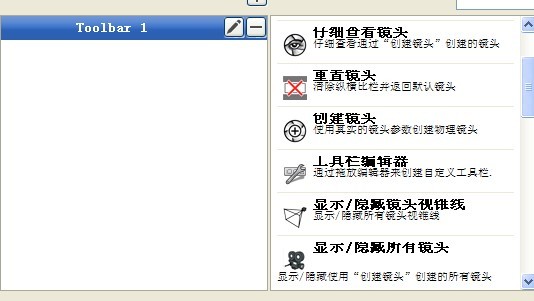
        22.jpg

        I come from China, is to learn

        1 Reply Last reply
        Reply Quote 0
        • D
          danb
          last edited by

          Thankyou, I am on a mac and am sick of the toolbars floating all over the place and have been envious of Windows, this has instantly improved my workflow.

          best

          Dan

          Sketchup Pro 2019/20
          OSX 10.15.3
          Macbook Pro

          1 Reply Last reply
          Reply Quote 0
          • Dave RD
            Dave R
            last edited by

            I haven't seen that. I maybe haven't looked very hard, though. I got the tools I wanted onto a toolbar without any problems.

            Etaoin Shrdlu

            %

            (THERE'S NO PLACE LIKE)

            G28 X0.0 Y0.0 Z0.0

            M30

            %

            1 Reply Last reply
            Reply Quote 0
            • R
              RickW
              last edited by

              Has anyone else had problems with not all commands being available? I'm also missing a lot of icons that exist on other toolbars.

              RickW
              www.smustard.com

              1 Reply Last reply
              Reply Quote 0
              • zieiosZ
                zieios
                last edited by

                Nice one

                1 Reply Last reply
                Reply Quote 0
                • ArisA
                  Aris
                  last edited by

                  Great plugin! very nice interface and very useful!
                  I would suggest (don't know if it is doable) giving the option to create dialog boxes as well.

                  Not a native speaker, point out my spelling (or other) mistakes, I won't be offended!!!

                  1 Reply Last reply
                  Reply Quote 0
                  • K
                    kct3937
                    last edited by

                    I followed Dave's instructions and the toolbars are showing up fine in my Mac version. However they are vertical toolbars only. Can I get them to set out horizontally?

                    1 Reply Last reply
                    Reply Quote 0
                    • Dave RD
                      Dave R
                      last edited by

                      It's a feature! 😄

                      Move the toolbar up to the top or down to the bottom temporarily and it'll swing around to horizontal. Then you can place it wherever you want.

                      Etaoin Shrdlu

                      %

                      (THERE'S NO PLACE LIKE)

                      G28 X0.0 Y0.0 Z0.0

                      M30

                      %

                      1 Reply Last reply
                      Reply Quote 0
                      • K
                        kct3937
                        last edited by

                        Thanks Dave…two thumbs up! 👍 👍 😆

                        Have you met a new friend each morning in the mirror, yet? ❓

                        Ken T

                        1 Reply Last reply
                        Reply Quote 0
                        • L
                          lionk
                          last edited by

                          hi Aerilius,
                          some bugs:
                          1.there is a mismatch between toolbar name in the Editor and the real name.
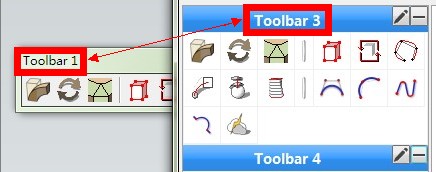
                          20130506072119.jpg
                          2.when renaming the toolbar, ENTER will delete it instead of confirm the name...

                          20130506072417.jpg
                          3.i can't rename toolbars in double-byte characters.it will show like this.

                          20130506073245.jpg
                          the same problem happened to LaunchUp when i search DBCS strings.
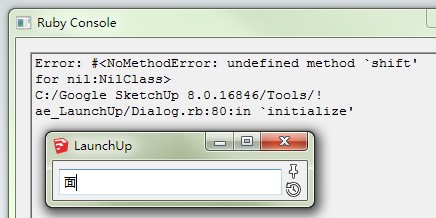
                          20130506074502.jpg
                          4.if i close the toolbar and restart sketchup, i have to click 3 times in View menu to reopen it.
                          5.the position of the toolbar can't be saved.it troubled me so much...

                          1 Reply Last reply
                          Reply Quote 0
                          • A
                            Aerilius
                            last edited by

                            Hi, thanks for the reports!
                            As for 2. it looks like the "-" button has focus and accepts enter. I think I can make sure that this doesn't happen.
                            4., 5. I have no control about that, I wished it worked in SketchUp as it should.

                            1 Reply Last reply
                            Reply Quote 0
                            • A
                              Aerilius
                              last edited by

                              I could solve 1., 2. and 3., but I don't get an error when searching in LaunchUp for 面 or 测. Do you use the latest version of LaunchUp? Which version if Internet Explorer do you use?

                              1 Reply Last reply
                              Reply Quote 0
                              • L
                                lionk
                                last edited by

                                @aerilius said:

                                I could solve 1., 2. and 3., but I don't get an error when searching in LaunchUp for 面 or 测. Do you use the latest version of LaunchUp? Which version if Internet Explorer do you use?

                                yes,the version of LaunchUp is 1.0.11. and IE10.
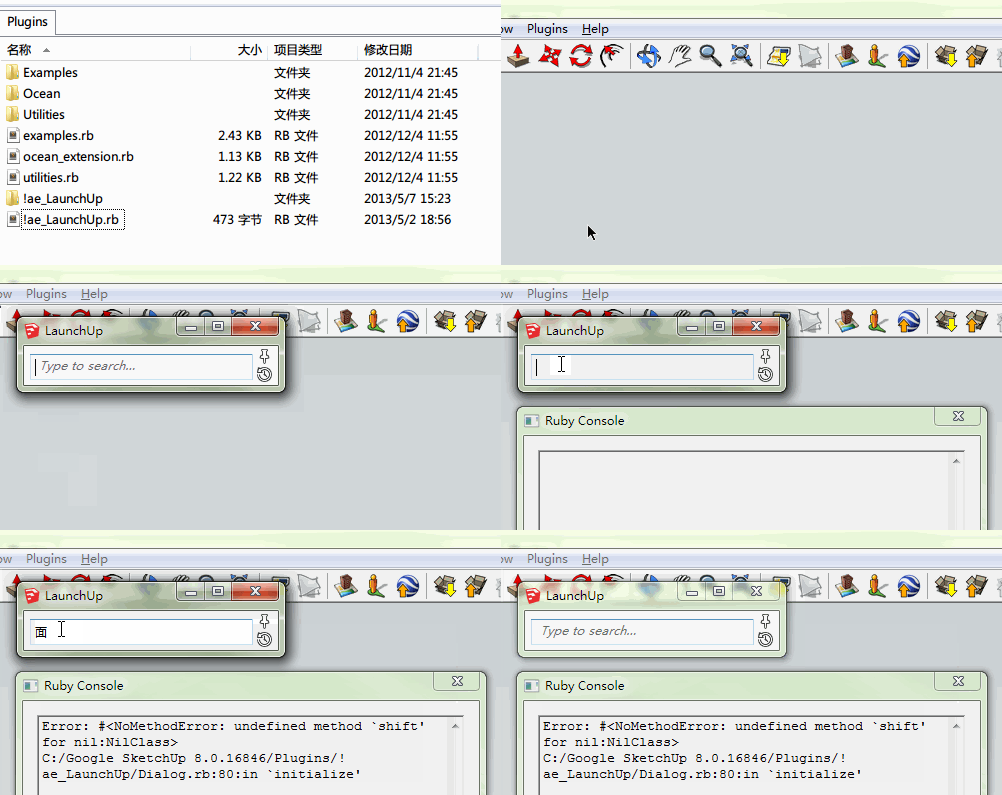
                                LaunchUp_error.gif

                                1 Reply Last reply
                                Reply Quote 0
                                • A
                                  Aerilius
                                  last edited by

                                  Hi lionk,
                                  can you try ToolbarEditor 1.0.4? It should now remember toolbar names and display Chinese correctly.

                                  1 Reply Last reply
                                  Reply Quote 0
                                  • CadFatherC
                                    CadFather
                                    last edited by

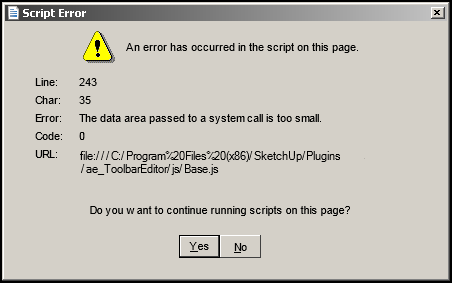
                                    Thanks Aerilius - just in case this means something to you i get this quite often when i press apply.

                                    after this error, the toolbars i was in the process of creating are lost.
                                    ted.png

                                    1 Reply Last reply
                                    Reply Quote 0
                                    • A
                                      Aerilius
                                      last edited by

                                      I don't get this and I can't see anything obvious around line 243. Also I don't use a any system calls.

                                      It could be related to SketchUp's skp protocol [1,2,3].
                                      Does this still occur with version 1.0.4, and if so, does it now show a different line?

                                      1 Reply Last reply
                                      Reply Quote 0
                                      • TIGT
                                        TIG Moderator
                                        last edited by

                                        line250

                                        var message = messageQueue.shift();
                                            if (!message) { ready = true; return; }
                                            // Lock the status variable before sending the message.
                                            // (because window.location is synchronous in IE and finishes before this
                                            // function finishes.)
                                            ready = false;
                                            var id = message[0],
                                                url = message[1],
                                                data = message[2];
                                            fillMessageField(id, data);
                                        

                                        line260
                                        IF 'id' OR more likely 'data' is somehow 'wrong' you get the error ? NULL ?

                                        TIG

                                        1 Reply Last reply
                                        Reply Quote 0
                                        • A
                                          Aerilius
                                          last edited by

                                          If data or id could be wrong, no Ruby callback would happen. If url were wrong, IE would navigate to a not existing site. Nothing that gives such an error.

                                          1 Reply Last reply
                                          Reply Quote 0
                                          • CadFatherC
                                            CadFather
                                            last edited by

                                            only thing is i can't find any underlying pattern - unpredictable so far but i'll keep an eye on it (i'll have a go tonight with the new version. thanks!

                                            also - i made a batch file to import export the registry settings but also i'm getting strange behaviour (when exporting) - will report more on this as it's great if one can save and share the same toolbar layout. overall it's getting better with each version, and the positions are kept more consistently.. great stuff!


                                            1 Reply Last reply
                                            Reply Quote 0

                                            Hello! It looks like you're interested in this conversation, but you don't have an account yet.

                                            Getting fed up of having to scroll through the same posts each visit? When you register for an account, you'll always come back to exactly where you were before, and choose to be notified of new replies (either via email, or push notification). You'll also be able to save bookmarks and upvote posts to show your appreciation to other community members.

                                            With your input, this post could be even better 💗

                                            Register Login
                                            • 1
                                            • 2
                                            • 3
                                            • 4
                                            • 5
                                            • 6
                                            • 7
                                            • 5 / 7
                                            • First post
                                              Last post
                                            Buy SketchPlus
                                            Buy SUbD
                                            Buy WrapR
                                            Buy eBook
                                            Buy Modelur
                                            Buy Vertex Tools
                                            Buy SketchCuisine
                                            Buy FormFonts

                                            Advertisement