sketchucation logo sketchucation
    • 登入
    Oops, your profile's looking a bit empty! To help us tailor your experience, please fill in key details like your SketchUp version, skill level, operating system, and more. Update and save your info on your profile page today!
    🔌 Smart Spline | Fluid way to handle splines for furniture design and complex structures. Download

    [Plugin][$] TopoShaper - v2.7b - 30 Jan 26


    已排程 已置頂 已鎖定 已移動 Plugins
    456 貼文 144 Posters 715.8k 瀏覽 143 Watching
    正在載入更多貼文
    • 從舊到新
    • 從新到舊
    • 最多點贊
    回覆
    • 在新貼文中回覆
    登入後回覆
    此主題已被刪除。只有擁有主題管理權限的使用者可以查看。
    • pbacotP 離線
      pbacot
      最後由 編輯

      OK. thanks. I could probably take out the road. So closer intervals is not the answer.

      MacOSX MojaveSketchUp Pro v19 Twilight v2 Thea v3 PowerCADD

      1 條回覆 最後回覆 回覆 引用 0
      • M 離線
        menes
        最後由 編輯

        Hello,
        I need help!
        I'm puzzled and I can't get on top of this issue
        this great plugin from the time I've installed the new 2020 SU it's not working as it was effectively before...
        I attach some files maybe someone understands what's going on

        thanks, everybody will be going to help
        Alberto
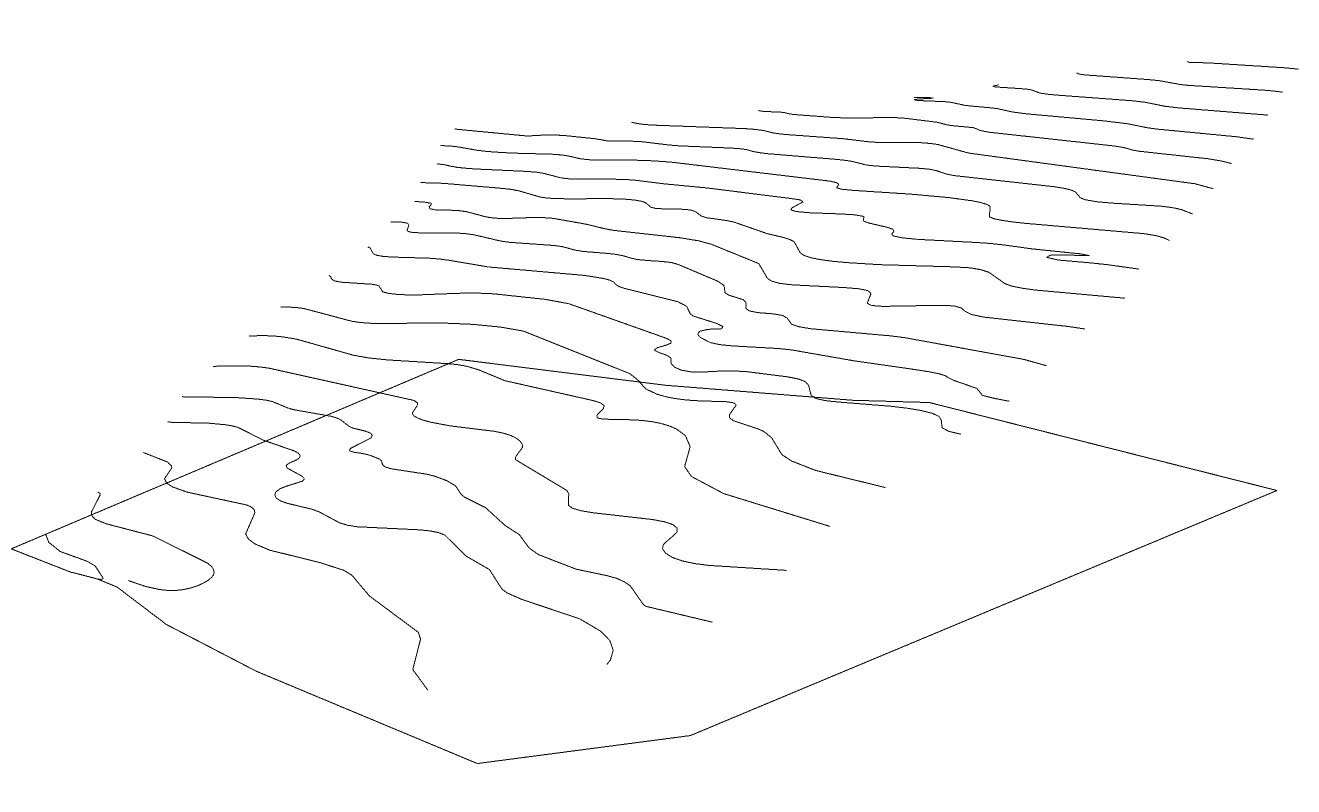

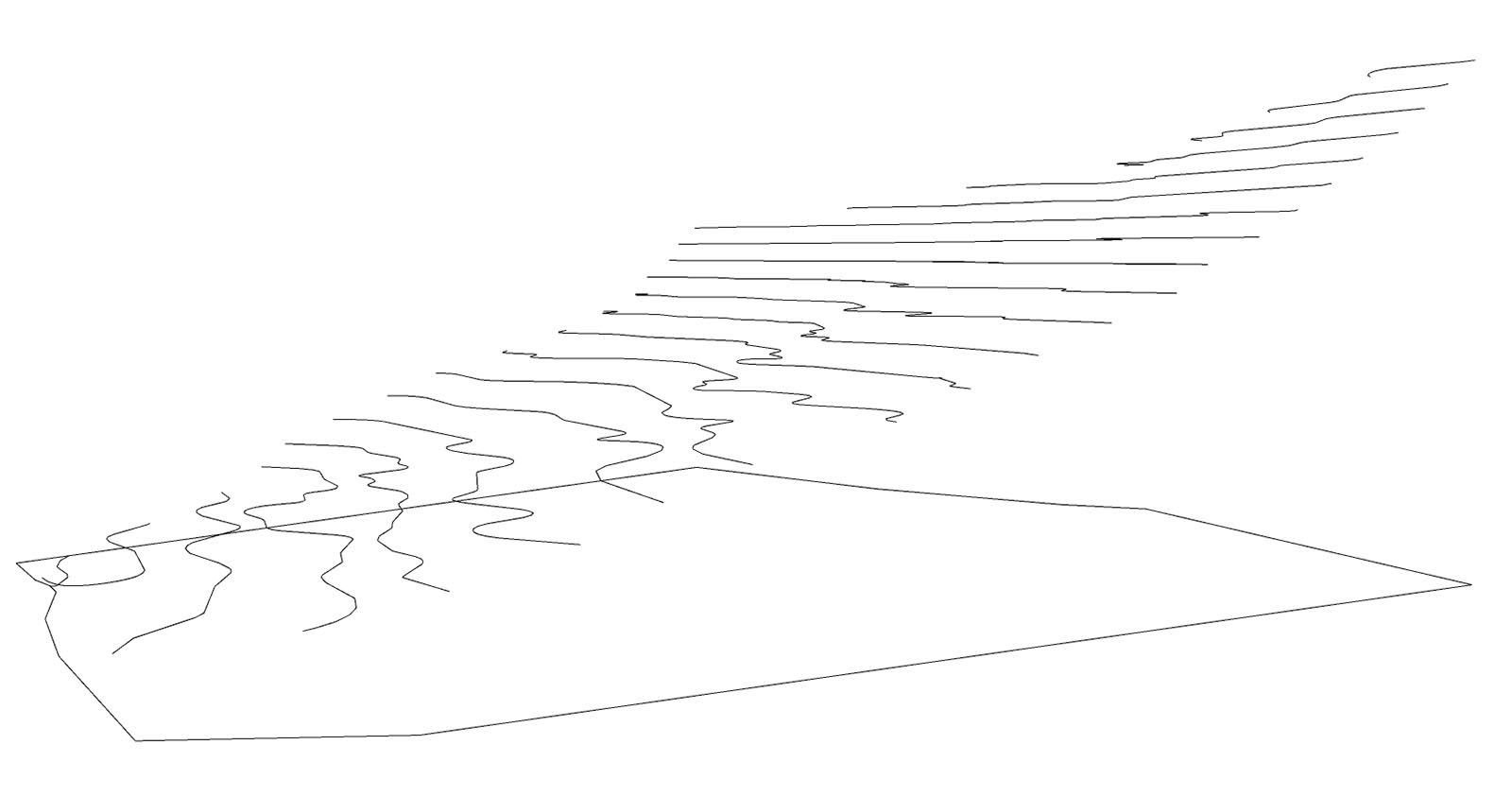
        TOPO 3D CLEANED 1.jpg


        initial status of isolines


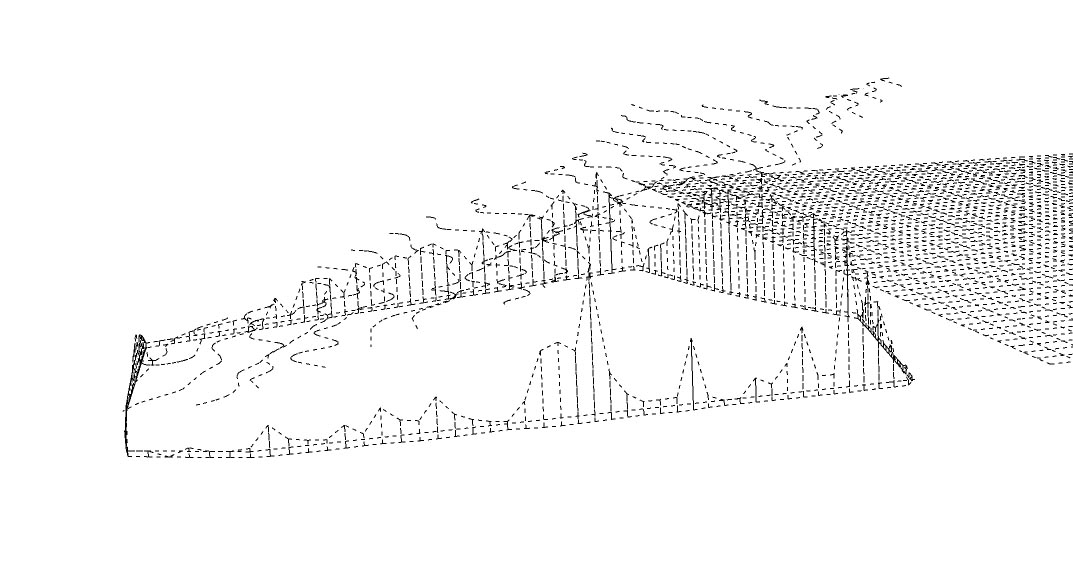
        preview


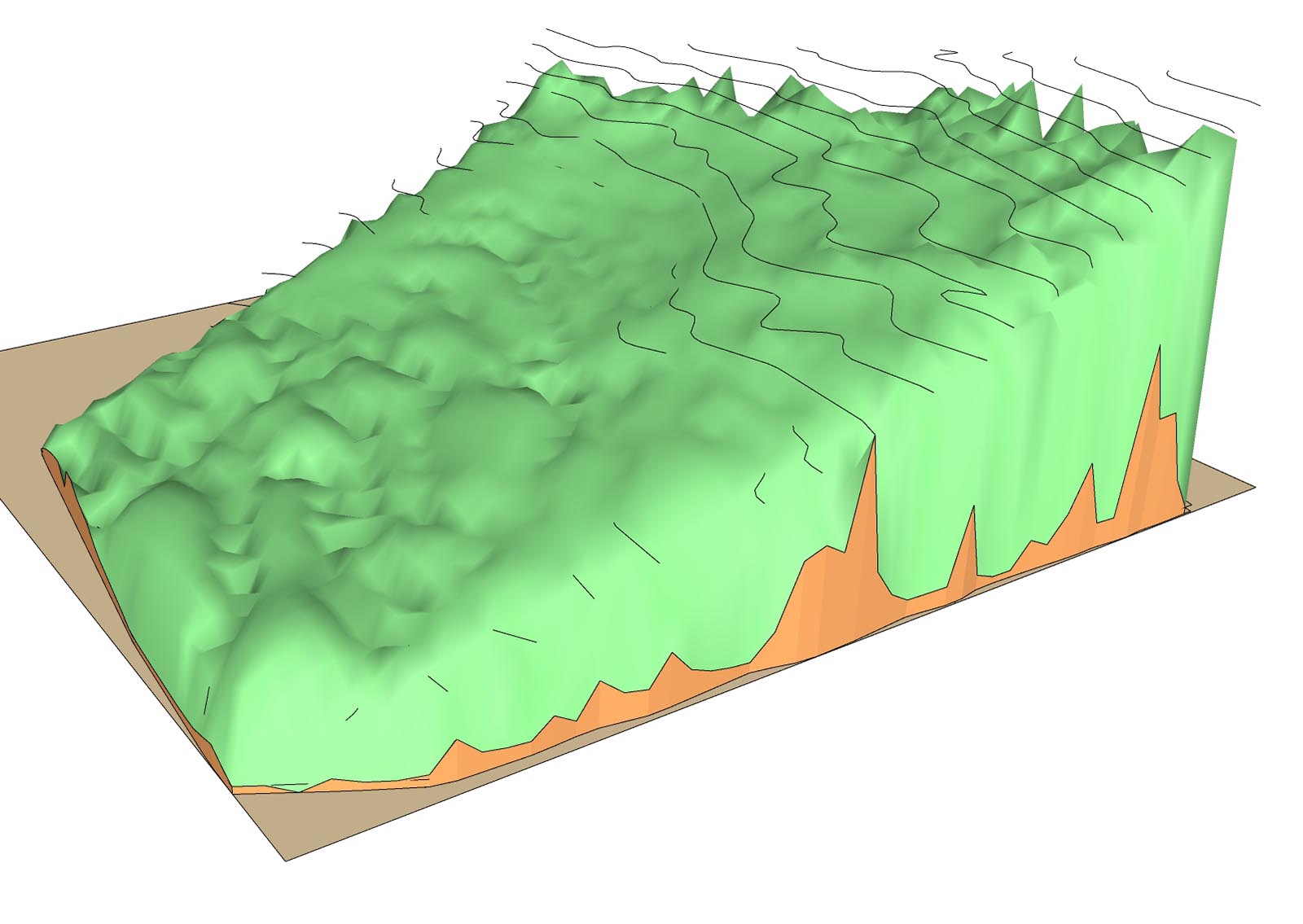
        terrain created...not correct!

        1 條回覆 最後回覆 回覆 引用 0
        • fredo6F 離線
          fredo6
          最後由 編輯

          @menes said:

          I attach some files maybe someone understands what's going on

          I would suggest you do not select the quadrangular base contour, just the isocontours.

          Best would be that you attach the model.

          Fredo

          1 條回覆 最後回覆 回覆 引用 0
          • M 離線
            menes
            最後由 編輯

            Hello,

            thank you very much for your reply...

            "I would suggest you do not select the quadrangular base contour, just the isocontours.

            Best would be that you attach the model.

            Fredo"

            I didn't included the base contour...but the problem remains
            I add here the file , thank you

            Best
            Alberto


            TOPO 3D CLEANED.skp

            1 條回覆 最後回覆 回覆 引用 0
            • fredo6F 離線
              fredo6
              最後由 編輯

              @menes said:

              I didn't included the base contour...but the problem remains

              Actually, it's a matter of scale. Your model is far too small (height is 30 cm).

              So scale it by a factor of 1000 and it will give give normal results.
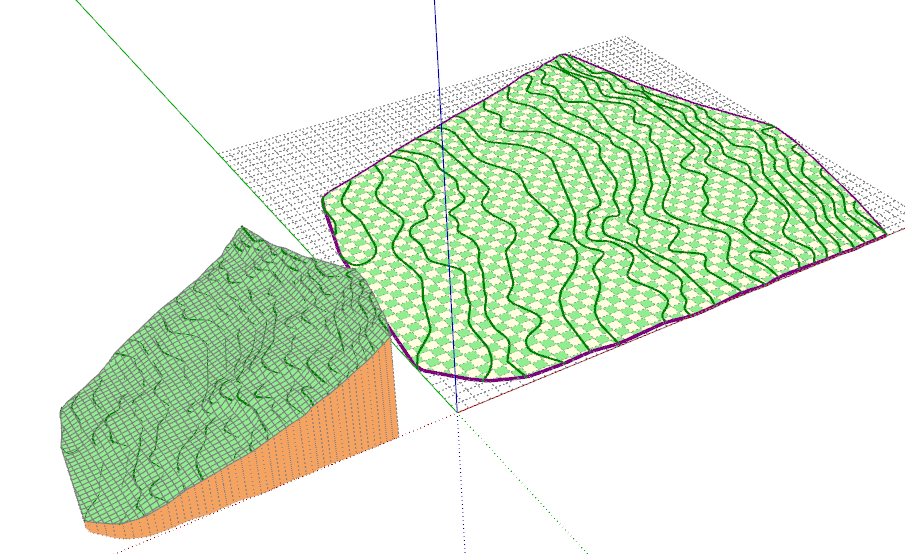
              Menes - terrain iso.png

              1 條回覆 最後回覆 回覆 引用 0
              • M 離線
                menes
                最後由 編輯

                LOL .... 🤣
                you're right...sometimes we getting lost with the most stupid thing...
                thank you very much...sorry.

                Best regards
                Alberto

                1 條回覆 最後回覆 回覆 引用 0
                • M 離線
                  menes
                  最後由 編輯

                  I've just imported from Autocad from a Topographer...and I didn't scale it at all 😆

                  Thank you again

                  1 條回覆 最後回覆 回覆 引用 0
                  • M 離線
                    menes
                    最後由 編輯

                    ah ...by the way

                    You are great Fredo ...admiration!

                    1 條回覆 最後回覆 回覆 引用 0
                    • S 離線
                      sgb1456
                      最後由 編輯

                      I keep getting an error while using the extension with Sketchup 2021. Ill post the text below:

                      Date: 03-Mar-21 10:06:57
                      An error occurred in CLEANSING
                      The operation is fully aborted

                      cannot hide layer that is a part of the active path

                      body_lib6tool.rbe: 2538 -- visible=
                      body_lib6tool.rbe: 2538 -- block in switch_to_temp_layer
                      body_lib6tool.rbe: 2537 -- each
                      body_lib6tool.rbe: 2537 -- switch_to_temp_layer
                      toposhapertool.rbe: 1391 -- change_view
                      toposhapertool.rbe: 1358 -- set_preview_working
                      toposhapertool.rbe: 544 -- cleansing_processing
                      toposhapertool.rbe: 523 -- after_selection
                      toposhapertool.rbe: 493 -- notify_edge_picked
                      body_lib6edgepicker.rbe: 539 -- call
                      body_lib6edgepicker.rbe: 539 -- notify_action
                      body_lib6edgepicker.rbe: 595 -- terminate_current_selection
                      toposhapertool.rbe: 658 -- execute_validate
                      toposhapertool.rbe: 387 -- handle_initial_selection
                      toposhapertool.rbe: 319 -- activate
                      toposhapertool.rbe: 133 -- select_tool
                      toposhapertool.rbe: 133 -- action__mapping
                      lib6plugin.rbe: 129 -- call
                      lib6plugin.rbe: 129 -- launch_action
                      lib6plugin.rbe: 227 -- launch_action
                      bootstrap_toposhaper.rbe: 83 -- launch_action
                      bootstrap_toposhaper.rbe: 136 -- block in startup
                      lib6plugin.rbe: 1347 -- command_invoke
                      lib6plugin.rbe: 1328 -- block (2 levels) in build_config_commands
                      lib6traductor.rbe: 1377 -- block in add_command

                      Should I just reinstall Sketchup 2020? I can't live without this extension!

                      1 條回覆 最後回覆 回覆 引用 0
                      • fredo6F 離線
                        fredo6
                        最後由 編輯

                        @sgb1456 said:

                        Should I just reinstall Sketchup 2020? I can't live without this extension!

                        You do NOT need to reinstall Sketchup. Maybe relaunch it and try again.

                        Otherwise, if you could post or PM me the model, this would help.

                        Fredo

                        1 條回覆 最後回覆 回覆 引用 0
                        • G 離線
                          Grey24601
                          最後由 編輯

                          Hi Fredo,

                          Brilliant plugin.
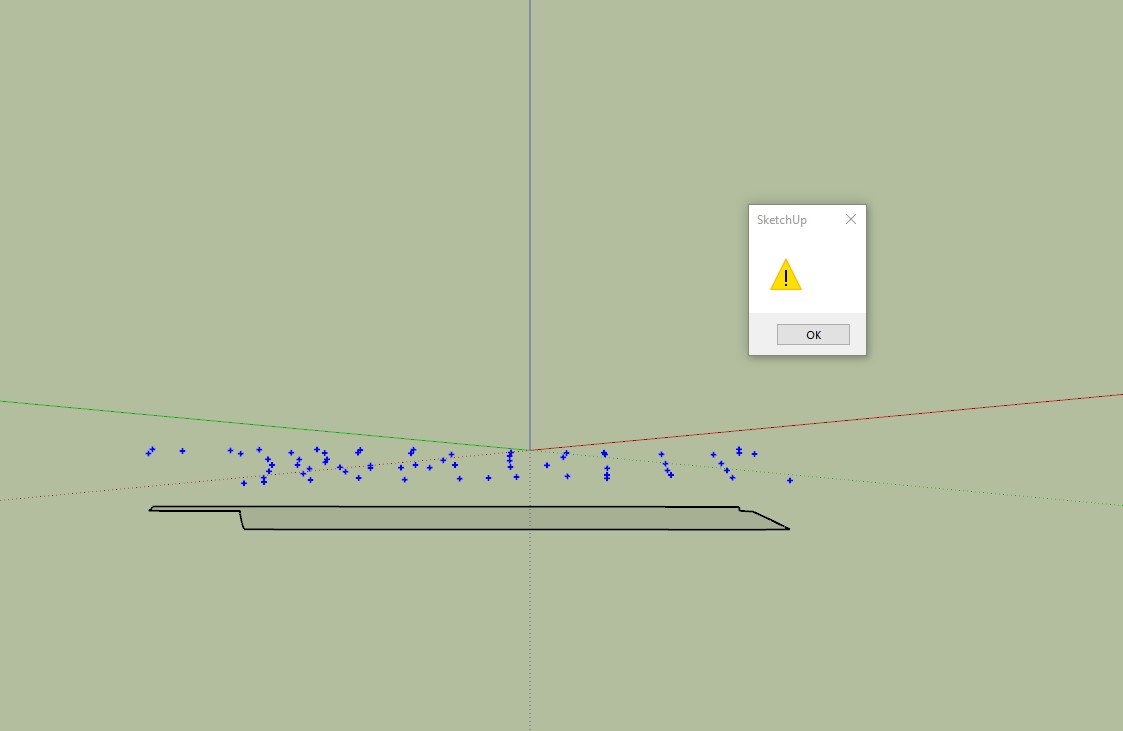
                          What am I doing wrong here? When I select cloud I get a yellow triangle warning as if the guide points have not been selected? It worked earlier without any problems?

                          Thanks in advance.


                          toposhader.jpg

                          1 條回覆 最後回覆 回覆 引用 0
                          • Dave RD 離線
                            Dave R
                            最後由 編輯

                            Maybe you could upload the .skp file so we can see what you're working with?

                            Etaoin Shrdlu

                            %

                            (THERE'S NO PLACE LIKE)

                            G28 X0.0 Y0.0 Z0.0

                            M30

                            %

                            1 條回覆 最後回覆 回覆 引用 0
                            • fredo6F 離線
                              fredo6
                              最後由 編輯

                              @grey24601 said:

                              What am I doing wrong here? When I select cloud I get a yellow triangle warning as if the guide points have not been selected? It worked earlier without any problems?

                              You need to enclose the guide points in a group and then select this group before launching TopoShaper cloud.

                              1 條回覆 最後回覆 回覆 引用 0
                              • fredo6F 離線
                                fredo6
                                最後由 編輯

                                NEW RELEASE: TopoShaper v2.6a - 24 Apr 21

                                Requirement: LibFredo6 11.6a

                                TopoShaper 2.6a is a technical release for performance of contextual selection menu.


                                Home Page of TopoShaper for information and Download.

                                Main post of this TopoShaper thread.

                                1 條回覆 最後回覆 回覆 引用 0
                                • E 離線
                                  emrecy
                                  最後由 編輯

                                  Hi,

                                  I have SU2017 and fredo lib 6 and some fredo tools. I need Topo shaper. I have downloaded extension file (TopoShaper_v2.6a - the one for the SU2017 and later versions)I have installed it from extension manager. It said menus will appear after I restart SU. But nothing happened. I have restarted whole computer several times, checked if it was installed actually. I see Toposhaper in extension manager list. I have checked AppData Roaming Plugin folder. Toposhaper is there as well. But no menu is showing up. It is as if it was never downloaded. I have tried the old version for the ones before SU2017. Surprisingly toposhaper menus have showed up. But one of two icons do not work. I could not use it. Now I am going for a trial SU2020 to make it work. But I need to solve the issue for SU2017 as its my paid licensed software. Anyone any ideas?

                                  1 條回覆 最後回覆 回覆 引用 0
                                  • T 離線
                                    TeKnoel
                                    最後由 編輯

                                    @fredo6 said:

                                    @teknoel said:

                                    Hi this is still a very valuable plugin and one of the most powerful ways of transforming CAD typographical information into 3d. It would be even more powerful if we could get it to output meshes that were compliant with the new Quad workflow that subdivision surfaces utilizes. I imagine you're familiar with the requirements. would it be a big job to update?

                                    Are you referring to the properties of the diagonal of quads?

                                    Hi Fredo
                                    Sorry I never saw your reply. Every time I have to generate topology I think about a quad workflow so I rechecked this post. your exactly right about the diagonal of the quads. If they are soft, smooth and cast no shadows then the quadface plugin will recognize them for accurate subdivision. One could ideally generate a pretty large format grid from toposhaper and then subdivide with subdivision surface for extra detail and editability. you could also export to blender for texturing really easily.

                                    1 條回覆 最後回覆 回覆 引用 0
                                    • J 離線
                                      jschwaiger
                                      最後由 編輯

                                      I have also been receiving the error that sgb1456 outlined (a few minor differences in the numbers are highlighted in red). I am able to get the plugin to work successfully on very simple setups, but not anything more complex. I uninstalled and re-installed all the Fredo plugins I use, but still get the error. I can PM the file if that would help. Thank you for all your wonderful plugins!

                                      Date: 30-Jun-21 11:10:48
                                      An error occurred in CLEANSING
                                      The operation is fully aborted

                                      cannot hide layer that is a part of the active path

                                      body_lib6tool.rbe: 2538 -- visible=
                                      body_lib6tool.rbe: 2538 -- block in switch_to_temp_layer
                                      body_lib6tool.rbe: 2537 -- each
                                      body_lib6tool.rbe: 2537 -- switch_to_temp_layer
                                      toposhapertool.rbe: 1391 -- change_view
                                      toposhapertool.rbe: 1358 -- set_preview_working
                                      toposhapertool.rbe: 544 -- cleansing_processing
                                      toposhapertool.rbe: 523 -- after_selection
                                      toposhapertool.rbe: 493 -- notify_edge_picked
                                      body_lib6edgepicker.rbe: 539 -- call
                                      body_lib6edgepicker.rbe: 539 -- notify_action
                                      body_lib6edgepicker.rbe: 595 -- terminate_current_selection
                                      toposhapertool.rbe: 658 -- execute_validate
                                      toposhapertool.rbe: 387 -- handle_initial_selection
                                      toposhapertool.rbe: 319 -- activate
                                      toposhapertool.rbe: 133 -- select_tool
                                      toposhapertool.rbe: 133 -- action__mapping
                                      lib6plugin.rbe: 129 -- call
                                      lib6plugin.rbe: 129 -- launch_action
                                      lib6plugin.rbe: 227 -- launch_action
                                      bootstrap_toposhaper.rbe: 83 -- launch_action
                                      bootstrap_toposhaper.rbe: 149 -- block in startup
                                      lib6plugin.rbe: 1360 -- command_invoke
                                      lib6plugin.rbe: 1341 -- block (2 levels) in build_config_commands
                                      lib6traductor.rbe: 1377 -- block in add_command

                                      1 條回覆 最後回覆 回覆 引用 0
                                      • J 離線
                                        jschwaiger
                                        最後由 編輯

                                        I was able to copy my linework into a new sketchup file and get it to work - not sure what the issue was before - I have been getting similar cleansing errors for some time, but never created a log, so not sure how similar they are...

                                        1 條回覆 最後回覆 回覆 引用 0
                                        • Dave RD 離線
                                          Dave R
                                          最後由 編輯

                                          @jschwaiger said:

                                          I have also been receiving the error...

                                          What version of SketchUp are you using? Please complete your profile.

                                          Etaoin Shrdlu

                                          %

                                          (THERE'S NO PLACE LIKE)

                                          G28 X0.0 Y0.0 Z0.0

                                          M30

                                          %

                                          1 條回覆 最後回覆 回覆 引用 0
                                          • J 離線
                                            jschwaiger
                                            最後由 編輯

                                            Sketchup Pro 2021 on Windows 10.

                                            @dave r said:

                                            @jschwaiger said:

                                            I have also been receiving the error...

                                            What version of SketchUp are you using? Please complete your profile.

                                            1 條回覆 最後回覆 回覆 引用 0
                                            • 1
                                            • 2
                                            • 9
                                            • 10
                                            • 11
                                            • 12
                                            • 13
                                            • 22
                                            • 23
                                            • 11 / 23
                                            • 第一個貼文
                                              最後的貼文
                                            Buy SketchPlus
                                            Buy SUbD
                                            Buy WrapR
                                            Buy eBook
                                            Buy Modelur
                                            Buy Vertex Tools
                                            Buy SketchCuisine
                                            Buy FormFonts

                                            Advertisement