[Plugin][$] TopoShaper - v2.7b - 30 Jan 26




-
From the trace, it seems you have installed LibFredo6, TopoShaper (and FredoTools) correctly. Can you confirm?
For generating a terrain from the point cloud, Toposhaper requires that the points are
- Construction point (Guide Point in Sketchup), positioned at their altitude.
- all enclosed within a group
- If you add one or several faces within the group, they will delimit the boundary of the terrain by projection.
There are tools to import point clouds from CSV or TXT file (one by Didier Bur and one by TIG), I think.
Also, have a look at the videos in the first post of this thread for TopoShaper generation of terrain from point clouds.
Fredo
-
@fredo
Thanks for the help, I used a different importer from TIG and yielded much better results. I made a small donation to your paypal on 9/22 for your time and wonderfully narrated videos on TopoShaper.
Cheers,
hiryfi
-
Thank you for this wonderful plugin. I do have a question about the cell sizes. Is there a way to increase the cell size beyond 200? The current contour profiles that I'm using is set at 2 foot intervals. Unfortunately for the size of the profiles, the 200 limit on cell sizes is producing a less than desirable resolution for the entire map. I will gladly donate as this is an exceptional tool, but could you provide guidance or suggestions on any way to increase the cell size limit. Thank you in advance and kind regards.
-
NEW RELEASE: TopoShaper v2.3b - 06 Dec 17
This is a minor release with an increase of the grid resolution for the Contour tool
- up to 200 by Default
- up to 2000, by changing in the Default Parameters dialog box
See main post of this thread for Download.
Fredo
-
The purpose of TopShaper is to smooth the terrain to a grid. so this is why a too detailed grid is usually not necessary. In addition, the algorithm is quite greedy, so oversampling the grid may lead to very long computation times.
Anyway, I just published a new version, TopoShaper (v2.3b), where the default maximum value for the grid resolution an be increased up to 2000, by going to the Default Parameters box of TopoShaper (default is still 200). But be prepared to have a long coffee break...!
Fredo
-
Nice! Thanks Fredo!
-
Fredo, thank you so much for addressing my issue. That is truly some amazing support. Please include your preferred link and I will gladly donate for your efforts!
-
@slagothoric said:
...Please include your preferred link and I will gladly donate for your efforts!
Many authors provide a 'Donate' link-button [yellow] on their PluginStore entries listings... -
where ccan i download it?#
-
@edarchm2 said:
where ccan i download it?#
You can download the RBZ at https://sketchucation.com/pluginstore?pln=TopoShaper
Note that you need to install also the companion library LibFredo6.
Otherwise, the best is to install the Sketchucation ExtensionStore plugin and then auto-install TopoShaper and any of the 800 plugins in the store in one click.
Fredo
-
Hi Fredo,
*) How do I solve 'needle eye' obstacle (see attached)? Plugin get stuck at this stage forever.
*) Second very primitive mesh crashes on generating. Could you take a look at this example?
P.S. I always had scruples to ask, What is purpose of this 2nd 'zoomed' mesh in beige square?Thanks
-
@rv1974 said:
Hi Fredo,
*) How do I solve 'needle eye' obstacle (see attached)? Plugin get stuck at this stage forever.
*) Second very primitive mesh crashes on generating. Could you take a look at this example?
P.S. I always had scruples to ask, What is purpose of this 2nd 'zoomed' mesh in beige square?Thanks
Your models seems 'unprepared' for TopoShaper. I don't see contour lines, but instead lot of edges with intersections and different altitudes.
The blocking on Needle Eye is actually just a Ruby error due to the convoluted configuration of contours, but even if I fixed it, I don't see how you can generate a terrain from your input data.
Fredo
-
RTFM helped as usual, many thanks
-
I was wondering if there is a limit to how detailed a ISO lines terrain can be to work with Toposhaper?
As you can see in the attached image only a part of the terrain is created. If I try with a less dense contour file of the same area it works but I need the detail as high as possible.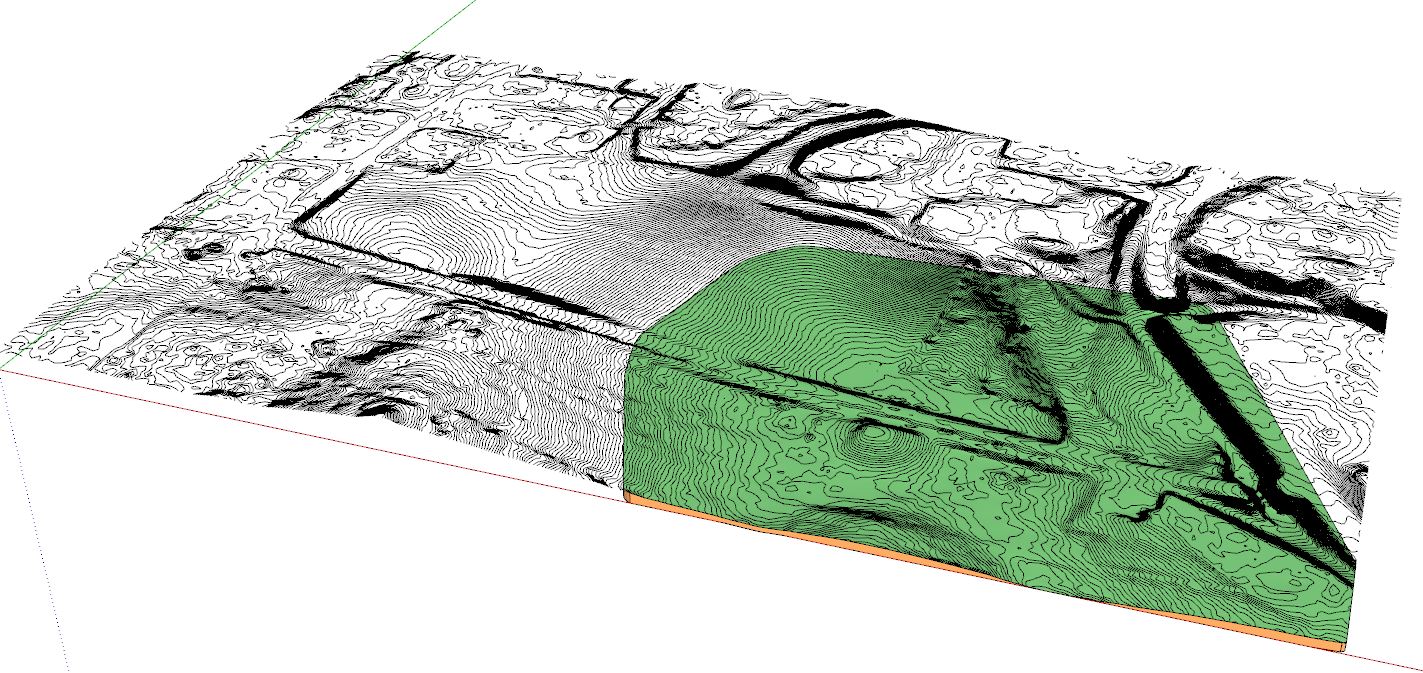
-
@pixero said:
I was wondering if there is a limit to how detailed a ISO lines terrain can be to work with Toposhaper?
As you can see in the attached image only a part of the terrain is created. If I try with a less dense contour file of the same area it works but I need the detail as high as possible.[attachment=0:2s5end60]<!-- ia0 -->screenshot.jpg<!-- ia0 -->[/attachment:2s5end60]
The typical usage of TopoShaper is to smooth out the terrain, using isocontours as guides for altitude. The precision of the contours is not necessary (i.e. does not need closely spaced contours, nor many points in the contour curves), and anyway in relation with the resolution of the mesh.
All this being said, I am impressed by the large model you have.
Fredo
-
Bonjour Fredo,
Après installation de la dernière version de Toposhaper (2.3b) et de LibFredo6 v8.1h, Toposhaper ne s'execute pas à l'ouverture de Sketchup, renvoyant un message d'erreur qui est le suivant : "you must install LibFredo6 to run Toposhaper
Open the download page of LibFredo6 at https....".Après vérification dans l'extension manager, LibFredo est pourtant bien installé. Une idée sur l'origine du bug ?
-
@clement duvoux said:
Bonjour Fredo,
Après installation de la dernière version de Toposhaper (2.3b) et de LibFredo6 v8.1h, Toposhaper ne s'execute pas à l'ouverture de Sketchup, renvoyant un message d'erreur qui est le suivant : "you must install LibFredo6 to run Toposhaper
Open the download page of LibFredo6 at https....".Après vérification dans l'extension manager, LibFredo est pourtant bien installé. Une idée sur l'origine du bug ?
Il faut verifier que LibFredo6 est bien chargé. Est ce qu'il y a un menu Window > LibFredo6 Settings.... ?
Fredo
-
@pixero said:
I was wondering if there is a limit to how detailed a ISO lines terrain can be to work with Toposhaper?
As you can see in the attached image only a part of the terrain is created. If I try with a less dense contour file of the same area it works but I need the detail as high as possible.[attachment=0:1bzib748]<!-- ia0 -->screenshot.jpg<!-- ia0 -->[/attachment:1bzib748]
Maybe you can make just smaller portions and join them in the end?
Gio
-
Hello,
Great plugin, however I am having an issue, after generating the terrain from guide points, using the toolbar, and clicking off elsewhere, the toolbar disappears and I can't seem to get it back to modify the terrain. How can I get the toolbar back after it has disappeared?
David. -
@dlannetts said:
Hello,
Great plugin, however I am having an issue, after generating the terrain from guide points, using the toolbar, and clicking off elsewhere, the toolbar disappears and I can't seem to get it back to modify the terrain. How can I get the toolbar back after it has disappeared?
David.Can you open the Ruby console, as there may be an error.
Did the terrain generate correctly by the way?
Fredo






Advertisement