sketchucation logo sketchucation
    • Login
    Oops, your profile's looking a bit empty! To help us tailor your experience, please fill in key details like your SketchUp version, skill level, operating system, and more. Update and save your info on your profile page today!
    โš ๏ธ Update | Sketchucation Tools 5.0.8 released with licensing improvements and bugfixes Download

    [Plugin][$] TopoShaper - v2.7b - 30 Jan 26


    Scheduled Pinned Locked Moved Plugins
    460 Posts 145 Posters 875.7k Views 144 Watching
    Loading More Posts
    • Oldest to Newest
    • Newest to Oldest
    • Most Votes
    Reply
    • Reply as topic
    Log in to reply
    This topic has been deleted. Only users with topic management privileges can see it.
    • CadFatherC
      CadFather
      last edited by

      ๐Ÿ˜ฒ i just have a question... WHO is Fredo6!!! ๐Ÿ˜†

      this stuff should be in the evening news!

      Thanks Fredo

      1 Reply Last reply
      Reply Quote 0
      • pbacotP
        pbacot
        last edited by

        I just used this on imported contours that I had reworked in CAD beforehand. Toposhaper was the smoothest part of the whole operation. Looking good. If you need another real world case, I can send it. I also made some simple fill outlines from the building and edges from the mesh. Ran Toposhaper to create those as well. Thanks Fredo!

        MacOSX MojaveSketchUp Pro v19 Twilight v2 Thea v3 PowerCADD

        1 Reply Last reply
        Reply Quote 0
        • pilouP
          pilou
          last edited by

          And at the end apply a Color by Z (By Chris Fullmer or Sdmitch) and you will have a perfect tool for Topography! ๐Ÿ˜Ž

          Frenchy Pilou
          Is beautiful that please without concept!
          My Little site :)

          1 Reply Last reply
          Reply Quote 0
          • cottyC
            cotty
            last edited by

            Fantastic update, thank you!

            my SketchUp gallery

            1 Reply Last reply
            Reply Quote 0
            • fredo6F
              fredo6
              last edited by

              @pbacot said:

              I just used this on imported contours that I had reworked in CAD beforehand. Toposhaper was the smoothest part of the whole operation. Looking good. If you need another real world case, I can send it. I also made some simple fill outlines from the building and edges from the mesh. Ran Toposhaper to create those as well. Thanks Fredo!

              I am indeed interested by this real world case!

              Thanks

              Fredo

              1 Reply Last reply
              Reply Quote 0
              • P
                Panga
                last edited by

                Fredo, what can I say...and my parents were telling me that Santa dit not exist !! I'll try it right now and give you some feedback, but I'm already give you my BRAVO !

                Regards.

                1 Reply Last reply
                Reply Quote 0
                • utilerU
                  utiler
                  last edited by

                  Ahhh, toposhaper from cloud points! Just what I needed when I asked this question:

                  404 Not Found

                  favicon

                  (sketchucation.com)

                  Thank you Fredo. You are genius!!!

                  Just Curious...

                  1 Reply Last reply
                  Reply Quote 0
                  • utilerU
                    utiler
                    last edited by

                    I too am happy to send you real world case, Fredo. I have a few good surveys that I can send you....

                    One question re: cloud points: when a survey file is sent you to the points are provided as just that; points. Do I have to somehow convert them to guide points? And if so, how??

                    Just Curious...

                    1 Reply Last reply
                    Reply Quote 0
                    • P
                      pierro44
                      last edited by

                      super plugin congratulations Fredo6,
                      is it possible for you to improve the plugin by adding the stamp function because the basic function of Sketchup does not function well with a non-flat platform.
                      we could from the current stamp function by adding a regular slope adjustment feature. (angle parameter).
                      Because of Sketchup stamp function offers a parrallel offset.
                      this feature could be ideal for earthmoving ground with regular slope even allows pente.it's draw on autocad perfectly calibrated slope and sutout non parrallel.
                      excuse me for my English I am french
                      thank you
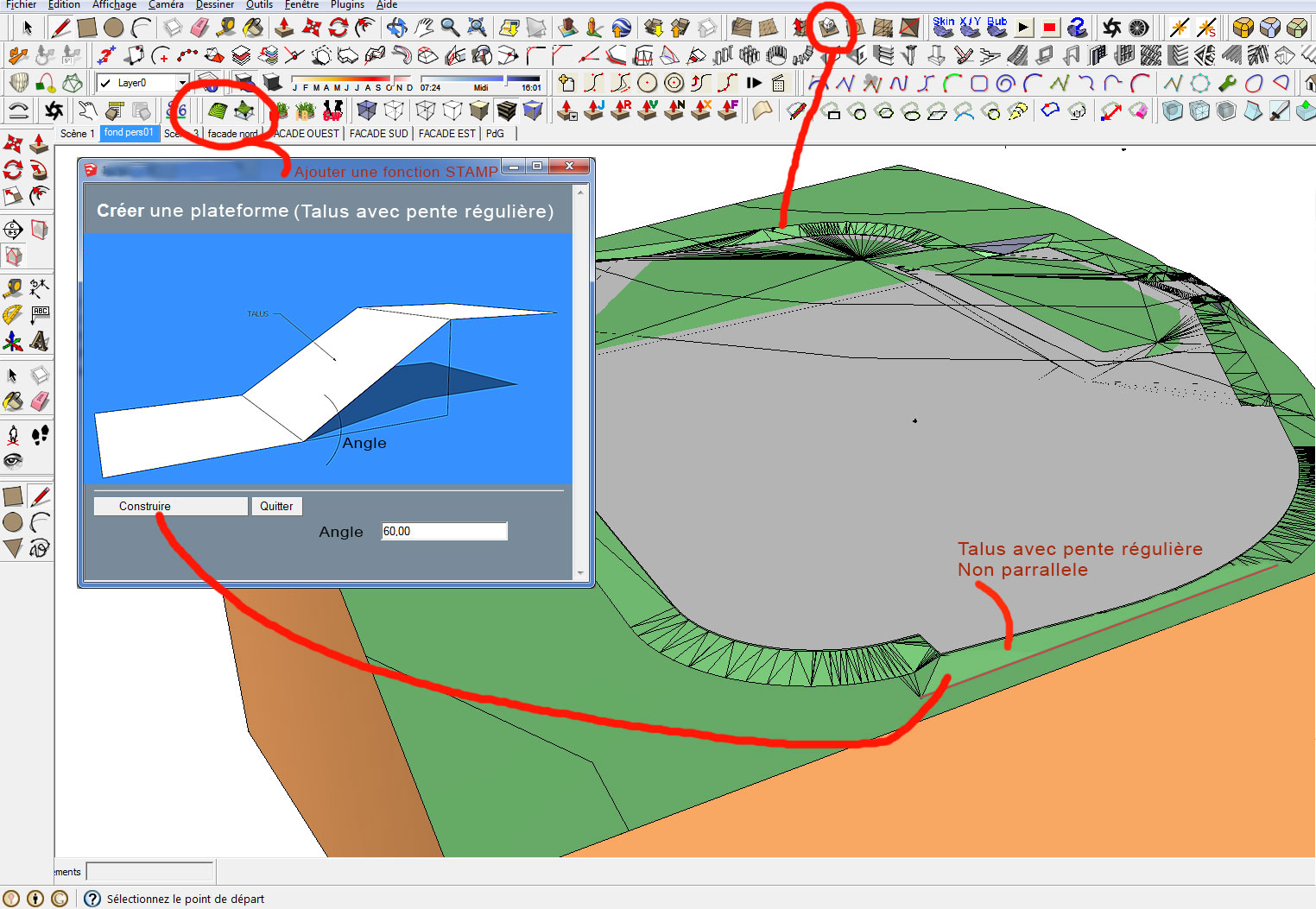
                      STAMP.jpg

                      1 Reply Last reply
                      Reply Quote 0
                      • P
                        pierro44
                        last edited by

                        hi, I am a draftsman in an architectural firm, the "toposhaper" function is beautiful, congratulations FREDO 6, it works great.

                        I have an idea to improve the plug-in by adding a function on the basis of the tool "STAMP" to create platform on an existing field (created by toposhaper) with a side slope adjustment function that will permit to have non parrallel slope to the platform.
                        What about you? -
                        Is this possible?
                        The "STAMP" of Sketchup does not work very well and slopes are parrallel to the platform.

                        Thank you.
                        Sorry for my English, I'm French
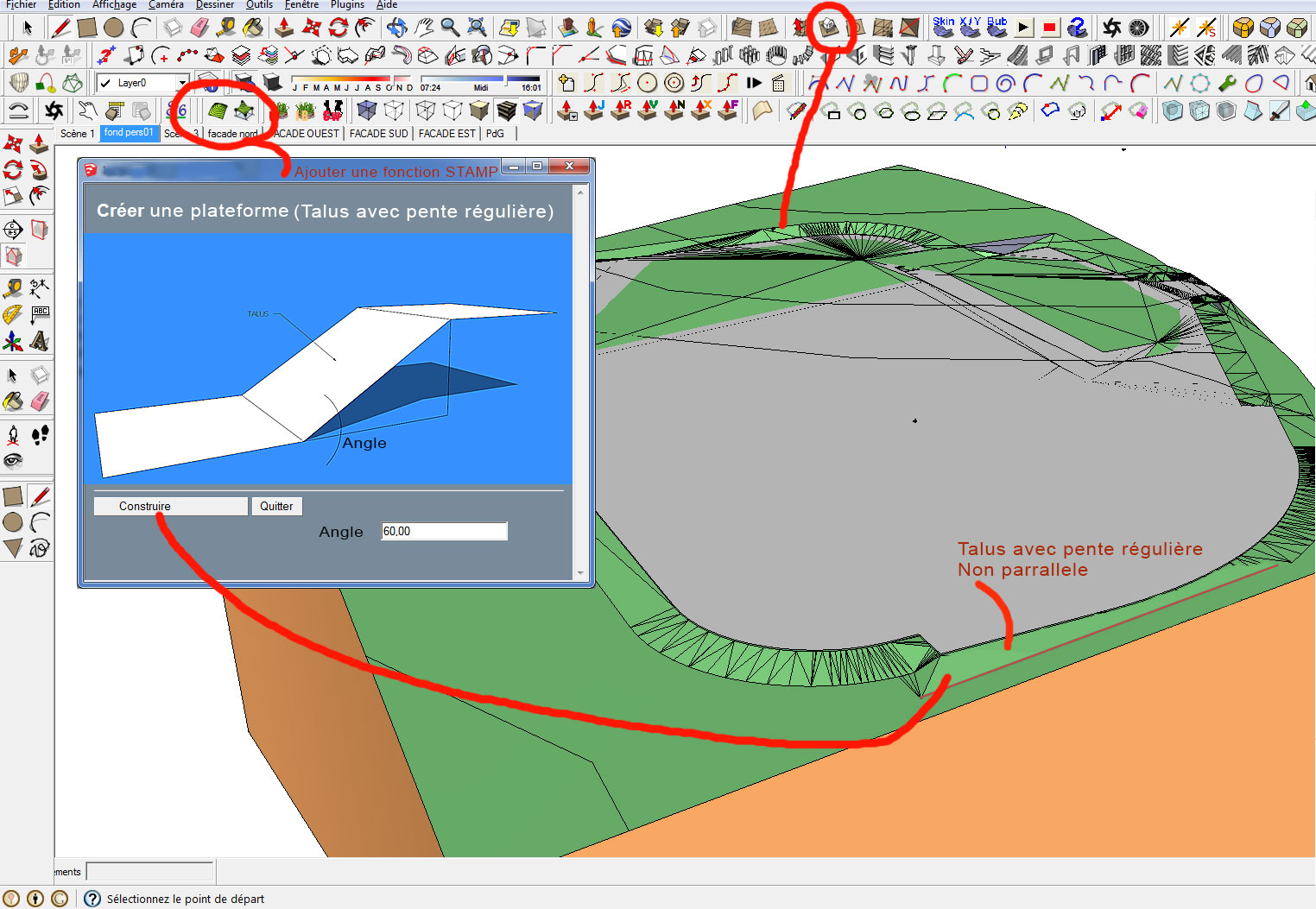
                        STAMP.jpg

                        1 Reply Last reply
                        Reply Quote 0
                        • fredo6F
                          fredo6
                          last edited by

                          NEW RELEASE: TopoShaper v2.1a - 25 Mar 14

                          This release provides a documented service API to calculate terrains from isocontours. It also fixes a few bugs.

                          See main post of this thread for Download of TopoShaper.

                          Fredo

                          1 Reply Last reply
                          Reply Quote 0
                          • KrisidiousK
                            Krisidious
                            last edited by

                            Thank You Fredo...

                            By: Kristoff Rand
                            Home DesignerUnique House Plans

                            1 Reply Last reply
                            Reply Quote 0
                            • Rich O BrienR
                              Rich O Brien Moderator
                              last edited by

                              Hi Fredo,

                              Do you think adding csv import to Toposhaper is feasible?

                              This would make terrain generation much more unified into one tool rather than installing 2 plugins to what you need in one.

                              Download the free D'oh Book for SketchUp ๐Ÿ“–

                              1 Reply Last reply
                              Reply Quote 0
                              • pbacotP
                                pbacot
                                last edited by

                                I think I said this before. Excellent work on this!

                                When I use it I wish the grid could be set to a standard horizontal square dimension and set to always align to the origin. then work can be more easily patched and combined.

                                Another wish is for the edges to be restricted to conform (close as possible) to land on a bounding contour. Again this will help joining with other forms.

                                MacOSX MojaveSketchUp Pro v19 Twilight v2 Thea v3 PowerCADD

                                1 Reply Last reply
                                Reply Quote 0
                                • pilouP
                                  pilou
                                  last edited by

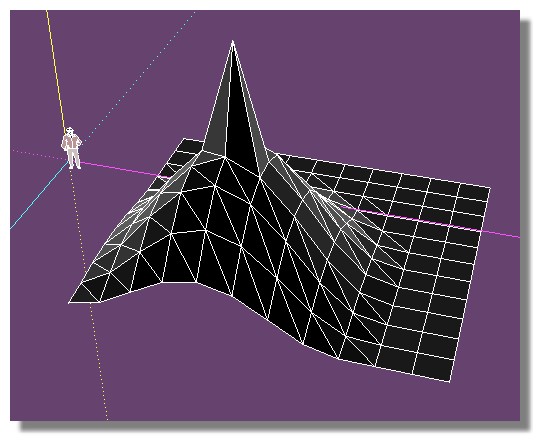
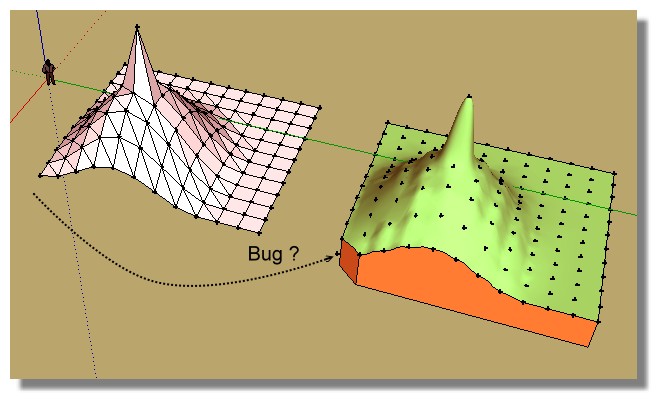
                                  does toposhaper can use this sort of file ?
                                  Because it generates bugs! ๐Ÿ˜ฎ
                                  (I have last version Prog / Lib )

                                  tset_topo.jpg


                                  test_topo.skp

                                  Frenchy Pilou
                                  Is beautiful that please without concept!
                                  My Little site :)

                                  1 Reply Last reply
                                  Reply Quote 0
                                  • fredo6F
                                    fredo6
                                    last edited by

                                    Pilou,

                                    What do you mean by 'use'.

                                    Did you generate the terrain via Toposhaper QaudMesh instead?

                                    Fredo

                                    1 Reply Last reply
                                    Reply Quote 0
                                    • pilouP
                                      pilou
                                      last edited by

                                      @unknownuser said:

                                      What do you mean by 'use'.

                                      Start from this file

                                      @unknownuser said:

                                      Did you generate the terrain via Toposhaper QaudMesh instead?

                                      No just speedy by hand for the grid (a copy/Move square) + SandBox for deformation

                                      Frenchy Pilou
                                      Is beautiful that please without concept!
                                      My Little site :)

                                      1 Reply Last reply
                                      Reply Quote 0
                                      • pbacotP
                                        pbacot
                                        last edited by

                                        The plugin requires Point cloud or isocontours.

                                        MacOSX MojaveSketchUp Pro v19 Twilight v2 Thea v3 PowerCADD

                                        1 Reply Last reply
                                        Reply Quote 0
                                        • pilouP
                                          pilou
                                          last edited by

                                          @unknownuser said:

                                          requires Point cloud

                                          Seems that is the key ! ๐Ÿ˜„
                                          When I create points from the file then use TopoShaper that works!
                                          (except for the little triangle bottom left corner? )

                                          PS The alert message when you select points who are not a group/ component is empty!
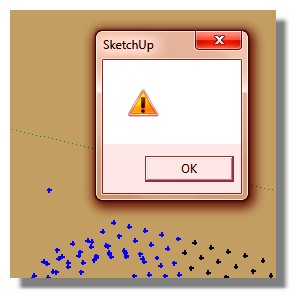
                                          alert.jpg
                                          Topoz1.jpg

                                          Frenchy Pilou
                                          Is beautiful that please without concept!
                                          My Little site :)

                                          1 Reply Last reply
                                          Reply Quote 0
                                          • fredo6F
                                            fredo6
                                            last edited by

                                            Pilou,

                                            Could you post the file with the point cloud. I'll check for the missing triangle and the missing message.

                                            Which Sketchup version do you use by the way?

                                            Fredo

                                            1 Reply Last reply
                                            Reply Quote 0

                                            Hello! It looks like you're interested in this conversation, but you don't have an account yet.

                                            Getting fed up of having to scroll through the same posts each visit? When you register for an account, you'll always come back to exactly where you were before, and choose to be notified of new replies (either via email, or push notification). You'll also be able to save bookmarks and upvote posts to show your appreciation to other community members.

                                            With your input, this post could be even better ๐Ÿ’—

                                            Register Login
                                            • 1
                                            • 2
                                            • 6
                                            • 7
                                            • 8
                                            • 9
                                            • 10
                                            • 22
                                            • 23
                                            • 8 / 23
                                            • First post
                                              Last post
                                            Buy SketchPlus
                                            Buy SUbD
                                            Buy WrapR
                                            Buy eBook
                                            Buy Modelur
                                            Buy Vertex Tools
                                            Buy SketchCuisine
                                            Buy FormFonts

                                            Advertisement