sketchucation logo sketchucation
    • 登入
    Oops, your profile's looking a bit empty! To help us tailor your experience, please fill in key details like your SketchUp version, skill level, operating system, and more. Update and save your info on your profile page today!
    🔌 Smart Spline | Fluid way to handle splines for furniture design and complex structures. Download

    [Plugin][$] TopoShaper - v2.7b - 30 Jan 26


    已排程 已置頂 已鎖定 已移動 Plugins
    456 貼文 144 Posters 715.4k 瀏覽 143 Watching
    正在載入更多貼文
    • 從舊到新
    • 從新到舊
    • 最多點贊
    回覆
    • 在新貼文中回覆
    登入後回覆
    此主題已被刪除。只有擁有主題管理權限的使用者可以查看。
    • M 離線
      miikka1978
      最後由 編輯

      In quite many cases I end up tracing all the contours from layout. Because of complexity and visibility I have to put all the individual contours into the layers based on their altitude (60m altitude => Layer:60).

      Would it be possible to include option in TopoShaper to read/create contour altitude from layer information in future? Anyway, I am not sure how many people actually trace the contours when creating terrain in their modeling, so I don't know if this functionality would be beneficial for greater audience.

      1 條回覆 最後回覆 回覆 引用 0
      • edenuxE 離線
        edenux
        最後由 編輯

        I am so glad I found this. Thank you so much, you are amazing!

        Want to see more? Visit my facebook page: https://www.facebook.com/Edvisualisation

        1 條回覆 最後回覆 回覆 引用 0
        • G 離線
          Gmansu8
          最後由 編輯

          Folks:

          I've installed Fredo6's fabulous TopoShaper. However, the menu bar that pops up (across the top of my computer screen) doesn't seem to "size" properly. The text is too large for the menu rectangles that should restrain them. I've tried changing font sizes for the operating system (Win7), but the issue (too large text) persists.

          Anyone have a solution?

          Thanks to All.

          1 條回覆 最後回覆 回覆 引用 0
          • G 離線
            Gmansu8
            最後由 編輯

            Okay, I think I've resolved my problem. Win7 has a font multiplier (125%, 150%) above normal (100%). It seems only normal sizing (100%) functions properly with the TopoShaper operation menu.

            If Fredo6 could find a way to make the TopoShaper operations menu size itself dynamically that would help those of us with suboptimal vision.

            Hey, it's Christmas! I can ask, right?

            Fredo, you're a Rock Star (...ends cadence on power chord "A").

            1 條回覆 最後回覆 回覆 引用 0
            • fredo6F 離線
              fredo6
              最後由 編輯

              @gmansu8 said:

              If Fredo6 could find a way to make the TopoShaper operations menu size itself dynamically that would help those of us with suboptimal vision.

              Hey, it's Christmas! I can ask, right?

              You are right. It's Christmas and the impossible can be ordered, with probable delivery for the next one 😄

              Actually, the Ruby API completely lacks control about text display (size, color, fonts, ....) and this is something that would be welcome. For info, the hottest issue today is on Mac with Retina screens.

              Fredo

              1 條回覆 最後回覆 回覆 引用 0
              • pbacotP 離線
                pbacot
                最後由 編輯

                Yes some rubies are unusable with a retina screen.

                Actually SU is not that great on it either. It looks nice, but the lines are very thin and one sometimes cannot easily see what lines and faces are selected.

                MacOSX MojaveSketchUp Pro v19 Twilight v2 Thea v3 PowerCADD

                1 條回覆 最後回覆 回覆 引用 0
                • bobpineoB 離線
                  bobpineo
                  最後由 編輯

                  Fredo,
                  first of all thank you again for your most excellent Plugin.
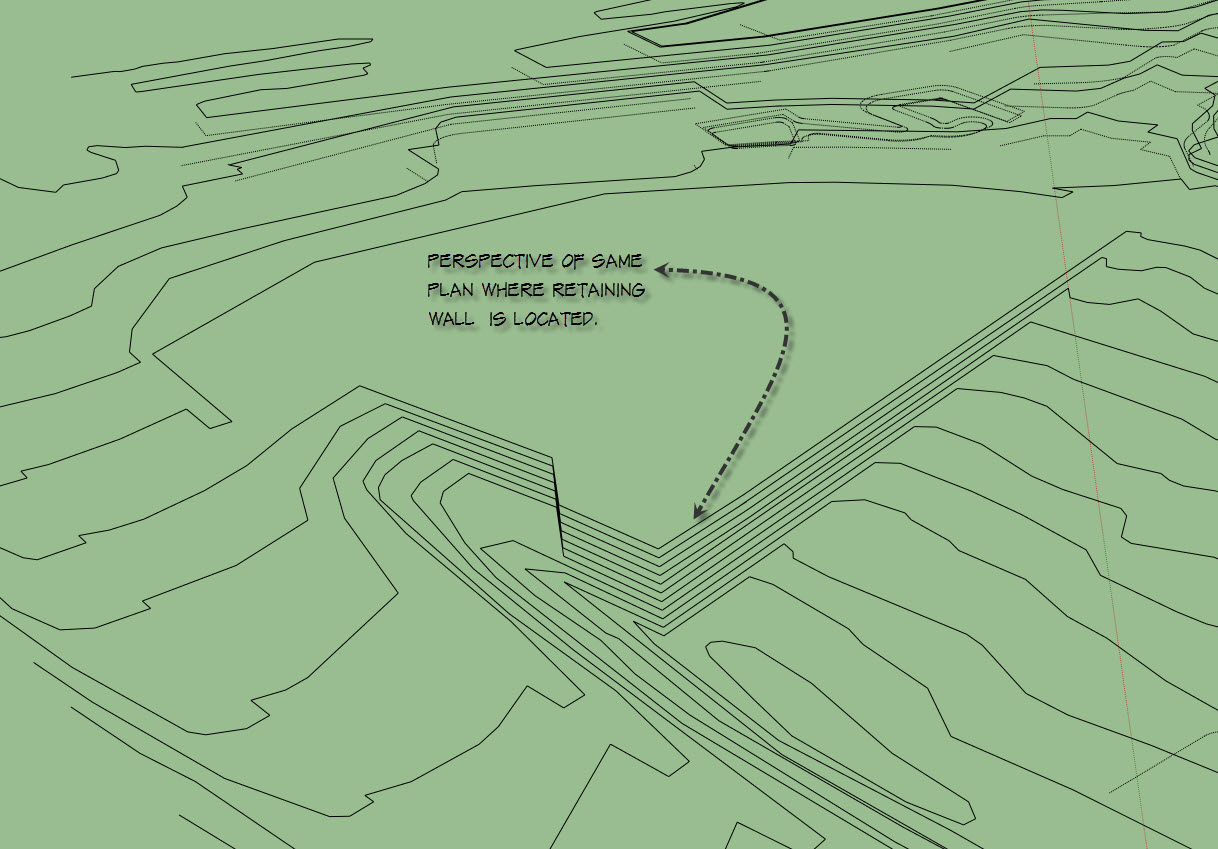
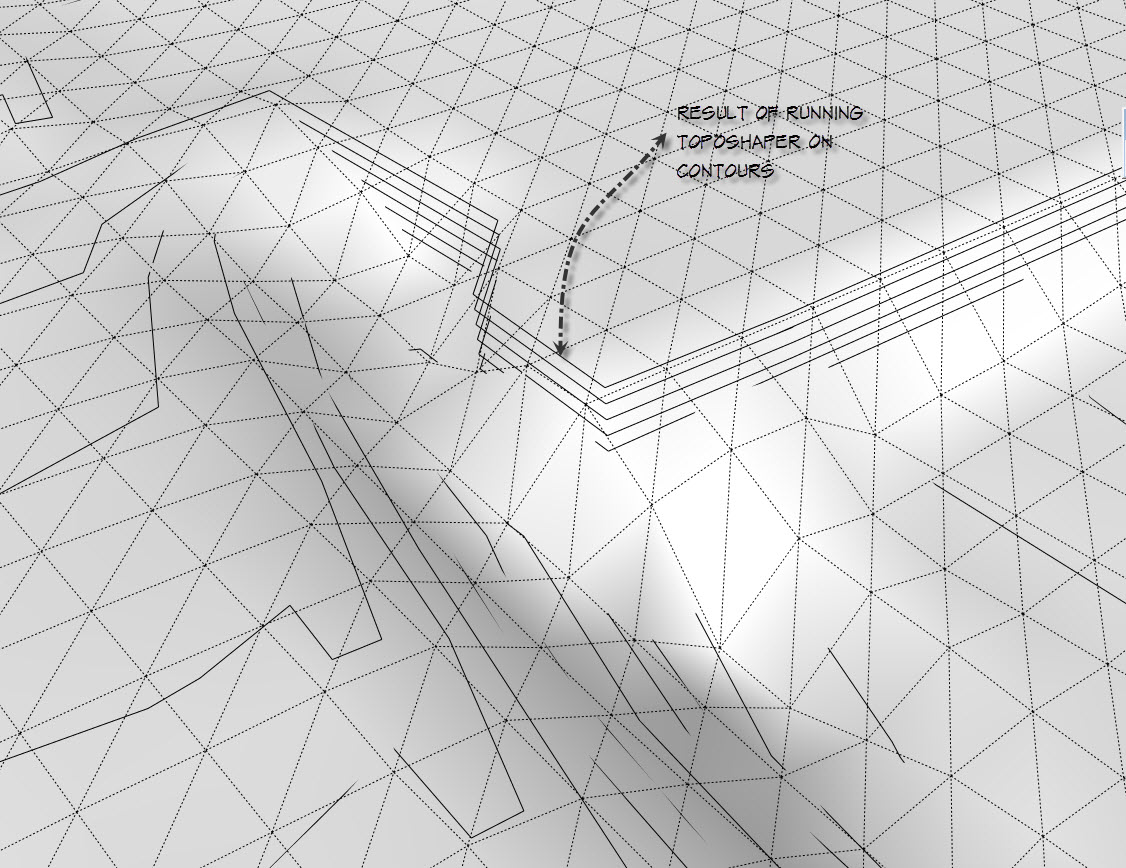
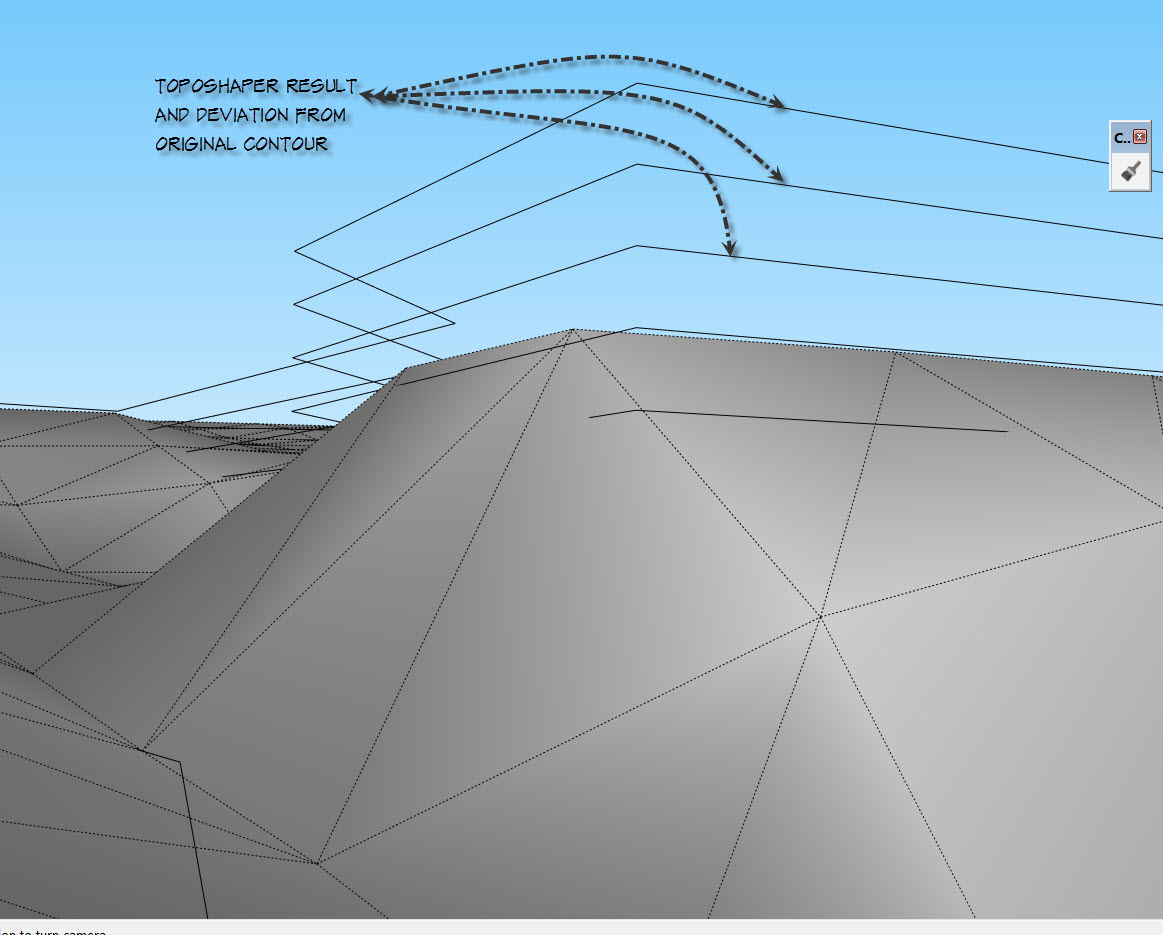
                  I have a question, how do you suggest modeling contours around a retaining wall?
                  I have been testing a variety of options, but can't quite get a clean surface that would approximate this detail.
                  There would be a lot of clean up to get the surface correct, and I was hoping you could comment on a work around...
                  Or dare I say it, and added function to the plugin..?
                  Not sure even how to explain it, (let alone figure out how to go about adding this function)...but could it be possible to designate areas that are to remain flat?
                  For example a surface at the top of a retaining wall.
                  Thank you in advance TIG, and I am dropping by your donation tab to give you a much appreciated thank you!
                  Best.
                  BP
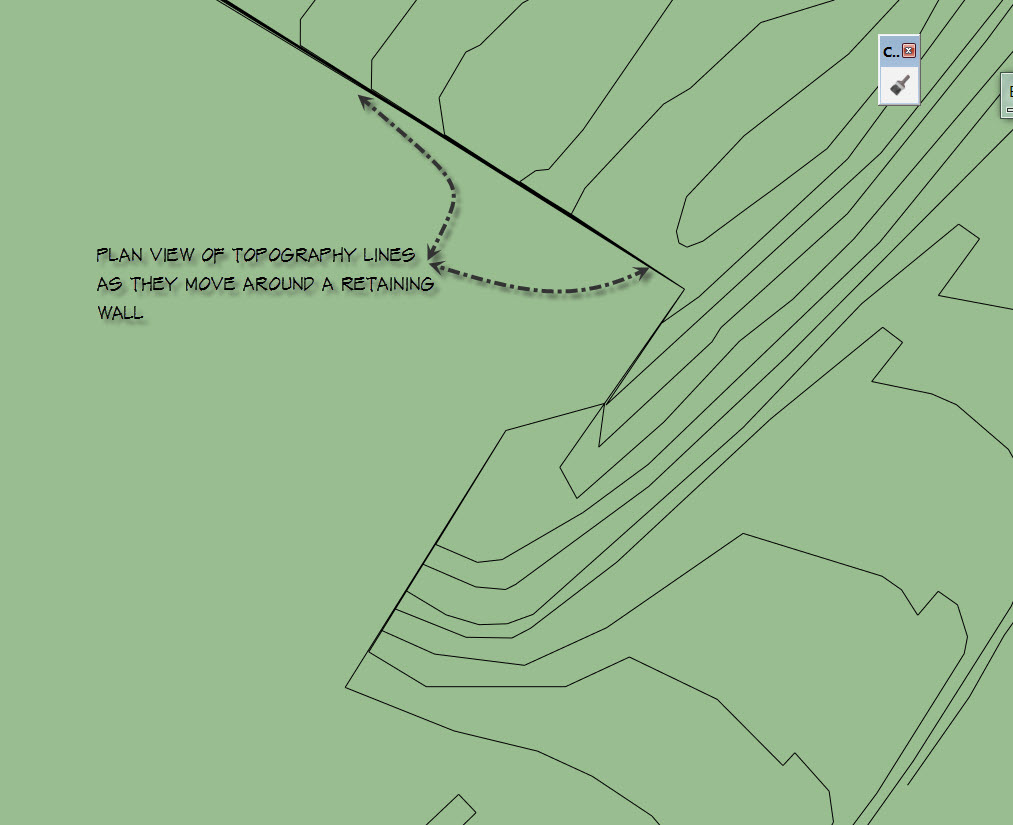

                  Plan view of topographic lines around a retaining wall


                  Perspective view


                  Result after running toposhaper


                  Deviation of mesh from contour

                  Bob Pineo, Design Develop LLC http://www.designdevelop.org.

                  1 條回覆 最後回覆 回覆 引用 0
                  • I 離線
                    ivreich
                    最後由 編輯

                    Hi Fredo

                    I'm having problems running your latest version of Topo Shaper. Everything works fine up until I hit "generate terrain" at the last step, then the model goes crazy and i end up with a bunch of unexpected geometry (guide lines, blank rectangle face)

                    No error warnings in the ruby console either...

                    I've attached the SU 2013 file, could you help me have a look?

                    Thanks!

                    Joel
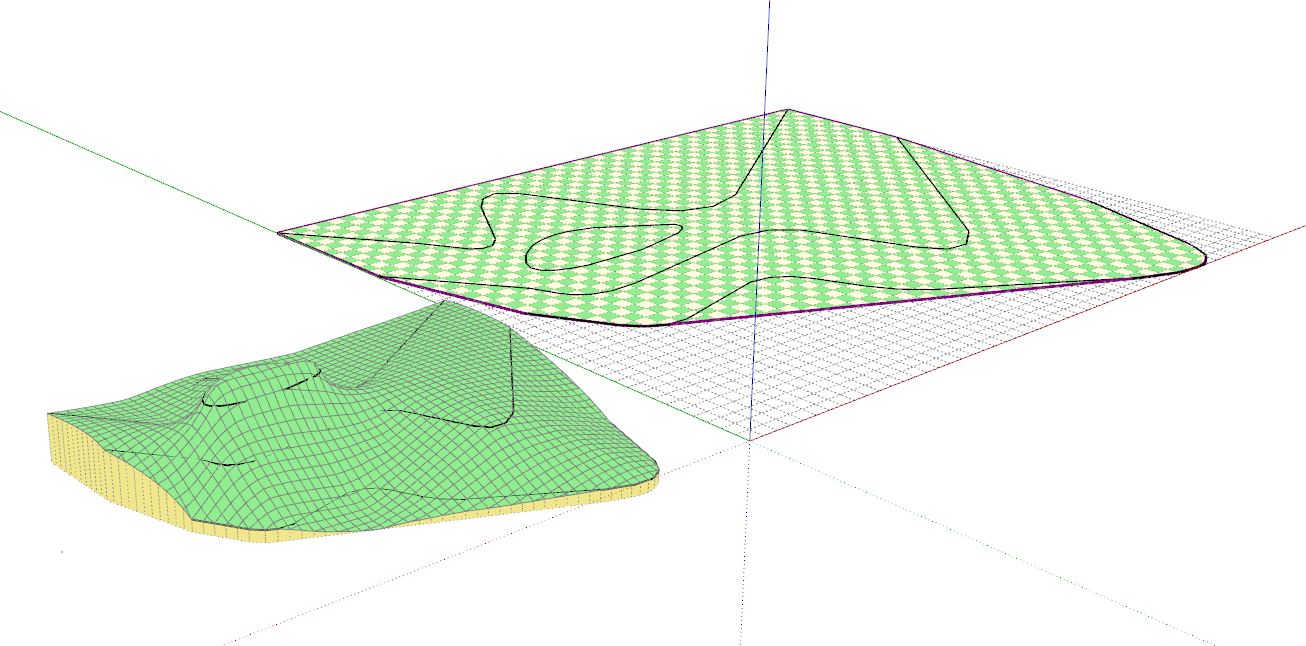

                    SU 2013 File with contours


                    Preview Mode works fine...


                    Unexpected end-results...

                    1 條回覆 最後回覆 回覆 引用 0
                    • fredo6F 離線
                      fredo6
                      最後由 編輯

                      @ivreich said:

                      Hi Fredo

                      I'm having problems running your latest version of Topo Shaper. Everything works fine up until I hit "generate terrain" at the last step, then the model goes crazy and i end up with a bunch of unexpected geometry (guide lines, blank rectangle face)

                      No error warnings in the ruby console either...

                      I've attached the SU 2013 file, could you help me have a look?

                      Thanks!

                      Joel
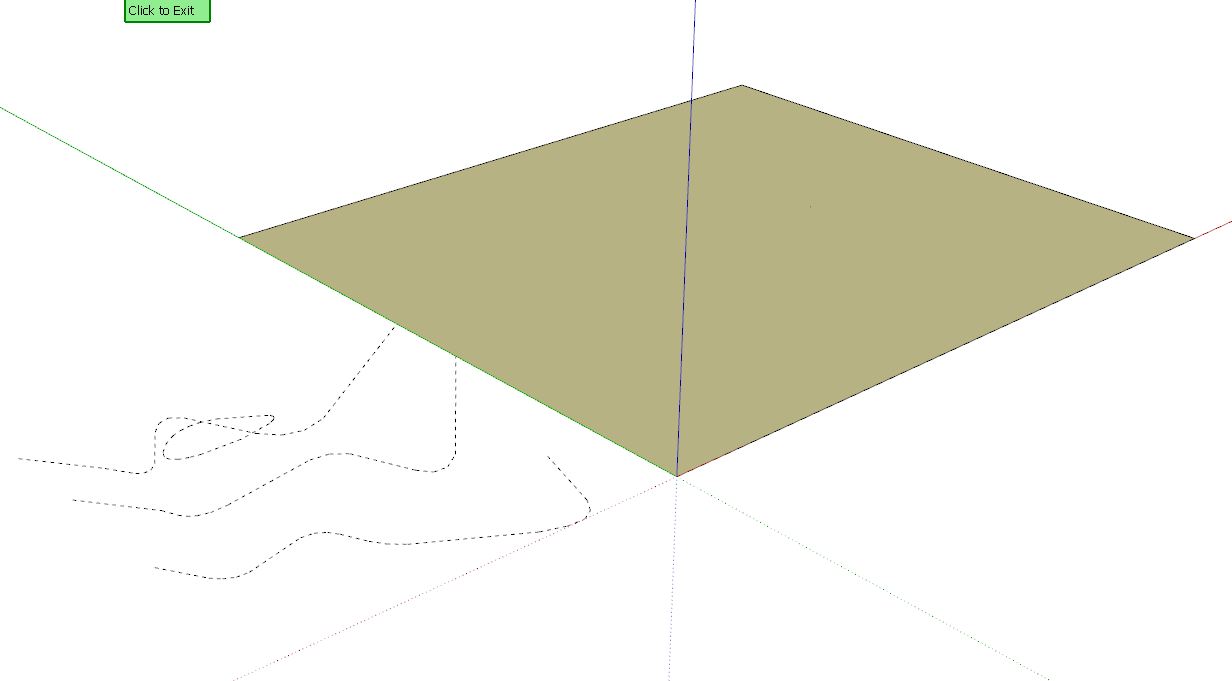
                      I tried, with SU13 (since your model is SU13) and get a correct result with a 50x and 100x grid. However, I noticed a small problem (which requires a model fix), most probably in a small triangle of the skirt.
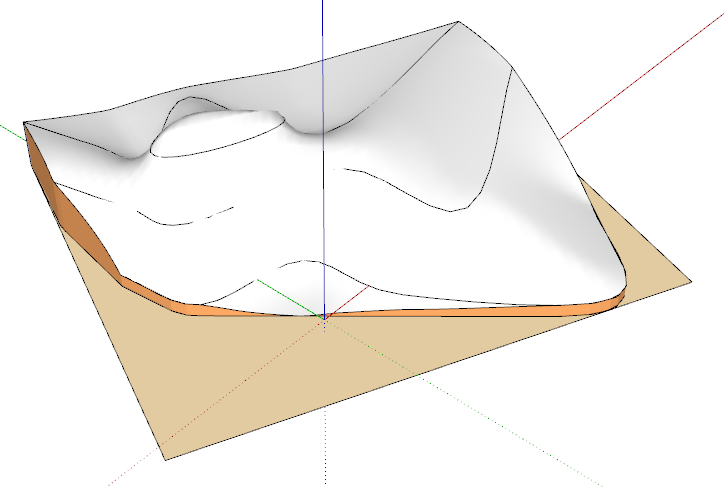
                      Ivreich topo.png

                      Ivreich_Topo.skp

                      Could you send the bad-generation file.

                      Fredo

                      1 條回覆 最後回覆 回覆 引用 0
                      • fredo6F 離線
                        fredo6
                        最後由 編輯

                        @bobpineo said:

                        Fredo,
                        first of all thank you again for your most excellent Plugin.
                        I have a question, how do you suggest modeling contours around a retaining wall?

                        Unfortunately, cliff cannot be handled in the current version of Toposhaper, because it is based on a Grid concept where each point of the grid corresponds to one altitude.

                        Currently, you have to post-process the shape by cutting the wall manually.

                        Fredo

                        1 條回覆 最後回覆 回覆 引用 0
                        • I 離線
                          ivreich
                          最後由 編輯

                          Hi Fredo

                          File with bad results attached...

                          Thanks again!

                          J


                          bad results

                          1 條回覆 最後回覆 回覆 引用 0
                          • bobpineoB 離線
                            bobpineo
                            最後由 編輯

                            @fredo6 said:

                            @bobpineo said:

                            Fredo,
                            first of all thank you again for your most excellent Plugin.
                            I have a question, how do you suggest modeling contours around a retaining wall?

                            Unfortunately, cliff cannot be handled in the current version of Toposhaper, because it is based on a Grid concept where each point of the grid corresponds to one altitude.

                            Currently, you have to post-process the shape by cutting the wall manually.

                            Fredo

                            Thank you Fredo, How hard is that to incorporate into the plugin, its is christmas pretty soon after all!
                            thanks Again.
                            BP

                            Bob Pineo, Design Develop LLC http://www.designdevelop.org.

                            1 條回覆 最後回覆 回覆 引用 0
                            • fredo6F 離線
                              fredo6
                              最後由 編輯

                              @bobpineo said:

                              Thank you Fredo, How hard is that to incorporate into the plugin, its is christmas pretty soon after all!
                              thanks Again.
                              BP

                              Before Christmas, you may use the Sandbox stamp and then JointPushPull to extrude the sahpe surrounded by walls.

                              Handling cliff is rather complex, because I need first to introduce a feature where the mesh is adapted to follow exactly some contours and then change the mesh logic to handle several altitudes for the same grid node.

                              Fredo

                              1 條回覆 最後回覆 回覆 引用 0
                              • J 離線
                                jcorreiadefreitas
                                最後由 編輯

                                Hi,

                                Tried the plugin today and it does wonders... however i am wondering if it is possible to clip or "limit" the terrain generation to a line as i dont want it to generate in terrain beyond the lowest contour...
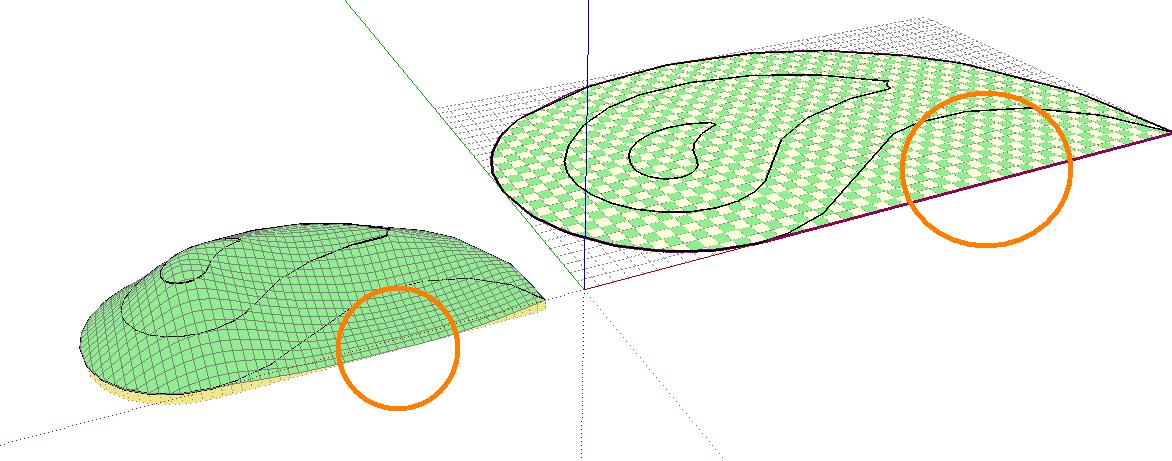
                                1.jpg

                                1 條回覆 最後回覆 回覆 引用 0
                                • fredo6F 離線
                                  fredo6
                                  最後由 編輯

                                  @jcorreiadefreitas said:

                                  Hi,

                                  Tried the plugin today and it does wonders... however i am wondering if it is possible to clip or "limit" the terrain generation to a line as i dont want it to generate in terrain beyond the lowest contour...

                                  [attachment=0:3eevq3al]<!-- ia0 -->1.jpg<!-- ia0 -->[/attachment:3eevq3al]

                                  If all contours are enclosed within a big one, then this big contour is taken as the limit.

                                  So it should work in your case.

                                  Otherwise, just send me the model so that I have a look.

                                  Fredo

                                  1 條回覆 最後回覆 回覆 引用 0
                                  • T 離線
                                    tspco
                                    最後由 編輯

                                    Error in SU make, I installed toposhaper in SU make this morning, and got this error. I used the same terrain in SU8 no error using the same procedure. Just wanted to let someone know.
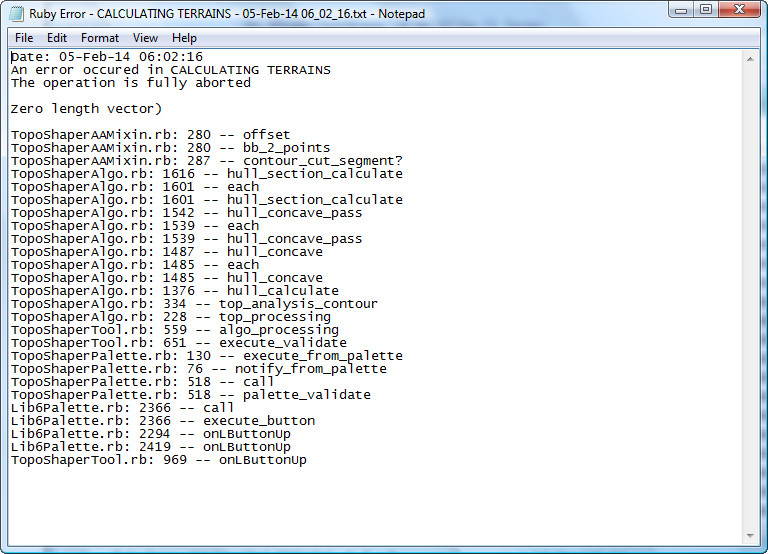

                                    2014-02-05_065225.jpg

                                    SU make 2017, /Twilight Render Hobby
                                    Windows 10,64 bit,16GB ram, quad core Athlon 3.6 gHz proc. Anything else you want to know, ask me.

                                    1 條回覆 最後回覆 回覆 引用 0
                                    • fredo6F 離線
                                      fredo6
                                      最後由 編輯

                                      @tspco

                                      I will publish a fix for this error.

                                      However, I am interested in seeing your model, as it may be related to defects in the contours.

                                      Fredo

                                      1 條回覆 最後回覆 回覆 引用 0
                                      • T 離線
                                        tspco
                                        最後由 編輯

                                        I just tried again this morning and it worked, but somehow things were different, not sure what is going on. The model was simply a geolocation grab, from within SketchUp.

                                        SU make 2017, /Twilight Render Hobby
                                        Windows 10,64 bit,16GB ram, quad core Athlon 3.6 gHz proc. Anything else you want to know, ask me.

                                        1 條回覆 最後回覆 回覆 引用 0
                                        • mariochaM 離線
                                          mariocha
                                          最後由 編輯

                                          As requested in the documentation, here is the error report I get when trying to edit a generated terrain.
                                          On Mac (french) and PC (english) same error.
                                          %(#0000BF)[**Une erreur s'est produite dans
                                          L'opération a été annulée

                                          undefined method `unshift' for nil:NilClass

                                          TopoShaperTool.rb:: 1457 -- registry_info_new
                                          TopoShaperTool.rb:: 1389 -- registry_info_get
                                          TopoShaperAAMixin.rb:: 184 -- contour_global_boundaries
                                          TopoShaperAAMixin.rb:: 176 -- contour_analysis
                                          TopoShaperAlgo.rb:: 330 -- top_analysis_contour
                                          TopoShaperAlgo.rb:: 228 -- top_processing
                                          TopoShaperTool.rb:: 559 -- algo_processing
                                          TopoShaperTool.rb:: 581 -- algo_load_from_attr
                                          TopoShaperTool.rb:: 973 -- onLButtonUp**]

                                          %(#0000BF)[**An error occured in CALCULATING TERRAINS
                                          The operation is fully aborted

                                          undefined method `unshift' for nil:NilClass

                                          TopoShaperTool.rb: 1457 -- registry_info_new
                                          TopoShaperTool.rb: 1389 -- registry_info_get
                                          TopoShaperAAMixin.rb: 184 -- contour_global_boundaries
                                          TopoShaperAAMixin.rb: 176 -- contour_analysis
                                          TopoShaperAlgo.rb: 330 -- top_analysis_contour
                                          TopoShaperAlgo.rb: 228 -- top_processing
                                          TopoShaperTool.rb: 559 -- algo_processing
                                          TopoShaperTool.rb: 581 -- algo_load_from_attr
                                          TopoShaperTool.rb: 973 -- onLButtonUp**]

                                          Contour file attached


                                          Contours-plats.skp

                                          %(#008000)[Mario C.
                                          Every rule has exceptions, but some.]

                                          1 條回覆 最後回覆 回覆 引用 0
                                          • fredo6F 離線
                                            fredo6
                                            最後由 編輯

                                            @mariocha said:

                                            As requested in the documentation, here is the error report I get when trying to edit a generated terrain.
                                            On Mac (french) and PC (english) same error.
                                            %(#0000BF)[**Une erreur s'est produite dans
                                            L'opération a été annulée

                                            undefined method `unshift' for nil:NilClass

                                            TopoShaperTool.rb:: 1457 -- registry_info_new
                                            TopoShaperTool.rb:: 1389 -- registry_info_get
                                            TopoShaperAAMixin.rb:: 184 -- contour_global_boundaries
                                            TopoShaperAAMixin.rb:: 176 -- contour_analysis
                                            TopoShaperAlgo.rb:: 330 -- top_analysis_contour
                                            TopoShaperAlgo.rb:: 228 -- top_processing
                                            TopoShaperTool.rb:: 559 -- algo_processing
                                            TopoShaperTool.rb:: 581 -- algo_load_from_attr
                                            TopoShaperTool.rb:: 973 -- onLButtonUp**]

                                            %(#0000BF)[**An error occured in CALCULATING TERRAINS
                                            The operation is fully aborted

                                            undefined method `unshift' for nil:NilClass

                                            TopoShaperTool.rb: 1457 -- registry_info_new
                                            TopoShaperTool.rb: 1389 -- registry_info_get
                                            TopoShaperAAMixin.rb: 184 -- contour_global_boundaries
                                            TopoShaperAAMixin.rb: 176 -- contour_analysis
                                            TopoShaperAlgo.rb: 330 -- top_analysis_contour
                                            TopoShaperAlgo.rb: 228 -- top_processing
                                            TopoShaperTool.rb: 559 -- algo_processing
                                            TopoShaperTool.rb: 581 -- algo_load_from_attr
                                            TopoShaperTool.rb: 973 -- onLButtonUp**]

                                            Contour file attached

                                            I found the error. Will go into the next release.
                                            If you wish to skip this error, select a contour anywhere in the model, then deselect it and select your Terrain Group.

                                            Fredo

                                            1 條回覆 最後回覆 回覆 引用 0
                                            • 1
                                            • 2
                                            • 19
                                            • 20
                                            • 21
                                            • 22
                                            • 23
                                            • 22 / 23
                                            • 第一個貼文
                                              最後的貼文
                                            Buy SketchPlus
                                            Buy SUbD
                                            Buy WrapR
                                            Buy eBook
                                            Buy Modelur
                                            Buy Vertex Tools
                                            Buy SketchCuisine
                                            Buy FormFonts

                                            Advertisement