sketchucation logo sketchucation
    • 登入
    Oops, your profile's looking a bit empty! To help us tailor your experience, please fill in key details like your SketchUp version, skill level, operating system, and more. Update and save your info on your profile page today!
    🔌 Smart Spline | Fluid way to handle splines for furniture design and complex structures. Download

    [Plugin] GOSU v1.1.1

    已排程 已置頂 已鎖定 已移動 Plugins
    69 貼文 16 Posters 69.8k 瀏覽 16 Watching
    正在載入更多貼文
    • 從舊到新
    • 從新到舊
    • 最多點贊
    回覆
    • 在新貼文中回覆
    登入後回覆
    此主題已被刪除。只有擁有主題管理權限的使用者可以查看。
    • renderizaR 離線
      renderiza
      最後由 編輯

      New Update!
      1.0.1 Beta:: 4/19/2013
      * Set:: SCENE - Allows you to set specific scene to any component.
      * ::GOSU:: - Now recognize between URL & SCENES

      Hi, I am excited to release this new update for ::GOSU:: and hope you like it!

      This new tool called Set:: SCENE allows you to link any component to a scene so that when you click it the scene will activate. Hope you find cool uses for this that will help ypu modeling, showcasing and what not.

      Here is New Video explaining the new feature...

      And here is the old video just in case...
      http://www.youtube.com/watch?v=5ZnhhHra7ac

      Cheers!

      [url=https://www.sketchupcode.com/:z3kqsidd]My Extensions ...[/url:z3kqsidd]

      1 條回覆 最後回覆 回覆 引用 0
      • renderizaR 離線
        renderiza
        最後由 編輯

        New Update GOSU v1.0.2 Beta:: 4/20/2013
        * Set :: Layer - Allows you to set a specific layer to any component.
        * If ::GOSU:: is active and component have layer set to it that layer will be active.
        * If ::GOSU:: is active and you double click component with layer set to it then that layer will be isolated on & off.
        * Tool will be desactivated if 'Escape' key is pressed.

        Hi, this new update add a Layer tool that will hopefully be useful to have.

        Enjoy

        [url=https://www.sketchupcode.com/:z3kqsidd]My Extensions ...[/url:z3kqsidd]

        1 條回覆 最後回覆 回覆 引用 0
        • renderizaR 離線
          renderiza
          最後由 編輯

          GOSU v1.0.3 Released!

          Please look at first post for details.

          Cheers!

          [url=https://www.sketchupcode.com/:z3kqsidd]My Extensions ...[/url:z3kqsidd]

          1 條回覆 最後回覆 回覆 引用 0
          • iichiversiiI 離線
            iichiversii
            最後由 編輯

            That is fantastic, I'm all over this already, Cheers R

            Bring on the Rain...

            1 條回覆 最後回覆 回覆 引用 0
            • pilouP 離線
              pilou
              最後由 編輯

              If I well understand (for a PC user) it's a simulation of Microsoft Windows system inside SU ? 😄
              An Windows UI 3D ? 💭

              Frenchy Pilou
              Is beautiful that please without concept!
              My Little site :)

              1 條回覆 最後回覆 回覆 引用 0
              • renderizaR 離線
                renderiza
                最後由 編輯

                @iichiversii said:

                That is fantastic, I'm all over this already, Cheers R

                I am happy that you are using this plugin "iichiversii"! 💚

                @unknownuser said:

                If I well understand (for a PC user) it's a simulation of Microsoft Windows system inside SU ? 😄
                An Windows UI 3D ? 💭

                GOSU tries to integrate tools that are indeed often used by "Microsoft Windows system" I guess you can say.

                For the Windows UI 3D I guess that you an simulate this experience by using the Set:Scene and create your own UI 3d navigation kind of system.

                Thank you both for the comments...Cheers!

                [url=https://www.sketchupcode.com/:z3kqsidd]My Extensions ...[/url:z3kqsidd]

                1 條回覆 最後回覆 回覆 引用 0
                • iichiversiiI 離線
                  iichiversii
                  最後由 編輯

                  R I'm very impressed with this and see alot of potentional in it, ideas are flowing, never would of taught of it myself, I applaud you on a great plugin, well done and look forward to updates, seriously, well done.

                  Bring on the Rain...

                  1 條回覆 最後回覆 回覆 引用 0
                  • renderizaR 離線
                    renderiza
                    最後由 編輯

                    @iichiversii said:

                    R I'm very impressed with this and see alot of potentional in it, ideas are flowing, never would of taught of it myself, I applaud you on a great plugin, well done and look forward to updates, seriously, well done.

                    Thanks its really nice to read compliments like that... 💚

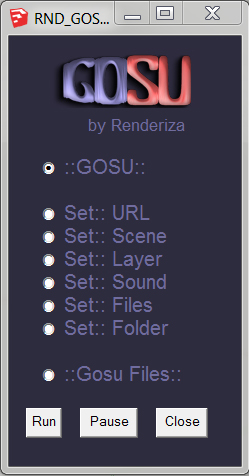
                    dlg-1.png
                    New Video for GOSU v1.0.3


                    dlg-1.jpg

                    [url=https://www.sketchupcode.com/:z3kqsidd]My Extensions ...[/url:z3kqsidd]

                    1 條回覆 最後回覆 回覆 引用 0
                    • L 離線
                      Litchi
                      最後由 編輯

                      Thanks for your present!
                      I would like to know whether we can be completely removed my settings
                      “Pause”is just only pause
                      Thanks!

                      1 條回覆 最後回覆 回覆 引用 0
                      • renderizaR 離線
                        renderiza
                        最後由 編輯

                        @litchi said:

                        Thanks for your present!
                        I would like to know whether we can be completely removed my settings
                        “Pause”is just only pause
                        Thanks!

                        Hi, thanks for your comment!

                        Let me see if I understood correctly...

                        You want a tool that removes the Set:: Options that you previously added, more like reset everything button?

                        or

                        You suggesting for the pause button to be removed?

                        Again thanks!

                        [url=https://www.sketchupcode.com/:z3kqsidd]My Extensions ...[/url:z3kqsidd]

                        1 條回覆 最後回覆 回覆 引用 0
                        • L 離線
                          Litchi
                          最後由 編輯

                          @unknownuser said:

                          @litchi said:

                          Thanks for your present!
                          I would like to know whether we can be completely removed my settings
                          “Pause”is just only pause
                          Thanks!

                          Hi, thanks for your comment!

                          Let me see if I understood correctly...

                          You want a tool that removes the Set:: Options that you previously added, more like reset everything button?

                          or

                          You suggesting for the pause button to be removed?

                          Again thanks!

                          I'm sorry,My English is not good……
                          I mean if we can add a new function "Reset",remove my settings(Can select all or selected components)
                          thanks! 😄

                          1 條回覆 最後回覆 回覆 引用 0
                          • renderizaR 離線
                            renderiza
                            最後由 編輯

                            @litchi said:

                            I'm sorry,My English is not good……
                            I mean if we can add a new function "Reset",remove my settings(Can select all or selected components)
                            thanks! 😄

                            I got it now and don't worry English is not my 1rst language as well. 👍

                            This is what I have in mind for next update...

                            Clear:: Selected
                            Clear:: All

                            Will remove settings on all or selected components but before doing so a messege will pop asking "Are you sure?".

                            In the mean time just in case all of the setting values are stored on component is name. You can access that by opening "Entity Info" window. There you can manually remove it or you can use Set:: URL and erase the content there I believe.

                            Cheers!

                            [url=https://www.sketchupcode.com/:z3kqsidd]My Extensions ...[/url:z3kqsidd]

                            1 條回覆 最後回覆 回覆 引用 0
                            • L 離線
                              Litchi
                              最後由 編輯

                              @unknownuser said:

                              @litchi said:

                              I'm sorry,My English is not good……
                              I mean if we can add a new function "Reset",remove my settings(Can select all or selected components)
                              thanks! 😄

                              I got it now and don't worry English is not my 1rst language as well. 👍

                              This is what I have in mind for next update...

                              Clear:: Selected
                              Clear:: All

                              Will remove settings on all or selected components but before doing so a messege will pop asking "Are you sure?".

                              In the mean time just in case all of the setting values are stored on component is name. You can access that by opening "Entity Info" window. There you can manually remove it or you can use Set:: URL and erase the content there I believe.

                              Cheers!

                              that's great,thanks!
                              I look forward to your new works!

                              1 條回覆 最後回覆 回覆 引用 0
                              • renderizaR 離線
                                renderiza
                                最後由 編輯

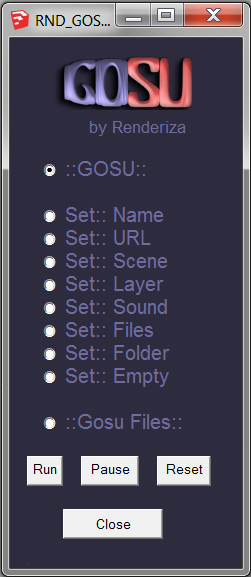
                                GOSU v1.0.4 Released!
                                dlg-1.jpg

                                1.0.4:: 4/23/2013
                                *Set :: Name - Allows you to set a specific name to any component.
                                *Set :: Empty - Allows you to clear the name of any component.
                                *Reset Button - This will remove the 'Set:: Attributes' of every component

                                Again thanks for the comments & suggestions!

                                [url=https://www.sketchupcode.com/:z3kqsidd]My Extensions ...[/url:z3kqsidd]

                                1 條回覆 最後回覆 回覆 引用 0
                                • L 離線
                                  Litchi
                                  最後由 編輯

                                  @unknownuser said:

                                  GOSU v1.0.4 Released!
                                  [attachment=0:3i6adbg9]<!-- ia0 -->dlg-1.jpg<!-- ia0 -->[/attachment:3i6adbg9]

                                  1.0.4:: 4/23/2013
                                  *Set :: Name - Allows you to set a specific name to any component.
                                  *Set :: Empty - Allows you to clear the name of any component.
                                  *Reset Button - This will remove the 'Set:: Attributes' of every component

                                  Again thanks for the comments & suggestions!

                                  Thanks,Your work with remarkable efficiency!
                                  Do you agree with me to reprint your files to other forums?
                                  I promise I will retain the original URL and the name of the author
                                  I want to share it with more people
                                  Again thanks !

                                  1 條回覆 最後回覆 回覆 引用 0
                                  • renderizaR 離線
                                    renderiza
                                    最後由 編輯

                                    @litchi said:

                                    Thanks,Your work with remarkable efficiency!
                                    Do you agree with me to reprint your files to other forums?
                                    I promise I will retain the original URL and the name of the author
                                    I want to share it with more people
                                    Again thanks !

                                    I will be happy if you shared this with other people on other forums. 👍

                                    [url=https://www.sketchupcode.com/:z3kqsidd]My Extensions ...[/url:z3kqsidd]

                                    1 條回覆 最後回覆 回覆 引用 0
                                    • T 離線
                                      TECHDAVE02
                                      最後由 編輯

                                      Am I right that GOSU will only do 1 function at a time??
                                      If so what about a right click sub menu to choose function???

                                      My pause button is not working
                                      rest works great so far.

                                      1 條回覆 最後回覆 回覆 引用 0
                                      • renderizaR 離線
                                        renderiza
                                        最後由 編輯

                                        @techdave02 said:

                                        Am I right that GOSU will only do 1 function at a time??

                                        Hi,

                                        Gosu can do multiple functions in some cases since it uses the same component name for all "Set::" parameters. The "Set:: Scene" and "Set:: Layer" are the ones that can be repeated with another "Set::" option withoud any issues...Let me give you an example;

                                        Example A

                                        1. Set:: URL = http://www.sketchUcation.com
                                        2. Set:: Scene = http://www.sketchUcation.com
                                        3. Set:: Layer = http://www.sketchUcation.com

                                        ^^When you use ::Gosu:: it will active URL,Scene and Layer at the same time.

                                        Example B

                                        1. Set:: Sound = C:\Users\name\Desktop\folders\audio.wav
                                        2. Set:: Scene = C:\Users\name\Desktop\folders\audio.wav
                                        3. Set:: Layer = C:\Users\name\Desktop\folders\audio.wav

                                        Note: Again notice how Set:: Scene & Set:: Layer can be combine with other "Set::" Options.

                                        @techdave02 said:

                                        If so what about a right click sub menu to choose function???

                                        This is great idea I will try to add it on next version...thanks!

                                        @techdave02 said:

                                        My pause button is not working
                                        rest works great so far.

                                        What the Pause button is supposed to do is deactivate tool be leave the web dlg window instead to closing it like the close button do. If this does not work try hitting 'Esc' key or Select another tool like the Select tool. I will see if I can find the issue...thanks.

                                        Cheers!

                                        [url=https://www.sketchupcode.com/:z3kqsidd]My Extensions ...[/url:z3kqsidd]

                                        1 條回覆 最後回覆 回覆 引用 0
                                        • S 離線
                                          smicha
                                          最後由 編輯

                                          I just watched a video tutorial - your plugin is great!

                                          1 條回覆 最後回覆 回覆 引用 0
                                          • renderizaR 離線
                                            renderiza
                                            最後由 編輯

                                            @smicha said:

                                            I just watched a video tutorial - your plugin is great!

                                            Thank you sir for does kind words! 👍

                                            [url=https://www.sketchupcode.com/:z3kqsidd]My Extensions ...[/url:z3kqsidd]

                                            1 條回覆 最後回覆 回覆 引用 0
                                            • 1
                                            • 2
                                            • 3
                                            • 4
                                            • 4 / 4
                                            • 第一個貼文
                                              最後的貼文
                                            Buy SketchPlus
                                            Buy SUbD
                                            Buy WrapR
                                            Buy eBook
                                            Buy Modelur
                                            Buy Vertex Tools
                                            Buy SketchCuisine
                                            Buy FormFonts

                                            Advertisement