sketchucation logo sketchucation
    • Login
    Oops, your profile's looking a bit empty! To help us tailor your experience, please fill in key details like your SketchUp version, skill level, operating system, and more. Update and save your info on your profile page today!
    ⚠️ Important | Libfredo 15.6a introduces important bugfixes for Fredo's Extensions Update

    Artisan - Subdivide and Smooth causing problems

    Scheduled Pinned Locked Moved Newbie Forum
    sketchup
    7 Posts 4 Posters 332 Views 4 Watching
    Loading More Posts
    • Oldest to Newest
    • Newest to Oldest
    • Most Votes
    Reply
    • Reply as topic
    Log in to reply
    This topic has been deleted. Only users with topic management privileges can see it.
    • bunnyackB Offline
      bunnyack
      last edited by

      Hey forum,

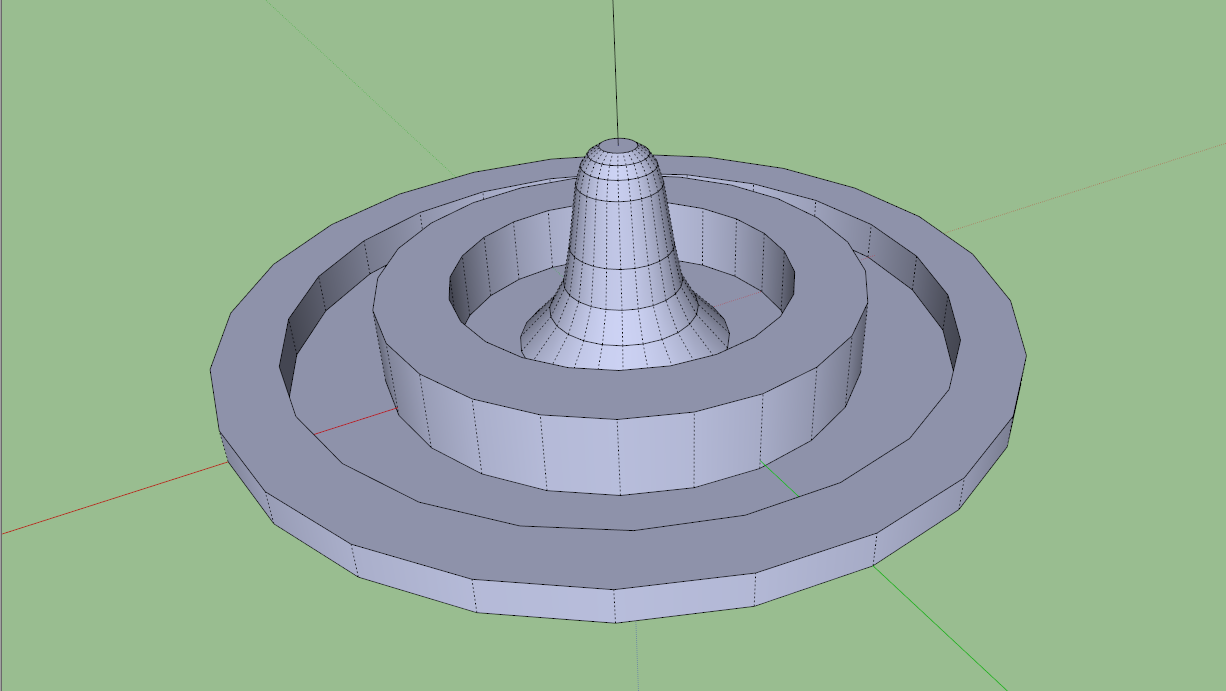
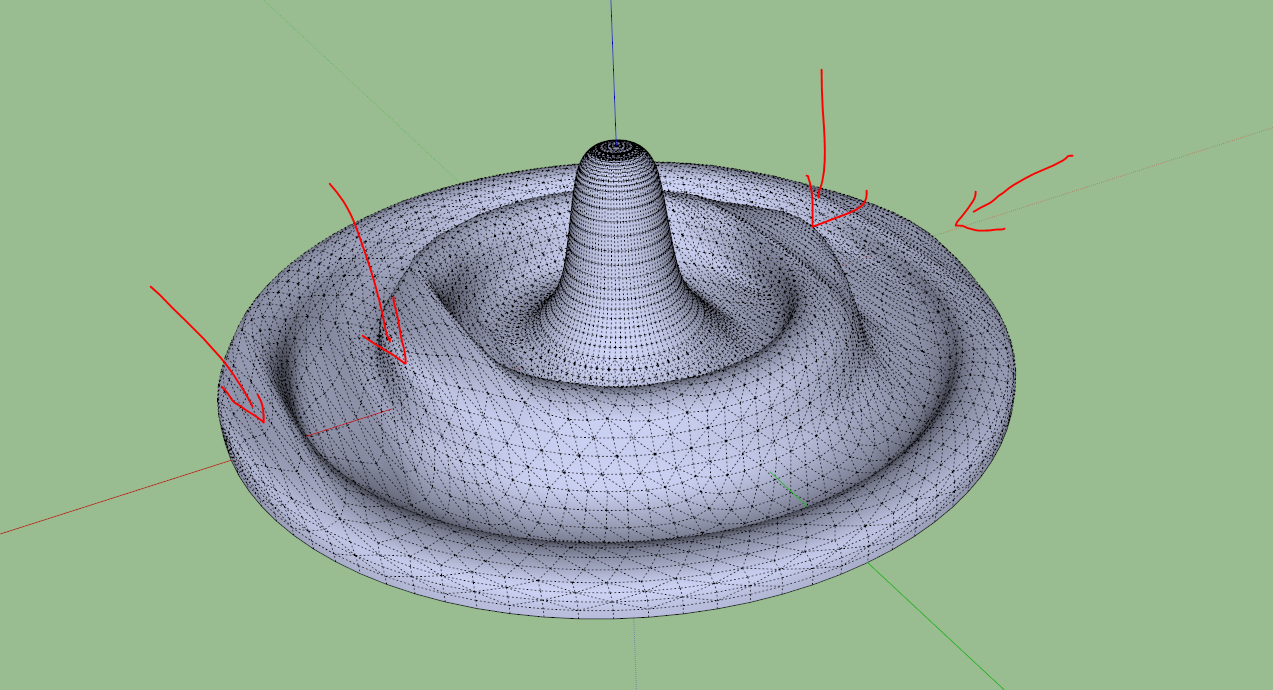
      I was playing around with artisan trying to create the shape of a water drop. When using Artisans "Subdivide and Smooth" tool, I noticed it was causing a weird deformation in the results it gave me. I'll let the screenshots explain:

      This is the basic shape I was using.
      artisan1.PNG

      And this is what Artisan gives me, when finished.
      artisan2.PNG

      Does anybody have an idea as to what could be causing this? I'm a complete newbie to artisan, using it for the first time today.

      Thanks in advance,
      Kevin

      1 Reply Last reply Reply Quote 0
      • dukejazzD Offline
        dukejazz
        last edited by

        Do you have a example jpg you working from

        Here one I found

        water-drop.jpg

        1 Reply Last reply Reply Quote 0
        • bunnyackB Offline
          bunnyack
          last edited by

          @dukejazz said:

          Do you have a example jpg you working from

          Here one I found

          Nah, I was just playing around, no reference images πŸ˜„

          1 Reply Last reply Reply Quote 0
          • Rich O BrienR Offline
            Rich O Brien Moderator
            last edited by

            The faces that are 'causing problems' are ngons. A big no-no when subdividing.

            Download the free D'oh Book for SketchUp πŸ“–

            1 Reply Last reply Reply Quote 0
            • HieruH Offline
              Hieru
              last edited by

              Tig's Splidonut is needed in this situation. You should apply it to all the flat donut-shaped surfaces.

              You could also benefit from using a simpler proxy - see here.

              www.davidhier.co.uk

              1 Reply Last reply Reply Quote 0
              • bunnyackB Offline
                bunnyack
                last edited by

                @hieru said:

                Tig's Splidonut is needed in this situation. You should apply it to all the flat donut-shaped surfaces.

                You could also benefit from using a simpler proxy - see here.

                Thank you so much, this did the trick.

                1 Reply Last reply Reply Quote 0
                • HieruH Offline
                  Hieru
                  last edited by

                  No problem πŸ‘

                  As Rich says you need to avoid n-gons and stick to quads and tris.

                  www.davidhier.co.uk

                  1 Reply Last reply Reply Quote 0
                  • 1 / 1
                  • First post
                    Last post
                  Buy SketchPlus
                  Buy SUbD
                  Buy WrapR
                  Buy eBook
                  Buy Modelur
                  Buy Vertex Tools
                  Buy SketchCuisine
                  Buy FormFonts

                  Advertisement


