sketchucation logo sketchucation
    • Login
    Oops, your profile's looking a bit empty! To help us tailor your experience, please fill in key details like your SketchUp version, skill level, operating system, and more. Update and save your info on your profile page today!
    ⚠️ Update | Sketchucation Tools 5.0.8 released with licensing improvements and bugfixes Download

    [Plugin] 3D Text Editor

    Scheduled Pinned Locked Moved Plugins
    204 Posts 51 Posters 224.5k Views 50 Watching
    Loading More Posts
    • Oldest to Newest
    • Newest to Oldest
    • Most Votes
    Reply
    • Reply as topic
    Log in to reply
    This topic has been deleted. Only users with topic management privileges can see it.
    • J
      JuanV.Soler
      last edited by

      no more warnings no . I think that the trick was to ignore the first warning after installed
      .
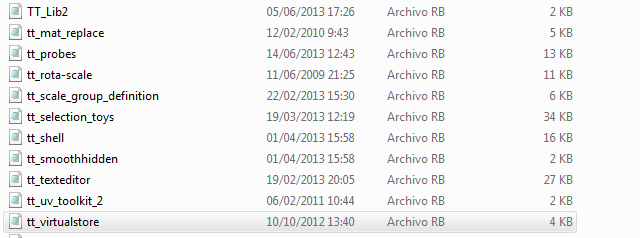
      As I edited my latest post : I have the virtualstore plugin installed in the folder but it does not show in Plugins SketchUp aplication so I cannot run it
      ,))),

      1 Reply Last reply
      Reply Quote 0
      • thomthomT
        thomthom
        last edited by

        ? Really? No menu under the Plugins menu?

        Thomas Thomassen — SketchUp Monkey & Coding addict
        List of my plugins and link to the CookieWare fund

        1 Reply Last reply
        Reply Quote 0
        • J
          JuanV.Soler
          last edited by

          no , no menu under the Plugins menu

          ,))),

          1 Reply Last reply
          Reply Quote 0
          • thomthomT
            thomthom
            last edited by

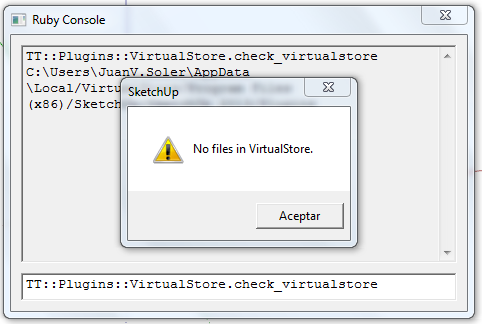
            what happens if you type this into the ruby console: TT::Plugins::VirtualStore.check_virtualstore
            ?

            Thomas Thomassen — SketchUp Monkey & Coding addict
            List of my plugins and link to the CookieWare fund

            1 Reply Last reply
            Reply Quote 0
            • J
              JuanV.Soler
              last edited by

              The **Text Editor**still works with the same workaround of unticking the extrude function to get the heights modified

              NO FILES.png

              ,))),

              1 Reply Last reply
              Reply Quote 0
              • thomthomT
                thomthom
                last edited by

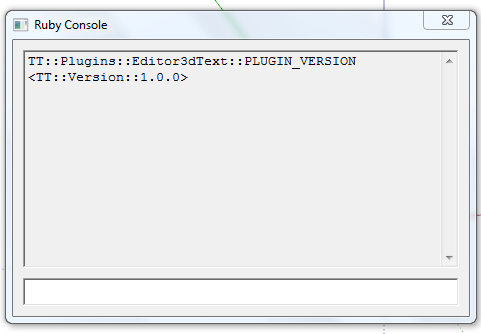
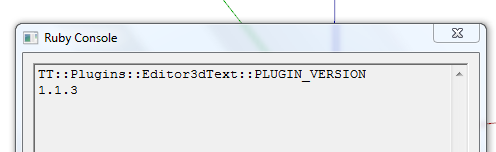
                What does TT::Plugins::Editor3dText::PLUGIN_VERSION report.

                And what version of Internet Explorer do you have installed?

                (Lots of questions here - but I'm baffled by what is going on here. It should be working... :s )

                Thomas Thomassen — SketchUp Monkey & Coding addict
                List of my plugins and link to the CookieWare fund

                1 Reply Last reply
                Reply Quote 0
                • J
                  JuanV.Soler
                  last edited by

                  it reports :
                  plugin version.png

                  about Internet Explorer :
                  Internet 10.png


                  now those are all my credentials 😄

                  ,))),

                  1 Reply Last reply
                  Reply Quote 0
                  • thomthomT
                    thomthom
                    last edited by

                    Your 3d Text Editor is out of date. It should be 1.1.3 - if you install the version from EW.

                    Thomas Thomassen — SketchUp Monkey & Coding addict
                    List of my plugins and link to the CookieWare fund

                    1 Reply Last reply
                    Reply Quote 0
                    • J
                      JuanV.Soler
                      last edited by

                      ............finally.............succeeded
                      1.1.3.png

                      .......tyuuuu....... 👍

                      ,))),

                      1 Reply Last reply
                      Reply Quote 0
                      • thomthomT
                        thomthom
                        last edited by

                        😍

                        Thomas Thomassen — SketchUp Monkey & Coding addict
                        List of my plugins and link to the CookieWare fund

                        1 Reply Last reply
                        Reply Quote 0
                        • M
                          matt.gordon320
                          last edited by

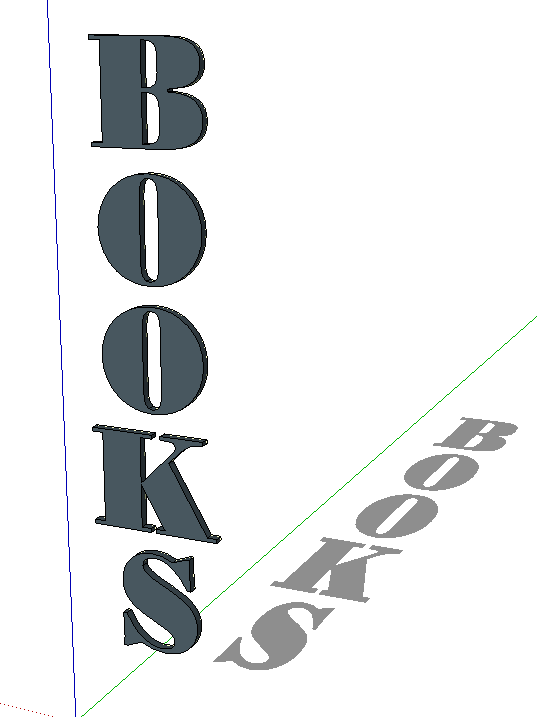
                          Hi Thomthom, thanks again for an awesome plugin. I have an idea for a feature that some might find useful if they're doing visualization work - vertically stacked text (like the following, perhaps).

                          http://2.bp.blogspot.com/_nswHPYi_dEw/SoWP9m4sr6I/AAAAAAAAH_4/BUtChw6LSK8/s400/P1000262.JPG

                          Any way, just a thought! Thanks for creating so many awesome tools, it's inspiring. I'm slowly learning code, and it's great to see what you've written.

                          Thanks!

                          Matt

                          1 Reply Last reply
                          Reply Quote 0
                          • Dave RD
                            Dave R
                            last edited by

                            Capture.PNG

                            FWIW, you can already make vertically stacked text. It would be nice to be able to control things like leading and kerning, though.

                            Etaoin Shrdlu

                            %

                            (THERE'S NO PLACE LIKE)

                            G28 X0.0 Y0.0 Z0.0

                            M30

                            %

                            1 Reply Last reply
                            Reply Quote 0
                            • G
                              glro
                              last edited by

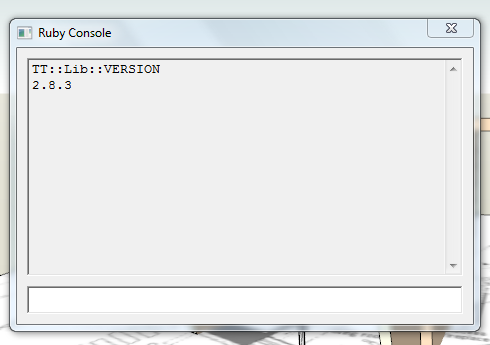
                              i downloaded and installed you plugin an TT_Lib_v2.8.3.rbz

                              but then, when sketchup was launched, a message said i have to download TT_Lib2-2.8.0.rbz

                              so i uninstalled TT_Lib_v2.8.3.rbz and installed TT_Lib2-2.8.0.rbz

                              and then it worked

                              you did a great job

                              you managed to make a multilines editor...

                              would it be possible to ...? 😛

                              have the 3d text in a red/blue plan, instead of red/green?

                              i would like to use your plugin to add comments to a scene, one comment per scene; usually, the camera is oriented so that vertical objects appear vertical

                              So, it would be easier to read if the text was in the red/blue plan.

                              1 Reply Last reply
                              Reply Quote 0
                              • G
                                glro
                                last edited by

                                @glro said:

                                i downloaded and installed you plugin an TT_Lib_v2.8.3.rbz

                                but then, when sketchup was launched, a message said i have to download TT_Lib2-2.8.0.rbz

                                so i uninstalled TT_Lib_v2.8.3.rbz and installed TT_Lib2-2.8.0.rbz

                                and then it worked

                                you did a great job

                                you managed to make a multilines editor...

                                would it be possible to ...? 😛

                                have the 3d text in a red/blue plan, instead of red/green?

                                i would like to use your plugin to add comments to a scene, one comment per scene; usually, the camera is oriented so that vertical objects appear vertical

                                So, it would be easier to read if the text was in the red/blue plan.

                                no, i just realised that you can change the plan by writing on a face of the model; so to write vertically, you just have to find a vertical face in the model

                                1 Reply Last reply
                                Reply Quote 0
                                • tt_suT
                                  tt_su
                                  last edited by

                                  @glro said:

                                  i downloaded and installed you plugin an TT_Lib_v2.8.3.rbz
                                  but then, when sketchup was launched, a message said i have to download TT_Lib2-2.8.0.rbz
                                  so i uninstalled TT_Lib_v2.8.3.rbz and installed TT_Lib2-2.8.0.rbz

                                  Whaaat? 😕
                                  You shouldn't need to downgrade. Are you on Windows by any chance?
                                  Maybe you ended up with some files in VirtualStore...
                                  How did you install it?

                                  1 Reply Last reply
                                  Reply Quote 0
                                  • G
                                    glro
                                    last edited by

                                    @tt_su said:

                                    @glro said:

                                    i downloaded and installed you plugin an TT_Lib_v2.8.3.rbz
                                    but then, when sketchup was launched, a message said i have to download TT_Lib2-2.8.0.rbz
                                    so i uninstalled TT_Lib_v2.8.3.rbz and installed TT_Lib2-2.8.0.rbz

                                    Whaaat? 😕
                                    You shouldn't need to downgrade. Are you on Windows by any chance?
                                    Maybe you ended up with some files in VirtualStore...
                                    How did you install it?

                                    windows 7 64 bits

                                    installed using preferences > extensions

                                    downloaded vers 2.8.3 here
                                    http://sketchucation.com/resources/pluginstore?pln=TT_Lib

                                    but it didn't work so i downloaded the previous version using the link that appeared on my screen

                                    but it's OK now;works great

                                    1 Reply Last reply
                                    Reply Quote 0
                                    • tt_suT
                                      tt_su
                                      last edited by

                                      That is strange. I need to look into that.

                                      1 Reply Last reply
                                      Reply Quote 0
                                      • M
                                        matt.gordon320
                                        last edited by

                                        @dave r said:

                                        [attachment=0:38jz7em6]<!-- ia0 -->Capture.PNG<!-- ia0 -->[/attachment:38jz7em6]

                                        FWIW, you can already make vertically stacked text. It would be nice to be able to control things like leading and kerning, though.


                                        http://s23.postimg.org/pu5me6ejb/3d_text_editor.jpg

                                        Dave/TT - I'm glad to hear it's already capable, but here's the embarrassing part:I can't figure out how to do it 😳 . I've updated to the most recent version, but maybe I have an older version floating around in Virtual Store or something?

                                        Thanks!

                                        EDIT - Ok I'm stupid. I just realized what you meant @Dave.


                                        http://s24.postimg.org/x152egbj9/I_m_Stupid.jpg

                                        download screenshot

                                        1 Reply Last reply
                                        Reply Quote 0
                                        • Dave RD
                                          Dave R
                                          last edited by

                                          Matt, I hope this doesn't embarrass you further. Try using Enter between typing the letters. 😉 I setting Align to Center. You may need to play with the leading (spacing) between the letters after you've created the text but that will depend upon the font you choose.

                                          Edit: You edited your post while I was typing. 😄 Now you've got it and if anyone asked, it was a great day because you learned something. 👍

                                          Etaoin Shrdlu

                                          %

                                          (THERE'S NO PLACE LIKE)

                                          G28 X0.0 Y0.0 Z0.0

                                          M30

                                          %

                                          1 Reply Last reply
                                          Reply Quote 0
                                          • M
                                            matt.gordon320
                                            last edited by

                                            Haha no worries Dave. I've frequently found that publicly making a fool of myself is the best way to learn, and I'm ok with that 😄 I'm sure you experienced programmers will have a good laugh when I finally get around to releasing an actual plugin.

                                            1 Reply Last reply
                                            Reply Quote 0

                                            Hello! It looks like you're interested in this conversation, but you don't have an account yet.

                                            Getting fed up of having to scroll through the same posts each visit? When you register for an account, you'll always come back to exactly where you were before, and choose to be notified of new replies (either via email, or push notification). You'll also be able to save bookmarks and upvote posts to show your appreciation to other community members.

                                            With your input, this post could be even better 💗

                                            Register Login
                                            • 1
                                            • 2
                                            • 3
                                            • 4
                                            • 5
                                            • 6
                                            • 7
                                            • 10
                                            • 11
                                            • 5 / 11
                                            • First post
                                              Last post
                                            Buy SketchPlus
                                            Buy SUbD
                                            Buy WrapR
                                            Buy eBook
                                            Buy Modelur
                                            Buy Vertex Tools
                                            Buy SketchCuisine
                                            Buy FormFonts

                                            Advertisement