sketchucation logo sketchucation
    • Login
    Oops, your profile's looking a bit empty! To help us tailor your experience, please fill in key details like your SketchUp version, skill level, operating system, and more. Update and save your info on your profile page today!
    ⚠️ Update | Sketchucation Tools 5.0.8 released with licensing improvements and bugfixes Download

    [Plugin] 3D Text Editor

    Scheduled Pinned Locked Moved Plugins
    204 Posts 51 Posters 224.4k Views 50 Watching
    Loading More Posts
    • Oldest to Newest
    • Newest to Oldest
    • Most Votes
    Reply
    • Reply as topic
    Log in to reply
    This topic has been deleted. Only users with topic management privileges can see it.
    • Dave RD
      Dave R
      last edited by

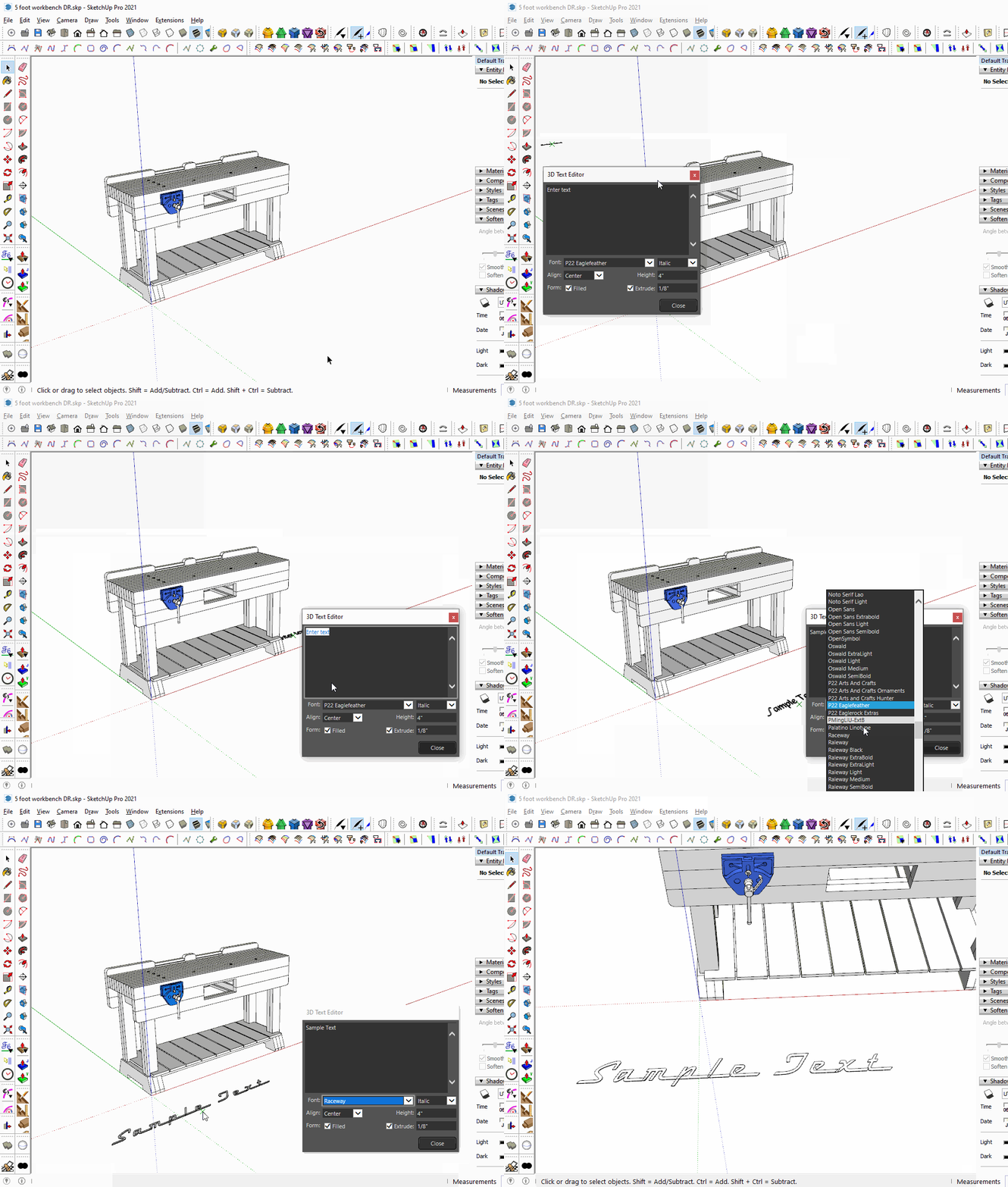
      This is what I see in SketchUp 2021.
      Click on the picture

      Make sure you installed SketchUp correctly which involves right clicking on the downloaded installer and choosing Run as administrator from the context menu.

      By the way, perhaps you could update your profile. Currently it says you are using SketchUp 2019 Free/Make which would be impossible anyway.

      Etaoin Shrdlu

      %

      (THERE'S NO PLACE LIKE)

      G28 X0.0 Y0.0 Z0.0

      M30

      %

      1 Reply Last reply
      Reply Quote 0
      • atelierpaarA
        atelierpaar
        last edited by

        Hello and good morning,
        after installing SU 2025 3D its not possible to edit 3 D text - any clue how to fix this ??
        Tanks for your help/advice
        Uli

        TIGT Dave RD 2 Replies Last reply
        Reply Quote 0
        • TIGT
          TIG Moderator @atelierpaar
          last edited by

          @atelierpaar

          Basic 3dText is not 'editable', you need an extension like this -
          https://sketchucation.com/pluginstore?pln=tt_texteditor

          TIG

          1 Reply Last reply
          Reply Quote 0
          • Dave RD
            Dave R @atelierpaar
            last edited by

            @atelierpaar it works fine in SketchUp 2025 for me. As TIG implies, the 3D text needs to have been created with this extension in order to be editable. Also make sure you have the current version of TT_Lib2 installed. It is required by this extension.

            This is done in SketchUp 2025.

            Editable Text.mp4

            Etaoin Shrdlu

            %

            (THERE'S NO PLACE LIKE)

            G28 X0.0 Y0.0 Z0.0

            M30

            %

            1 Reply Last reply
            Reply Quote 0
            • TIGT
              TIG Moderator
              last edited by

              I suspect you need to reinstall this extension [and perhaps some others?]
              Extensions don't automatically 'port' over from an earlier version of SketchUp when you install a newer one -
              although v2025 does have a new extension to let you do that -
              but it's not 100% foolproof, and reinstalling them manually does let you do some tidying up and housekeeping, to keep your extensions 'lean-and-mean'...

              TIG

              1 Reply Last reply
              Reply Quote 0
              • J
                jjtakestheworld
                last edited by

                Hi, Can i add custom fonts to the list? I use a lot of specific brands fonts which are installed on my machine but i cannot see them in the drop down list?

                TIGT 1 Reply Last reply
                Reply Quote 0
                • TIGT
                  TIG Moderator @jjtakestheworld
                  last edited by

                  @jjtakestheworld
                  If the font is installed it should be listed.
                  However, I think that only ttf fonts show
                  otf fonts don't...

                  TIG

                  J 1 Reply Last reply
                  Reply Quote 0
                  • J
                    jjtakestheworld @TIG
                    last edited by

                    @TIG Ah legend. I've just converted a OTF to TTF and it's found it. Thanks

                    1 Reply Last reply
                    Reply Quote 0
                    • P
                      puttea
                      last edited by puttea

                      I work with two monitors, SketchUp runs on the right screen. The editor always opens in the left screen. Is it possible to let it open on the right screen or let it remember the location where it was used the last time?

                      Dave RD 1 Reply Last reply
                      Reply Quote 1
                      • Dave RD
                        Dave R @puttea
                        last edited by

                        @puttea what version of SketchUp? What operating system?

                        Etaoin Shrdlu

                        %

                        (THERE'S NO PLACE LIKE)

                        G28 X0.0 Y0.0 Z0.0

                        M30

                        %

                        1 Reply Last reply
                        Reply Quote 0
                        • P
                          puttea
                          last edited by

                          @Dave R SketchUp 2025 Pro on Windows 11

                          1 Reply Last reply
                          Reply Quote 1
                          • Dave RD
                            Dave R
                            last edited by

                            Close Sketchup. Go to user/AppData/Local/SketchUp/SketchUp 2025/SketchUp and open PrivatePreferences.json. Look for "ThreeDTextDlg". What are the "x" and "y" values? Edit those to move the dialog onto the correct screen. This is what it looks like on my computer.
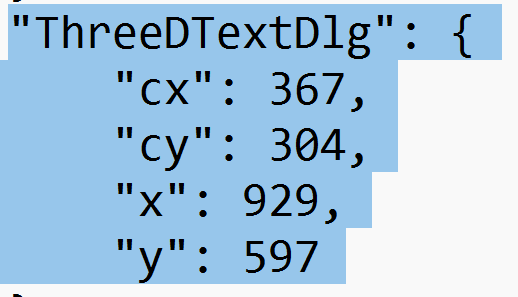
                            Screenshot - 9_18_2025 , 3_58_34 PM.png
                            And here's the dialog relative to the top left corner.
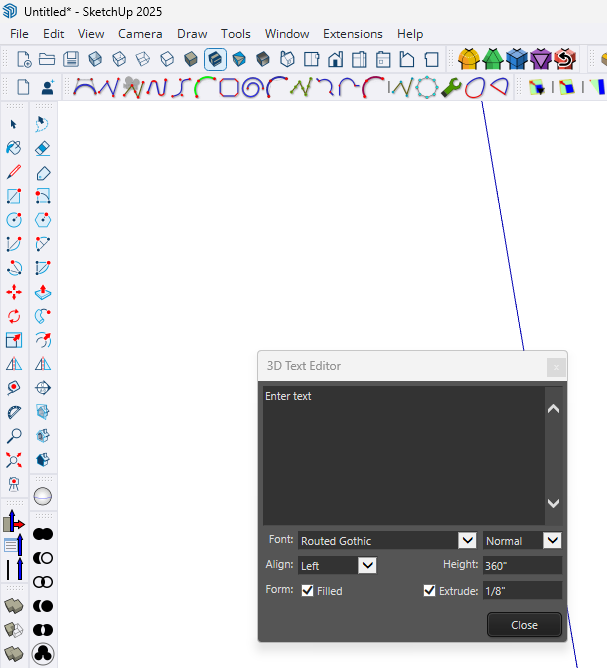
                            Screenshot - 9_18_2025 , 4_06_56 PM.png
                            Note that the user/AppData folder is normally hidden so you'll need to make hidden folders visible in File Explorer.

                            Did you install SketchUp 2025 correctly? That requires right clicking on the downloaded installer and selecting Run as administrator. If you didn't do that it's possible that Windows is preventing SketchUp from making suitable updates to PrivatePreferences.json. To ensure SketchUp is installed correctly, close SketchUp, find the installer in your Downloads folder, right click on it, choose Run as administrator, and when prompted, click Repair. No matter what, it won't hurt to do it.

                            Etaoin Shrdlu

                            %

                            (THERE'S NO PLACE LIKE)

                            G28 X0.0 Y0.0 Z0.0

                            M30

                            %

                            P 1 Reply Last reply
                            Reply Quote 1
                            • P
                              puttea @Dave R
                              last edited by

                              @Dave-R Thanks!

                              1 Reply Last reply
                              Reply Quote 0
                              • X
                                xannanov
                                last edited by

                                1 Месяц назад перестал работать плагин. Кнопка плагина активна. После нажатия - ничего не происходит и не появляется окно редактирования и создания текста. Пробовал это: переустанавливал плагины и библиотеки разных версий. Во всех случаях - одинаковое поведение. Кто смог решить эту проблему?

                                The plugin stopped working a month ago. The plugin button is active, but nothing happens when I click it—the text editing/creation window does not appear. I have tried reinstalling plugins and libraries of various versions, but the behavior remains the same in every case. Has anyone managed to solve this problem?

                                Dave RD 1 Reply Last reply
                                Reply Quote 0
                                • Dave RD
                                  Dave R @xannanov
                                  last edited by

                                  @xannanov what version of SketchUp are you using? What operating system? The plugin works fine for me in SketchUp 2026 and has worked fine in all previous versions.

                                  Maybe there's a conflicting extension? Open the Ruby Console, try running the plugin and then share the output from the Console with us.


                                  Etaoin Shrdlu

                                  %

                                  (THERE'S NO PLACE LIKE)

                                  G28 X0.0 Y0.0 Z0.0

                                  M30

                                  %

                                  1 Reply Last reply
                                  Reply Quote 0

                                  Hello! It looks like you're interested in this conversation, but you don't have an account yet.

                                  Getting fed up of having to scroll through the same posts each visit? When you register for an account, you'll always come back to exactly where you were before, and choose to be notified of new replies (either via email, or push notification). You'll also be able to save bookmarks and upvote posts to show your appreciation to other community members.

                                  With your input, this post could be even better 💗

                                  Register Login
                                  • 1
                                  • 2
                                  • 7
                                  • 8
                                  • 9
                                  • 10
                                  • 11
                                  • 10 / 11
                                  • First post
                                    Last post
                                  Buy SketchPlus
                                  Buy SUbD
                                  Buy WrapR
                                  Buy eBook
                                  Buy Modelur
                                  Buy Vertex Tools
                                  Buy SketchCuisine
                                  Buy FormFonts

                                  Advertisement