sketchucation logo sketchucation
    • 登入
    Oops, your profile's looking a bit empty! To help us tailor your experience, please fill in key details like your SketchUp version, skill level, operating system, and more. Update and save your info on your profile page today!
    🔌 Smart Spline | Fluid way to handle splines for furniture design and complex structures. Download

    Barley Twist Spirals

    已排程 已置頂 已鎖定 已移動 SketchUp Discussions
    sketchup
    119 貼文 12 Posters 11.9k 瀏覽 12 Watching
    正在載入更多貼文
    • 從舊到新
    • 從新到舊
    • 最多點贊
    回覆
    • 在新貼文中回覆
    登入後回覆
    此主題已被刪除。只有擁有主題管理權限的使用者可以查看。
    • gillesG 離線
      gilles
      最後由 編輯

      Will do later, its late here in France and I should sleep.

      " c'est curieux chez les marins ce besoin de faire des phrases "

      1 條回覆 最後回覆 回覆 引用 0
      • jeff hammondJ 離線
        jeff hammond
        最後由 編輯

        use a whole bunch of profile curves then apply wonky style?
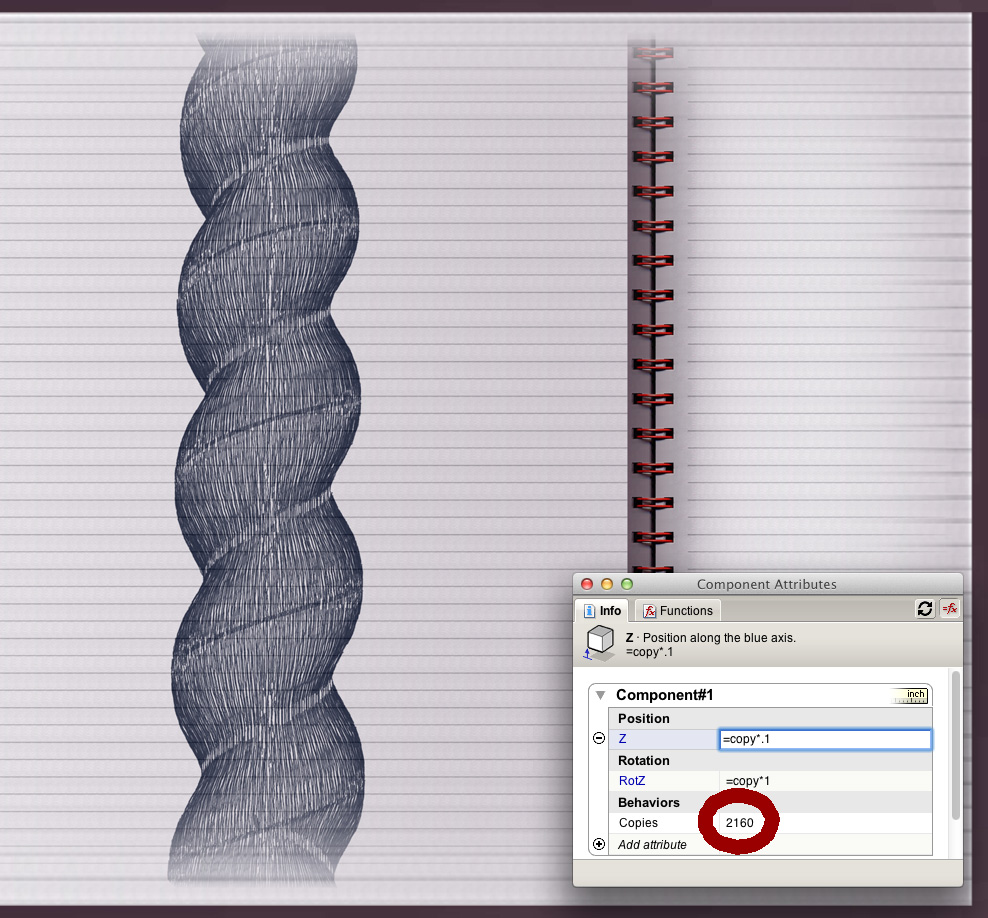
        lines.jpg

        dotdotdot

        1 條回覆 最後回覆 回覆 引用 0
        • daleD 離線
          dale
          最後由 編輯

          Just a quick question. In reality, can you turn a Barley Twist, or is it more of a carving exercise?

          Just monkeying around....like Monsanto

          1 條回覆 最後回覆 回覆 引用 0
          • Dave RD 離線
            Dave R
            最後由 編輯

            Dale, barley twists can be turned, sort of. There's a machine that combines a router with a lathe and gears them together for creating barley twists and other ornamental milling. Check out this link. I used to have one of their machines and used it a lot. Of course now with CNC-driven equipment, it gets even more sophisticated. I can't say I would recommend dealing with the company but the idea was interesting.

            Etaoin Shrdlu

            %

            (THERE'S NO PLACE LIKE)

            G28 X0.0 Y0.0 Z0.0

            M30

            %

            1 條回覆 最後回覆 回覆 引用 0
            • daleD 離線
              dale
              最後由 編輯

              Thanks Dave, really interesting machine. I often wish I was a machinist, boy there would be trouble then.

              Just monkeying around....like Monsanto

              1 條回覆 最後回覆 回覆 引用 0
              • A 離線
                archturn
                最後由 編輯

                @dale said:

                Just a quick question. In reality, can you turn a Barley Twist, or is it more of a carving exercise?

                Here are two videos of turning a barley twist and then a rope twist on my machine.

                http://www.youtube.com/watch?v=LcjVLg0ql7c
                Barley Twist

                http://www.youtube.com/watch?v=0zVD22NqgSc>
                Rope Twist

                1 條回覆 最後回覆 回覆 引用 0
                • daleD 離線
                  dale
                  最後由 編輯

                  That's Great. So can you directly import from SketchUp to you machine?
                  ( Oh and, I guess I'm still living in the past, as I was thinking of how difficult if not impossible to turn it by hand. 😳 )

                  Just monkeying around....like Monsanto

                  1 條回覆 最後回覆 回覆 引用 0
                  • A 離線
                    archturn
                    最後由 編輯

                    @dale said:

                    That's Great. So can you directly import from SketchUp to you machine?
                    ( Oh and, I guess I'm still living in the past, as I was thinking of how difficult if not impossible to turn it by hand. 😳 )

                    My machine is not a full CNC but a step below it. It is a hydraulic copier so it traces a profile. The indexing function (used for the twisting) however is computer controlled so the setting up of gears and indexing pins that Dave R referred is not necessary. The templates I use for the turning profile are drawn in CAD and sent to a machine shop with a laser CNC so I can get a pretty fine template for tracing

                    1 條回覆 最後回覆 回覆 引用 0
                    • A 離線
                      archturn
                      最後由 編輯

                      @archturn said:

                      @dale said:

                      ( Oh and, I guess I'm still living in the past, as I was thinking of how difficult if not impossible to turn it by hand. 😳 )

                      As for turning by hand, it's not impossible but I wouldn't want to make a living like that.

                      1 條回覆 最後回覆 回覆 引用 0
                      • Dave RD 離線
                        Dave R
                        最後由 編輯

                        Archturn, I was just looking at an old book on turning from the Gutenberg Project and toward the end they spend some time talking about doing various spiral turning by hand. They show some pretty cool examples in the photos. I'm sure you're getting them done in a lot less time.

                        Talk to you tonight with live demo. 😉

                        Etaoin Shrdlu

                        %

                        (THERE'S NO PLACE LIKE)

                        G28 X0.0 Y0.0 Z0.0

                        M30

                        %

                        1 條回覆 最後回覆 回覆 引用 0
                        • A 離線
                          archturn
                          最後由 編輯

                          @dave r said:

                          Archturn, I was just looking at an old book on turning from the Gutenberg Project and toward the end they spend some time talking about doing various spiral turning by hand. They show some pretty cool examples in the photos. I'm sure you're getting them done in a lot less time.

                          I've had to do 100-200 at a time so it's not really feasible for the turnings I do. God Bless 'em for they were able to do 100 years ago.

                          1 條回覆 最後回覆 回覆 引用 0
                          • gillesG 離線
                            gilles
                            最後由 編輯

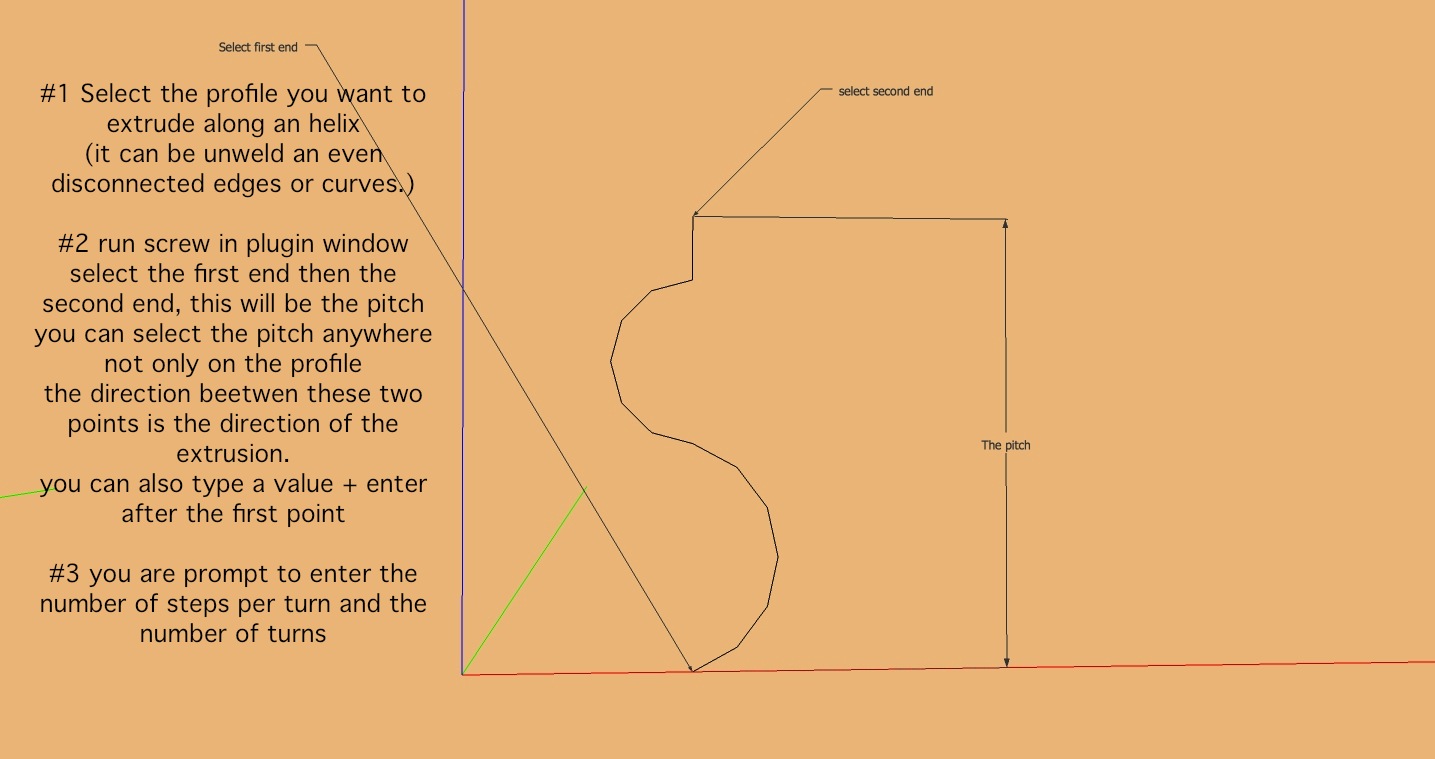
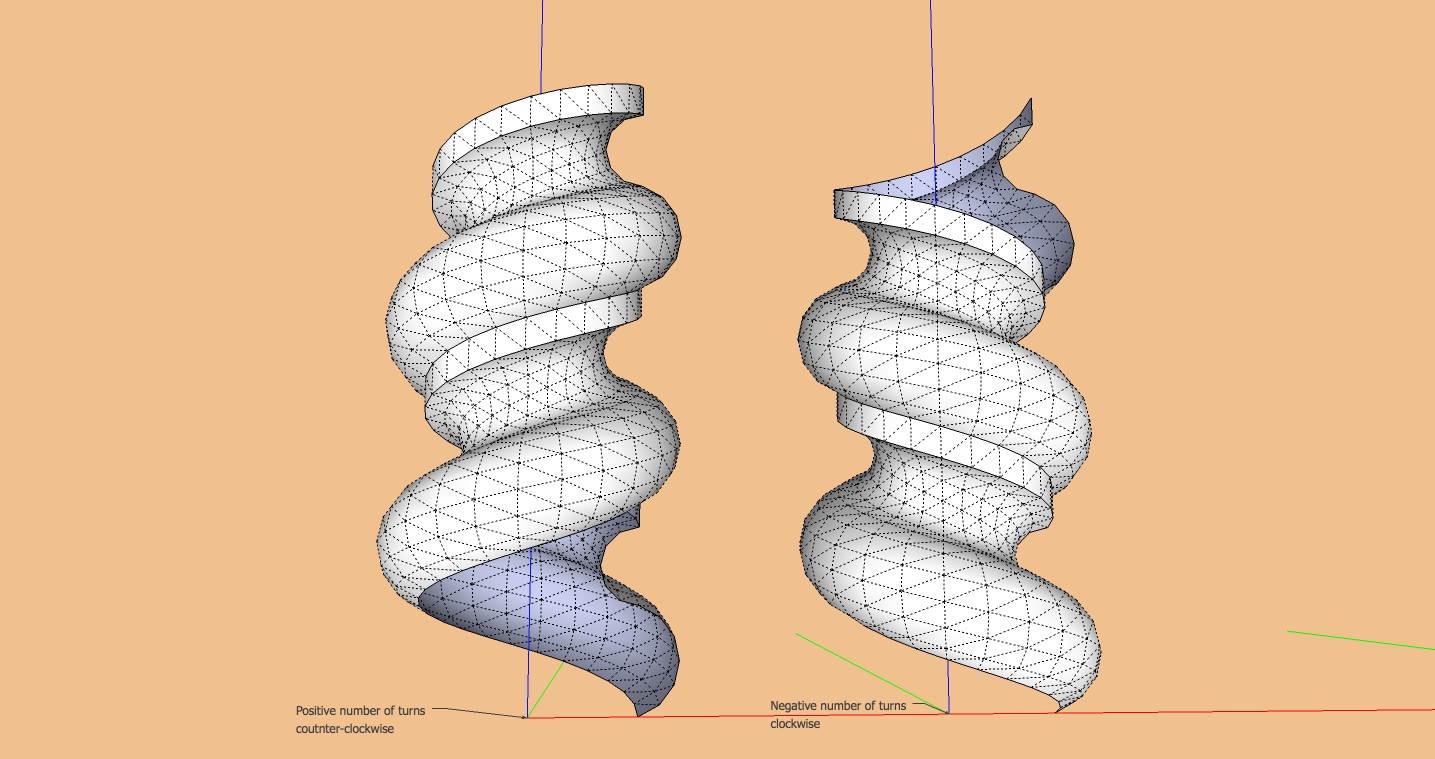
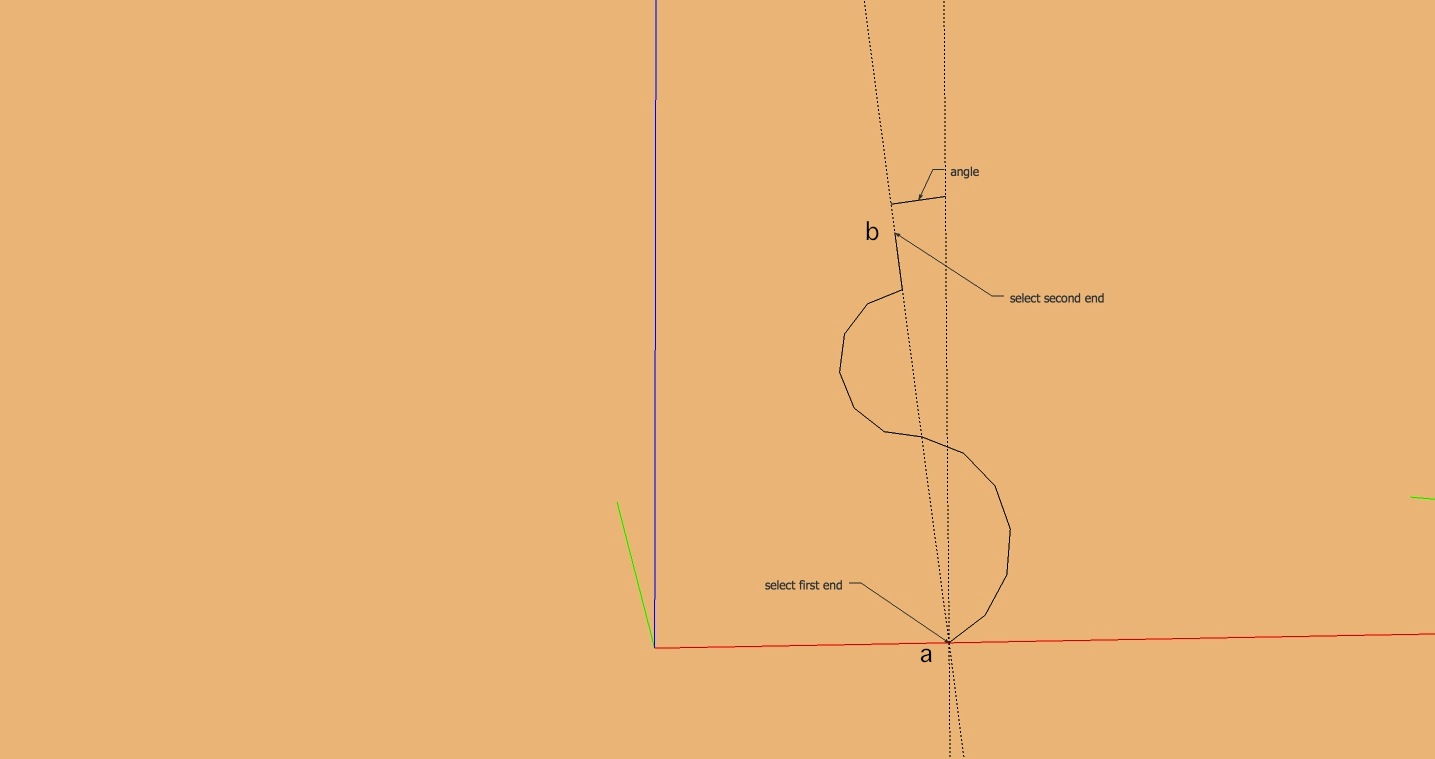
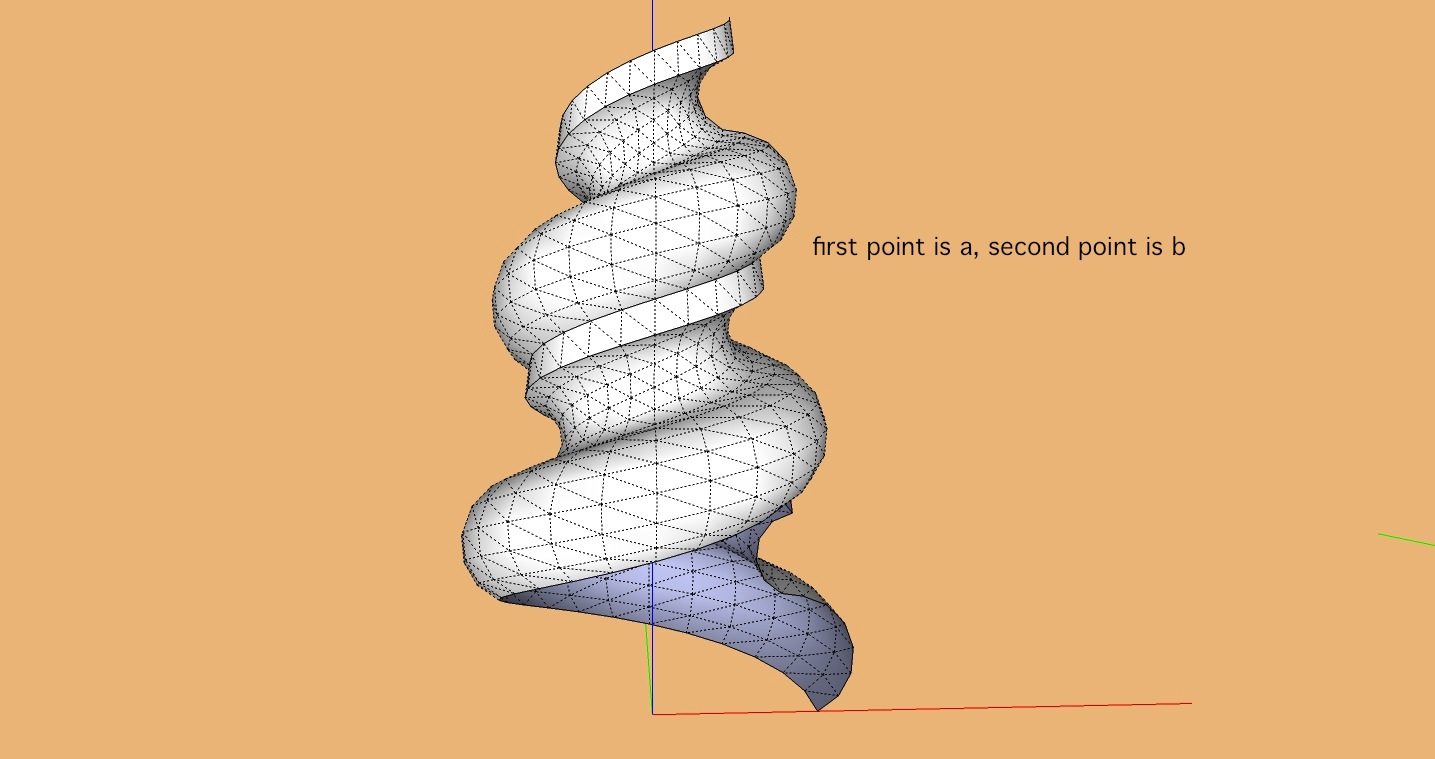
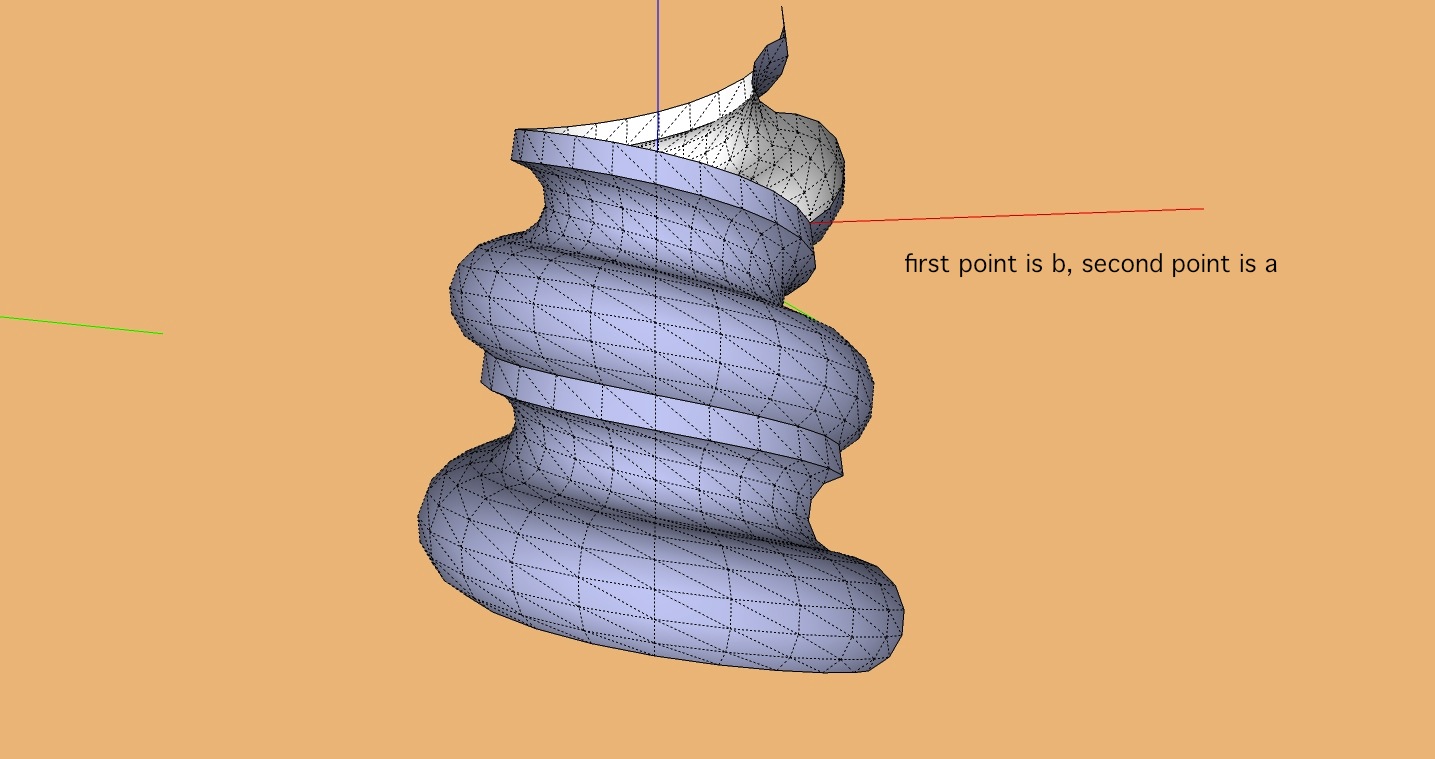
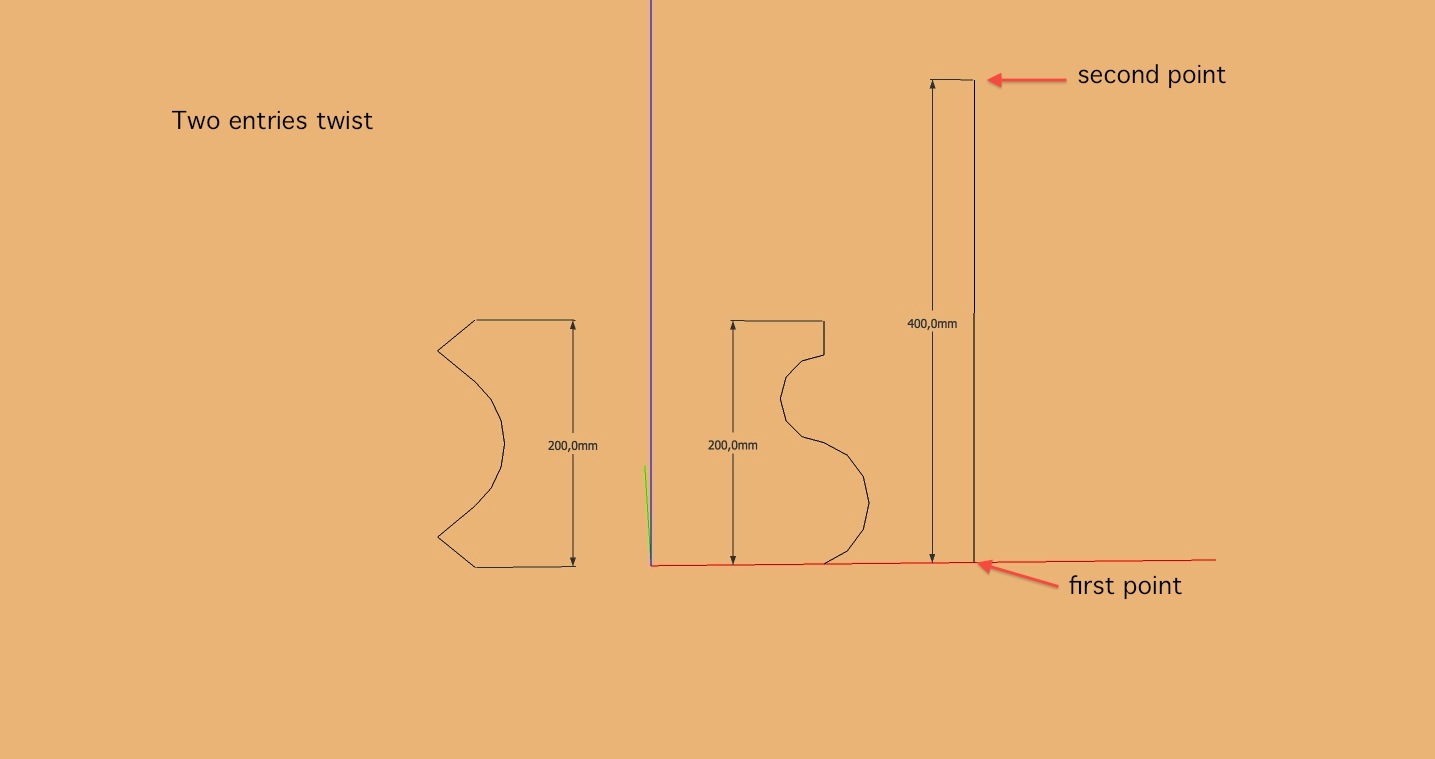
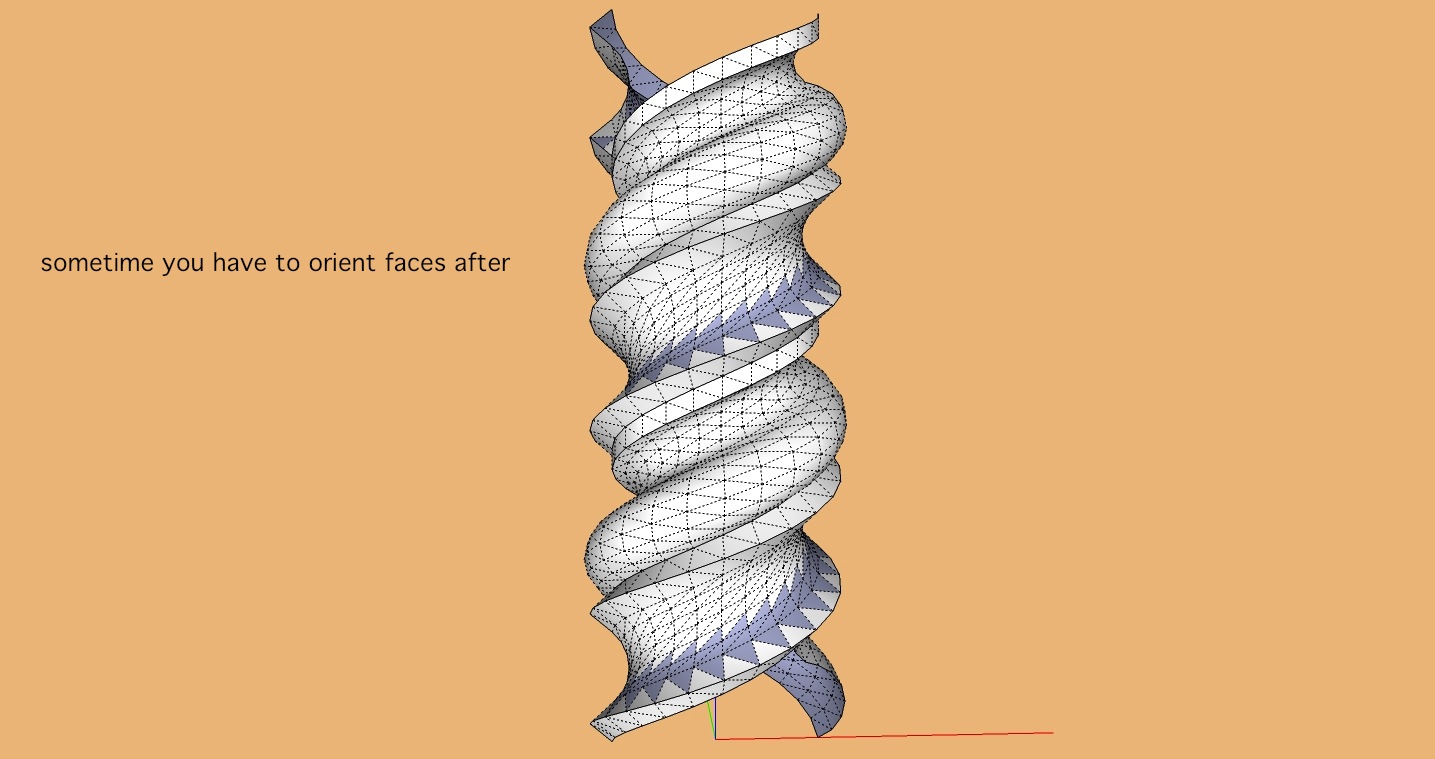
                            About Screw1_5.rb:

                            Download to:
                            http://rhin.crai.archi.fr/rld/plugin_details.php?id=357

                            In fact Screw1_5.rb is version 3 not 1.5 so this the most achieve.

                            # Name ;          Screw 3.0
                            # Description ;   screw/spins a set of edges/components around the 
                            #                 z-axis (if "turns" is a negative number, rotation 
                            #                 is clockwise)
                            # Author ;        Frank Wiesner
                            # Usage ;         1. select edges and/or Components
                            #                 2. run script
                            #                 3. enter desired values in dialog box
                            #                 4. pick two points (offset vector)
                            # Note;           selecting the "spin" tool is a shortcut for selecting 
                            #                 the "screw" tool and picking two identical points for 
                            #                 the offset vector.
                            # Date ;          25.Jun.2oo5
                            # Type ;          script
                            # History;        
                            #                 3.0 (25.Jun.2005) - offset vector is picked interactively
                            #                 2.2 (31.Aug.2004) - supports spin operation
                            #                 2.1 (31.Aug.2004) - remembers turn/step values during SU session
                            #                                     expressions in dialog (i.e. use turns = 483/360.0 for a 483 degrees turn)
                            #                 2.0 (30.Aug.2004) - support for ConstructionPoints
                            #                                     instant drawing (although Sketchup does not update during execution)
                            #                                     status info
                            #                                     new algorithm for offset vector
                            #                                     fractional value support
                            #                 1.4  (5.Aug.2oo4) - cleaned up ugly transformation code, script now faster
                            #                                     error checking for "add_face'; Points are not planar" errors
                            #                 1.3  (4.Aug.2oo4) - support for components
                            #                 1.2  (4.Aug.2oo4) - edges are smoothed
                            #                 1.1  (3.Aug.2oo4) - if "turns" is a negative number, rotation is clockwise, minor fixes
                            #                 1.o  (3.Aug.2oo4) - first version
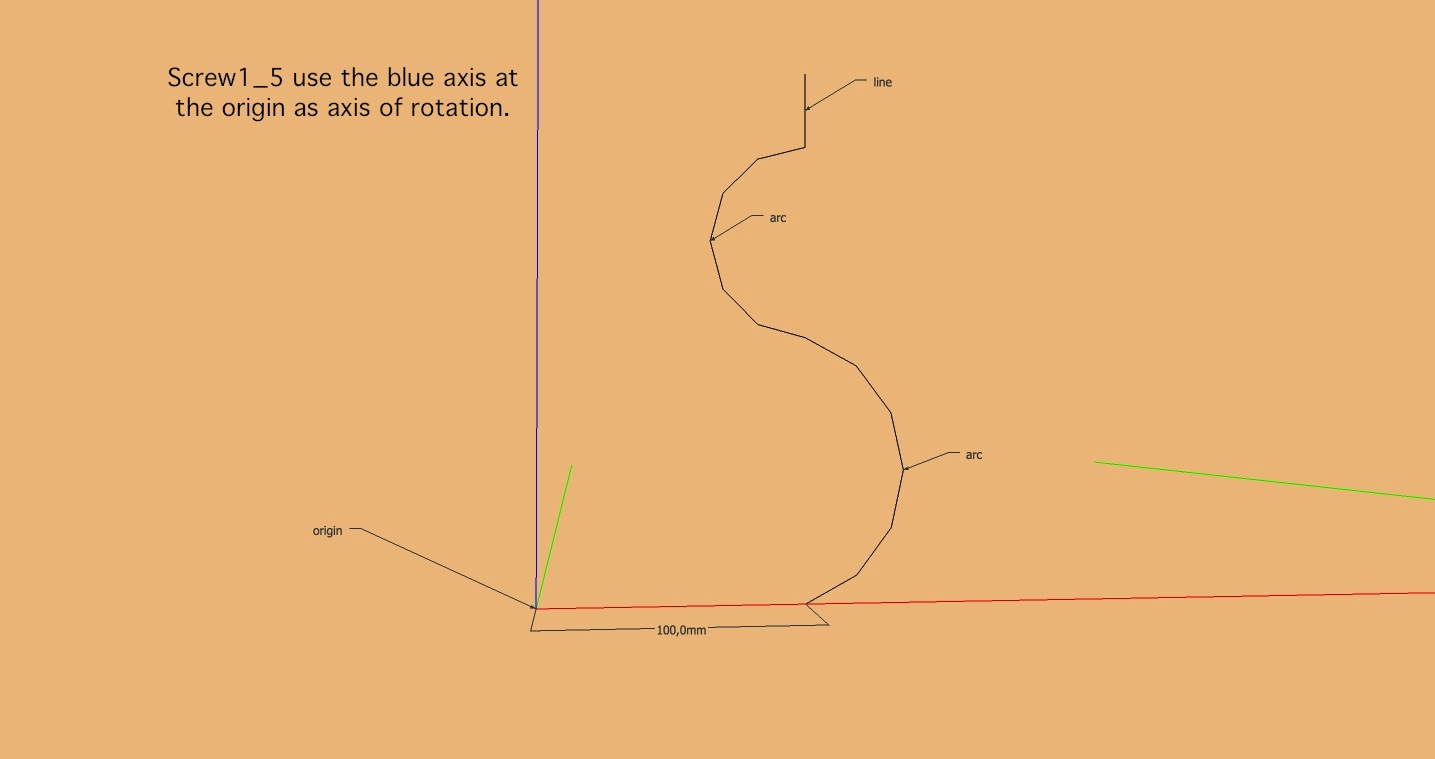
                            

                            Screw1_5#01basics - #1.jpg


                            Screw1_5#01basics - #2.jpg


                            Screw1_5#01basics - #3.jpg


                            Screw1_5#01basics - #4.jpg


                            Screw1_5#01basics - #5.jpg


                            Screw1_5#01basics - #6.jpg


                            Screw1_5#01basics - #7.jpg


                            Screw1_5#01basics - #8.jpg

                            " c'est curieux chez les marins ce besoin de faire des phrases "

                            1 條回覆 最後回覆 回覆 引用 0
                            • A 離線
                              archturn
                              最後由 編輯

                              Thanks Gilles

                              1 條回覆 最後回覆 回覆 引用 0
                              • pbacotP 離線
                                pbacot
                                最後由 編輯

                                Next project?
                                http://cache.virtualtourist.com/4/1793507-Baldacchino_canopy_Vatican_City.jpg

                                MacOSX MojaveSketchUp Pro v19 Twilight v2 Thea v3 PowerCADD

                                1 條回覆 最後回覆 回覆 引用 0
                                • A 離線
                                  archturn
                                  最後由 編輯

                                  Piece of cake...lol

                                  1 條回覆 最後回覆 回覆 引用 0
                                  • A 離線
                                    archturn
                                    最後由 編輯

                                    @gilles said:

                                    Here is a step by step.

                                    Gilles
                                    I've used your method for the barley twist. Thanks to you and Dave R the twist (using the screw plugin) is a piece of cake. The "intersect model" used to join the newel with the twist , however, is another thing altogether. I'm really struggling with that part of it. Can you give me any pointers?

                                    1 條回覆 最後回覆 回覆 引用 0
                                    • A 離線
                                      archturn
                                      最後由 編輯

                                      I've been having a time trying to intersect the barley twisted part into the rest of the newel. watched YTube videos and I'm wondering if there is an issue with intersecting complex surfaces?N114.jpg

                                      1 條回覆 最後回覆 回覆 引用 0
                                      • Dave RD 離線
                                        Dave R
                                        最後由 編輯

                                        I can't tell from your image but it could be you are running up against SketchUp's dislike of tiny faces. It won't fill in very tiny ones which will leave a ragged edge. The fix is to perform the intersection after scaling the model up by a factor of 100 or 1000.

                                        It looks like you could use some softening of the ends, there and your barley twist is inside out. 😉

                                        Are you making the intersecting 'bowl' in the same context as the twist?

                                        Etaoin Shrdlu

                                        %

                                        (THERE'S NO PLACE LIKE)

                                        G28 X0.0 Y0.0 Z0.0

                                        M30

                                        %

                                        1 條回覆 最後回覆 回覆 引用 0
                                        • Dave RD 離線
                                          Dave R
                                          最後由 編輯

                                          Good point, Peter.

                                          When I draw pommels and such I tend to make them much larger in diameter than needed and trim them back. I tend to think of it a bit in terms of turning in wood by hand. The cutter would run along the pommel shape and off the wood in a smooth continuous action and not stop right at the edge of the wood. You can see a similar sort of thing in this octagonal pedestal.

                                          Etaoin Shrdlu

                                          %

                                          (THERE'S NO PLACE LIKE)

                                          G28 X0.0 Y0.0 Z0.0

                                          M30

                                          %

                                          1 條回覆 最後回覆 回覆 引用 0
                                          • pbacotP 離線
                                            pbacot
                                            最後由 編輯

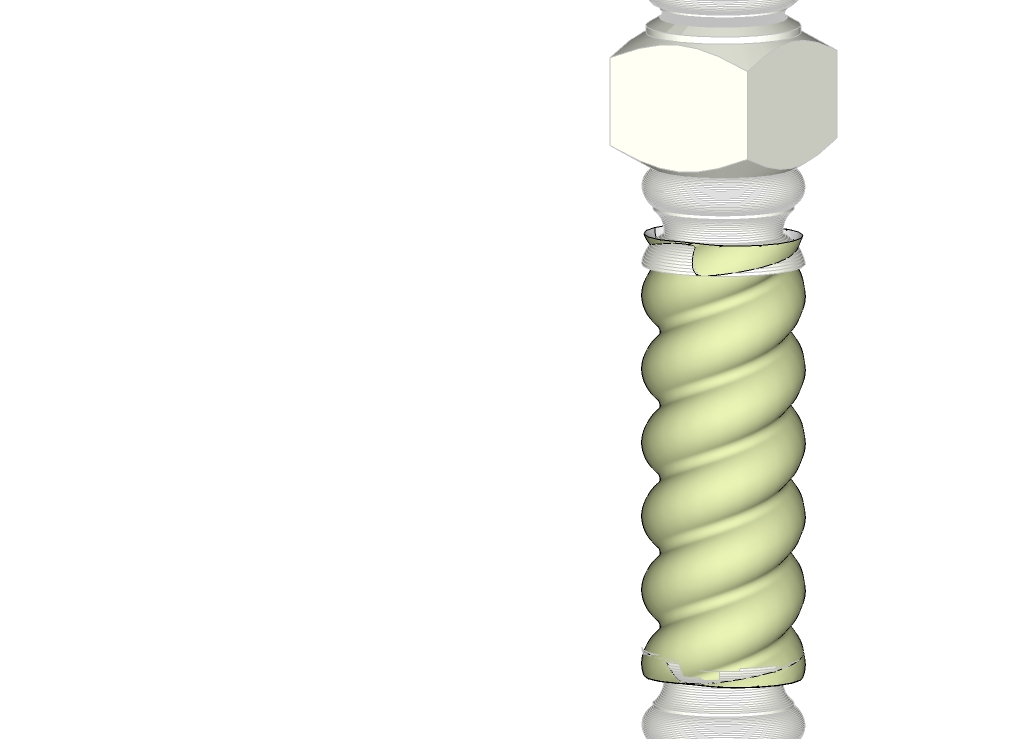
                                            It looks a bit like the bowl is not big enough in circumference. It can be larger so that it's rim is beyond any intersection with the twist. You are just going to delete the extra anyway. Same with the twist. At the bottom it looks like it isn't long enough to be sticking out of the bowl. Overlap them completely.

                                            EDIT, Here's my try. I find in using screw.rb (did you?) It's easier to use the same number of segments for other forms that join to it. It helps line up the geometry. IDK the proper termination, but mine looks like it needs some sanding. I think the bell shape might need be as tangent to the spiral shape as possible. which leads to the very problem. You also need a good intersection!
                                            You can see the geometry line up in the second picture
                                            The third picture shows an attempt to "sand it down" with Artisan. Get out the 100 grit!
                                            More turnings (slow processing) may give better results. Also, I did not bother to adjust the segments in my profile arcs. Probably should not be such a large variance in spacing.

                                            EDIT: More notes: the two shapes are separate groups. Enter each and intersect with model. You can dbl. click the excess face and delete. I find it helps sometimes to leave the excess in place until done with both intersect-with-model operations. Seems SU does not always recognize a one edge intersection.
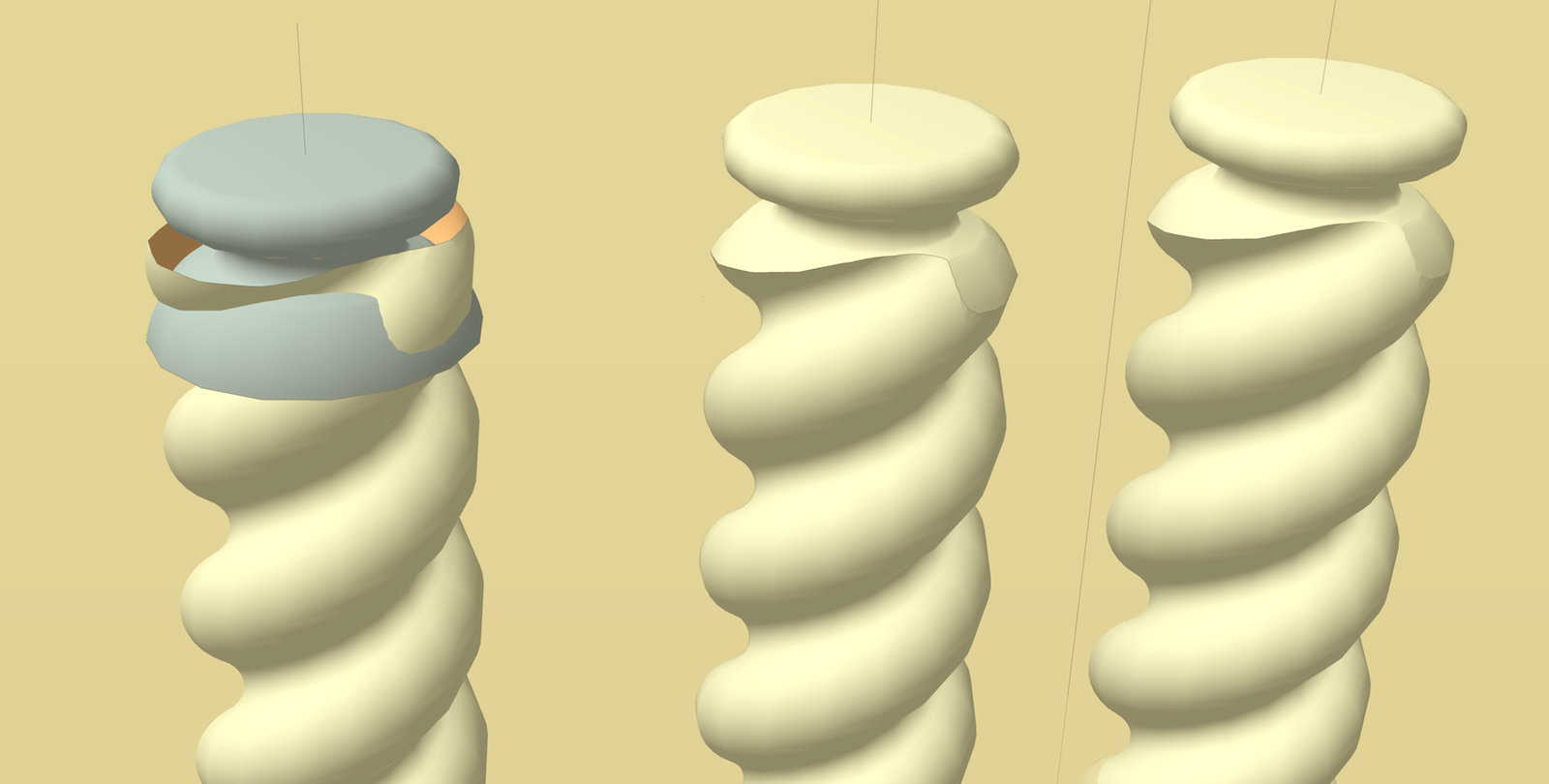
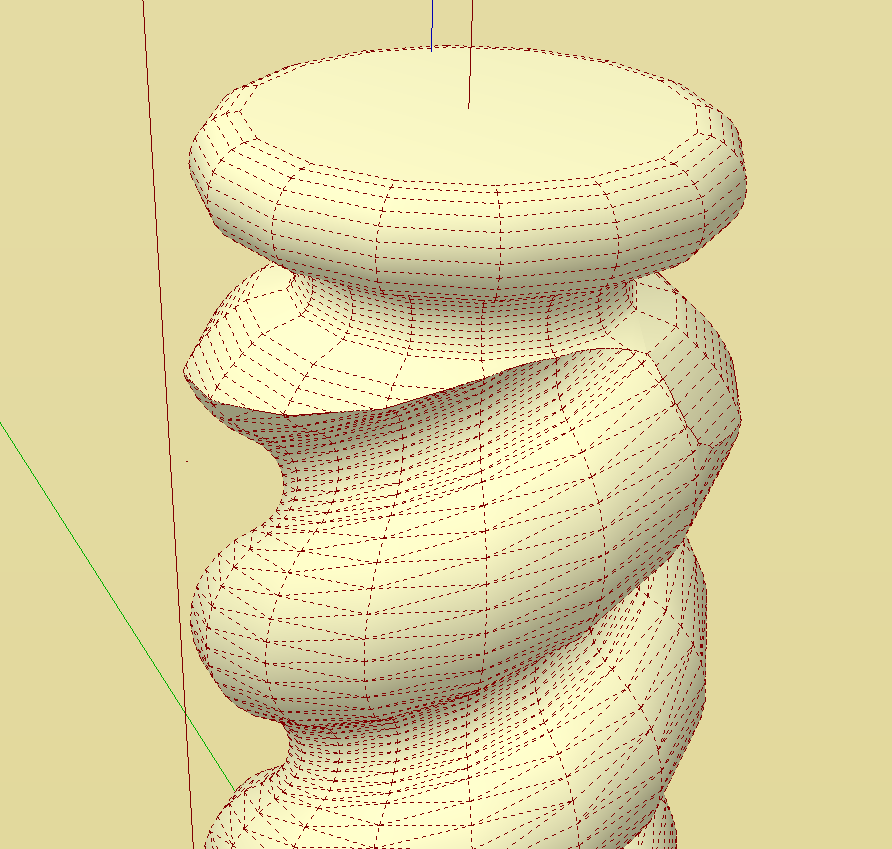
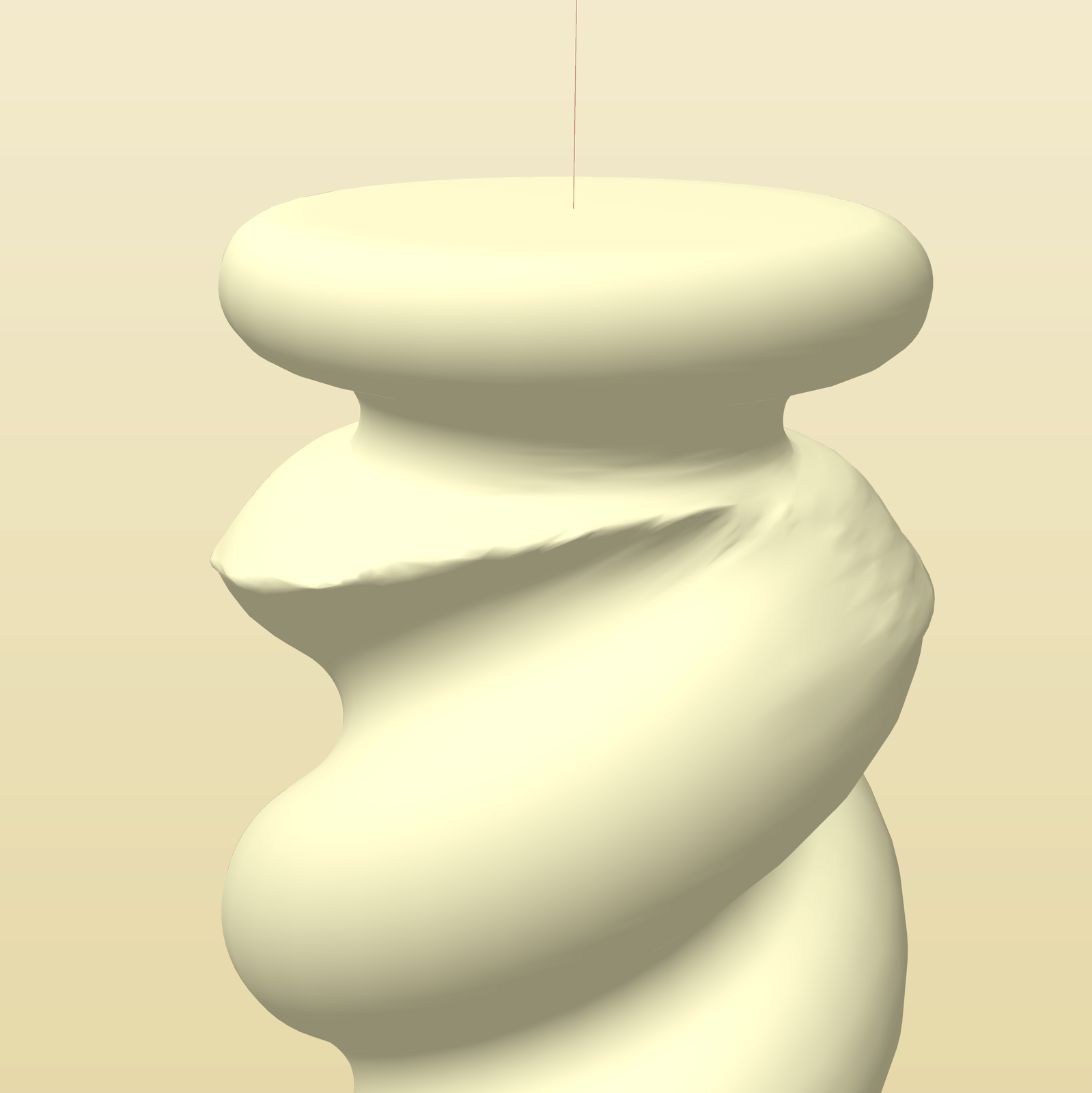
                                            TEST.png


                                            Screen shot 2013-01-29 at 6.56.05 PM.png


                                            TEST smooth.png

                                            MacOSX MojaveSketchUp Pro v19 Twilight v2 Thea v3 PowerCADD

                                            1 條回覆 最後回覆 回覆 引用 0
                                            • 1
                                            • 2
                                            • 3
                                            • 4
                                            • 5
                                            • 6
                                            • 5 / 6
                                            • 第一個貼文
                                              最後的貼文
                                            Buy SketchPlus
                                            Buy SUbD
                                            Buy WrapR
                                            Buy eBook
                                            Buy Modelur
                                            Buy Vertex Tools
                                            Buy SketchCuisine
                                            Buy FormFonts

                                            Advertisement