sketchucation logo sketchucation
    • Login
    Oops, your profile's looking a bit empty! To help us tailor your experience, please fill in key details like your SketchUp version, skill level, operating system, and more. Update and save your info on your profile page today!
    Mac User? | Join the Rayscaper Beta for Mac Learn More

    [Plugin] TIG-Smart_offset

    Scheduled Pinned Locked Moved Plugins
    143 Posts 55 Posters 196.6k Views 54 Watching
    Loading More Posts
    • Oldest to Newest
    • Newest to Oldest
    • Most Votes
    Reply
    • Reply as topic
    Log in to reply
    This topic has been deleted. Only users with topic management privileges can see it.
    • TrixtaT
      Trixta
      last edited by

      Just wondering? Is "TIG_Random _Shape_Generator.rb.v2.1" the final offer. ❓

      Thanks for working at it over 'The End of the world', Christmas and New Years.

      Great Plugin. Thank you! You rock.

      Win7 & SU14 Pro

      1 Reply Last reply
      Reply Quote 0
      • TIGT
        TIG Moderator
        last edited by

        No.

        It is in the middle of a revamp...

        BUT other more pressure projects have intervened.

        Keep watching, an update will arrive one day...

        TIG

        1 Reply Last reply
        Reply Quote 0
        • D
          dedmin
          last edited by

          See attached video - SU PRO 2014, Win 7 64 bit

          Video_2014-05-31_075712.wmv

          1 Reply Last reply
          Reply Quote 0
          • TIGT
            TIG Moderator
            last edited by

            @dedmin said:

            See attached video - SU PRO 2014, Win 7 64 bit

            [attachment=0:1e099geg]<!-- ia0 -->Video_2014-05-31_075712.wmv<!-- ia0 -->[/attachment:1e099geg]
            It should offset any arcs/circles/curves as curves NOT arcs/circles.
            BUT I' unsure why one of the curve's edges is failing to be incorporated in that new curve...

            remember that it's not really intended to replace the native Offset for these kinds of very simple operations, but rather to avoid the annoying 'bow-tie' issues it can cause in complex concave/narrowing loops

            This tool IS long overdue its annual update...
            Keep watching [but don't hold your breath]... πŸ˜’

            TIG

            1 Reply Last reply
            Reply Quote 0
            • T
              tomot
              last edited by

              @tig said:

              No.
              It is in the middle of a revamp...
              BUT other more pressure projects have intervened.
              Keep watching, an update will arrive one day...

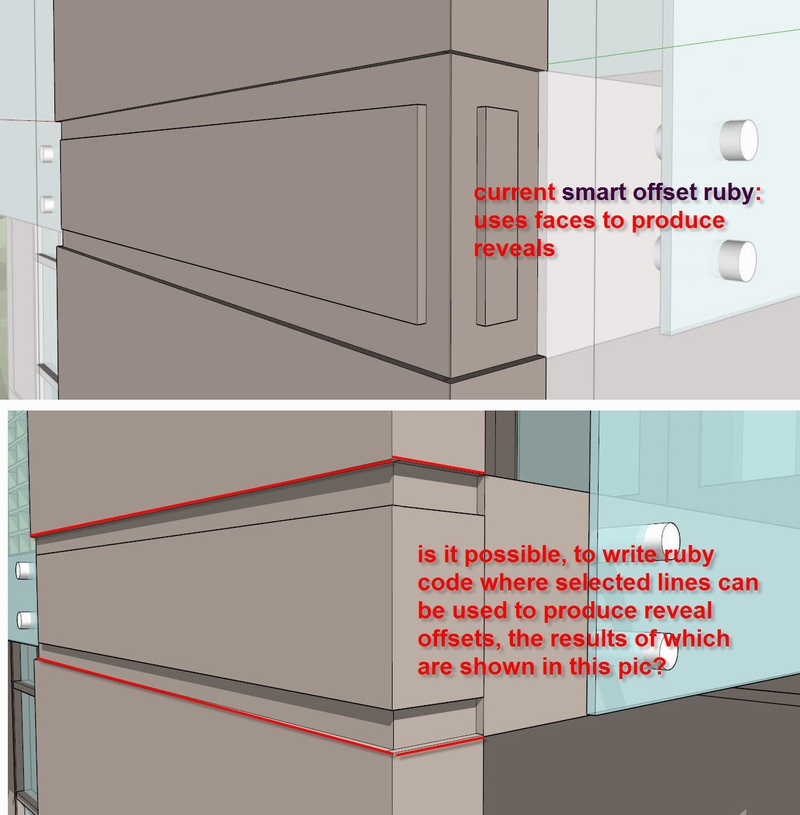
              Does the ruby API have code similar to your offset and reveal Ruby. But that instead of selecting faces one would select lines, similar to the "edge loops" concept used in Zbrush or C4D? see attachment

              reveal0.jpg

              my plugins
              tomot

              1 Reply Last reply
              Reply Quote 0
              • E
                edgars
                last edited by

                how instal this plugin?

                1 Reply Last reply
                Reply Quote 0
                • TIGT
                  TIG Moderator
                  last edited by

                  Either 1. download its RBZ from the SCF PluginStore page linked above... and 2. use the Preferences > Extensions > Install... button.
                  OR one off - get the SketchUcation Toolset RBZ from the Resources menu [above], then install it - and thereafter use that to install all of your needs from the PluginStore directly using AutoInstall from the PluginStore dialog in one step.

                  TIG

                  1 Reply Last reply
                  Reply Quote 0
                  • pilouP
                    pilou
                    last edited by

                    @unknownuser said:

                    A +ve distance

                    What is the meaning of "ve" ?

                    Frenchy Pilou
                    Is beautiful that please without concept!
                    My Little site :)

                    1 Reply Last reply
                    Reply Quote 0
                    • Dave RD
                      Dave R
                      last edited by

                      Positive.

                      Etaoin Shrdlu

                      %

                      (THERE'S NO PLACE LIKE)

                      G28 X0.0 Y0.0 Z0.0

                      M30

                      %

                      1 Reply Last reply
                      Reply Quote 0
                      • TIGT
                        TIG Moderator
                        last edited by

                        Yes, +ve and -ve are common English abbreviations for Positive and Negative respectively: used with numbers - e.g. 2, -2

                        TIG

                        1 Reply Last reply
                        Reply Quote 0
                        • pilouP
                          pilou
                          last edited by

                          Thx for the info! πŸ‘

                          Frenchy Pilou
                          Is beautiful that please without concept!
                          My Little site :)

                          1 Reply Last reply
                          Reply Quote 0
                          • TIGT
                            TIG Moderator
                            last edited by

                            Version 3.0 is released. https://sketchucation.com/pluginstore?pln=TIG_Smart_offset It's now updated to work with newer versions of SketchUp [including 'signing'].
                            If used within another tool it also properly returns the newly created face[s] within an array...
                            See usage notes in first post...

                            TIG

                            1 Reply Last reply
                            Reply Quote 0
                            • M
                              melahome12
                              last edited by

                              good morning I am a university student this plugin interests me many I would like to know how to download the plugin

                              1 Reply Last reply
                              Reply Quote 0
                              • Dave RD
                                Dave R
                                last edited by

                                @melahome12 said:

                                good morning I am a university student this plugin interests me many I would like to know how to download the plugin

                                Click the Download button in TIG's post immediately above yours.

                                Screenshot - 11_26_2017 , 9_52_38 AM.png

                                Etaoin Shrdlu

                                %

                                (THERE'S NO PLACE LIKE)

                                G28 X0.0 Y0.0 Z0.0

                                M30

                                %

                                1 Reply Last reply
                                Reply Quote 0
                                • TIGT
                                  TIG Moderator
                                  last edited by

                                  Please note that the newer versions of SketchUp [v2017/2018] now have improved Offset processes which might render this tool unnecessary...

                                  TIG

                                  1 Reply Last reply
                                  Reply Quote 0
                                  • E
                                    Einstein
                                    last edited by

                                    Hi TIG!

                                    In my opinion your tool IS still necessary because sketchup is still not yet smart enough to support offsetting multiple faces πŸ˜›
                                    I think I tried out all free multi-offsetting plugins and, although Smart Offset is the slowest, it doesn't cause reversed offsets (going outsie face instead of inside).

                                    1 Reply Last reply
                                    Reply Quote 0
                                    • D
                                      davionkia555
                                      last edited by

                                      ty sir πŸ‘ πŸ‘

                                      1 Reply Last reply
                                      Reply Quote 0
                                      • D
                                        dangtungx
                                        last edited by

                                        Hi. I think the plugin has been active for a very long time.

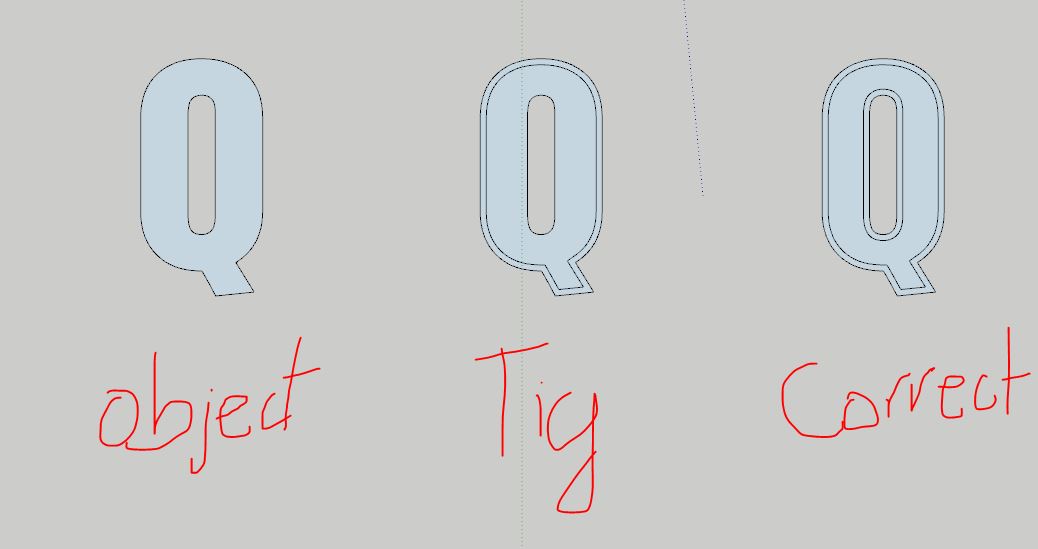
                                        There's a feature I come across often. That applies to text objects.

                                        Is the plugin editable to work like the example below.

                                        I feel.

                                        Capture.JPG

                                        1 Reply Last reply
                                        Reply Quote 0
                                        • TIGT
                                          TIG Moderator
                                          last edited by

                                          You might be able to add some code to apply the offset to all loops of the face - currently it only works on the outer-loop, so inner 'holes' are not processed...

                                          Feel free to mess around with the code...

                                          TIG

                                          1 Reply Last reply
                                          Reply Quote 0
                                          • E
                                            Einstein
                                            last edited by

                                            Well, I know there one was a plugin called TruOffset, which - I think as the only one - respected holes in faces and was also able to offset them. But it's lost in space, and I couldn't find it anywhere these days.
                                            I am referring to this thread:
                                            https://forums.sketchup.com/t/hole-aware-offset/83561
                                            It must have been removed from the Extension Warehouse. I saw it there a few years ago. Maybe it can be found somewhere.


                                            1 Reply Last reply
                                            Reply Quote 0

                                            Hello! It looks like you're interested in this conversation, but you don't have an account yet.

                                            Getting fed up of having to scroll through the same posts each visit? When you register for an account, you'll always come back to exactly where you were before, and choose to be notified of new replies (either via email, or push notification). You'll also be able to save bookmarks and upvote posts to show your appreciation to other community members.

                                            With your input, this post could be even better πŸ’—

                                            Register Login
                                            • 1
                                            • 2
                                            • 3
                                            • 4
                                            • 5
                                            • 6
                                            • 7
                                            • 8
                                            • 6 / 8
                                            • First post
                                              Last post
                                            Buy SketchPlus
                                            Buy SUbD
                                            Buy WrapR
                                            Buy eBook
                                            Buy Modelur
                                            Buy Vertex Tools
                                            Buy SketchCuisine
                                            Buy FormFonts

                                            Advertisement
