sketchucation logo sketchucation
    • Login
    Oops, your profile's looking a bit empty! To help us tailor your experience, please fill in key details like your SketchUp version, skill level, operating system, and more. Update and save your info on your profile page today!
    ⚠️ Important | Libfredo 15.6b introduces important bugfixes for Fredo's Extensions Update

    Z-Depth gone crazy

    Scheduled Pinned Locked Moved V-Ray
    renderpluginsextensions
    18 Posts 4 Posters 1.9k Views 4 Watching
    Loading More Posts
    • Oldest to Newest
    • Newest to Oldest
    • Most Votes
    Reply
    • Reply as topic
    Log in to reply
    This topic has been deleted. Only users with topic management privileges can see it.
    • thomthomT Offline
      thomthom
      last edited by

      But - then I'd expect the fore ground blur to fade towards 4000. It just abruptly jumps.

      Thomas Thomassen — SketchUp Monkey & Coding addict
      List of my plugins and link to the CookieWare fund

      1 Reply Last reply Reply Quote 0
      • thomthomT Offline
        thomthom
        last edited by

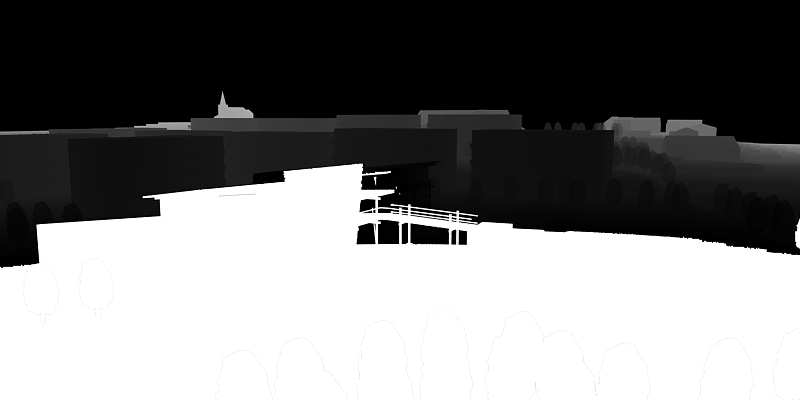
        Just to try what you suggested. It just looks clipped:
        Render18.ZDepth.png

        It's looking more like a bug - there the out of range values are filled with the wrong colours. It appear to fill the z depth closer than with the Max colour, and the z depth further away than Maxmium with the Minimum colour...

        Thomas Thomassen — SketchUp Monkey & Coding addict
        List of my plugins and link to the CookieWare fund

        1 Reply Last reply Reply Quote 0
        • andybotA Offline
          andybot
          last edited by

          AFAIK - clipped areas will show as white in the zdepth channel, not black. - both front and back clipped areas.

          http://charlottesvillearchitecturalrendering.com/

          1 Reply Last reply Reply Quote 0
          • thomthomT Offline
            thomthom
            last edited by

            @andybot said:

            AFAIK - clipped areas will show as white in the zdepth channel, not black. - both front and back clipped areas.

            See this example from V-Ray fro Max. The render diaply the V-Ray environment in the backgroud - similar to my scene, but the Z depth is black for the background. It fades from white to black.

            I'd set up mine to be black is nearest, while white was furthest away.
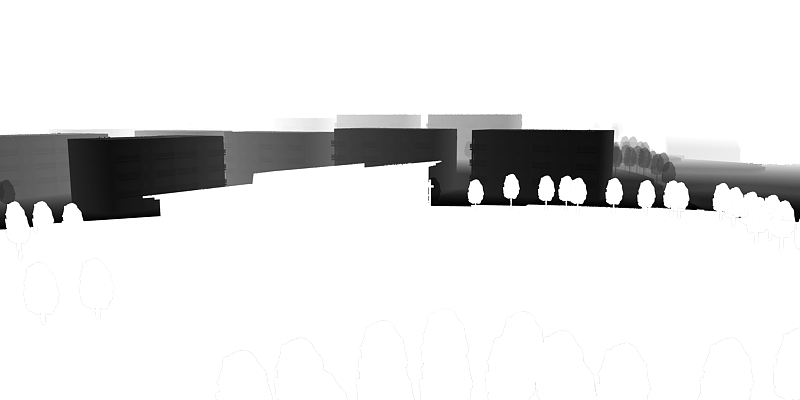
            Render22.ZDepth.png
            Here foreground and background is white.

            I then flip it around, white is closest and black is furthest away:
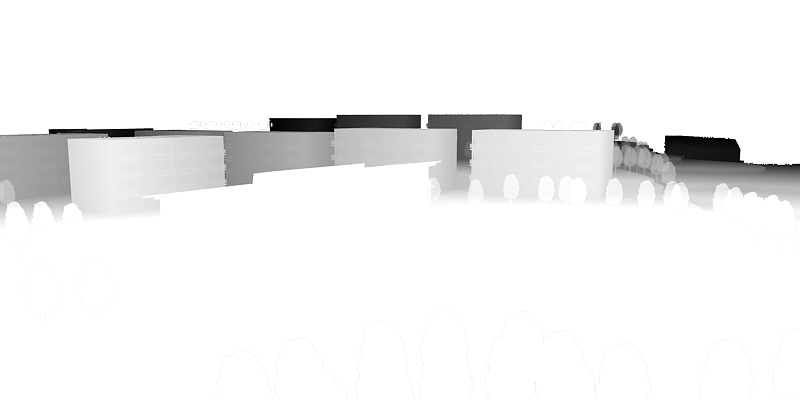
            Render23.ZDepth.png
            Here the foreground and background is white. But this deviates from what you see in the V-Ray from Max example linked at the top.

            Searching other V-Ray for Max examples never show the same behaviour I see in VfSU. It looks like a bug in VfSU. (Wish I has VfMax now...)

            Thomas Thomassen — SketchUp Monkey & Coding addict
            List of my plugins and link to the CookieWare fund

            1 Reply Last reply Reply Quote 0
            • thomthomT Offline
              thomthom
              last edited by

              http://www.workshop.mintviz.com/tutorials/depth-of-field-using-vray-zdepth/

              Thomas Thomassen — SketchUp Monkey & Coding addict
              List of my plugins and link to the CookieWare fund

              1 Reply Last reply Reply Quote 0
              • V Offline
                valerostudio
                last edited by

                Where in VRay Toys is this measure tool?

                1 Reply Last reply Reply Quote 0
                • V Offline
                  valerostudio
                  last edited by

                  Isn't there a trick to make a Z-Depth channel using Styles in SU?

                  1 Reply Last reply Reply Quote 0
                  • thomthomT Offline
                    thomthom
                    last edited by

                    @valerostudio said:

                    Where in VRay Toys is this measure tool?

                    In the menus. But it might be introduced in version 2.0 - which is unreleased. Need to fix some OSX issues.

                    Thomas Thomassen — SketchUp Monkey & Coding addict
                    List of my plugins and link to the CookieWare fund

                    1 Reply Last reply Reply Quote 0
                    • thomthomT Offline
                      thomthom
                      last edited by

                      @valerostudio said:

                      Isn't there a trick to make a Z-Depth channel using Styles in SU?

                      Yea, using fog. But then you need to export up an image much larger than the V-Ray image - and sample it down to get a nice anti-aliasing.

                      Thomas Thomassen — SketchUp Monkey & Coding addict
                      List of my plugins and link to the CookieWare fund

                      1 Reply Last reply Reply Quote 0
                      • andybotA Offline
                        andybot
                        last edited by

                        When you have the alpha channel selected, the background will be drawn as black in the zdepth channel. Try rendering without the alpha channel. The thing you can do to avoid the clipping is to set your zdepth distances to include all of your model, and then in photoshop, you can adjust the levels so all of your foreground is black.

                        Andy

                        http://charlottesvillearchitecturalrendering.com/

                        1 Reply Last reply Reply Quote 0
                        • thomthomT Offline
                          thomthom
                          last edited by

                          But I haven't been rendering with Alpha. It's been all without.

                          Thomas Thomassen — SketchUp Monkey & Coding addict
                          List of my plugins and link to the CookieWare fund

                          1 Reply Last reply Reply Quote 0
                          • andybotA Offline
                            andybot
                            last edited by

                            @thomthom said:

                            But I haven't been rendering with Alpha. It's been all without.

                            I had a chance to look at it some more. You're right, alpha was not on - but it still rendered areas without geometry as black. I tried the "z-depth catcher" plane - and it does work in making the background white. I did a quick check- and if the plane is beyond the rear clipping distance, it still shows up as white, so I assume that anything that's clipped by vray is drawn as white, but anything transparent is shown as black.

                            I agree that it's really not an optimal situation. It should clip the foreground to black, the background to white, and draw transparency as white (to assume that you are looking at the back distance...)


                            http://charlottesvillearchitecturalrendering.com/

                            1 Reply Last reply Reply Quote 0
                            • 1 / 1
                            • First post
                              Last post
                            Buy SketchPlus
                            Buy SUbD
                            Buy WrapR
                            Buy eBook
                            Buy Modelur
                            Buy Vertex Tools
                            Buy SketchCuisine
                            Buy FormFonts

                            Advertisement