Z-Depth gone crazy
-
I was rendering out a test of my model - where I wanted to get a depth map.
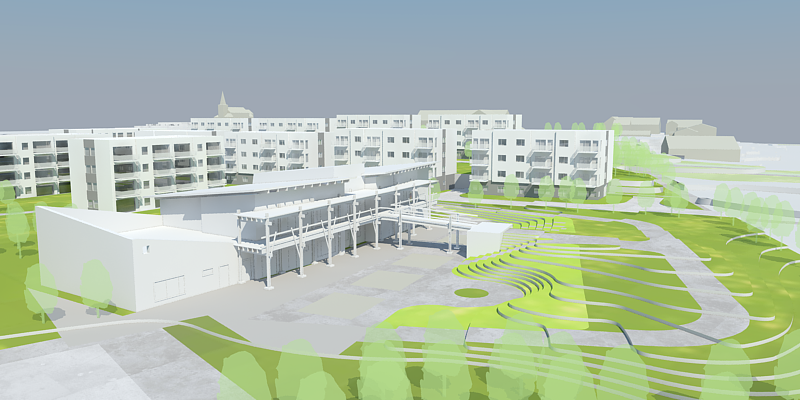
I wanted to create a depth map so everything behind the building in the middle could be faded out by blurring based on depth. I measured and found the distance from the camera to the end of the building to be ca 4000 inches and about 18000 to the far back where you can see the church.
So I set Black to 4000 and white to 18000. Ticking Z-Depth clamp.
But the result was this:
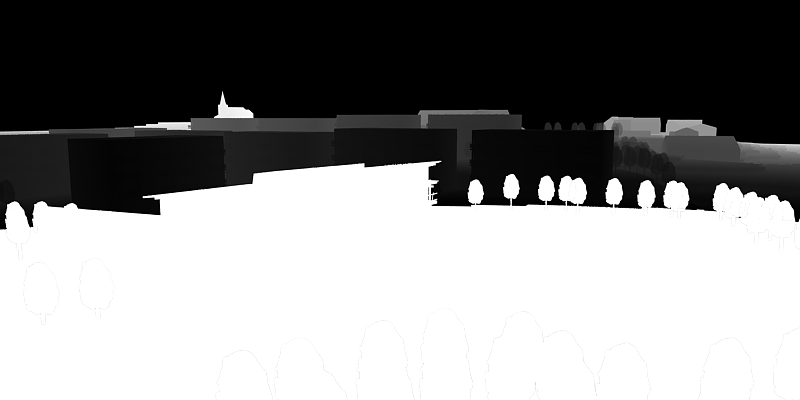
Why on earth is the foreground white? Surely this should be black as it's closer than 4000? And the sky should be white as it's in infinite distance away.
I then reverted the values:
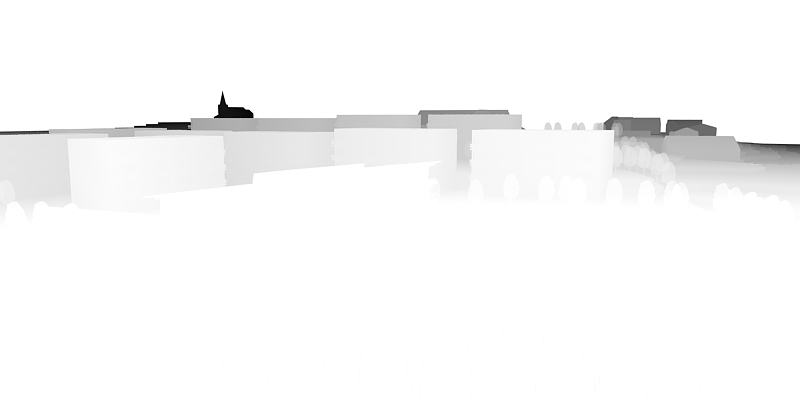
I almost could have used this - expect, why is the sky white??
I cannot remember running into this problem before...

-
So I placed a big plane in the far back - hoping that would catch the Z-Depth and make it black:
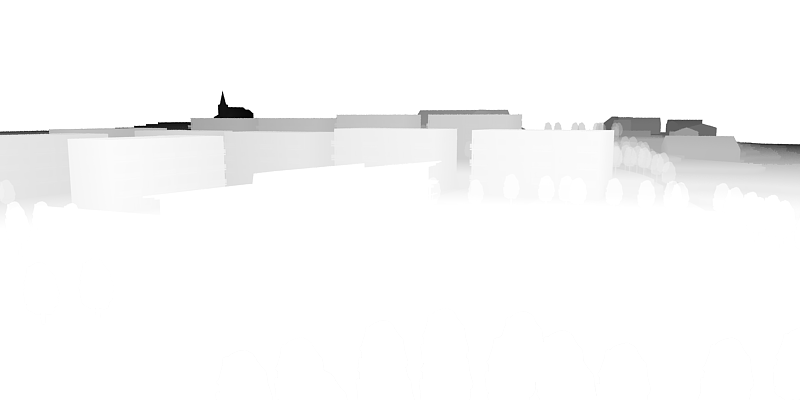
Not so.
 What gives?
 -
very odd. I did a quick check on a site model and it worked fine for me. Do you have the alpha channel selected as well? - I'm imagining that's why the background is black in the first image. Are you sure your values are correct for distance? Did you try lowering your foreground distance to 500" perhaps? Maybe your plane in the 2nd is getting clipped off the back.
Another question - you could just export a sketchup fog style. I've done that for a quick z-depth pass. One advantage is you see the adjustment in real-time. Downside is that the control isn't very fine, but at this low bit-depth (256 levels for grayscale) it doesn't matter much. -
@andybot said:
very odd. I did a quick check on a site model and it worked fine for me. Do you have the alpha channel selected as well?
nope!
@andybot said:
- I'm imagining that's why the background is black in the first image.
But why would the background flip around?
@andybot said:
Are you sure your values are correct for distance?
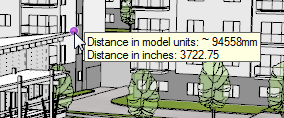
Yup! I used my V-Ray Tools to measure points in the model from the camera - in inches. 4000 is right at the end of the building in the front - 18000 is right at the church.
@andybot said:
Maybe your plane in the 2nd is getting clipped off the back.
I've never seen V-Ray clip anything...
I even added that large plane even further in the back. It rendered in the diffuse - but didn't appear to make an effect in Zd.@andybot said:
Another question - you could just export a sketchup fog style. I've done that for a quick z-depth pass. One advantage is you see the adjustment in real-time. Downside is that the control isn't very fine, but at this low bit-depth (256 levels for grayscale) it doesn't matter much.
That could work, yes. But I was hoping for a V-Ray solution as it'd be so much easier to update.
Now I need to select and correct the background in PhotoShop before using the mask.
- I'm imagining that's why the background is black in the first image.
-
That's really odd. Do you want to share the SU file with the models stripped out and just some placeholders for where you are supposed to be getting z-depth. My guess is that somehow your z depth values are off slightly and so the foreground and background are getting clamped out in the zdepth channel.
-
Well from what I figure you have set. Anything in front of 4000" will not be black and anything past 18000" will be white. So what I'm seeing is typically what depth of field would show, because anything in front of 4000" would be blurry, things AT 4000" would be in focus and then focus would be reduced until you hit 18000". So I would just adjust your values to be more exaggerated say 3000" and 25000" and see what happens.
-
But - then I'd expect the fore ground blur to fade towards 4000. It just abruptly jumps.
-
Just to try what you suggested. It just looks clipped:
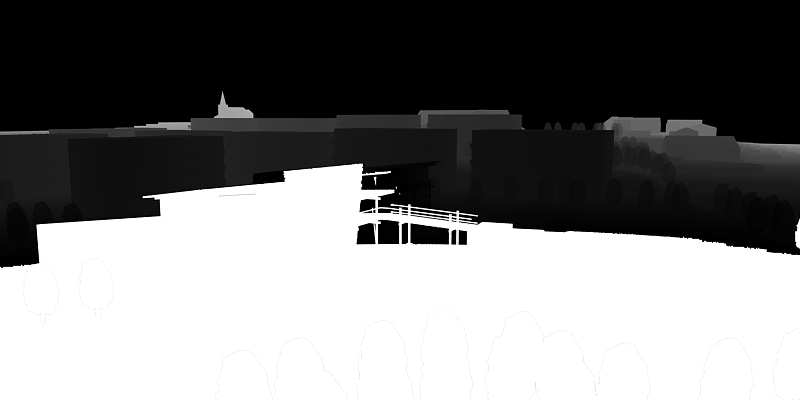
It's looking more like a bug - there the out of range values are filled with the wrong colours. It appear to fill the z depth closer than with the Max colour, and the z depth further away than Maxmium with the Minimum colour...
-
AFAIK - clipped areas will show as white in the zdepth channel, not black. - both front and back clipped areas.
-
@andybot said:
AFAIK - clipped areas will show as white in the zdepth channel, not black. - both front and back clipped areas.
See this example from V-Ray fro Max. The render diaply the V-Ray environment in the backgroud - similar to my scene, but the Z depth is black for the background. It fades from white to black.
I'd set up mine to be black is nearest, while white was furthest away.
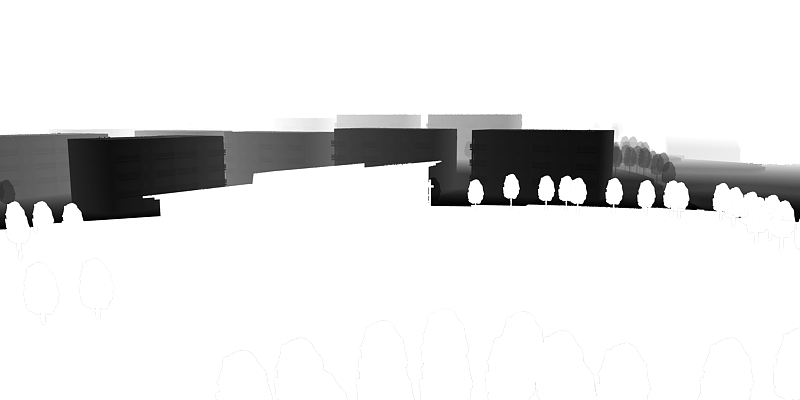
Here foreground and background is white.I then flip it around, white is closest and black is furthest away:
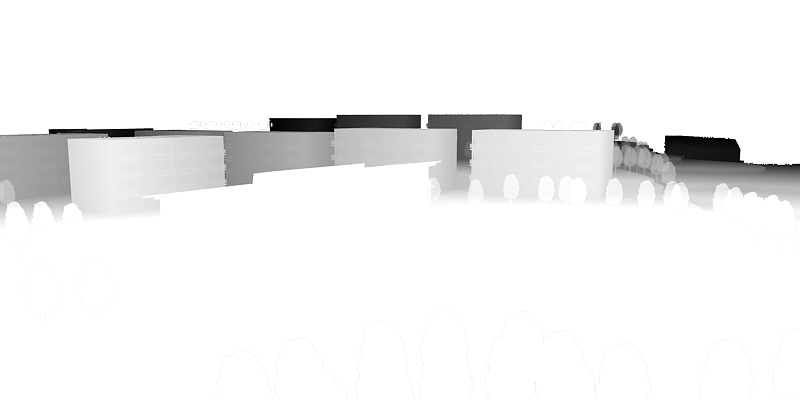
Here the foreground and background is white. But this deviates from what you see in the V-Ray from Max example linked at the top.Searching other V-Ray for Max examples never show the same behaviour I see in VfSU. It looks like a bug in VfSU. (Wish I has VfMax now...)
-
-
Where in VRay Toys is this measure tool?
-
Isn't there a trick to make a Z-Depth channel using Styles in SU?
-
@valerostudio said:
Where in VRay Toys is this measure tool?
In the menus. But it might be introduced in version 2.0 - which is unreleased. Need to fix some OSX issues.
-
@valerostudio said:
Isn't there a trick to make a Z-Depth channel using Styles in SU?
Yea, using fog. But then you need to export up an image much larger than the V-Ray image - and sample it down to get a nice anti-aliasing.
-
When you have the alpha channel selected, the background will be drawn as black in the zdepth channel. Try rendering without the alpha channel. The thing you can do to avoid the clipping is to set your zdepth distances to include all of your model, and then in photoshop, you can adjust the levels so all of your foreground is black.
Andy
-
But I haven't been rendering with Alpha. It's been all without.
-
@thomthom said:
But I haven't been rendering with Alpha. It's been all without.
I had a chance to look at it some more. You're right, alpha was not on - but it still rendered areas without geometry as black. I tried the "z-depth catcher" plane - and it does work in making the background white. I did a quick check- and if the plane is beyond the rear clipping distance, it still shows up as white, so I assume that anything that's clipped by vray is drawn as white, but anything transparent is shown as black.
I agree that it's really not an optimal situation. It should clip the foreground to black, the background to white, and draw transparency as white (to assume that you are looking at the back distance...)


Hello! It looks like you're interested in this conversation, but you don't have an account yet.
Getting fed up of having to scroll through the same posts each visit? When you register for an account, you'll always come back to exactly where you were before, and choose to be notified of new replies (either via email, or push notification). You'll also be able to save bookmarks and upvote posts to show your appreciation to other community members.
With your input, this post could be even better 💗
Register Login


Advertisement