Happened to anyone before?
-
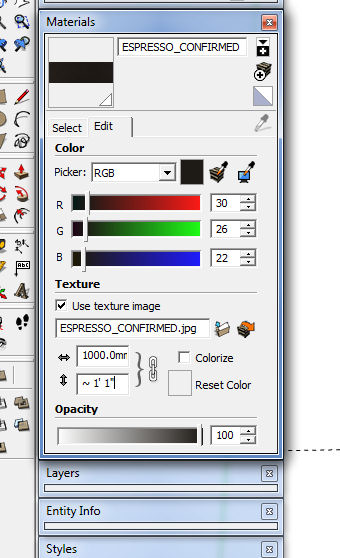
Look at image, snapshot of material editor, notice something strange?
-
Different units?
-
I see mm and '/" in image size ???
I can't replicate it... the units are consistent,
but I have managed to get it to show 'mm' for one size [~] but not the other exact one [Units set to display suffix] ???
-
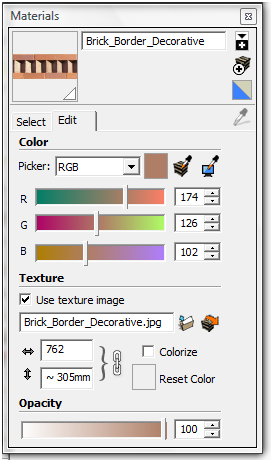
Yeah, mm and inches together.
-
You'rev a freak, Pete.

-
-
you can type what ever you want. I can type imperial in Metric and it makes the length I want. as long as I use the ' and " markers.
and in imperial I can type decimal. but not metric.
-
@krisidious said:
you can type what ever you want. I can type imperial in Metric and it makes the length I want. as long as I use the ' and " markers.
and in imperial I can type decimal. but not metric.
But even if you enter a dimension in a unit you aren't using currently, the display will show in current model units. It should be the same on the texture dimensions as well.
-
And whilst I could not get different units displaying in the two panes, I did manage to get one pane to show the units suffix and the other pane display without the 'mm' - seems illogical and inconsistent. Before now it always seemed to display in current units properly ?
Can anyone else get my effect ?






Hello! It looks like you're interested in this conversation, but you don't have an account yet.
Getting fed up of having to scroll through the same posts each visit? When you register for an account, you'll always come back to exactly where you were before, and choose to be notified of new replies (either via email, or push notification). You'll also be able to save bookmarks and upvote posts to show your appreciation to other community members.
With your input, this post could be even better 💗
Register Login


Advertisement