sketchucation logo sketchucation
    • Login
    Oops, your profile's looking a bit empty! To help us tailor your experience, please fill in key details like your SketchUp version, skill level, operating system, and more. Update and save your info on your profile page today!
    ⚠️ Important | Libfredo 15.6b introduces important bugfixes for Fredo's Extensions Update

    (REQ) Random tile UVs

    Scheduled Pinned Locked Moved Plugins
    16 Posts 8 Posters 1.5k Views 8 Watching
    Loading More Posts
    • Oldest to Newest
    • Newest to Oldest
    • Most Votes
    Reply
    • Reply as topic
    Log in to reply
    This topic has been deleted. Only users with topic management privileges can see it.
    • pilouP Offline
      pilou
      last edited by

      It's not aespecially UV but seems the result can be the same if first apply to a plane + texture ?
      Random Components replacement by Sdmitch

      Frenchy Pilou
      Is beautiful that please without concept!
      My Little site :)

      1 Reply Last reply Reply Quote 0
      • TIGT Offline
        TIG Moderator
        last edited by

        It exists... http://forums.sketchucation.com/viewtopic.php?p=392834#p392834 ...my Texture Randomizer...

        TIG

        1 Reply Last reply Reply Quote 0
        • PixeroP Offline
          Pixero
          last edited by

          @tig said:

          It exists... http://forums.sketchucation.com/viewtopic.php?p=392834#p392834 ...my Texture Randomizer...

          Hmm... not quite the same if I'm not missing something.
          The idea is a plugin that randomizes tiled texture coordinates within a face not just between different faces.
          For getting continous seamless texturing on a face without visible tiling.

          I was thinking, a solution that tiles the UVs of a face into "texture sized chunks" and randomly mirrors them across the face.
          A UV-array of sorts... Am I making sense? Just thinking load here. πŸ˜•

          1 Reply Last reply Reply Quote 0
          • thomthomT Offline
            thomthom
            last edited by

            But SketchUp only has one mapping channel....

            Thomas Thomassen β€” SketchUp Monkey & Coding addict
            List of my plugins and link to the CookieWare fund

            1 Reply Last reply Reply Quote 0
            • A Offline
              Aerilius
              last edited by

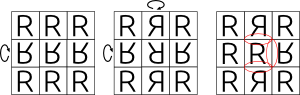
              We can only set UVs for the face as a whole (with one way of tiling, we know SketchUp only supports %(#000000)[repeat] not %(#000000)[flip]/ %(#000000)[clamp] etc.).
              We can't set different UVs for every "repeated instance" of the image – except if we split the face into smaller faces. πŸ˜„

              We have to be careful only to flip rows/columns, otherwise it can actually introduce new seams (marked red).
              random_tiling.png

              1 Reply Last reply Reply Quote 0
              • thomthomT Offline
                thomthom
                last edited by

                flip = mirror? That we can do.

                Thomas Thomassen β€” SketchUp Monkey & Coding addict
                List of my plugins and link to the CookieWare fund

                1 Reply Last reply Reply Quote 0
                • PixeroP Offline
                  Pixero
                  last edited by

                  @thomthom said:

                  flip = mirror? That we can do.

                  So not impossible then?

                  1 Reply Last reply Reply Quote 0
                  • TIGT Offline
                    TIG Moderator
                    last edited by

                    You can't manipulate the mapping of individual 'tiles' within a textured material on a single face, you can manipulate the mapping on different faces.
                    My linked tool does randomizing including mirroring if you use -ve scaling values.
                    BUT that is on a per face basis...
                    As has been said SUp only 'repeats' image-tiles, it doesn't allow for their manipulation otherwise, except as a 'set' on a given face.

                    TIG

                    1 Reply Last reply Reply Quote 0
                    • PixeroP Offline
                      Pixero
                      last edited by

                      Thinking loud again:

                      Wouldn't it be possible to "remap" tiled UVs?
                      For example, *(for simplicity I'll use some simple numbers),*If the entire face UVs are from 0 to 1 but the texture is tiled lets say 2 times.
                      Can't one divide the UVs so 0 to 0,5 and 0,5 to 1 are mapped differently?
                      Or create new UVs so 0 to 0,5 is now 0 to 1 and 0,5 to 1 is now for examle 1 to 0?

                      1 Reply Last reply Reply Quote 0
                      • thomthomT Offline
                        thomthom
                        last edited by

                        @pixero said:

                        Can't one divide the UVs so 0 to 0,5 and 0,5 to 1 are mapped differently?
                        Or create new UVs so 0 to 0,5 is now 0 to 1 and 0,5 to 1 is now for examle 1 to 0?

                        No - UVs in SketchUp are continuous. You can only specify anything from 1 to 4 sets of 3D<=>UV2D points. Only way is, as mentioned, to divide the face itself into smaller faces.

                        Thomas Thomassen β€” SketchUp Monkey & Coding addict
                        List of my plugins and link to the CookieWare fund

                        1 Reply Last reply Reply Quote 0
                        • PixeroP Offline
                          Pixero
                          last edited by

                          OK, too bad.
                          Maybe one of you who plans on going to the BaseCamp could ask if they can't add some features to UVs so it would be possible.
                          Tiling textures are always a problem for large textured areas.

                          1 Reply Last reply Reply Quote 0
                          • thomthomT Offline
                            thomthom
                            last edited by

                            Composite materials would be nice, with materials channels. Would benefit render engines as well.

                            Thomas Thomassen β€” SketchUp Monkey & Coding addict
                            List of my plugins and link to the CookieWare fund

                            1 Reply Last reply Reply Quote 0
                            • GaieusG Offline
                              Gaieus
                              last edited by

                              Procedurals... πŸ˜’

                              Gai...

                              1 Reply Last reply Reply Quote 0
                              • Chris FullmerC Offline
                                Chris Fullmer
                                last edited by

                                Procedurals cross my mind often in SU...

                                Lately you've been tan, suspicious for the winter.
                                All my Plugins I've written

                                1 Reply Last reply Reply Quote 0
                                • srxS Offline
                                  srx
                                  last edited by

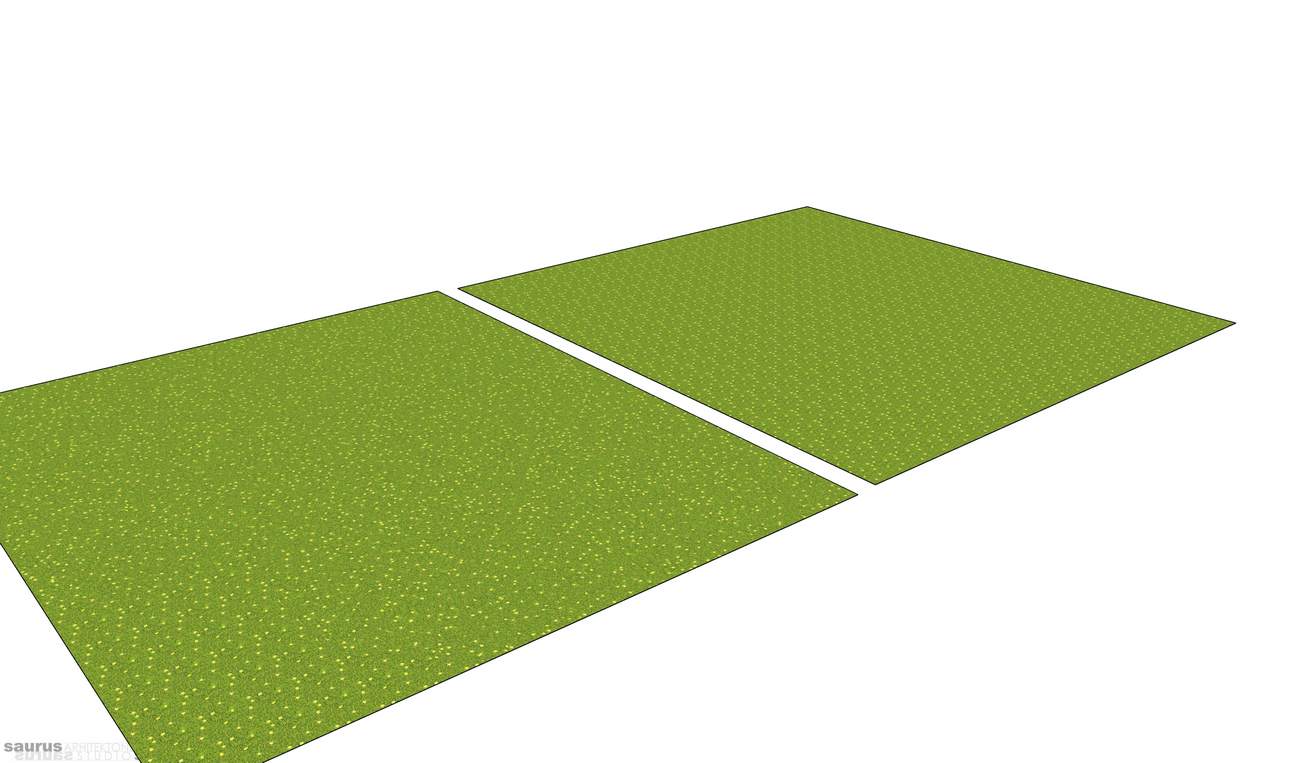
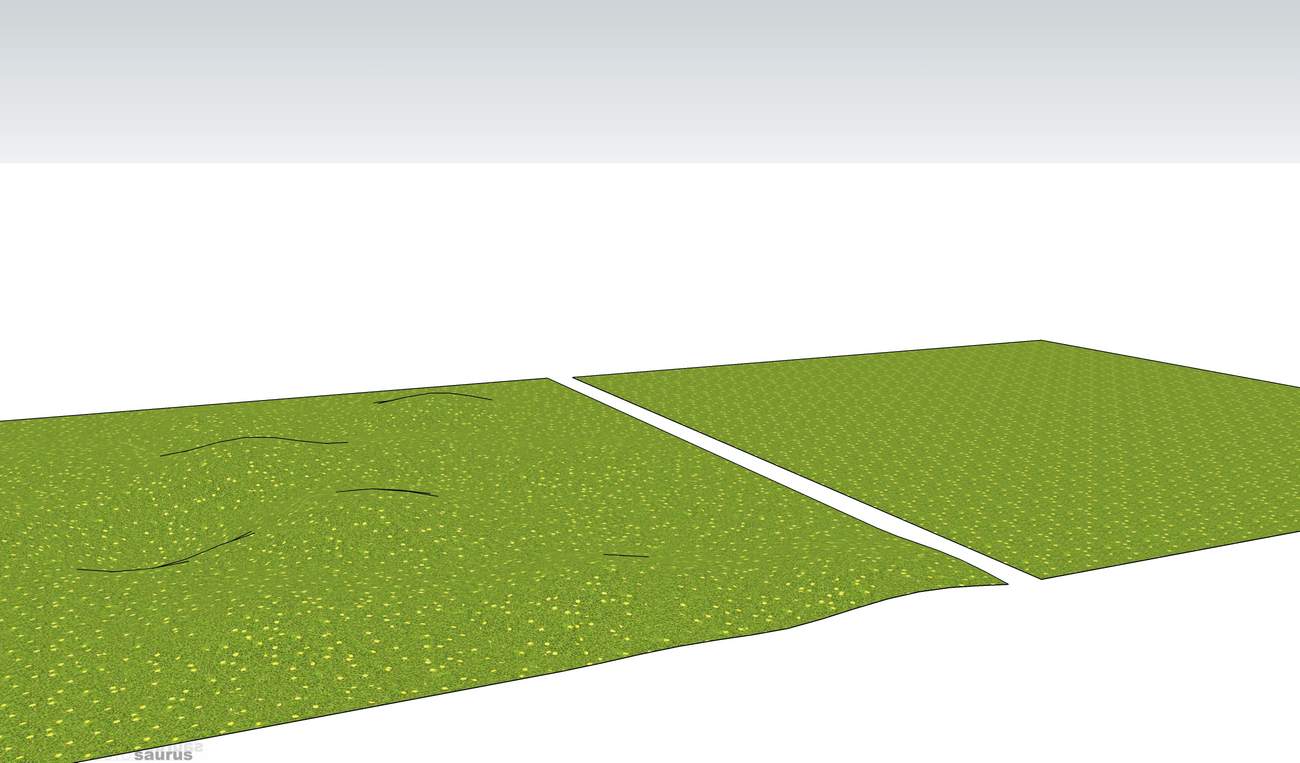
                                  ttUVtools save ttPlanToolsFlatten ttUVtoolsloadTiling only on flat surface

                                  Here is an idea. I noticed that tiling only occures on flat surface. Whan you add distortion with sandbox tools there is no tiling. The problem is how to transfer UVs from distorted surface to the flat one. With ttUVtools I saved UVs. Than with ttPlan tools I flattened the surface, than loaded UVs again. the resolt is non tiling flat surface! πŸ˜„

                                  www.saurus.rs

                                  1 Reply Last reply Reply Quote 0
                                  • 1 / 1
                                  • First post
                                    Last post
                                  Buy SketchPlus
                                  Buy SUbD
                                  Buy WrapR
                                  Buy eBook
                                  Buy Modelur
                                  Buy Vertex Tools
                                  Buy SketchCuisine
                                  Buy FormFonts

                                  Advertisement