sketchucation logo sketchucation
    • Login
    Oops, your profile's looking a bit empty! To help us tailor your experience, please fill in key details like your SketchUp version, skill level, operating system, and more. Update and save your info on your profile page today!
    Mac User? | Join the Rayscaper Beta for Mac Learn More

    (REQ) Random tile UVs

    Scheduled Pinned Locked Moved Plugins
    16 Posts 8 Posters 2.0k Views 8 Watching
    Loading More Posts
    • Oldest to Newest
    • Newest to Oldest
    • Most Votes
    Reply
    • Reply as topic
    Log in to reply
    This topic has been deleted. Only users with topic management privileges can see it.
    • TIGT
      TIG Moderator
      last edited by

      It exists... http://forums.sketchucation.com/viewtopic.php?p=392834#p392834 ...my Texture Randomizer...

      TIG

      1 Reply Last reply
      Reply Quote 0
      • PixeroP
        Pixero
        last edited by

        @tig said:

        It exists... http://forums.sketchucation.com/viewtopic.php?p=392834#p392834 ...my Texture Randomizer...

        Hmm... not quite the same if I'm not missing something.
        The idea is a plugin that randomizes tiled texture coordinates within a face not just between different faces.
        For getting continous seamless texturing on a face without visible tiling.

        I was thinking, a solution that tiles the UVs of a face into "texture sized chunks" and randomly mirrors them across the face.
        A UV-array of sorts... Am I making sense? Just thinking load here. πŸ˜•

        1 Reply Last reply
        Reply Quote 0
        • thomthomT
          thomthom
          last edited by

          But SketchUp only has one mapping channel....

          Thomas Thomassen β€” SketchUp Monkey & Coding addict
          List of my plugins and link to the CookieWare fund

          1 Reply Last reply
          Reply Quote 0
          • A
            Aerilius
            last edited by

            We can only set UVs for the face as a whole (with one way of tiling, we know SketchUp only supports %(#000000)[repeat] not %(#000000)[flip]/ %(#000000)[clamp] etc.).
            We can't set different UVs for every "repeated instance" of the image – except if we split the face into smaller faces. πŸ˜„

            We have to be careful only to flip rows/columns, otherwise it can actually introduce new seams (marked red).
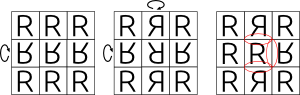
            random_tiling.png

            1 Reply Last reply
            Reply Quote 0
            • thomthomT
              thomthom
              last edited by

              flip = mirror? That we can do.

              Thomas Thomassen β€” SketchUp Monkey & Coding addict
              List of my plugins and link to the CookieWare fund

              1 Reply Last reply
              Reply Quote 0
              • PixeroP
                Pixero
                last edited by

                @thomthom said:

                flip = mirror? That we can do.

                So not impossible then?

                1 Reply Last reply
                Reply Quote 0
                • TIGT
                  TIG Moderator
                  last edited by

                  You can't manipulate the mapping of individual 'tiles' within a textured material on a single face, you can manipulate the mapping on different faces.
                  My linked tool does randomizing including mirroring if you use -ve scaling values.
                  BUT that is on a per face basis...
                  As has been said SUp only 'repeats' image-tiles, it doesn't allow for their manipulation otherwise, except as a 'set' on a given face.

                  TIG

                  1 Reply Last reply
                  Reply Quote 0
                  • PixeroP
                    Pixero
                    last edited by

                    Thinking loud again:

                    Wouldn't it be possible to "remap" tiled UVs?
                    For example, *(for simplicity I'll use some simple numbers),*If the entire face UVs are from 0 to 1 but the texture is tiled lets say 2 times.
                    Can't one divide the UVs so 0 to 0,5 and 0,5 to 1 are mapped differently?
                    Or create new UVs so 0 to 0,5 is now 0 to 1 and 0,5 to 1 is now for examle 1 to 0?

                    1 Reply Last reply
                    Reply Quote 0
                    • thomthomT
                      thomthom
                      last edited by

                      @pixero said:

                      Can't one divide the UVs so 0 to 0,5 and 0,5 to 1 are mapped differently?
                      Or create new UVs so 0 to 0,5 is now 0 to 1 and 0,5 to 1 is now for examle 1 to 0?

                      No - UVs in SketchUp are continuous. You can only specify anything from 1 to 4 sets of 3D<=>UV2D points. Only way is, as mentioned, to divide the face itself into smaller faces.

                      Thomas Thomassen β€” SketchUp Monkey & Coding addict
                      List of my plugins and link to the CookieWare fund

                      1 Reply Last reply
                      Reply Quote 0
                      • PixeroP
                        Pixero
                        last edited by

                        OK, too bad.
                        Maybe one of you who plans on going to the BaseCamp could ask if they can't add some features to UVs so it would be possible.
                        Tiling textures are always a problem for large textured areas.

                        1 Reply Last reply
                        Reply Quote 0
                        • thomthomT
                          thomthom
                          last edited by

                          Composite materials would be nice, with materials channels. Would benefit render engines as well.

                          Thomas Thomassen β€” SketchUp Monkey & Coding addict
                          List of my plugins and link to the CookieWare fund

                          1 Reply Last reply
                          Reply Quote 0
                          • GaieusG
                            Gaieus
                            last edited by

                            Procedurals... πŸ˜’

                            Gai...

                            1 Reply Last reply
                            Reply Quote 0
                            • Chris FullmerC
                              Chris Fullmer
                              last edited by

                              Procedurals cross my mind often in SU...

                              Lately you've been tan, suspicious for the winter.
                              All my Plugins I've written

                              1 Reply Last reply
                              Reply Quote 0
                              • srxS
                                srx
                                last edited by

                                ttUVtools save ttPlanToolsFlatten ttUVtoolsloadTiling only on flat surface

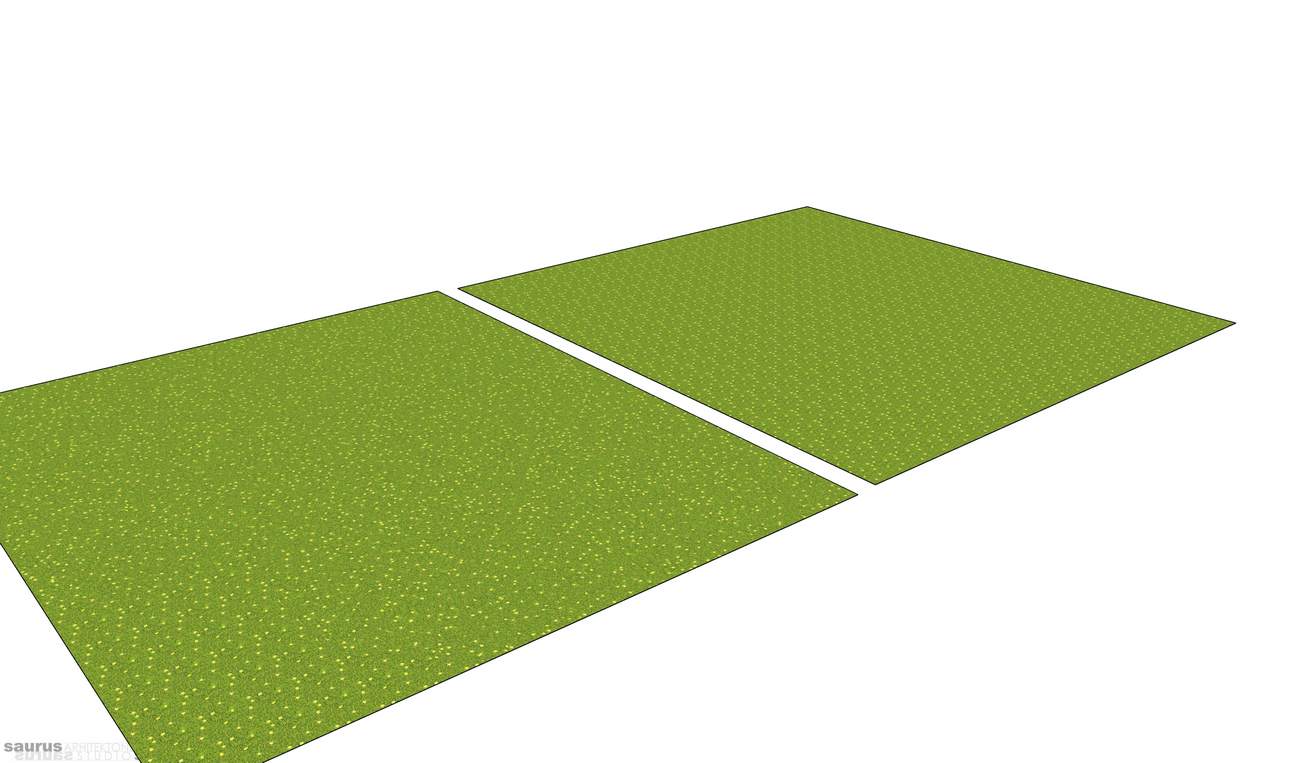
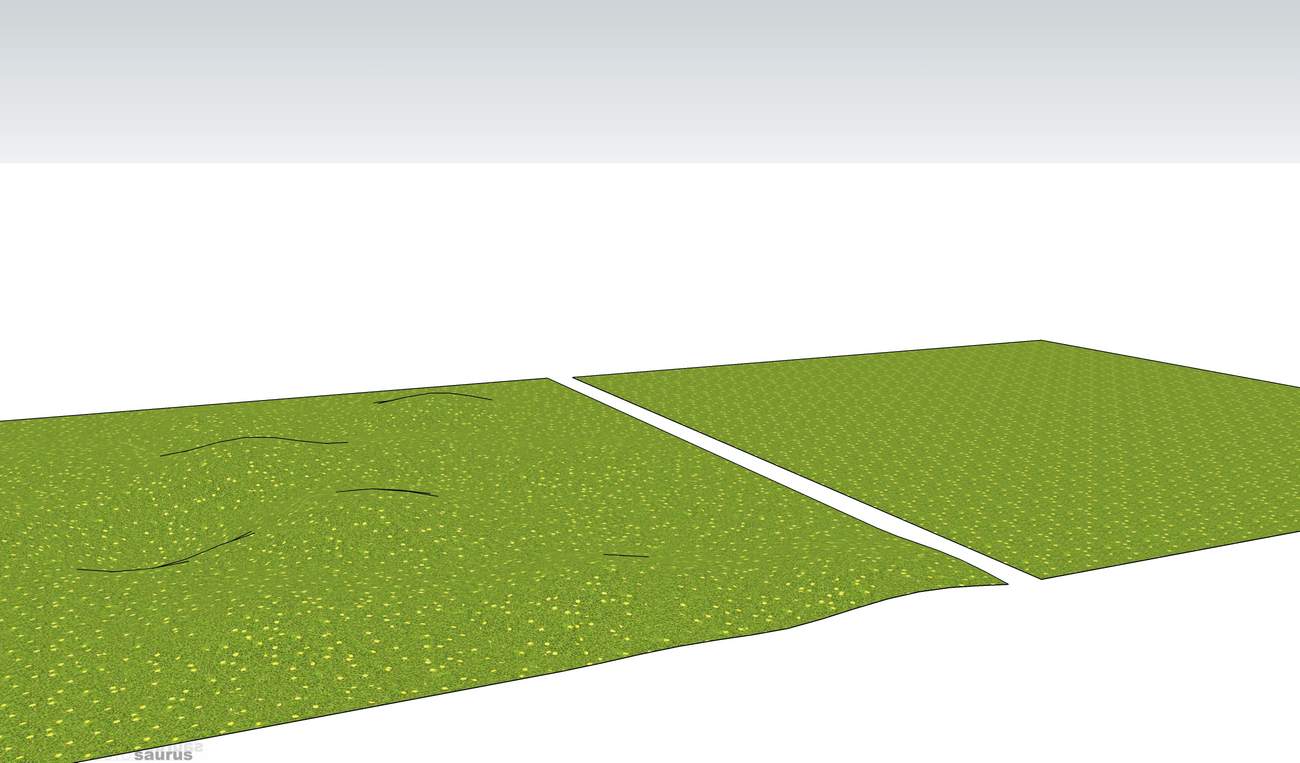
                                Here is an idea. I noticed that tiling only occures on flat surface. Whan you add distortion with sandbox tools there is no tiling. The problem is how to transfer UVs from distorted surface to the flat one. With ttUVtools I saved UVs. Than with ttPlan tools I flattened the surface, than loaded UVs again. the resolt is non tiling flat surface! πŸ˜„

                                www.saurus.rs

                                1 Reply Last reply
                                Reply Quote 0

                                Hello! It looks like you're interested in this conversation, but you don't have an account yet.

                                Getting fed up of having to scroll through the same posts each visit? When you register for an account, you'll always come back to exactly where you were before, and choose to be notified of new replies (either via email, or push notification). You'll also be able to save bookmarks and upvote posts to show your appreciation to other community members.

                                With your input, this post could be even better πŸ’—

                                Register Login
                                • 1 / 1
                                • First post
                                  Last post
                                Buy SketchPlus
                                Buy SUbD
                                Buy WrapR
                                Buy eBook
                                Buy Modelur
                                Buy Vertex Tools
                                Buy SketchCuisine
                                Buy FormFonts

                                Advertisement