sketchucation logo sketchucation
    • Login
    Oops, your profile's looking a bit empty! To help us tailor your experience, please fill in key details like your SketchUp version, skill level, operating system, and more. Update and save your info on your profile page today!
    Mac User? | Join the Rayscaper Beta for Mac Learn More

    [Plugin] Scale Face to Target Area - TIG

    Scheduled Pinned Locked Moved Plugins
    46 Posts 11 Posters 32.2k Views 11 Watching
    Loading More Posts
    • Oldest to Newest
    • Newest to Oldest
    • Most Votes
    Reply
    • Reply as topic
    Log in to reply
    This topic has been deleted. Only users with topic management privileges can see it.
    • thomthomT
      thomthom
      last edited by

      @earthmover said:

      Thom, excuse my ignorance, but how would I going about testing your code?

      Sorry Adam, I typed it up and posted in a hurry. You'd put it in a .rb file and form the console invoke: TT_ScaleToArea.scale_face( Sketchup.active_model.selection[0], 4000 )

      Didn't have the time to add UI.

      Thomas Thomassen β€” SketchUp Monkey & Coding addict
      List of my plugins and link to the CookieWare fund

      1 Reply Last reply
      Reply Quote 0
      • TIGT
        TIG Moderator
        last edited by

        The code is now tested and working version... I edited the original ! http://forums.sketchucation.com/viewtopic.php?p=419936#p419936
        Stupid typo unless**.**file_loaded? instead of unless file_loaded?
        I added the UI as an afterthought and never tested it sorry!

        TIG

        1 Reply Last reply
        Reply Quote 0
        • EarthMoverE
          EarthMover
          last edited by

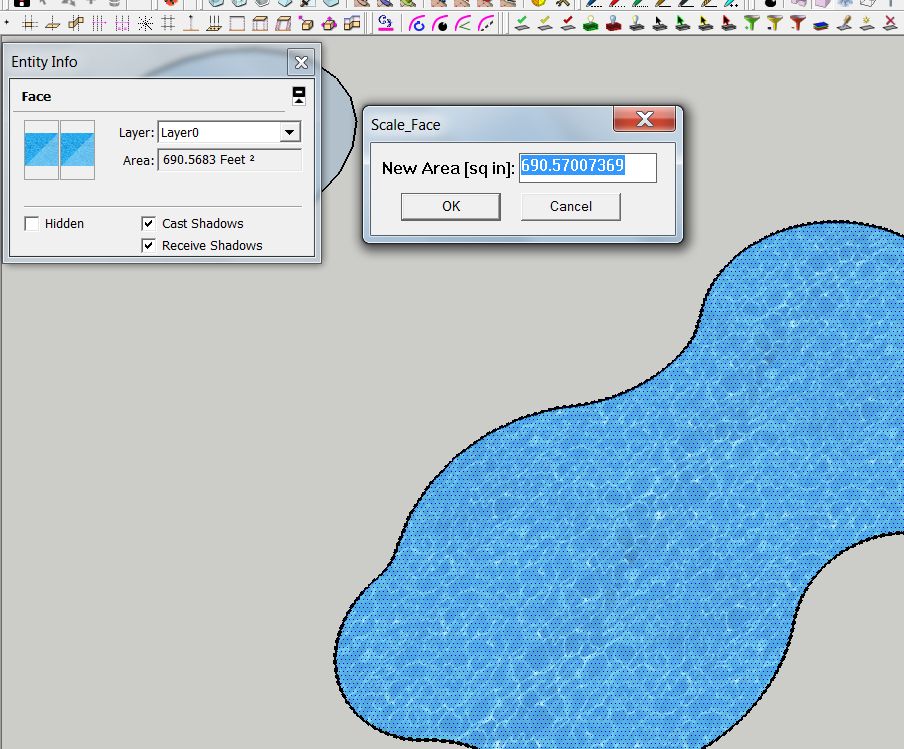
          Thanks TIG. It works as long as I am using a decimal unit type. With fractional units, it deletes everything in the model. Not sure why, just have to remember to switch the units before using the plugin. Thanks again. I'll update the first post with the rb file.

          Also it is still stating inches in the dialog even when the units are feet. No big deal though. Works for what I need. Thanks again! πŸ‘ πŸ‘


          Clipboard01.jpg

          3D Artist at Clearstory 3D Imaging
          Guide Tool at Winning With Sketchup
          Content Creator at Skapeup

          1 Reply Last reply
          Reply Quote 0
          • TIGT
            TIG Moderator
            last edited by

            I'll adjust the code... I did type it on the fly...

            TIG

            1 Reply Last reply
            Reply Quote 0
            • EarthMoverE
              EarthMover
              last edited by

              If you have time. If not, no worries. I just figured I'd mention the issues in case anyone else needed to use the plugin.

              3D Artist at Clearstory 3D Imaging
              Guide Tool at Winning With Sketchup
              Content Creator at Skapeup

              1 Reply Last reply
              Reply Quote 0
              • TIGT
                TIG Moderator
                last edited by

                I've updated the .rb in your post and edited the post's text to match [hope you are OK with that πŸ˜‰ ]
                It now handles all Unit-types/Fractional/Engineering etc properly.
                One oddity is that 'Engineering' displays on screen in 'feet', but the API unit-type [LengthUnit] is left in 'inches' [0] - unlike all other types where the 'LengthUnit' matches the displayed-unit.

                Anyway it now works for all combos... I hope πŸ˜•

                TIG

                1 Reply Last reply
                Reply Quote 0
                • EarthMoverE
                  EarthMover
                  last edited by

                  Works great now. Thanks again.

                  3D Artist at Clearstory 3D Imaging
                  Guide Tool at Winning With Sketchup
                  Content Creator at Skapeup

                  1 Reply Last reply
                  Reply Quote 0
                  • H
                    hebeijianke
                    last edited by

                    @tig said:

                    I've updated the .rb in your post and edited the post's text to match [hope you are OK with that πŸ˜‰ ]

                    This plug-in only applies to the quadrangle

                    1 Reply Last reply
                    Reply Quote 0
                    • TIGT
                      TIG Moderator
                      last edited by

                      NO, it works on any face.
                      The selected face is simply scaled to have the desired area.
                      The dialog shows the current area in current units.
                      You enter the new area and OK.
                      The selected face is made to have that area.
                      So if it's a square, a star or a circle it doesn't matter...

                      TIG

                      1 Reply Last reply
                      Reply Quote 0
                      • bmikeB
                        bmike
                        last edited by

                        This is a great little plugin.
                        Any chance to make it work in square ft, when my units are set to Architectural?

                        Or do I need to divide by hand first...?

                        mike beganyi design + consulting llc

                        1 Reply Last reply
                        Reply Quote 0
                        • EarthMoverE
                          EarthMover
                          last edited by

                          Works on almost any face. Faces created by the freehand tool seem to fail to resize properly. Not sure why.

                          3D Artist at Clearstory 3D Imaging
                          Guide Tool at Winning With Sketchup
                          Content Creator at Skapeup

                          1 Reply Last reply
                          Reply Quote 0
                          • J
                            jorge2011
                            last edited by

                            @thomthom said:

                            @jorge2011 said:

                            You see this plugin?

                            Not Found

                            favicon

                            (rubits.com)

                            That's nice looking. The VCB is a nice way to control it. But I think $10 is too much for such a trivial script. πŸ˜•

                            YES thomthom. You are right, it's a plugin with a high cost.
                            I made the post, the plugin is very interesting, and has features that can be added to the free version plugin of sr. TIG.

                            1 Reply Last reply
                            Reply Quote 0
                            • TIGT
                              TIG Moderator
                              last edited by

                              @bmike said:

                              This is a great little plugin.
                              Any chance to make it work in square ft, when my units are set to Architectural?
                              Or do I need to divide by hand first...?
                              Here's a version of the code for users who want to work in feet OR inches [any kind] and see 'sq ft' areas; it also does 'sq m' areas if the user is using any metric units [m/cm/mm]... Copy the code and paste it into the .rb file using Notepad or similar plain-text editor - overwriting all of the original code...

                              require 'sketchup.rb'
                              ###
                              module TIG
                              ### scales a selected face about its center to a new area, in current units.
                              	def self.scale_face()
                              		model=Sketchup.active_model
                              		es=model.active_entities
                              		ss=model.selection
                              		fa=nil
                              		fa=ss[0] if ss[0]
                              		unless fa && fa.is_a?(Sketchup;;Face)
                              			UI.messagebox("Scale_Face;\n\nPreSelect ONE FACE !")
                              			return nil
                              		end
                              		ar=fa.area
                              		mo=model.options["UnitsOptions"]
                              		if mo["LengthUnit"] > 1 ### metric
                              			units="m"
                              			ar=ar*25.4*25.4/1000/1000
                              		else ### ft/"
                              			units="ft"
                              			ar=ar/12.0/12.0
                              		end
                              		rs=inputbox(["New Area [sq "+units+"];        "], [ar], "Scale_Face")
                              		return nil unless rs
                              		na= rs[0]
                              		na= -na if na < 0
                              		unless na>0
                              			UI.beep
                              			return nil
                              		end
                              		ro=Math.sqrt(na/ar)
                              		pt=fa.bounds.center
                              		tr=Geom;;Transformation.scaling(pt, ro)
                              	  model.start_operation("Scale_Face")
                              		es.transform_entities(tr, fa.vertices)
                              	  model.commit_operation
                              	end
                              	###
                              	UI.menu("Plugins").add_item("Scale_Face"){self.scale_face()} unless file_loaded?(__FILE__)
                              	file_loaded(__FILE__)
                              	###
                              end
                              ###


                              TIG

                              1 Reply Last reply
                              Reply Quote 0
                              • EarthMoverE
                                EarthMover
                                last edited by

                                Thanks TIG. That's even better!

                                3D Artist at Clearstory 3D Imaging
                                Guide Tool at Winning With Sketchup
                                Content Creator at Skapeup

                                1 Reply Last reply
                                Reply Quote 0
                                • TIGT
                                  TIG Moderator
                                  last edited by

                                  Do you want to add an alternative version .rb in the first post ?

                                  TIG

                                  1 Reply Last reply
                                  Reply Quote 0
                                  • EarthMoverE
                                    EarthMover
                                    last edited by

                                    Sure, I can. If you feel like dropping it in it's own thread for proper indexing, let me know and I'll remove the bracketed plugin wording. Or feel free to edit it yourself if need be. I don't mind at all.

                                    3D Artist at Clearstory 3D Imaging
                                    Guide Tool at Winning With Sketchup
                                    Content Creator at Skapeup

                                    1 Reply Last reply
                                    Reply Quote 0
                                    • I
                                      irich
                                      last edited by

                                      Hi guys!

                                      Thank you for this plugin it’s very very useful.
                                      My question is, is it possible to make it scale texture on face too?
                                      If you for example have one projected texture on face.

                                      1 Reply Last reply
                                      Reply Quote 0
                                      • GaieusG
                                        Gaieus
                                        last edited by

                                        Hi Miso,

                                        You may be interested in this plugin: http://forums.sketchucation.com/viewtopic.php?t=18992

                                        Gai...

                                        1 Reply Last reply
                                        Reply Quote 0
                                        • zhangyu200831Z
                                          zhangyu200831
                                          last edited by

                                          Thank you TIG

                                          1 Reply Last reply
                                          Reply Quote 0
                                          • L
                                            luozhan
                                            last edited by

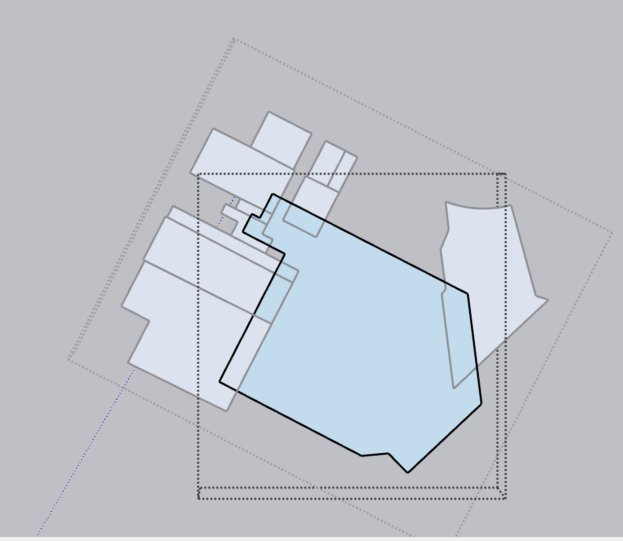
                                            Thanks TIG. It's a very useful tool. Is there a way to scale the other faces with the same ratio? The plugin only scale the selected face, but the remaining faces remain unchanged as shown below:
                                            step 3.png

                                            Please let me know. Thank you so much again!

                                            Best regards,
                                            Leo

                                            1 Reply Last reply
                                            Reply Quote 0

                                            Hello! It looks like you're interested in this conversation, but you don't have an account yet.

                                            Getting fed up of having to scroll through the same posts each visit? When you register for an account, you'll always come back to exactly where you were before, and choose to be notified of new replies (either via email, or push notification). You'll also be able to save bookmarks and upvote posts to show your appreciation to other community members.

                                            With your input, this post could be even better πŸ’—

                                            Register Login
                                            • 1
                                            • 2
                                            • 3
                                            • 2 / 3
                                            • First post
                                              Last post
                                            Buy SketchPlus
                                            Buy SUbD
                                            Buy WrapR
                                            Buy eBook
                                            Buy Modelur
                                            Buy Vertex Tools
                                            Buy SketchCuisine
                                            Buy FormFonts

                                            Advertisement