sketchucation logo sketchucation
    • Login
    Oops, your profile's looking a bit empty! To help us tailor your experience, please fill in key details like your SketchUp version, skill level, operating system, and more. Update and save your info on your profile page today!
    Mac User? | Join the Rayscaper Beta for Mac Learn More

    Entity info not showing volume?

    Scheduled Pinned Locked Moved SketchUp Discussions
    sketchup
    14 Posts 10 Posters 8.1k Views 10 Watching
    Loading More Posts
    • Oldest to Newest
    • Newest to Oldest
    • Most Votes
    Reply
    • Reply as topic
    Log in to reply
    This topic has been deleted. Only users with topic management privileges can see it.
    • thomthomT
      thomthom
      last edited by

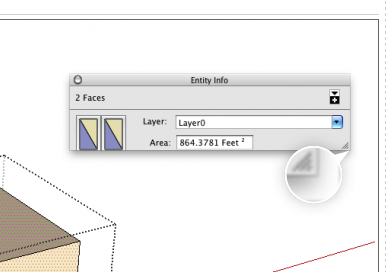
      DragHandle.png

      Drag the size-gripper to resize the window.

      Thomas Thomassen β€” SketchUp Monkey & Coding addict
      List of my plugins and link to the CookieWare fund

      1 Reply Last reply
      Reply Quote 0
      • O
        otb designworks
        last edited by

        @thomthom said:

        [attachment=0:3vq0rtpj]<!-- ia0 -->DragHandle.png<!-- ia0 -->[/attachment:3vq0rtpj]

        Drag the size-gripper to resize the window.

        Yeah, I tried that. It would just expand horizontally and not vertically.

        Ended up trashing everything to do with sketchup 8, re-downloaded the most recent version, transferred my application support files from my mirror drive, and rebuilt my preferences. a nice wasted hour, but at least it is working again.

        Cheers, Chuck

        OTB Designworks is on Youtube

        6 core nMP, 32 gig RAM, (2) D700 GPU's, dual monitors

        1 Reply Last reply
        Reply Quote 0
        • bazB
          baz
          last edited by

          Had the same problem but discovered that the 'volume' option is only available on groups or comps in their unedited but selected mode. In other words, if you enter edit mode in a group or comp the volume option is unavailable even if you select everything, which I think is counter intuitive.
          I'm not sure that is what was happening with Chuck though.

          1 Reply Last reply
          Reply Quote 0
          • GaieusG
            Gaieus
            last edited by

            The reason is that the volume field only appears for solids and "solids" are only (otherwise) solid groups or components in SU. That's the "definition" of solids here (not definition by word but by programming).

            Gai...

            1 Reply Last reply
            Reply Quote 0
            • O
              otb designworks
              last edited by

              No, this was a definite window clipping issue.

              I could see that the window had expanded to show the volume field, but I just couldn't see the last bit of the window, no matter what I did.

              This was/is a big, for sure.

              Cheers, Chuck

              OTB Designworks is on Youtube

              6 core nMP, 32 gig RAM, (2) D700 GPU's, dual monitors

              1 Reply Last reply
              Reply Quote 0
              • Dave RD
                Dave R
                last edited by

                Next time try resetting the workspace.
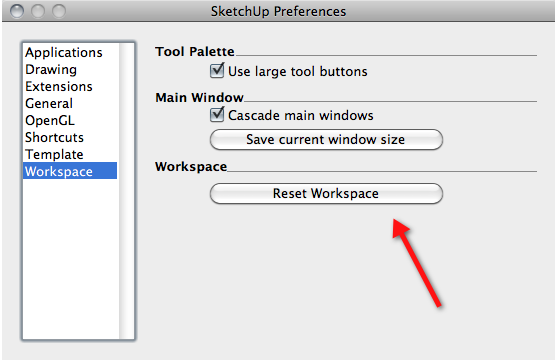
                Reset.png

                This happened to me recently, too. This fixed the problem. πŸ˜‰

                Etaoin Shrdlu

                %

                (THERE'S NO PLACE LIKE)

                G28 X0.0 Y0.0 Z0.0

                M30

                %

                1 Reply Last reply
                Reply Quote 0
                • O
                  otb designworks
                  last edited by

                  That never crossed my mind; I will definitely try that next time.

                  Thanks Dave

                  Cheers, Chuck

                  OTB Designworks is on Youtube

                  6 core nMP, 32 gig RAM, (2) D700 GPU's, dual monitors

                  1 Reply Last reply
                  Reply Quote 0
                  • C
                    caleb
                    last edited by

                    I have this same issue- Resetting workspace doesn't fix it... Reinstalling SketchUp ... Getting sick of mac

                    1 Reply Last reply
                    Reply Quote 0
                    • jeff hammondJ
                      jeff hammond
                      last edited by

                      @caleb said:

                      I have this same issue- Resetting workspace doesn't fix it... Reinstalling SketchUp ... Getting sick of mac

                      do you mind showing another app on mac that does this?

                      dotdotdot

                      1 Reply Last reply
                      Reply Quote 0
                      • R
                        ryaneiferd
                        last edited by

                        I had the same issue. Dave, your suggestion worked for me.

                        Thank you!

                        1 Reply Last reply
                        Reply Quote 0
                        • C
                          Campbell Architecture
                          last edited by

                          Had this problem on 2014 pro also, put up with it for ages. then found 'reset workspace', so simple.. doh.. I worked for me

                          1 Reply Last reply
                          Reply Quote 0
                          • J
                            jjccchhhh
                            last edited by

                            @dave r said:

                            Next time try resetting the workspace.

                            [attachment=0:3ig1rkuu]<!-- ia0 -->Reset.png<!-- ia0 -->[/attachment:3ig1rkuu]

                            This happened to me recently, too. This fixed the problem. πŸ˜‰

                            thanks, it worked for me

                            1 Reply Last reply
                            Reply Quote 0

                            Hello! It looks like you're interested in this conversation, but you don't have an account yet.

                            Getting fed up of having to scroll through the same posts each visit? When you register for an account, you'll always come back to exactly where you were before, and choose to be notified of new replies (either via email, or push notification). You'll also be able to save bookmarks and upvote posts to show your appreciation to other community members.

                            With your input, this post could be even better πŸ’—

                            Register Login
                            • 1 / 1
                            • First post
                              Last post
                            Buy SketchPlus
                            Buy SUbD
                            Buy WrapR
                            Buy eBook
                            Buy Modelur
                            Buy Vertex Tools
                            Buy SketchCuisine
                            Buy FormFonts

                            Advertisement