sketchucation logo sketchucation
    • Login
    Oops, your profile's looking a bit empty! To help us tailor your experience, please fill in key details like your SketchUp version, skill level, operating system, and more. Update and save your info on your profile page today!
    โš ๏ธ Important | Libfredo 15.8b introduces important bugfixes for Fredo's Extensions Update

    No idea for this animation (Mini challenge) ? :)

    Scheduled Pinned Locked Moved SketchUp Discussions
    sketchup
    14 Posts 4 Posters 618 Views 4 Watching
    Loading More Posts
    • Oldest to Newest
    • Newest to Oldest
    • Most Votes
    Reply
    • Reply as topic
    Log in to reply
    This topic has been deleted. Only users with topic management privileges can see it.
    • pilouP Offline
      pilou
      last edited by pilou

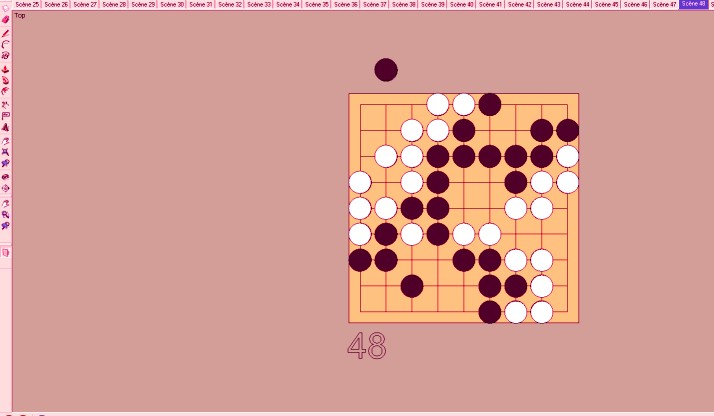
      I have yet 55 scenes of a Go Game (Goban) file linked
      Same size, same measure between each, each bases on the red axe

      How make for have exact surimposition of the gobans when the animation is launched ?
      Size wished at the screen is for example size of the number 48 of the scene 48
      for have each play of a "stone" (black & white) like an apparition ๐Ÿ˜„

      Make zoom / movement by hand for each Goban adjusment is some hard!

      No idea for the moment, i surely something missed! ๐Ÿ˜ณ

      goban.jpg


      Partie Gov601.skp

      Frenchy Pilou
      Is beautiful that please without concept!
      My Little site :)

      1 Reply Last reply Reply Quote 0
      • TIGT Offline
        TIG Moderator
        last edited by

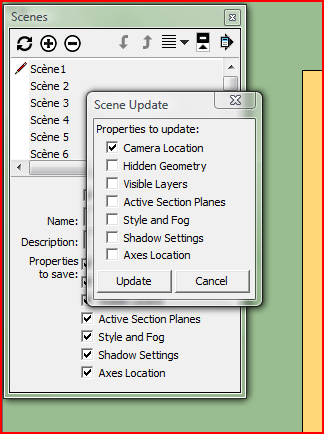
        This should do it ?


        Capture.PNG

        TIG

        1 Reply Last reply Reply Quote 0
        • TIGT Offline
          TIG Moderator
          last edited by

          Select a scene with the desired view.
          In the Scene Manager select all scenes [highlight first in the list, scroll to the end, hold shift-key and select the last one, they are all highlighted].
          The click the top left update button in the dialog only select to update the camera as I have shown and the camera is then common to all scene tabs...

          BUT now I see the issue - you have done this the hard way ! ๐Ÿ˜ฎ
          If you had placed the various versions of the board exactly one on top of the other, and used layers to control their visibility in each scene tab then it would be easy.
          As it is it you will give scene specific layers to each scene's board/pieces and then you need to relocate all of them over each other in the same view, so then the scene tab changes simply step through the visible layers one by one... ๐Ÿ˜’

          TIG

          1 Reply Last reply Reply Quote 0
          • pilouP Offline
            pilou
            last edited by

            Hum hum

            @unknownuser said:

            If you had placed the various versions of the board exactly one on top of the other

            That is not the case ๐Ÿ˜„
            I though at something like a "move camera" as a traveling as boards are "side by side"
            and wanted used that yet existing (if possible) ๐Ÿ˜„

            (copy the "position camera" of the scene 48 with changing Start End/ Position target to each scene but don't know if it's possible)

            Frenchy Pilou
            Is beautiful that please without concept!
            My Little site :)

            1 Reply Last reply Reply Quote 0
            • andybotA Offline
              andybot
              last edited by

              could you place all the boards in the same location and then put them on different layers to turn them on and off per layer?

              http://charlottesvillearchitecturalrendering.com/

              1 Reply Last reply Reply Quote 0
              • andybotA Offline
                andybot
                last edited by

                ah, I see, you'd like a shortcut, wouldn't we all ๐Ÿ˜†
                I do wish SU had better camera tools, but then I wouldn't have any reason to learn Blender. ๐Ÿ˜‰

                http://charlottesvillearchitecturalrendering.com/

                1 Reply Last reply Reply Quote 0
                • pilouP Offline
                  pilou
                  last edited by

                  @ Andy
                  I want with the file positions given make the less actions possible

                  Use layers is a little nightmare (visibility) for one (unvisibilty for other ) etc... ๐Ÿ˜„

                  For the moment my method of camera seems the more easy against the layers method
                  need only one line copy move *55, 55 cameras built

                  If i could "Copy Move" a camera * 55 by scene that will be the ultima trick!

                  Frenchy Pilou
                  Is beautiful that please without concept!
                  My Little site :)

                  1 Reply Last reply Reply Quote 0
                  • pilouP Offline
                    pilou
                    last edited by

                    Seems each scene has this case yet enable or must I all disable ๐Ÿ˜ณ

                    Frenchy Pilou
                    Is beautiful that please without concept!
                    My Little site :)

                    1 Reply Last reply Reply Quote 0
                    • pilouP Offline
                      pilou
                      last edited by

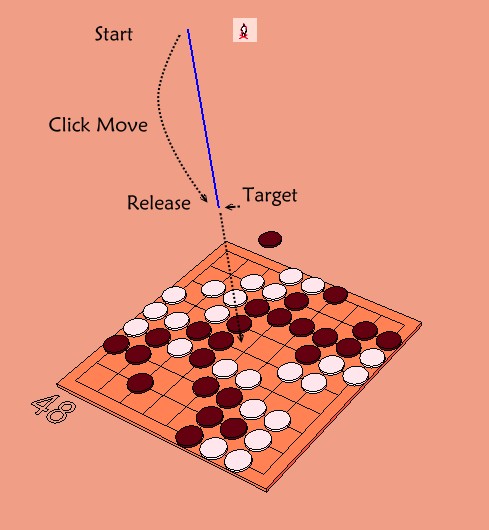
                      I have find something ๐Ÿ˜‰
                      I draw a line who is the Start / End of the camera
                      Copy past this line to each board
                      and make for all scene a new camera Start / Target / Up Date Scene
                      At the end kill all lines

                      Easy & works fine
                      but 55 new cameras drawings! ๐Ÿ˜„
                      Height of the line = zoom
                      If line is centered = View top

                      Have you better with the file linked ?

                      camera.jpg

                      Frenchy Pilou
                      Is beautiful that please without concept!
                      My Little site :)

                      1 Reply Last reply Reply Quote 0
                      • C Offline
                        Charlie__V
                        last edited by

                        @unknownuser said:

                        @ Andy
                        If i could "Copy Move" a camera * 55 by scene that will be the ultima trick!

                        Pilou,
                        Well you can copy a "camera" multiple times (advanced camera tools)but it will still leave a bit of work to do.
                        EDIT: You will need to set the first camera.....make cameras visible...then copy 54x.(oc/oc)

                        Rt click on camera....look thru camera.......Rt. click done......name & update scene....navigate to next camera...repeat.

                        FYI: I scaled the camera up 10x.

                        Charlie


                        Copy camera

                        Precision M1710/Win 7 Pro 64 bit/i-7 6920 Quad core 2.9 Ghz -3.8/16Gb ram/NVIDIA M5000M 8Gb

                        1 Reply Last reply Reply Quote 0
                        • TIGT Offline
                          TIG Moderator
                          last edited by

                          RickW has a free tool to add scenes/view orthogonally offset in specified x/y/z directions - which would work if the boards are equally spaced ???
                          See http://www.smustard.com/script/AddPages

                          TIG

                          1 Reply Last reply Reply Quote 0
                          • pilouP Offline
                            pilou
                            last edited by

                            Works fine but only with Inch ! ๐Ÿ˜‰

                            So Unity Inch Menu animations / Settings
                            Disable Transition and Delay Menu Animation / Settings
                            Kill all scenes
                            View top on first Goban
                            Create Scene (no need Update)
                            Call the Plug Menu View / Add Page Orthographically
                            Thx Rick WIlson! ๐Ÿ˜Ž
                            54 pages asked
                            X = length in Inch between middle's side of 2 gobans edges
                            y =0, Z = 0
                            When that is made : regulate delay and transition

                            Works like a charm and it's very easy and very speedy! ๐Ÿ‘
                            Many thanks TIG for the trick! And bravo Rick WIlson! ๐Ÿ˜Ž

                            Frenchy Pilou
                            Is beautiful that please without concept!
                            My Little site :)

                            1 Reply Last reply Reply Quote 0
                            • pilouP Offline
                              pilou
                              last edited by

                              @Charly
                              These advanced camera tools are not just inside the V8 ?

                              @ Tig Just read your post !

                              @unknownuser said:

                              which would work if the boards are equally spaced

                              That is the case! ๐Ÿ˜‰

                              I will see that! ๐Ÿ˜‰

                              Frenchy Pilou
                              Is beautiful that please without concept!
                              My Little site :)

                              1 Reply Last reply Reply Quote 0
                              • pilouP Offline
                                pilou
                                last edited by

                                Here the result ๐Ÿ˜‰
                                A little Offset image 24 (test file) ๐Ÿ˜‰
                                Perfection is not existing in this word ๐Ÿ˜„

                                Ps For the theorie of the Go Game ๐Ÿ˜„
                                I you look the Scene 55 : Black seems to win : 17 to 13 so 4 points
                                But no possibility to make equality at this diabolic game! ๐Ÿ’š
                                Fact to play first (Black)gives you 4.5 points' advantage!
                                So Black is losting by 0.5 point! ๐Ÿค“


                                Partie Go.skp

                                Frenchy Pilou
                                Is beautiful that please without concept!
                                My Little site :)

                                1 Reply Last reply Reply Quote 0
                                • 1 / 1
                                • First post
                                  Last post
                                Buy SketchPlus
                                Buy SUbD
                                Buy WrapR
                                Buy eBook
                                Buy Modelur
                                Buy Vertex Tools
                                Buy SketchCuisine
                                Buy FormFonts

                                Advertisement