sketchucation logo sketchucation
    • 登入
    Oops, your profile's looking a bit empty! To help us tailor your experience, please fill in key details like your SketchUp version, skill level, operating system, and more. Update and save your info on your profile page today!
    🔌 Smart Spline | Fluid way to handle splines for furniture design and complex structures. Download

    [Plugin] FredoTools::ThruPaint - v1.3a - 20 Oct 16

    已排程 已置頂 已鎖定 已移動 Plugins
    331 貼文 102 Posters 537.8k 瀏覽 102 Watching
    正在載入更多貼文
    • 從舊到新
    • 從新到舊
    • 最多點贊
    回覆
    • 在新貼文中回覆
    登入後回覆
    此主題已被刪除。只有擁有主題管理權限的使用者可以查看。
    • C 離線
      Clochard Deluxe
      最後由 編輯

      I made an example wich has the same problem. there always seem to be some sides off..


      example.skp

      1 條回覆 最後回覆 回覆 引用 0
      • fredo6F 離線
        fredo6
        最後由 編輯

        Here are some remarks

        1. make sure you are in NATURAL mode

        2. For the long faces, use Click and Drag to paint the 4 faces in continuity. You can interrupt the painting to orbit. Then, click on a face already painted and drag to the next face.

        3. For the short faces, just click on each face. As you can imagine, you cannot ensure continuity of surface for a cube-like shape.
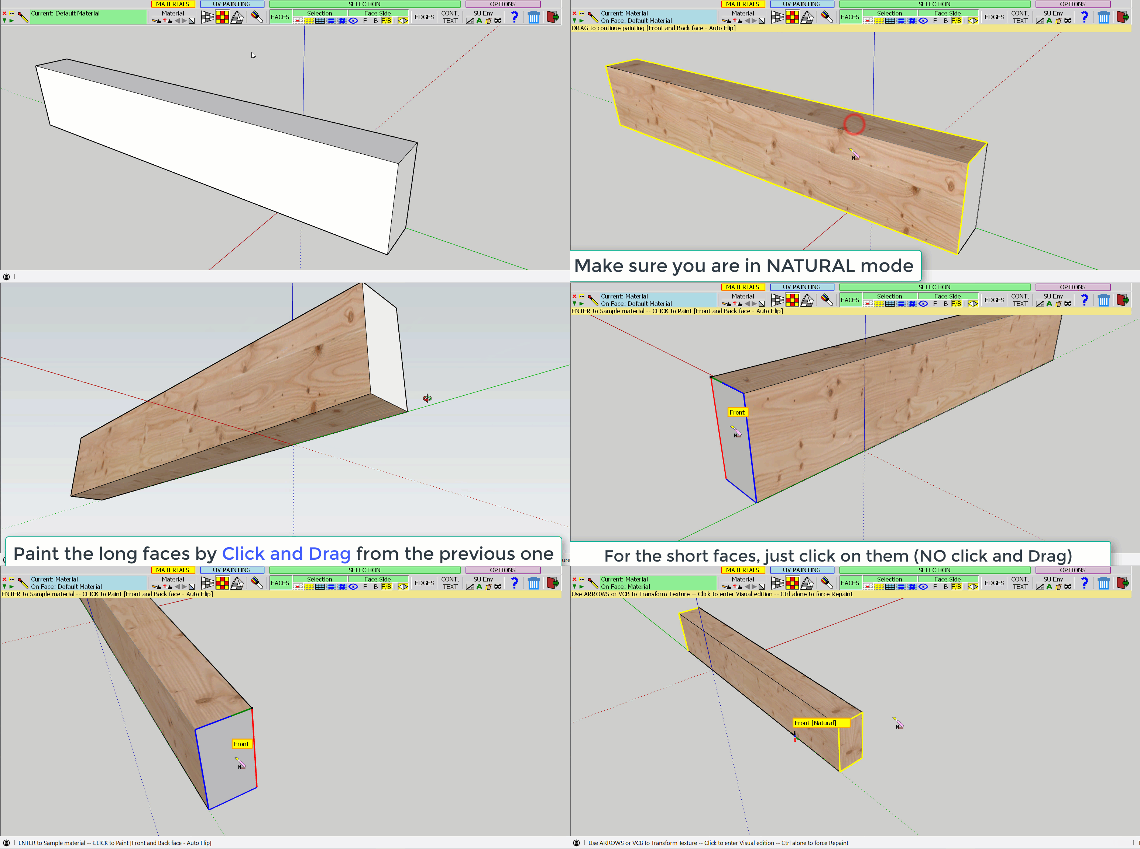
        ThruPaint - Example - ClochardDeLuxe.gif

        ThruPaint - Clochard de Luxe - example.skp

        1 條回覆 最後回覆 回覆 引用 0
        • C 離線
          Clochard Deluxe
          最後由 編輯

          Thanks Fredo, you're the best!

          1 條回覆 最後回覆 回覆 引用 0
          • A 離線
            Ahmed0007
            最後由 編輯

            Any update is expected soon?
            please reply?

            1 條回覆 最後回覆 回覆 引用 0
            • fredo6F 離線
              fredo6
              最後由 編輯

              @ahmed0007 said:

              Any update is expected soon?

              Are you expecting anything?

              1 條回覆 最後回覆 回覆 引用 0
              • A 離線
                Ahmed0007
                最後由 編輯

                @fredo6 said:

                @ahmed0007 said:

                Any update is expected soon?

                Are you expecting anything?

                i'm creator of TutorialsUp (youtube channel)
                and i'm going to make a tutorial on it.
                and if any major update is expected soon please let me know i will wait for it.
                Thanks.

                1 條回覆 最後回覆 回覆 引用 0
                • fredo6F 離線
                  fredo6
                  最後由 編輯

                  @ahmed0007 said:

                  i'm creator of TutorialsUp (youtube channel)
                  and i'm going to make a tutorial on it.
                  and if any major update is expected soon please let me know i will wait for it.
                  Thanks.

                  No update planned for the time being.

                  And, by the way, congratulation for your tutorials, which are very well done and instructive.

                  Fredo

                  1 條回覆 最後回覆 回覆 引用 0
                  • pilouP 離線
                    pilou
                    最後由 編輯

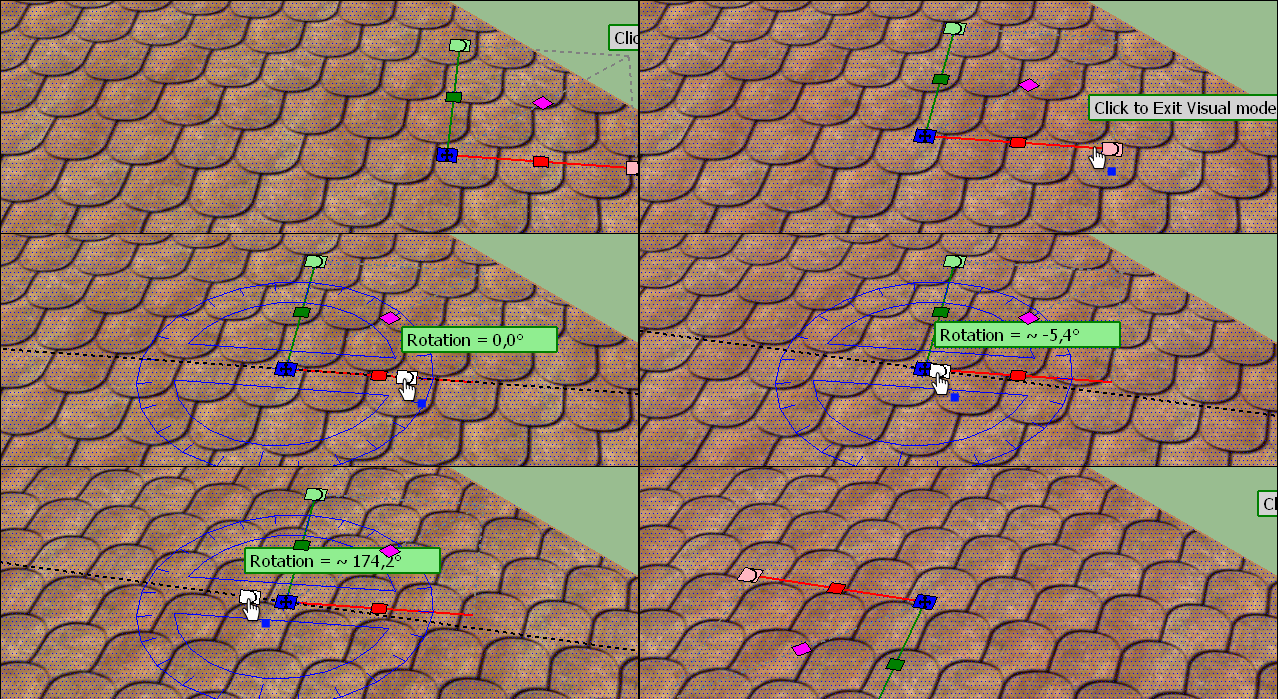
                    Does any difference between the 2 buttons Rotation of the Gizmo ?
                    Here i take the red one...
                    Result will be the same if i take the green one ?
                    https://i.postimg.cc/QM3mh45c/GIF-2-rotate.gif

                    Frenchy Pilou
                    Is beautiful that please without concept!
                    My Little site :)

                    1 條回覆 最後回覆 回覆 引用 0
                    • fredo6F 離線
                      fredo6
                      最後由 編輯

                      @pilou said:

                      Does any difference between the 2 buttons Rotation of the Gizmo ?
                      Here i take the red one...
                      Result will be the same if i take the green one ?

                      The buttons have the same role.

                      1 條回覆 最後回覆 回覆 引用 0
                      • pilouP 離線
                        pilou
                        最後由 編輯

                        Thanks for the info! 😎

                        Frenchy Pilou
                        Is beautiful that please without concept!
                        My Little site :)

                        1 條回覆 最後回覆 回覆 引用 0
                        • pbacotP 離線
                          pbacot
                          最後由 編輯

                          Can someone demonstrate the proper way to paint cube with perspective or quad painting on it? I thought this was working before. Now I cannot do it. Sometimes if I remove two faces, paint the remainder with the quad setting and add the faces back it works.

                          MacOSX MojaveSketchUp Pro v19 Twilight v2 Thea v3 PowerCADD

                          1 條回覆 最後回覆 回覆 引用 0
                          • fredo6F 離線
                            fredo6
                            最後由 編輯

                            @pbacot said:

                            Can someone demonstrate the proper way to paint cube with perspective or quad painting on it? I thought this was working before. Now I cannot do it. Sometimes if I remove two faces, paint the remainder with the quad setting and add the faces back it works.

                            A cube cannot be painted in Quad mesh, as this is not a quad mesh. At least one of the face will not be in continuity, unless your texture is perfectly symmetrical in U and V. And if so, use the Natural mode.

                            1 條回覆 最後回覆 回覆 引用 0
                            • pbacotP 離線
                              pbacot
                              最後由 編輯

                              Thanks!

                              MacOSX MojaveSketchUp Pro v19 Twilight v2 Thea v3 PowerCADD

                              1 條回覆 最後回覆 回覆 引用 0
                              • C 離線
                                chaosaic
                                最後由 編輯

                                hello . I'm kind of beginner of sketchup and your wonderful plug-in.
                                now I have some serious problem using Thrupaint.
                                The main problem is super slow whenever I paint UV map or adjust UV map(visual editor or simply use arrow key)

                                in every kind of furface(probably plain,non curve surface is the only kind that's still work normally)
                                288 faces sphere is slow(around 30sec),74 faces cylindrical is slow.
                                even 6x6 grid rectangle from sandbox tool takes about 20sec to apply UV map.
                                it's just frozen there about 30sec or several minute.

                                I have tried : turned off vray extension , turned off fast feedback in OpenGL,
                                open ruby console before using Thrupaint(no error) or not using other software beside sketchup.
                                still not working.

                                the only way I find work better is to delete all other model in the file,just keep the one I want to paint. (but i have keep other model out of my sight,would that be a problem?)

                                I'm using : sketchup 2018pro
                                intel i7-8700 CPU
                                NVIDIA geforce gtx 1060(driver is up to date)
                                libfredo6 8.8a
                                fredo6 tools 3.3c

                                it has great ability to paint UV map.but i have no idea why it seems so unusable in my situation.
                                please help if you have some time.

                                1 條回覆 最後回覆 回覆 引用 0
                                • fredo6F 離線
                                  fredo6
                                  最後由 編輯

                                  @chaosaic,

                                  Difficult to tell what is the problem.
                                  Could you indicate which UV mode you use (Natural, Projection, QuadMesh) and if you have a problem of performance in all modes.

                                  Also, what kind of texture do you use? Is it a heavy image?

                                  1 條回覆 最後回覆 回覆 引用 0
                                  • C 離線
                                    chaosaic
                                    最後由 編輯

                                    @fredo6 said:

                                    @chaosaic,
                                    Also, what kind of texture do you use? Is it a heavy image?

                                    I have tested natural,quadmesh,projected in simple 146 faces cylindrical(24*6 + 2).
                                    all three mode take over than 20sec to put on UV map.

                                    and the visual mode is lag to hell.

                                    Using the default map in "sketchuv mapping tools"(rainbow-like checker)
                                    which is like 512x512 pixel?
                                    I have also try my own texture(1024x1024). still lag.

                                    If I delete most of other high poly model in the file. still need about 15sec.
                                    And if I change selection face to visible face,it will down to 5~10sec.
                                    (but sketchuv mapping tools and native paint bucket is instant operation.)

                                    1 條回覆 最後回覆 回覆 引用 0
                                    • fredo6F 離線
                                      fredo6
                                      最後由 編輯

                                      Maybe you can PM me the model so that I see if this is related to ThruPaint or to your machine configuration.

                                      1 條回覆 最後回覆 回覆 引用 0
                                      • A 離線
                                        Ahmed0007
                                        最後由 編輯

                                        hi fredo6
                                        i'm making a tutorial about your this plugin but i think i found bug.
                                        it's not painting Dimensions in sketchup 2018-19
                                        what is the solution.
                                        Thanks
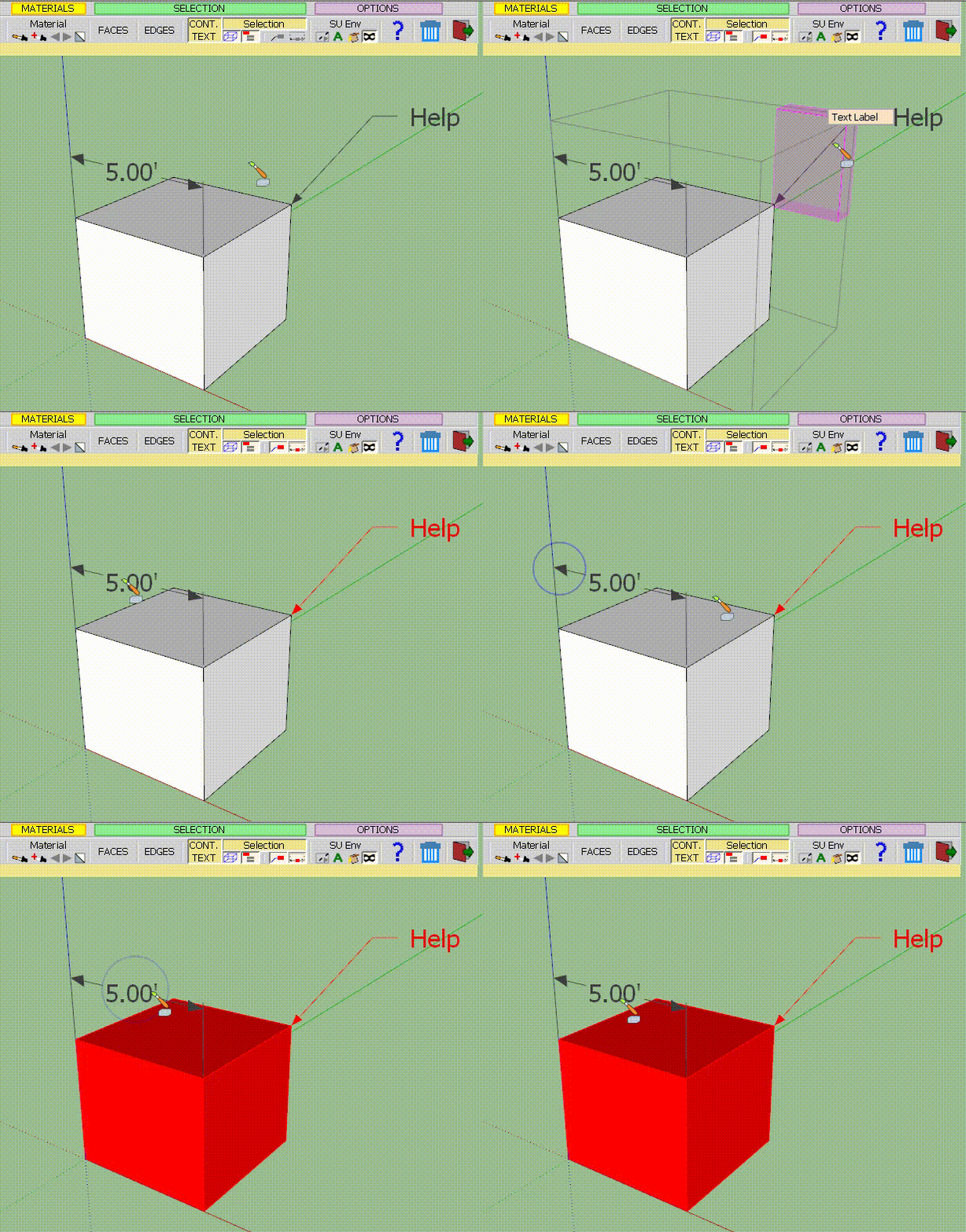

                                        Video


                                        Help.skp

                                        1 條回覆 最後回覆 回覆 引用 0
                                        • fredo6F 離線
                                          fredo6
                                          最後由 編輯

                                          @ahmed0007 said:

                                          hi fredo6
                                          i'm making a tutorial about your this plugin but i think i found bug.
                                          it's not painting Dimensions in sketchup 2018-19
                                          what is the solution.
                                          Thanks

                                          It's just a missing feature. Not sure if there is a value in this (versus using the native Paint tool).

                                          Fredo

                                          1 條回覆 最後回覆 回覆 引用 0
                                          • A 離線
                                            Ahmed0007
                                            最後由 編輯

                                            @fredo6 said:

                                            @ahmed0007 said:

                                            hi fredo6
                                            i'm making a tutorial about your this plugin but i think i found bug.
                                            it's not painting Dimensions in sketchup 2018-19
                                            what is the solution.
                                            Thanks

                                            It's just a missing feature. Not sure if there is a value in this (versus using the native Paint tool).

                                            Fredo

                                            ok.
                                            thanks for reply.

                                            1 條回覆 最後回覆 回覆 引用 0
                                            • 1
                                            • 2
                                            • 13
                                            • 14
                                            • 15
                                            • 16
                                            • 17
                                            • 16 / 17
                                            • 第一個貼文
                                              最後的貼文
                                            Buy SketchPlus
                                            Buy SUbD
                                            Buy WrapR
                                            Buy eBook
                                            Buy Modelur
                                            Buy Vertex Tools
                                            Buy SketchCuisine
                                            Buy FormFonts

                                            Advertisement