The Blender Tree Generator
-
Thank you sid.
3 mins isn't great, it's a CPU render, using NVIDIA GeForce GTX 560 Ti, CUDA render, 56 seconds! -
Dear Michalis, dear all,
what amazing trees and work

As I'm finally learning Blender (!), I'm at the first level interested by this very instructive thread ++
(!)SU + Blender = war machine)
Re: The Blender Tree Generator
http://forums.sketchucation.com/viewtopic.php?f=179&t=44345#p395545@michaliszissiou said:
Thanks for the kind comments.
About the skp file:
It looks heavy ~15Mb for downloading. It's not that huge though, I just don't use components.
I tested another skp tree, full of components ~400kb downloading. It behaves heavily in SU making rather impossible to load 10-20 such trees. It won't happen with the one a shared.
@andybot
http://forums.sketchucation.com/viewtopic.php?f=323&t=33448&p=372812#p372812
TIG's obj exporter thread.- SU exports non welded vertices as obj. Import in blender/edit mode, select all, delete double verts (under the [W] menu). This welds all verts.
- The ruby addon, remove inner faces. Very useful to kill non manifolds at once.
- be aware of the inverted faces in SU (the blue ones), you may fix it in blender but will mess the exported SU UVs.
- SU uses ngons internally and exports triangulated meshes. Terrible topology for subdivisions, displacements etc. The funny thing is that new builds of blender 2.62/bmesh implemented these ngons too. You have knifes, push pulls, insets (SU F tool), arcs etc . And some terrible topology in the end. If you're going for displacements, subdivisions, sculpting.
So, don't subdivide SU meshes. Just render them, apply better textures, unwrapping, materials for rendering (cycles), bumps. But never subdivide, it's logically impossible. You may retopo all these but not practical for archi vis projects. - Components: Explode them before it's too late

I've experienced some difficulty to find the Wikii Inner faces Remover you are talking about.I was remembering this inner faces remover but too vaguely to be able to find it on the forums and have found it into my downloaded plugins repertory. It is not referenced as a normal plugin but it is a reply from Wikii to a Pilou's request.
So here are the links :
Pilou _ [Plugin] Internal surfaces
http://forums.sketchucation.com/viewtopic.php?f=180&t=12668&p=92295#p92295Wikii remove_inner_faces.zip
http://forums.sketchucation.com/viewtopic.php?f=180&t=12668&p=92295#p92295Simon
-
My SolidSolver tool might also fix your non-manifold 'inner partition faces' issues [and small holes/flaps etc]
It only works on groups mind - so if it's a component you need to edit it, select all, and group temporarily... once fixed you can explode the group and the containing component should then be manifold too ? -
Nice usage of these tools untested until now

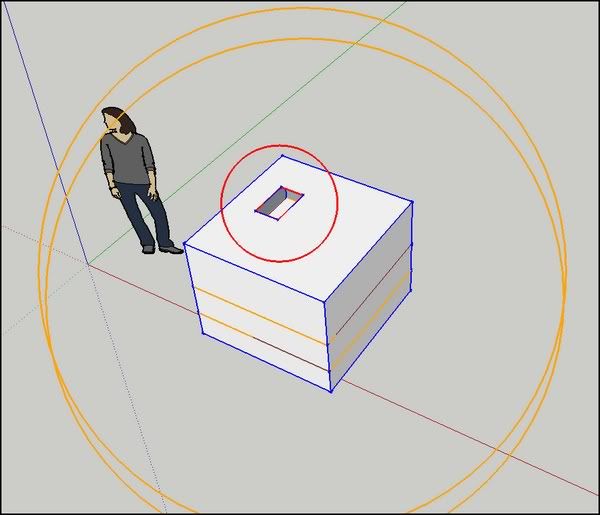

@tig said:
Parts are based on ThomThom's 'solid_inspector' tool which can also be
used prior to this tool, so that you get a better understanding of what
is wrong with your Non-Solid Group...Name: TIG-solidsolver.rb
Menu: 'Tools' > 'SolidSolver'
Usage: [Note this works on v8/Pro only]
Please note that all instances of the group are solved together even if only one is selected. (So I've been obliged to explode one copy of the invalid solid group to keep the errors of the group on the same picture as the one solved)
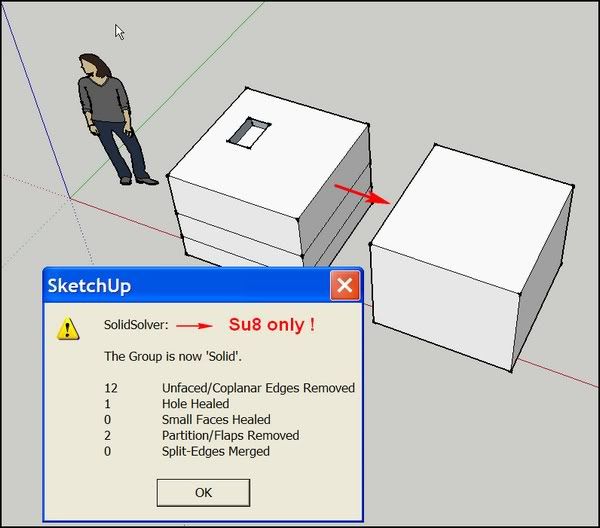
Wikii remove_inner_faces.zip
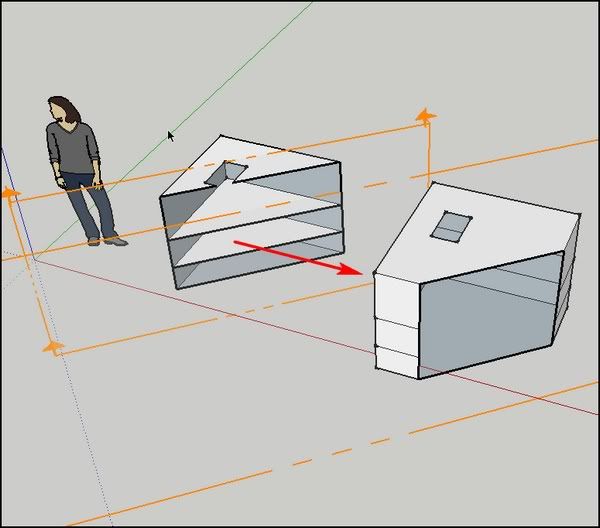
 Simon
Simon -
Nice Simon. Thanks for compiling links for these great scripts! Kudos to the authors as well!
-
Thanks for the link. I'm always looking for better Tree creation software. Will try.
Not to hijack this thread but have you seen TreeSketch for iPad?
If not, take a look at these videos to what an amazing (and free!) app this is.
http://algorithmicbotany.org/TreeSketch/
Especially the fourth video (Direct manipulation) shows it off well. -
@unknownuser said:
Not to hijack this thread but have you seen TreeSketch for iPad?
Interesting! BTW you're not hijacking at all.
@unknownuser said:
SU + Blender = war machine
True, but not for me. I'm the peacemaker.
I use this ruby.
remove_inner_faces.rbIn any case, to have face's normals outwards, is the more important. No blue faces.
Is there a plugin for this job? -
Wow, that remove innerfaces ruby is a great find! I've always done that manually. That can help with the native SU "orient faces" command to make sure faces are oriented properly (It messes up orientation with interior faces intersections.)
-
Sorry, I can't remember who's the creator of this ruby. Maybe Pilou can help us.
-
Interesting because I also have that plugin but could not find in the plugins index (was going to link to it instead) nor in the ruby deport. The file inside says Wikii. But it is not listed under his submissions:
http://forums.sketchucation.com/viewtopic.php?f=323&t=28782#wikii
nor by any search:
-
@simon le bon said:
I've experienced some difficulty to find the Wikii Inner faces Remover you are talking about.I was remembering this inner faces remover but too vaguely to be able to find it on the forums and have found it into my downloaded plugins repertory. It is not referenced as a normal plugin but it is a reply from Wikii to a Pilou's request.
So here are the links :
Pilou _ [Plugin] Internal surfaces
http://forums.sketchucation.com/viewtopic.php?f=180&t=12668&p=92295#p92295Wikii remove_inner_faces.zip
http://forums.sketchucation.com/viewtopic.php?f=180&t=12668&p=92295#p92295Simon
Excuse me sirs, It seems to me that I have given the links

PS1: This is the same ruby linked by Michalis
PS2: I have pmed Jim to bring this to his attention that this ruby misses to his database
-
All right, thanks, Simon. I have changed the OP now as well as the topic title and put Pilou's first post into a quote tag.
I know there are some more plugins like this so they should be treated like this, too.
-
Maybe you must add "initiator" because I have not written any lines of code for this one!








Advertisement